Claude Agent SDK: What It Is and How to Build Your First Agent

Short answer
The Claude Agent SDK is Anthropic's library for building agents with Claude Code's tools, agent loop and context management. It works in Python and TypeScript. Install claude-agent-sdk or @anthropic-ai/claude-agent-sdk, set ANTHROPIC_API_KEY, then call query() with a prompt, tools and a permission mode.
Imagine a developer who keeps pasting failing test output into Claude by hand. They want a small pipeline script that reads the test log, finds failing tests and prints a short report. The Agent SDK lets that script do the reading itself.
What the Claude Agent SDK is
Anthropic defines an agent as an application that plans its own steps and calls tools to complete a task. Those tools can read files, run commands or edit code.
The Agent SDK gives a Python or TypeScript app the same tools, agent loop and context management that power Claude Code. The library runs the Claude Code binary and includes permissions, sessions and hooks. Both SDKs bundle a native binary, so most installs need no separate Claude Code installation.
The product was previously called the Claude Code SDK. Anthropic renamed it the Claude Agent SDK.
Agent SDK, Claude Code CLI, Client SDK or Managed Agents
The right option depends on where you want the loop to run and how much of it you want to build.
Anthropic's agent options
Option | Use it when | What you get |
|---|---|---|
Agent SDK | You want an agent inside a Python or TypeScript app. | The Claude Code binary, built-in tools, permissions, sessions and hooks. |
Claude Code CLI | You want daily interactive work in a terminal. | The terminal interface. |
Client SDK | You want direct Claude API access in a supported language. | You write the tool loop yourself. |
Managed Agents | You want a hosted agent harness. | The agent loop runs in an Anthropic-managed or self-hosted sandbox. |
Source: Anthropic, Agent SDK overview, read 3 November 2026.
For another language, run the CLI as a subprocess with -p and --output-format json.
What an Agent SDK agent can do
The SDK exposes the main capabilities developers already use in Claude Code.
Capabilities in Anthropic's overview
Capability | What it does |
|---|---|
Built-in tools | Read, write and edit files, run commands and search the web. |
Run custom code at key points in the agent lifecycle. | |
Spawn specialized agents for focused subtasks. | |
Connect external tools and data through the Model Context Protocol. | |
Permissions | Control which tools run automatically and which need approval. |
Sessions | Keep context across exchanges, then resume or fork it. |
Load from the project and user | |
Plugins | Package skills, agents, hooks and MCP servers. |
Build your first agent step by step
You need Node.js 18.14 or later, or Python 3.10 or later. Install the SDK with either command:
npm install @anthropic-ai/claude-agent-sdk
pip install claude-agent-sdk
Set the key in the shell that runs the agent:
export ANTHROPIC_API_KEY=your-key-hereThe SDK does not load .env files automatically. For Amazon Bedrock, set CLAUDE_CODE_USE_BEDROCK=1 and configure AWS credentials. For Google's Agent Platform, set CLAUDE_CODE_USE_VERTEX=1 and configure Google Cloud credentials.
Anthropic's Python quickstart uses query(), ClaudeAgentOptions, allowed tools and acceptEdits:
import asyncio
from claude_agent_sdk import query, ClaudeAgentOptions

async def main():
    options = ClaudeAgentOptions(
        allowed_tools=["Read", "Edit", "Glob"],
        permission_mode="acceptEdits"
    )
    async for message in query(
        prompt="Find and fix the bug in this project",
        options=options,
    ):
        print(message)

asyncio.run(main())
Each loop yields a message. It may contain reasoning, a tool call, a tool result or the final outcome.
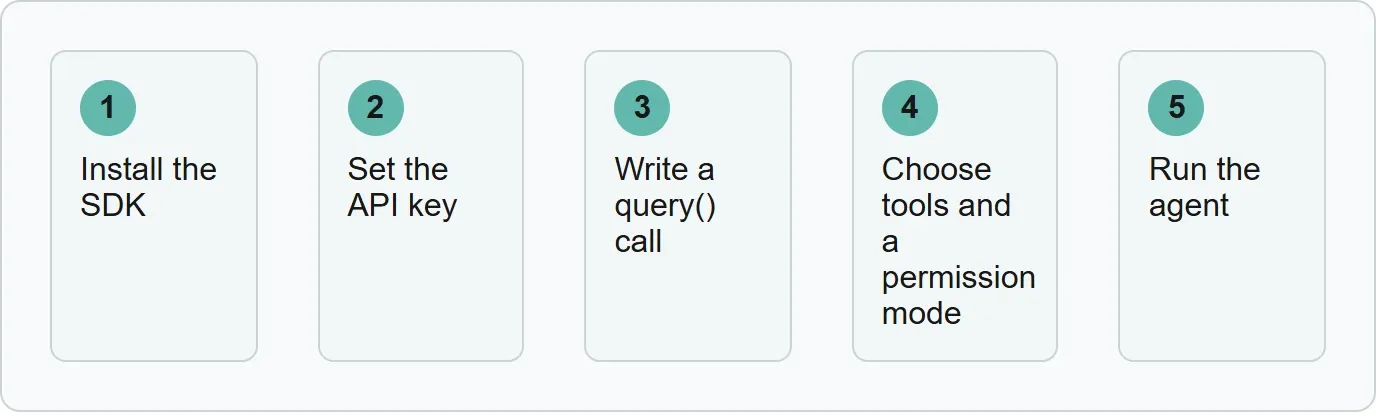
Install the SDK, set the API key, write a query() call, choose tools and a permission mode, and run the agent.
Our example: a read-only test-log agent
Our example (illustrative).
Harbor Triage is our made-up test helper. This original triage.py reads test-output.log, finds failing tests and the files they point to, then prints a short report. It can use only Read, Grep and Glob. The dontAsk mode denies any other tool call instead of prompting.
import asyncio
import sys
from claude_agent_sdk import query, ClaudeAgentOptions, ResultMessage

async def main():
    options = ClaudeAgentOptions(
        allowed_tools=["Read", "Grep", "Glob"],
        permission_mode="dontAsk",
    )
    prompt = """Read test-output.log. Find each failing test and the source files it points to. Print a short report with the test name, file path, and likely cause. Do not edit files or run commands."""
    async for message in query(prompt=prompt, options=options):
        if isinstance(message, ResultMessage):
            if message.subtype == "success":
                print(message.result)
            else:
                print(f"Agent run ended: {message.subtype}")
                sys.exit(1)

asyncio.run(main())
Read opens the log, Grep finds failure text and Glob locates matching files. Those tools are enough for diagnosis without giving the job editing or shell access.
dontAsk suits an unattended pipeline because it will “deny anything not pre-approved instead of prompting.” The job fails closed instead of waiting for a person.
The prompt adds a second boundary in plain language. “Do not edit files or run commands” tells the model that this job ends with a report, even though the tool permissions already enforce the limit.
A failed run exits with code 1, so the CI step fails visibly.
Run it with:
python triage.pyThe developer no longer has to paste the same test log into Claude by hand. The pipeline returns the final report when the run succeeds.
The developer now has an agent that checks their own code. Xtrusio covers the public side: it shows when ChatGPT and Gemini mention the product, which competitors appear instead and what to work on next.
Choose tools and a permission mode
Read, Glob and Grep provide read-only analysis. Add Edit to modify code. Add Bash for full automation.
All permission modes
Mode | What it does |
|---|---|
| Standard behavior with no mode-based auto-approvals. |
| Denies instead of prompting. |
| Auto-accepts file edits. |
| Bypasses permission checks. Use it with caution. |
| Lets Claude explore and plan without editing source files. |
| Uses a model classifier to review actions such as shell commands and network requests. |
Source: Anthropic, Permissions, read 3 November 2026.
A deny rule such as Bash(rm *) still blocks matching calls in every mode, including bypassPermissions. See Claude Code settings for the wider permission model.
Add your own tools and pick up sessions
Define a custom tool with @tool in Python or tool() in TypeScript. Give it a name, description, schema and handler. Its server runs inside your application, not as a separate process. See MCP vs API when choosing how to connect external systems.
continue resumes the latest session in the directory. To resume a specific session, save its session ID and pass it to resume.
Rules before you ship an agent
Unless Anthropic approved it first, a third-party product cannot offer claude.ai login or claude.ai rate limits. Keep your own branding. Do not make the product appear to be Claude Code or another Anthropic product. Agent SDK use is governed by Anthropic's Commercial Terms of Service.
Coming from the Claude Code SDK
The TypeScript package moved from @anthropic-ai/claude-code to @anthropic-ai/claude-agent-sdk. The Python package moved from claude-code-sdk to claude-agent-sdk.
When to start with the Agent SDK
Start with the Agent SDK when you need a repeatable agent inside a Python or TypeScript application. Use the CLI for interactive terminal work, or the Client SDK when you want to build the tool loop yourself.
Get your free AI visibility check.
Sources
- Anthropic, Agent SDK overview, read 3 November 2026.
- Anthropic, Agent SDK quickstart, read 3 November 2026.
- Anthropic, Permissions, read 3 November 2026.
- Anthropic, Custom tools, read 3 November 2026.
- Anthropic, Sessions, read 3 November 2026.
- Anthropic, Migration guide, read 3 November 2026.
- Xtrusio product page, read 3 November 2026.
Frequently asked questions
Is the Agent SDK the same as Claude Code?
No. It is a library that runs the Claude Code binary and exposes its agent capabilities to an application.
Which languages does it support?
Anthropic provides SDKs for Python and TypeScript. Other languages can drive the CLI as a subprocess.
Do I need Claude Code installed?
Usually not. The Python and TypeScript SDKs bundle a native Claude Code binary.
Where does the API key go?
Set ANTHROPIC_API_KEY in the shell where the agent runs. The SDK does not load.env files automatically.
Can users sign in with claude.ai?
Not unless Anthropic approved that use. Third-party products cannot offer claude.ai login or rate limits by default.
Topics
- claude agent sdk

Xtrusio
AI visibility research
Xtrusio is the Perception Engine for B2B brands.
Free check
See how AI engines answer about you
Get your free AI visibility check
Keep reading
 Technical SEO · Nov 4, 2026 · 6 min read
Rankscale: What It Tracks, What It Costs and Alternatives
See what Rankscale tracks, its current credit-based prices, how far 1,200 credits go and how Xtrusio, Peec AI and Profound compare. Technical SEO · Nov 4, 2026 · 5 min read
Claude Code Router: What It Is and How to Set It Up
Learn what Claude Code Router does and set up its current desktop or npm UI route with providers, local ports, profiles, logs and fallbacks. Technical SEO · Nov 4, 2026 · 6 min read