Claude Code MCP: How to Add, Scope and Manage MCP Servers
Short answer
Short answer: Add an MCP server to Claude Code with claude mcp add. Use --transport http with a name and URL for a remote server. Put the launch command after -- for a local stdio server. Choose local, project or user scope, then check the connection with claude mcp list or claude mcp get.

A developer often starts with setup instructions from an MCP server and one practical question: where should this connection live? The command creates the connection, but the scope decides whether it belongs to this project, the team or every project on the machine.
Before you start
You need the remote server's URL or the local command that starts it. Keep any key outside a shared file. At the end, claude mcp list should show the server as Connected.
Add a remote server, add a local server, choose the scope, check it connected, then manage and remove servers.
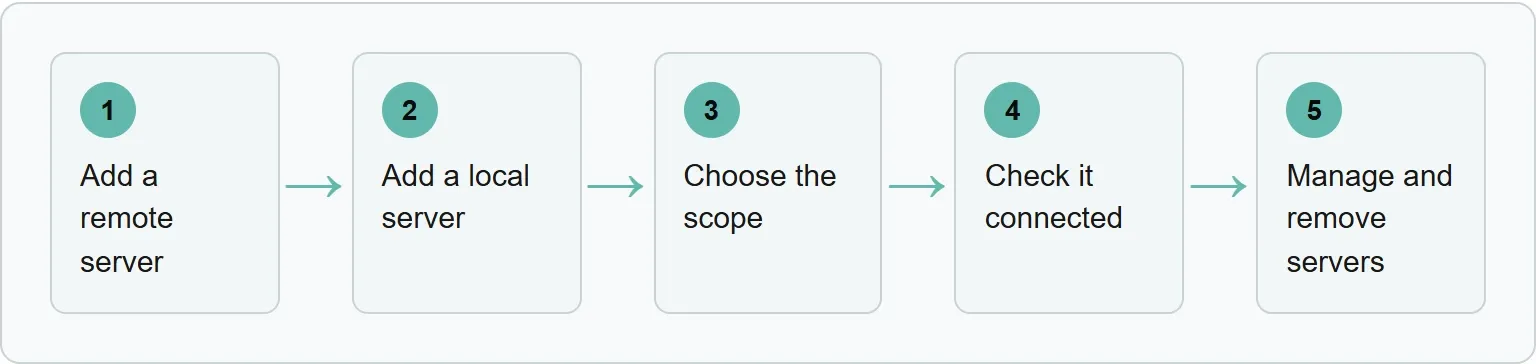
Step 1: add a remote server (remote option)
Claude Code adds a remote MCP server over HTTP with this form:
claude mcp add --transport http <name> <url>Anthropic's Notion example is:
claude mcp add --transport http notion https://mcp.notion.com/mcpChoose this remote option or the local option in Step 2. After a successful add, the command prints an Added ... line. Run claude mcp get notion; you should see the server and its status.
Use the name later with the get or remove command. Anthropic says SSE is deprecated, so use HTTP when the server offers it.
Step 2: add a local stdio server (local option)
A stdio server runs as a local process. This suits a custom script or a tool that needs direct access to the machine.
claude mcp add [options] <name> -- <command> [args...]The double dash matters. It separates Claude Code options such as --transport, --env and --scope from the command that runs the server. Put Claude Code flags before it and the server command after it.
Anthropic's worked local example places --env before the double dash:
claude mcp add --env AIRTABLE_API_KEY=YOUR_KEY --transport stdio airtable \
  -- npx -y airtable-mcp-server
Step 3: choose the scope
The scope controls which projects load the server and whether teammates receive the configuration.
Claude Code MCP scopes, checked 3 November 2026
Scope | Loads in | Shared with team | Stored in |
|---|---|---|---|
Local | Current project only | No | |
Project | Current project only | Yes, through version control | |
User | All your projects | No | |
Source: Anthropic, Connect Claude Code to tools via MCP.
Local is the default and stays private to you in the current project. Project scope writes the shared configuration to .mcp.json in the repository root. User scope makes the server available across your projects on this machine while keeping it private to your user account.
For a project-scoped server, add the scope before the server name:
claude mcp add --scope project --transport http <name> <url>“When the same server is defined in more than one place, Claude Code connects to it once, using the definition from the highest-precedence source.”Anthropic, Connect Claude Code to tools via MCP, read 3 November 2026
Claude Code uses the whole entry from the highest-precedence source. It does not merge fields across scopes.
Where Xtrusio fits
Once the connection works, the next question is what AI engines say about your business. Xtrusio checks those answers for brand mentions and competing businesses.
Get your free AI visibility check to see where your business appears.
Step 4: check it connected
List all configured servers and their health:
claude mcp listInspect one server by name:
claude mcp get <name>Each line pairs a server with a status such as Connected, Needs authentication or Failed to connect. A project server from .mcp.json can show Pending approval.
- Needs authentication: For an OAuth 2.0 remote server, open
/mcpand complete the sign-in. - Failed to connect: Read the detail on that line and fix the named HTTP or connection error.
- Pending approval: Start Claude Code interactively, review the project server and approve it.
If you are comparing MCP with a direct integration, our MCP versus API guide explains the difference. For the same workflow in another coding tool, see how Codex CLI connects to MCP servers.
Step 5: manage and remove servers
Inside a Claude Code session, open /mcp to manage servers and authentication. Remove a server from the command line with:
claude mcp remove <name>A shared .mcp.json file can use environment variable expansion. This lets the team commit one configuration while keeping machine paths and sensitive values out of the file.
Our example (illustrative configuration, not a real setup)
For Harborlight Tools, this illustrative .mcp.json combines the two entry forms and variable expansion documented by Anthropic:
{
  "mcpServers": {
    "remote-tools": {
      "type": "http",
      "url": "${API_BASE_URL:-https://api.example.com}/mcp",
      "headers": {
        "Authorization": "Bearer ${API_KEY}"
      }
    },
    "local-tools": {
      "type": "stdio",
      "command": "${LOCAL_TOOL_PATH}",
      "args": ["serve"]
    }
  }
}
Common mistakes
Most failures come from a small configuration detail rather than the server itself.
- A URL without a type: Claude Code reads an entry with no type as stdio. A JSON entry with a URL therefore needs its HTTP type.
- Flags after the double dash: Anything after
--belongs to the server command, not to Claude Code. - A project server still pending: Run Claude Code interactively and approve the entry from
.mcp.json. - Large tool output: Claude Code warns above 10,000 tokens and limits MCP output to 25,000 tokens by default. Change
MAX_MCP_OUTPUT_TOKENSonly when you truly need more output.
Sources
Frequently asked questions
Where is.mcp.json stored?
Project-scoped MCP servers are stored in.mcp.json at the project root. The file can be committed so the team shares the same server definitions.
Which MCP scope should a team use?
Use project scope when teammates should load the same server in that repository. Use local scope for a private connection in one project, or user scope for a private connection across your projects.
Why does a Claude Code MCP server show Pending approval?
A project server from.mcp.json stays pending until you run Claude Code interactively and approve it.
Does Claude Code still support SSE MCP servers?
The documentation says SSE is deprecated. Use HTTP when the server offers it.
Topics
- claude code mcp

Xtrusio
AI visibility research
Xtrusio is the Perception Engine for B2B brands.
Free check
See how AI engines answer about you
Get your free AI visibility check
Keep reading
 Technical SEO · Nov 3, 2026 · 6 min read
CLAUDE.md File: Where It Goes and What to Write in It
Learn where CLAUDE.md goes, what to write in it, how Claude Code loads it, and when a rule belongs in a hook instead. Technical SEO · Nov 3, 2026 · 7 min read
Claude Code Slash Commands: Built-in List and Custom Commands
A practical Claude Code slash commands list, plus a copyable custom command built as a skill with SKILL.md and $ARGUMENTS. Technical SEO · Nov 3, 2026 · 7 min read