Claude Code Slash Commands: Built-in List and Custom Commands
Short answer
Claude Code slash commands start with / at the beginning of a message. Built-in commands control the session, while skills run reusable instructions. To make your own command, put a SKILL.md file in .claude/skills/<name>/ for one project or ~/.claude/skills/<name>/ for every local project.
Text after the command name becomes its arguments. An older file in .claude/commands/ still works, but Anthropic now teaches custom commands as skills.
You may type the same issue-fixing checklist in every session. A custom command turns that repeated prompt into one named action. The built-in list handles the session around it.
The built-in commands you will use most
The table below uses Anthropic's current descriptions. The last column is our suggestion for when each command is useful.
Useful Claude Code built-in commands
Command | What it does | When to use it (our suggestion) |
|---|---|---|
| Start a new conversation with empty context. | Use it when the next task should not inherit the current discussion. |
| Free up context by summarizing the conversation so far. Optionally pass focus instructions for the summary. | Use it when a long session is running short of context. |
| Visualize current context usage as a colored grid. | Use it before deciding whether to compact or start fresh. |
| Initialize project with a CLAUDE.md guide. | Use it when a repository needs its first project instructions. |
| Edit CLAUDE.md files, enable or disable auto memory, and view auto memory entries. | Use it to see or change the instructions Claude keeps. |
| Switch the AI model and save it as your default for new sessions. | Use it when the task needs a different balance of speed and depth. |
| Manage allow, ask, and deny rules for tool permissions. | Use it to review what Claude may run without another prompt. |
| Show session cost, plan usage limits, and activity stats. | Use it to check usage before a long job. |
| Show help and available commands. | Use it when you cannot remember a command name. |
Source: Anthropic, Commands in Claude Code, read 3 November 2026.
More built-in commands
Command | What it does |
|---|---|
| Review the changes in your working tree. |
| Enter plan mode directly from the prompt. |
| Return to an earlier conversation. |
| Rewind the conversation and/or code to a previous point, or summarize from a selected message. |
Source: Anthropic, Commands in Claude Code, read 3 November 2026.
Choose between /clear and /compact by asking whether the old discussion still matters. Clear the session when it does not. Compact it when the decisions and constraints should stay, but the full transcript has become too large.
Use /context before making that choice. Its grid gives you a quick view of current context use. If the conversation is still useful, pass a short focus to /compact so the summary keeps the part you care about.
The project commands solve a different problem. /init creates a starting guide, while /memory helps you inspect and edit the instructions Claude keeps. Use /permissions when the question is not memory, but what tools may run.
How Claude Code commands work
A command is recognized only at the start of your message. Anything after its name becomes the argument text. For example, /compact focus on the failing tests tells the command what the summary should emphasize.
Not every item in the / menu works the same way. Most built-in commands run fixed logic. Bundled skills, such as /code-review, hand a prepared prompt to Claude and work like skills you write yourself.
If context is the problem rather than the command, read our guide to the context window. For automatic actions around tool use, see Claude Code hooks.
Custom commands are now skills
Older tutorials often start in .claude/commands/. That folder remains supported, but the current system is skills. A skill can carry instructions, reference files, scripts, and controls over who may invoke it.
Custom commands have been merged into skills. A file at .claude/commands/deploy.md and a skill at .claude/skills/deploy/SKILL.md both create /deploy and work the same way.
Official wording: Anthropic, Extend Claude with skills, read 3 November 2026.
Every skill needs a SKILL.md file. YAML frontmatter tells Claude when to use it, and the Markdown below holds the instructions. Our broader guide explains how skills load.
The practical benefit is the folder around the prompt. A one-file command is enough for a short checklist. A larger skill can keep longer guidance and supporting files beside SKILL.md, so the main instructions stay readable.
Use the old command folder only when you are maintaining an existing setup. For new work, a skill gives you the current layout and a clear path to add supporting material later.
Make your own slash command
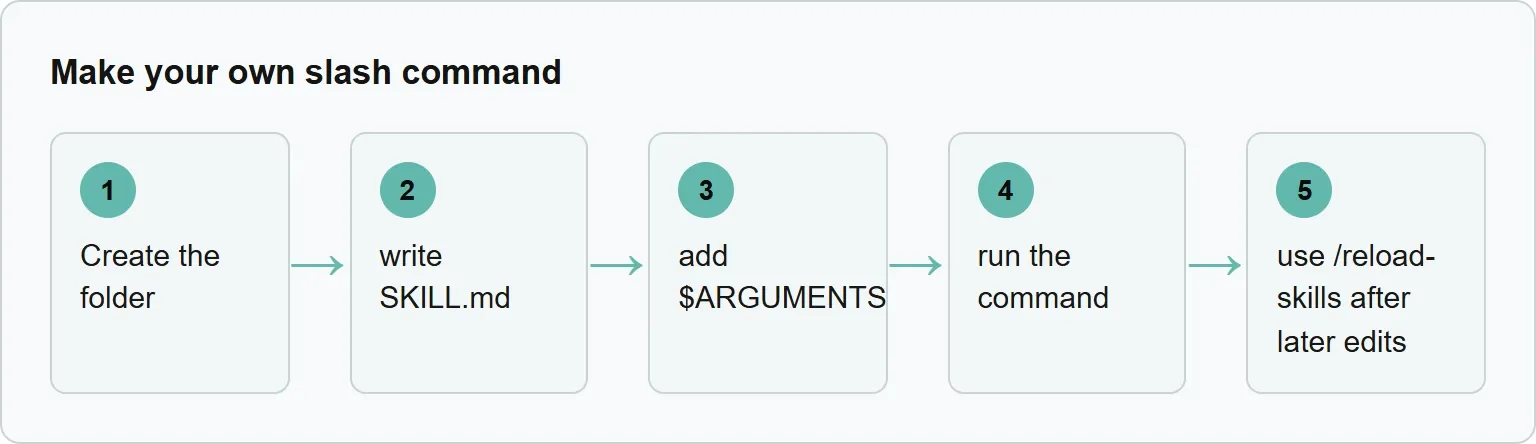
Create the folder, write SKILL.md, add $ARGUMENTS, run the command, and use /reload-skills after later edits when Claude Code needs to scan the folder again.
Start with a project skill so the repository can carry it. Create this folder:
mkdir -p .claude/skills/fix-issueThen save the following as .claude/skills/fix-issue/SKILL.md. This is Anthropic's example:
---
name: fix-issue
description: Fix a GitHub issue
disable-model-invocation: true
---

Fix GitHub issue $ARGUMENTS following our coding standards.

1. Read the issue description
2. Understand the requirements
3. Implement the fix
4. Write tests
5. Create a commit
Run it by placing the issue number after the command:
/fix-issue 123Claude receives the issue number through $ARGUMENTS. The disable-model-invocation: true line means Claude will not choose this skill on its own, so it runs only when you call it.
Our example (illustrative).
For a personal command that checks an issue before work begins, create this folder:
mkdir -p ~/.claude/skills/review-issueSave this as ~/.claude/skills/review-issue/SKILL.md:
---
name: review-issue
description: Review one issue and produce a safe implementation checklist
---

Review issue $ARGUMENTS before any code changes.

1. Read the issue description.
2. List the requirements in plain language.
3. Name the files likely to change.
4. List the tests that should prove the fix.
5. Stop and show the checklist.
Call it with an argument:
/review-issue 842Claude receives the issue identifier in place of $ARGUMENTS and follows the checklist in the personal skill.
Change the description before changing the instructions. It should say what the command does in words that match the requests people will make. Then keep the body focused on the steps Claude must follow.
Test the command with a harmless example first. Check that the argument appears in the right place and that each step produces the expected kind of result. If you edit the skill during a session and the change is not available, run /reload-skills.
Do not hide essential input inside the instructions. Put changing input after the command and refer to it through $ARGUMENTS. That keeps one reusable workflow while letting each run carry a different issue number, file name, or task.
Where commands live and which one wins
A project command belongs in .claude/skills/<name>/SKILL.md. Commit that folder when the team should receive it with the repository.
A personal command belongs in ~/.claude/skills/<name>/SKILL.md. It works across local projects on that machine. If personal and project folders contain the same skill name, the personal one runs.
If review-issue also exists in the project's .claude/skills/ folder, the personal command above runs. Anthropic gives personal skills precedence over project skills with the same name.
Use project scope for team methods and repository-specific rules. Use personal scope for a workflow that should follow you from one local project to another.
That choice also prevents a quiet conflict. If you keep a personal and project copy with the same name, the project copy will not run. Give them different names when they are meant to do different jobs.
Before sharing a project skill, read it as a new teammate would. Make the description specific, keep the steps in order, and point to any required file by its path. A command should remove repeated explanation, not create a second place where the same rule drifts.
Common command mistakes
A slash command must be at the start of the message. Putting a sentence before it turns the whole line into normal prompt text. Start with the command, then add its argument.
Another common mistake is using /clear when you still need decisions from the current session. Use /compact instead when the history matters. Add focus instructions if one part of that history must survive the summary.
For custom commands, do not keep the only copy in your personal folder if the team needs it. Put the shared version in the repository's project skills folder and commit it. Keep personal commands for work that is genuinely yours across projects.
Where Xtrusio fits
A slash command standardizes work inside Claude Code. Xtrusio tackles a different question: how AI and search systems describe your business outside your own tools. It shows when ChatGPT and Gemini mention you, which competitors appear instead, and what to work on next.
See how your company appears outside Claude Code with Xtrusio's free visibility check.
Sources
Sources read 3 November 2026.
Frequently asked questions
Does.claude/commands/ still work?
Yes. Anthropic says existing command files keep working, although custom commands are now taught as skills.
How do I pass text into a custom command?
Put $ARGUMENTS in SKILL.md. Claude Code replaces it with the text typed after the command name.
How do I stop Claude from running a command on its own?
Add disable-model-invocation: true to the skill's frontmatter. You can still invoke the command yourself.
How do I see the commands available in my session?
Run /help to show help and available commands.
Topics
- claude code slash commands

Xtrusio
AI visibility research
Xtrusio is the Perception Engine for B2B brands.
Free check
See how AI engines answer about you
Get your free AI visibility check
Keep reading
 Technical SEO · Nov 3, 2026 · 6 min read
Evertune AI: What It Tracks, What It Costs and Alternatives
See what Evertune AI tracks, how its prompt credits work, current plan prices and how Xtrusio, Peec AI and Profound compare. Technical SEO · Nov 3, 2026 · 6 min read
CLAUDE.md File: Where It Goes and What to Write in It
Learn where CLAUDE.md goes, what to write in it, how Claude Code loads it, and when a rule belongs in a hook instead. Technical SEO · Nov 3, 2026 · 5 min read