What Are Claude Skills? How They Load and When to Use One
Short answer
Short answer: A Claude skill is a folder with a SKILL.md file plus optional references and scripts. Claude keeps the name and description available, reads the instructions when your request matches, and opens extra files only when needed. Use a skill for work you repeat.

A marketing lead has a brand brief that works, but she keeps pasting it into Claude. One week she forgets the claims section. The next week she leaves out the review checklist. The method exists, but it is trapped in a long prompt.
A Claude skill turns that method into a folder Claude can find and use again. The folder can hold instructions, references and scripts. The useful part is not the folder itself. It is the clear trigger and repeatable method inside it.
A real Claude skill, file by file
Anthropic publishes a public skill-creator skill. Its folder separates the main instructions from references, scripts, assets and evaluation helpers.
skill-creator/
├── SKILL.md
├── LICENSE.txt
├── agents/
├── assets/
├── references/
└── scripts/
The real SKILL.md begins with a name and a description:
---
name: skill-creator
description: Create new skills, modify and improve existing skills, and measure skill performance. [...]
---
# Skill Creator

A skill for creating new skills and iteratively improving them.

At a high level, the process of creating a skill goes like this:
name: skill-creator
description: Create new skills, modify and improve existing skills, and measure skill performance. [...]
# Skill Creator
A skill for creating new skills and iteratively improving them.
At a high level, the process of creating a skill goes like this:
The cut is marked with [...]. The full description also says when the skill should be used. Anthropic publishes this skill under the Apache License 2.0.
Source: Anthropic skill-creator on GitHub, viewed 29 October 2026.
A brand-voice SKILL.md you can copy
This small example is ours. It keeps the trigger in the description and the method in six short steps.
---
name: checking-brand-voice
description: Reviews marketing copy against the approved brand voice and facts. Use when a draft needs a brand, claim or tone check.
---

# Brand voice check

1. Read references/voice-guide.md.
2. Read references/approved-facts.md.
3. Mark claims that are not in the approved facts.
4. Flag tone that conflicts with the voice guide.
5. Suggest the smallest accurate correction.
6. Return the checked draft and a short change log.
name: checking-brand-voice
description: Reviews marketing copy against the approved brand voice and facts. Use when a draft needs a brand, claim or tone check.
# Brand voice check
- Read references/voice-guide.md.
- Read references/approved-facts.md.
- Mark claims that are not in the approved facts.
- Flag tone that conflicts with the voice guide.
- Suggest the smallest accurate correction.
- Return the checked draft and a short change log.
Save the main file as checking-brand-voice/SKILL.md. Keep the deeper material beside it:
checking-brand-voice/
├── SKILL.md
└── references/
    ├── approved-facts.md
    └── voice-guide.md
The approved-facts file is where the team keeps product facts that a draft may use. The skill explains how to check them. It does not turn an unsupported claim into a true one.
How Xtrusio fits into that check
Your approved facts say what the brand can support. Xtrusio shows what AI engines actually say about the brand and which sources appear in their answers. Put the review method in the skill, then compare the saved answers with the facts your team has approved.
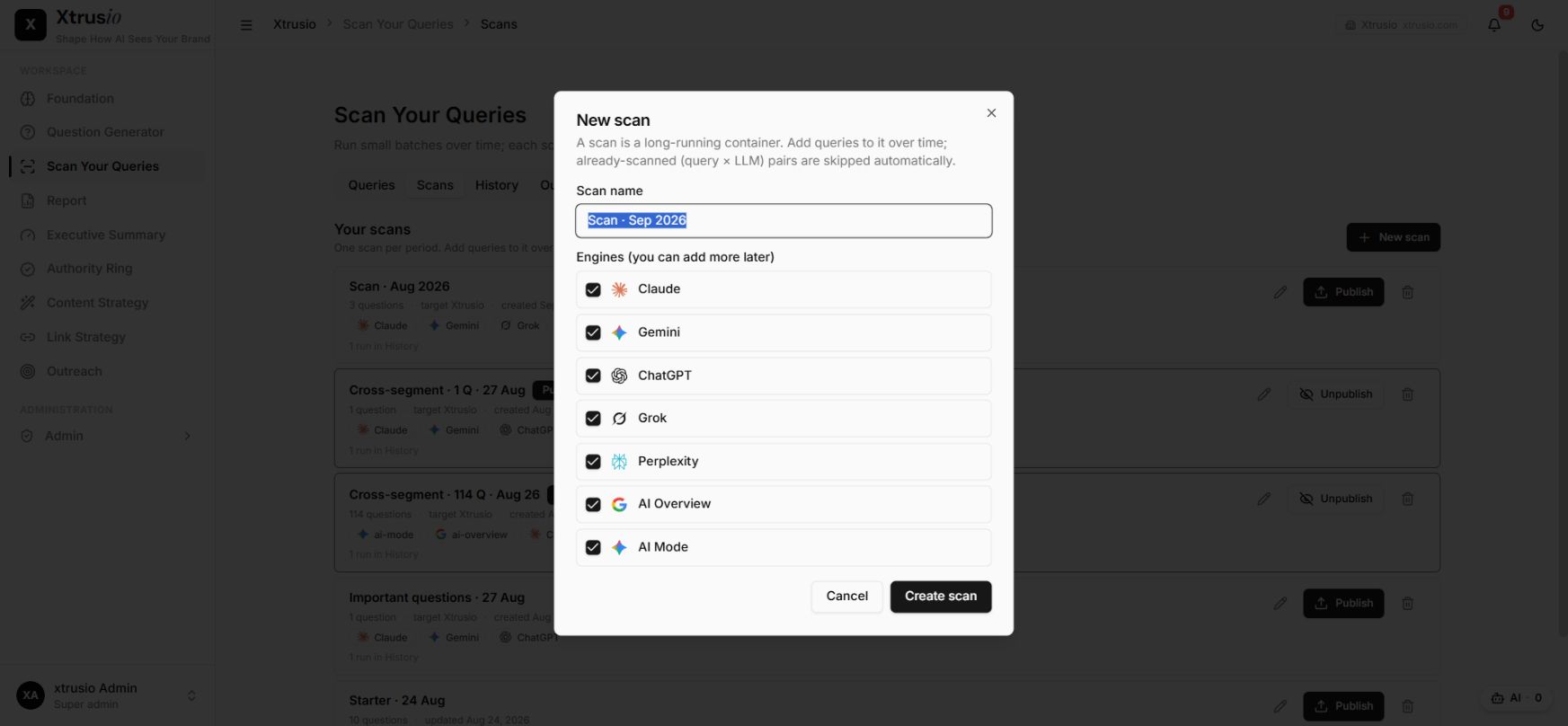
This split keeps the jobs clear. Xtrusio supplies dated evidence from AI answers. The skill supplies the repeatable review method around that evidence.
How Claude loads a skill
Claude does not place every file from every skill into the conversation at startup. Anthropic describes progressive disclosure in three stages.
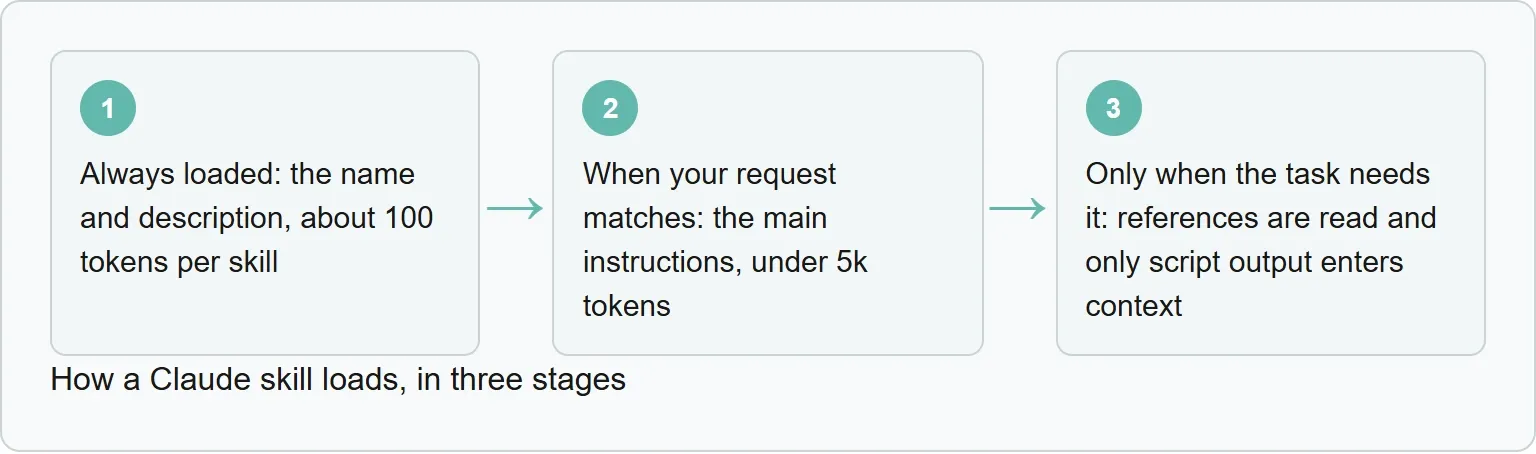
Source: Anthropic Agent Skills overview
Anthropic describes the always loaded material as the name and description, about 100 tokens per skill. For the next stage, when your request matches, Claude reads the main instructions, under 5k tokens. For the last stage, only when the task needs it, references are read and only script output enters context.
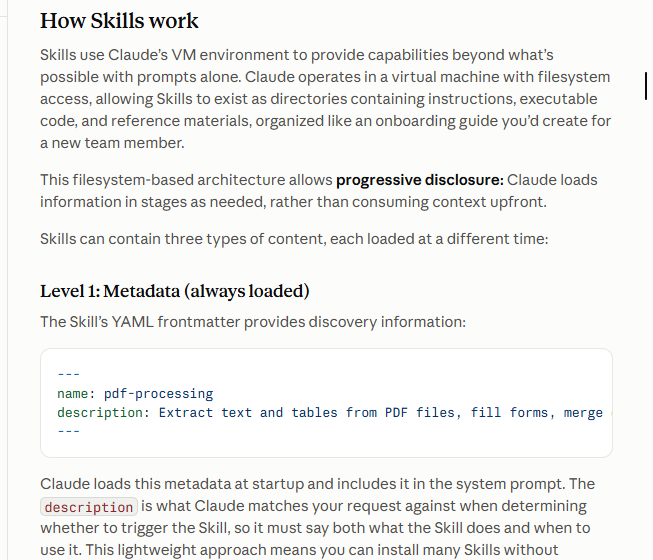
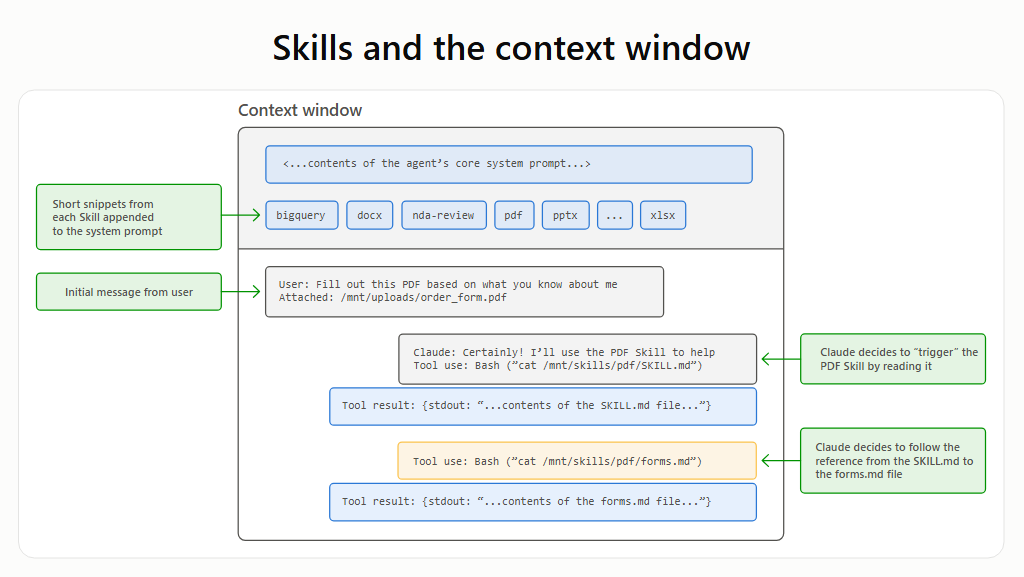
The description matters because Claude matches the request against it before reading the longer instructions. Keep the main file focused. Put supporting depth in references and deterministic work in scripts.
Prompt, skill, project file or MCP?
Start with the smallest tool that solves the job. Our rule of thumb is simple: if you have pasted the same instructions three times, consider a skill. Use a project file for context that should stay active throughout one codebase. Use MCP when Claude needs an outside service or data source.
Tool | When it loads | Best for | Marketing example |
|---|---|---|---|
Prompt | In the current chat | One-time work | Rewrite one email |
Skill | When the request matches, or when invoked | A repeatable method | Run the same brand review |
Project file or CLAUDE.md | Throughout the project | Always-on project context | Keep one campaign's rules in view |
MCP | When Claude uses the connected tool | Outside data or actions | Read approved records from a CRM |
Anthropic draws the same boundary: skills provide procedural knowledge, while MCP connects Claude to services and data. Some jobs need both. Add a script only when code is safer or more reliable than repeating the operation in prose.
Where Claude skills live
In Claude Code, a personal skill can live in ~/.claude/skills/. A project skill can live in .claude/skills/. The first follows one user across projects. The second stays with a codebase.
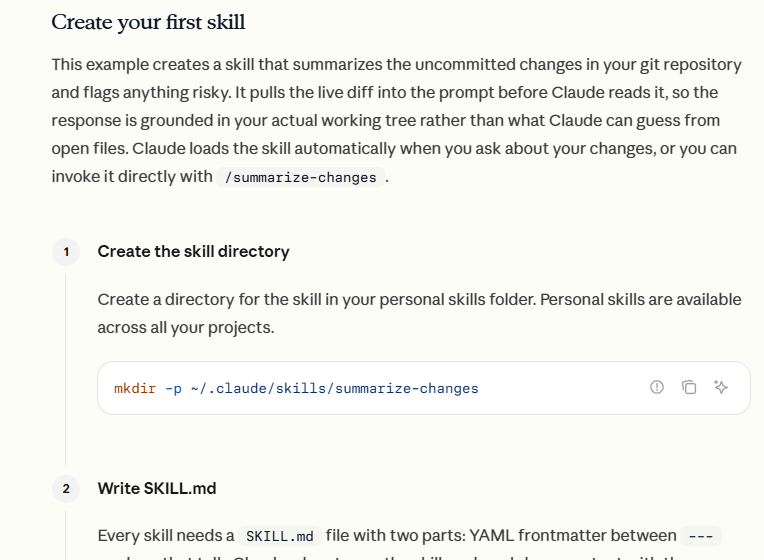
On claude.ai, upload the skill folder as a zip through Settings and Features. Code execution must be on. Through the API, custom skills are separate again. Custom skills do not automatically sync between Claude Code, claude.ai and the API.
If a skill is not working, first ask where it is installed.
Anthropic's help center says Skills are available on Free, Pro, Max, Team and Enterprise plans. Its platform overview says custom skills on claude.ai are available on Pro, Max, Team and Enterprise plans with code execution enabled. The official pages differ, so check the Features screen on your account.
Name and describe the trigger clearly
Anthropic limits a skill name to 64 characters and a description to 1,024 characters. Names can use lowercase letters, numbers and hyphens. Anthropic reserves the words anthropic and claude, and suggests a gerund form such as reviewing-copy.
The description should say what the skill does and when to use it. A label such as “Helps with documents” is too vague. The main body should stay under 500 lines, with deeper detail moved into references. Keep those references one level away from SKILL.md so Claude can find them without following a chain of links.
In Claude Code, add disable-model-invocation: true when you want the user to start the skill explicitly instead of letting Claude trigger it automatically.
Check a skill before you trust it
A skill can include instructions and executable code. Anthropic advises using skills from trusted sources and warns that a malicious skill can direct Claude to call tools or run code in ways that do not match its advertised purpose.
Read the main instructions and inspect every bundled script. Check which tools it asks Claude to use, which files it can reach and whether it makes network calls. If the package is too large to review, pause before using it.
Frequently asked questions
Is a Claude skill the same as a long prompt?
No. A prompt is useful for a one-time instruction. A skill packages a repeatable method with optional references and scripts.
Does Claude load every skill file at startup?
No. Claude keeps metadata available, loads the main instructions when a request matches, and opens supporting resources only when needed.
When should I use MCP instead?
Use MCP when Claude needs an external tool or data source. Use a skill for the repeatable method. Some workflows need both.
Do custom skills sync between Claude Code and claude.ai?
No. Custom skills do not automatically sync across Claude surfaces, so check each installation separately.
Are third-party Claude skills safe?
Not automatically. Anthropic recommends trusted sources and warns that malicious skills can direct tool calls or code execution. Inspect the package before use.
Do I need to code to make a skill?
No. A skill can be instructions and reference files. Add scripts only when the job needs deterministic code.
Can I make Claude use a skill only when I ask?
Yes, in Claude Code. Add disable-model-invocation: true to stop automatic model invocation for that skill.
Does Anthropic ship ready-made skills?
Yes. Anthropic provides ready-made skills for PowerPoint, Excel, Word and PDF work.
Official sources
These primary pages cover skill structure, loading, locations, API use and MCP.
- Anthropic Agent Skills overview
- Skill authoring best practices
- Extend Claude with skills
- What are skills?
- Using Agent Skills with the API
- Anthropic: extending Claude with skills and MCP
- Public repository for Agent Skills
- What is the Model Context Protocol?
Last checked: 29 October 2026.
Topics
- claude skills

Xtrusio
AI visibility research
Xtrusio is the Perception Engine for B2B brands.
Free check
See how AI engines answer about you
Get your free AI visibility check
Keep reading
 AI Tools Guide · 3 November 2026 · 8 min read
Athena HQ: What AthenaHQ Tracks, What It Costs and Alternatives
See what Athena HQ tracks, its current Essential, Starter and Enterprise pricing, how credits work, and how Xtrusio, Peec AI and Profound compare. AI Tools Guide · 3 November 2026 · 8 min read
Semrush AI Toolkit: What It Tracks, Pricing and Alternatives
See what the Semrush AI Toolkit tracks, current pricing, prompt limits, cost per prompt and how Xtrusio, Peec AI and Profound compare. AI Tools Guide · 3 November 2026 · 8 min read