CLAUDE.md File: Where It Goes and What to Write in It
Short answer
CLAUDE.md is a plain Markdown file of instructions that Claude Code reads at the start of every session. Put the shared version at ./CLAUDE.md or ./.claude/CLAUDE.md. Put personal rules for all projects at ~/.claude/CLAUDE.md, and private project notes in a git-ignored ./CLAUDE.local.md.
Start with /init, cut the file to under 200 lines, and keep only what Claude cannot work out from the code. Good entries include exact test commands, team conventions, and mistakes you have corrected twice.
You may keep retyping the same test command and the same warning about a legacy folder. A short project file puts those instructions beside the code. Claude can read them when a new session starts.
Where CLAUDE.md goes
The location decides who shares the instructions. Use this table before creating the file.
CLAUDE.md locations and scope
File | Location | Shared with | Use it for (our suggestion) |
|---|---|---|---|
Project | | People who get the repository | Build commands and team conventions |
Local project | | Only you in this project | Private preferences; add it to |
Personal | | Your projects on this machine | Preferences that should follow you |
Managed | | The organization | Organization-wide instructions |
Source: Anthropic, How Claude remembers your project, read 3 November 2026.
Commit the project file when the team should share it. Keep CLAUDE.local.md out of version control because it is for your personal project preferences.
Create your first CLAUDE.md
Before you start
You need a repository and the commands that install, test, typecheck, and lint it. At the end, you will have a short project guide and a way to confirm that Claude loaded it.
Step 1: run /init
Open Claude Code in the repository and run /init. It generates a starting file. If a file already exists, the command suggests improvements instead of overwriting it.
Step 2: cut it down
Remove facts Claude can read directly from the code. Anthropic advises targeting under 200 lines, so every line should earn attention in every session.
You should see a short file of plain bullets.
Step 3: add exact commands
Write the exact commands for installing dependencies and checking work. Include the fastest command for one test file so Claude does not have to run the full suite for every small change.
You should see commands that can be copied into a terminal without interpretation.
Step 4: add conventions and gotchas
Record decisions that are not obvious from the repository. Name the helper the team chose, the old pattern new code must avoid, and the setup a test needs.
You should see specific choices and warnings that the repository cannot explain on its own.
Anthropic gives this short example:
# Commands
- Install: pnpm install
- Run one test file: pnpm vitest run path/to/file.test.ts
- Typecheck: pnpm tsc --noEmit

# Conventions
- Use the error helpers in src/lib/errors.ts, never throw raw strings
- src/legacy/ is still live but don't copy its patterns into new code

# Gotchas
- Integration tests need DATABASE_URL set, see .env.example
Source: Anthropic, Claude Code best practices, read 3 November 2026.
Step 5: confirm it loaded
Run /context and look under Memory files. The list shows which CLAUDE.md and CLAUDE.local.md files loaded at launch.
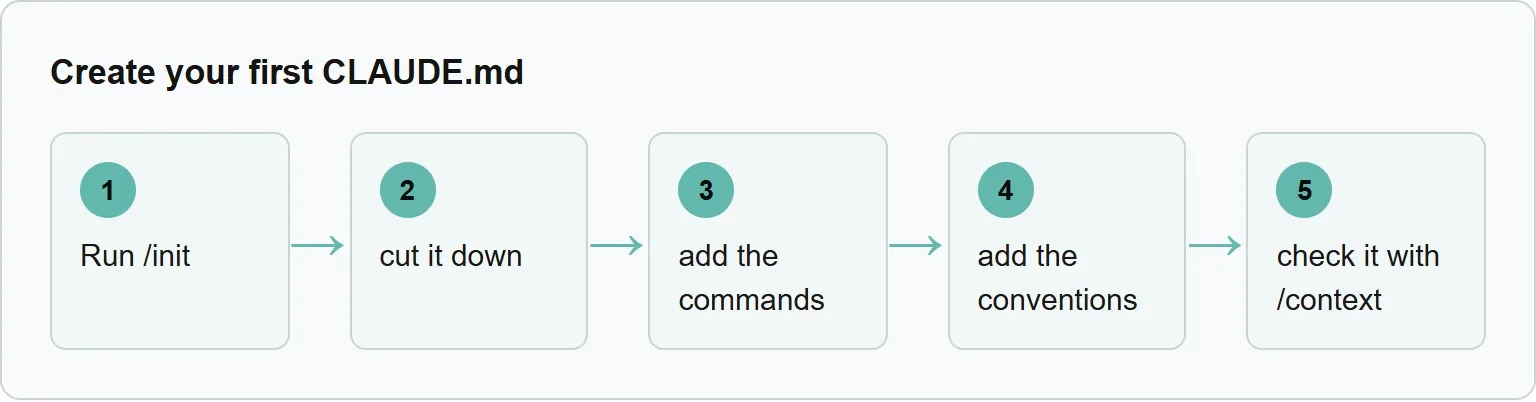
Run /init, cut it down, add the commands, add the conventions, and check it with /context.
If Claude ignores your CLAUDE.md
It is missing from Memory files
Check that the name is exactly CLAUDE.md. Launch Claude Code from the repository or a folder inside it. Files above the working directory load at launch, while files in subdirectories load on demand.
It loaded, but a line is ignored
Remove contradictions because Claude may choose between conflicting instructions arbitrarily. Cut the file toward Anthropic's target of under 200 lines.
The rule must always hold
Move it to a hook, a deny rule, or a managed setting. Those choices enforce behavior instead of asking Claude to use judgment.
The repository has only AGENTS.md
By default, Claude reads AGENTS.md only when no CLAUDE.md exists in the working directory or above it.
What to put in it, and what to leave out
Keep what Claude cannot work out from the code itself. That usually means the commands that confirm work, misleading parts of the repository, and team decisions that live outside the code.
Make each instruction concrete. “Run npm test before committing” can be followed and checked. “Test your changes” leaves the method open.
Add a lesson when the same mistake happens a second time. Then remove stale lines when paths, commands, or decisions change. A short accurate file is more useful than a long archive.
Avoid contradictions. If 2 instructions disagree, Claude may choose one arbitrarily. Adding IMPORTANT to an ignored line probably will not solve a file that is too long or a rule that needs enforcement.
Write down the facts Claude must not get wrong inside the repository. Outside it, AI engines can still get your company's facts wrong, which Xtrusio tracks. Get your free AI visibility check.
How Claude Code loads CLAUDE.md files
At launch, Claude Code loads CLAUDE.md and CLAUDE.local.md from the working directory and every directory above it. All files found are joined into context rather than one overriding another.
Subfolder files load later. Claude Code reads one when it first reads, writes, or edits a file in that subfolder. This lets a large repository keep local rules close to the part they govern.
A CLAUDE.md file can import another file with @path syntax. Imports can nest up to 4 hops. Block-level HTML comments are removed before the content reaches Claude.
The project-root file survives /compact because Claude Code reads it from disk again. A file larger than 4 MiB is skipped completely, which is another reason to keep it small.
When a rule must always hold, use a hook
CLAUDE.md supplies context, not enforced configuration. Use it for guidance Claude can apply with judgment. Use a hook or permission rule when an action must always happen or must always be blocked.
If something has to happen every time, make it a hook, a deny rule, or a managed setting.
Official wording: Anthropic, Claude Code best practices, read 3 November 2026.
For example, a line asking for a typecheck is guidance. A Stop hook can enforce that check before Claude finishes. Our hook guide explains that route.
CLAUDE.md, rules files, AGENTS.md, and auto memory
Use .claude/rules/ when instructions should apply only to matching files. A rule can use a paths field, so it loads only when Claude works with those files.
By default, Claude reads AGENTS.md only when no CLAUDE.md exists in the working directory or above it. Read our AGENTS.md guide for that shared format.
Auto memory is separate. Each project gets a directory at ~/.claude/projects/<project>/memory/. The first 200 lines or 25KB of MEMORY.md load at the start of a conversation. Run /memory to see memory files across user and project scopes.
For other persistent choices, see Claude Code settings. If the session itself is too full, our context window guide covers the next step.
Sources
Sources read 3 November 2026.
Frequently asked questions
Where should a project CLAUDE.md go?
Put it at./CLAUDE.md or./.claude/CLAUDE.md in the repository.
How long should CLAUDE.md be?
Anthropic advises targeting under 200 lines per file.
Does Claude Code read AGENTS.md too?
By default, it reads AGENTS.md only when no CLAUDE.md exists in the working directory or above it.
How do I check that the file loaded?
Run /context and check the list under Memory files.
Should I commit CLAUDE.local.md?
No. It holds personal project preferences, and Anthropic says to add it to.gitignore.
Topics
- claude md file

Xtrusio
AI visibility research
Xtrusio is the Perception Engine for B2B brands.
Free check
See how AI engines answer about you
Get your free AI visibility check
Keep reading
 Technical SEO · Nov 3, 2026 · 6 min read
Evertune AI: What It Tracks, What It Costs and Alternatives
See what Evertune AI tracks, how its prompt credits work, current plan prices and how Xtrusio, Peec AI and Profound compare. Technical SEO · Nov 3, 2026 · 7 min read
Claude Code Slash Commands: Built-in List and Custom Commands
A practical Claude Code slash commands list, plus a copyable custom command built as a skill with SKILL.md and $ARGUMENTS. Technical SEO · Nov 3, 2026 · 5 min read