Claude Code Settings: Where the Files Live and Which One Wins
Short answer
Claude Code reads settings from four files: ~/.claude/settings.json, .claude/settings.json, .claude/settings.local.json and managed-settings.json or another managed source. An organization can also deliver managed settings from the claude.ai console.

When the same key appears in more than one place, the higher level wins: managed settings, the command-line settings flag, project local, shared project, then user. List keys such as permissions.allow merge instead of replacing one another. Run /status to see which sources loaded and claude doctor to find rejected entries.
A developer can turn a setting off in a personal file, open a team project and find it on again. That does not mean Claude Code ignored the edit. A project file higher in the stack may have supplied the value.
The four settings files and who they affect
Anthropic documents four settings files, checked 3 November 2026. The right file depends on whether the setting belongs to one person, one project, a whole team or an organization.
Claude Code settings files, checked 3 November 2026
Scope | File | Who it affects | What belongs there |
|---|---|---|---|
User | | You in every project on this machine | Personal preferences, a default model and personal permission rules |
Shared project | | Everyone working in the folder | Team settings that should travel with the repository |
Project local | | You in this project only | Personal overrides and settings you are testing before sharing |
Managed | | Everyone the organization deploys it to | Security policy and compliance requirements |
Commit the shared project file when teammates should receive it. Claude Code keeps a local file out of git when it creates the file. If you create that local file by hand, add it to .gitignore yourself.
Claude Code also writes ~/.claude.json for its own account details, global configuration and per-project state. Anthropic says you do not need to edit that fifth file.
Which file wins: the precedence order
Claude Code uses the value from the highest level that sets a key. Nothing in your own files or the command-line settings flag overrides a managed key. A value passed with that flag lasts for one session and sits above project and user files.
The five levels are managed settings, the command-line settings flag, project local, shared project, and user, from highest to lowest.
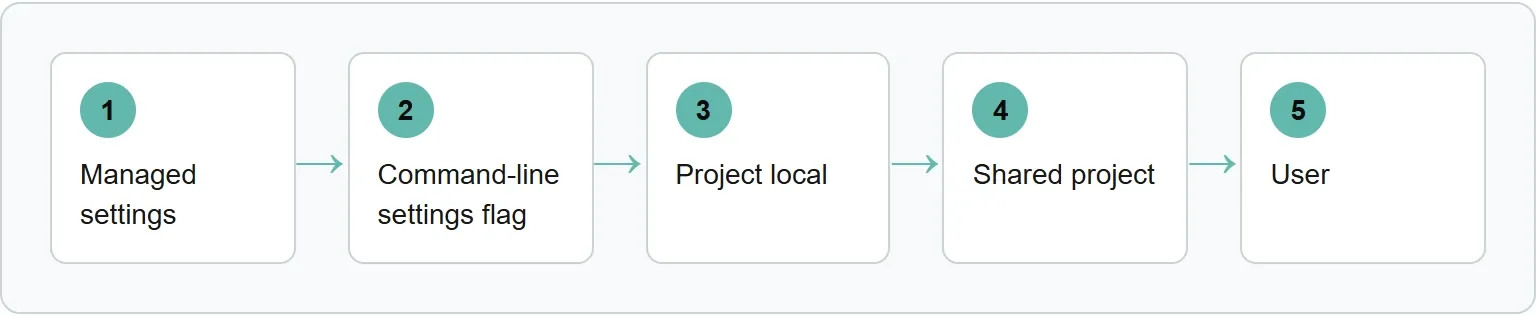
A shared project value therefore beats the same key in your user file. Add the key to .claude/settings.local.json when you need a personal value in that project.
Lists merge instead of overriding
List keys behave differently. When permissions.allow appears in more than one file, Claude Code combines the lists instead of selecting only the highest one.
This matters when troubleshooting permissions. A command allowed in your user file can remain allowed alongside a second rule from the shared project file. Read the combined rules before assuming one file erased the other. For the boundary between permissions and the shell sandbox, see the separate Claude Code sandbox guide.
Our example: one key in three files
Our example (illustrative). RiverbankApp is a fictional project. We did not change settings on a real machine.
The user file selects Sonnet and allows the lint command:
{
  "model": "claude-sonnet-5",
  "permissions": {
    "allow": ["Bash(npm run lint)"]
  }
}
The shared project file selects Opus and allows the test command:
{
  "model": "claude-opus-5-5",
  "permissions": {
    "allow": ["Bash(npm run test *)"]
  }
}
The project local file selects Sonnet again:
{
  "model": "claude-sonnet-5"
}- Inside RiverbankApp, the project local value wins, so the model is
claude-sonnet-5. - For a teammate without the local file, the shared project value wins, so the model is
claude-opus-5-5. - In another project with neither project file, the user value applies, so the model is
claude-sonnet-5. - The allow list contains both lint and test because lists merge across files.
How to edit a settings file
Choose the scope first, then open that file in an editor. Settings files are strict JSON. A comment or trailing comma causes a syntax error.
Anthropic gives this personal-file example for allowing lint and test commands while denying reads of environment files:
{
  "$schema": "https://json.schemastore.org/claude-code-settings.json",
  "permissions": {
    "allow": [
      "Bash(npm run lint)",
      "Bash(npm run test *)"
    ],
    "deny": [
      "Read(./.env)",
      "Read(./.env.*)"
    ]
  }
}
Source: Anthropic, Claude Code docs, Settings files and precedence, read 3 November 2026. The $schema line adds autocomplete and inline validation in editors that support JSON schemas.
The /config menu covers a short set of personal options, not every settings key. Edit the JSON file when the key you need is not in that menu.
Check which settings loaded
Confirm the source. Save the file, then run /status inside Claude Code. Its Setting sources line lists the active sources for the current session. It confirms that a file loaded, but it does not identify which file supplied every resolved key.
Check rejected entries. Run claude doctor to list entries Claude Code rejected. Invalid JSON or a schema-rejected value in a user, project or local file can also produce a Settings Error dialog when an interactive session starts.
Claude Code watches settings files and reloads most edits while a session runs. Some keys load only at session start, so restart the session if a documented startup-only key does not change.
When a setting does not apply
Use this order instead of editing the same value repeatedly:
- Check
/statusto confirm the file loaded. - Run
claude doctorto find rejected entries. - Look for the same key at a higher level.
- Check whether a command-line flag or environment variable controls that key.
- For
permissions.defaultMode, use user or managed settings forautoorbypassPermissions. - Restart if the key loads only when a session starts.
Environment variables are not another level in the settings stack. Their precedence is decided key by key. For example, Anthropic says ANTHROPIC_MODEL exported in your shell applies over the model key from any settings file.
Some values also have scope restrictions. The permissions.defaultMode values auto and bypassPermissions do not take effect from project or local settings.
Where Xtrusio fits
Settings decide how Claude Code behaves on your machine. Xtrusio answers a different question: whether ChatGPT and Gemini mention your company, which competitors appear instead and what to work on next.
See whether ChatGPT and Gemini mention your company with Xtrusio's free visibility check.
Sources
- Anthropic, Claude Code docs: Settings files and precedence, read 3 November 2026.
- Xtrusio, product and offer information, read 3 November 2026.
Frequently asked questions
Where is the global Claude Code settings file?
User settings live in ~/.claude/settings.json.
Should I commit settings.local.json?
No..claude/settings.local.json is for your personal overrides in one project. Claude Code keeps it out of git when it creates the file; add it to.gitignore if you create it by hand.
Do settings edits need a restart?
Most edits reload in a running session. Some keys load only at session start, so those changes need a restart.
Do environment variables beat settings files?
They are not a level in the normal stack. Check the reference for the individual key because each variable has its own precedence rule.
Topics
- claude code settings

Xtrusio
AI visibility research
Xtrusio is the Perception Engine for B2B brands.
Free check
See how AI engines answer about you
Get your free AI visibility check
Keep reading
 Technical SEO · Nov 4, 2026 · 9 min read
Codex Hooks: How to Set Them Up and Use Them
Set up Codex hooks, trust them in the CLI, block unsafe shell commands and fix hooks that do not run. Technical SEO · Nov 4, 2026 · 7 min read
Claude Code Agent Teams: How to Set Up and Use Them
Set up Claude Code agent teams, choose teams or subagents, control display modes, understand token costs and fix common problems. Technical SEO · Nov 4, 2026 · 7 min read