Claude Code Agent Teams: How to Set Up and Use Them
Short answer
Short answer: Claude Code agent teams are several Claude Code sessions that work as one team: a lead splits the work and teammates, each with its own context window, message each other and share a task list. They are experimental and off by default. Turn them on by setting CLAUDE_CODE_EXPERIMENTAL_AGENT_TEAMS to 1 in settings.json or your shell, then ask Claude in plain words for a team. They cost significantly more tokens than one session, so use them when teammates need to share findings and challenge each other. Use subagents when only the result matters. Anthropic's cost page says agent teams use approximately 7x more tokens than standard sessions when teammates run in plan mode (read 4 November 2026).
A developer wants 3 reviewers to inspect 1 pull request from different angles. In 1 Claude Code session, the review can drift toward only 1 kind of issue. A team lets each reviewer keep a separate lens and compare findings.
Before you start
You need Claude Code in an interactive session, not the -p mode. By the end, you will have a running team you can watch, message and shut down.
What Claude Code agent teams are
An agent team has a lead, teammates, a shared task list and a mailbox. The lead starts the team, assigns work and combines the result. Each teammate runs as a separate Claude Code session with its own context window. Teammates can message each other, and you can open any teammate directly.
This structure suits work where several views matter at once. Anthropic names research and review, competing debugging theories and cross-layer work as examples. Teams add coordination work and use more tokens, so they are a poor fit for a short sequential job.
Agent teams are experimental and disabled by default. Enable them by setting CLAUDE_CODE_EXPERIMENTAL_AGENT_TEAMS=1 in your settings.json or environment.
Official wording: Anthropic, Agent teams, read 4 November 2026, code.claude.com
Agent teams or subagents?
Check whether a lighter option will do the job. Subagents return focused results to the caller. Agent-team members work more independently and can discuss the work with each other.
Question | Subagents | Agent teams |
|---|---|---|
Context | Own context window; results return to the caller | Own context window; fully independent |
Communication | Return a result to the caller; named subagents can also message each other | Teammates message each other directly |
Coordination | Main agent manages all work | Messages and a shared task list support self-coordination |
Best for | Focused tasks where only the result matters | Complex work that needs discussion and collaboration |
Token cost | Lower because results are summarized back to the main context | Higher because every teammate is a separate Claude instance |
Source: Anthropic, Agent teams, read 4 November 2026.
Choose teams when reviewers must share findings or challenge each other's reasoning. Choose Claude Code subagents for focused work where the caller only needs the result. Use a single session for sequential jobs, same-file edits or work with many dependencies.
The same review habit helps when you check how AI engines describe a product. Xtrusio's free check shows when ChatGPT and Gemini mention you, which competitors appear instead and what to work on next.
Set up your first agent team
Turn the switch on, ask Claude for a team, check the team formed, message a teammate, then shut the teammates down.
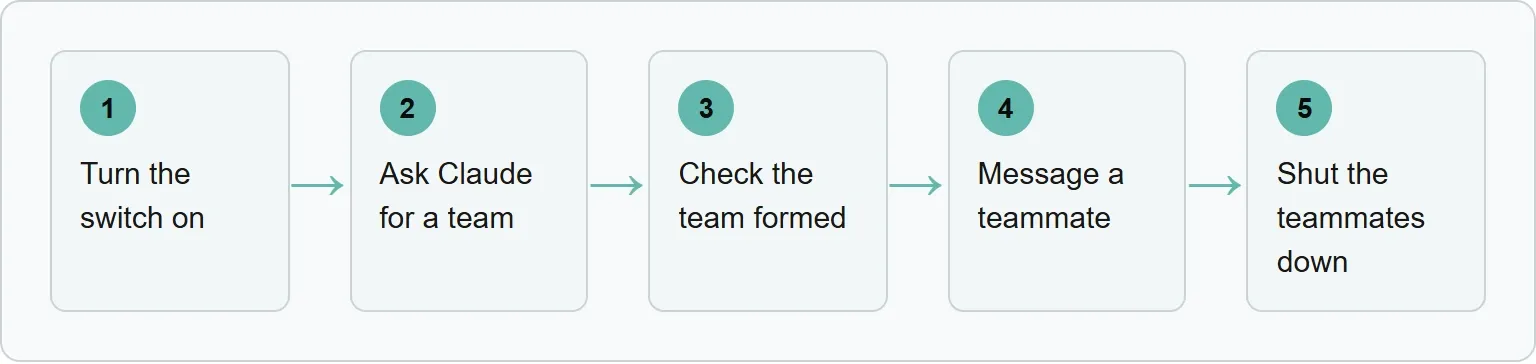
Step 1: Turn the switch on
Add the experimental variable to ~/.claude/settings.json for all your projects, or .claude/settings.json in the repository. Anthropic's example is:
{
  "env": {
    "CLAUDE_CODE_EXPERIMENTAL_AGENT_TEAMS": "1"
  }
}
You can set the same environment variable in your shell instead:
export CLAUDE_CODE_EXPERIMENTAL_AGENT_TEAMS=1You should see: a team request start teammates in the agent panel.
In our example: the switch makes the 3-reviewer team available.
Step 2: Ask Claude for a team
Describe the task and the teammates you want in plain words. Anthropic's first example says:
I'm designing a CLI tool that helps developers track TODO comments across
their codebase. Spawn three teammates to explore this from different angles:
one on UX, one on technical architecture, one playing devil's advocate.
You should see: Claude populate a shared task list and start teammates for the separate perspectives.
In our example: ask for security, performance and test-coverage reviewers.
Step 3: Check that a team formed
Look below the prompt input for the agent panel. It lists teammates, but subagents appear in the same panel. If Claude started subagents, ask again and explicitly say “agent team.”
You should see: teammates in the agent panel, with the lead coordinating a shared task list.
In our example: the lead has separate reviewers rather than 1 mixed review thread.
Step 4: Open and message a teammate
Use the up and down arrows to select a teammate, then press Enter. You can read its transcript and type a direct message. Press x to stop the selected teammate, or Ctrl+T to show the task list.
You should see: the selected teammate's transcript open for a direct message.
In our example: ask the security reviewer to explain 1 finding and its file location.
Step 5: Shut the teammates down
Ask the lead to shut down a teammate by name. The teammate receives a shutdown request and can approve it or reject it with an explanation.
You should see: the named teammate exit after approving the request.
In our example: shut down each reviewer after the lead has collected its findings.
Choose a display mode
In-process mode is the default and works in any terminal. You choose a teammate from the agent panel and open it in the same terminal. Split-pane mode gives each teammate a pane and requires tmux or iTerm2. It is not supported in VS Code's integrated terminal, Windows Terminal or Ghostty.
Set automatic selection in ~/.claude/settings.json:
{
  "teammateMode": "auto"
}
For 1 session, use:
claude --teammate-mode autoThe --teammate-mode flag is experimental and does not appear in claude --help.
What agent teams cost in tokens
Agent teams use significantly more tokens than a single session because each active teammate has a separate context window. Usage grows with the number of active teammates. Anthropic's cost page gives this conditional benchmark: agent teams use approximately 7x more tokens than standard sessions when teammates run in plan mode.
Keep the cost controlled:
- Use Sonnet for teammates when its capability fits the coordination job.
- Keep the team small because token use is roughly proportional to team size.
- Give each teammate a focused spawn prompt with enough task context.
- Shut down teammates when their work is done.
Anthropic suggests starting with 3 to 5 teammates for most workflows. It also suggests 5 to 6 tasks per teammate so the lead can reassign work when someone gets stuck. Treat those as starting points, then reduce the team if the jobs do not run independently.
Our example (illustrative).
Our example: Review Trio for 1 pull request
The prompt gives each teammate a clear lens, the needed context and a clean stopping point.
Create an agent team to review the current pull request.
Name 3 Sonnet teammates: security, performance, and tests.
Give each teammate the pull request context in its spawn prompt.
Assign different files to each teammate so their edits cannot overlap.
Ask them to share and challenge findings, then wait for all 3 reports.
Shut every teammate down after you synthesize the review.
Each reviewer gets 1 lens:
- The security reviewer looks for unsafe trust boundaries and permission mistakes.
- The performance reviewer looks for unnecessary work and slow paths.
- The test reviewer looks for behavior that the test suite does not cover.
The lead's history does not carry into a teammate. That is why the prompt tells the lead to pass task context. Different file ownership also avoids 2 teammates overwriting the same file.
Anthropic's official parallel-review prompt is:
Spawn three teammates to review PR #142:
- One focused on security implications
- One checking performance impact
- One validating test coverage
Have them each review and report findings.
When the reports are back, tell the lead to combine the findings and shut the teammates down.
Rules that trip people up
These limits matter before you assign work or recover a session.
- Teams can form when you did not ask. While the switch is on, a named subagent that Claude starts can launch as a teammate.
- Permissions come from the lead. You cannot set a separate permission mode at spawn time, and teammate permission prompts appear in the lead session.
- History does not carry over. A teammate receives its spawn prompt and project context, but not the lead's conversation history.
- Do not edit team runtime files. Claude overwrites runtime-state changes, and a project file such as
.claude/teams/teams.jsonis treated as an ordinary file. - There is 1 team per session. Teammates cannot create nested teams, and the lead stays fixed for the session.
- Resume starts without the old in-process teammates. After
/resumeor/rewind, tell the lead to start new teammates.
For reusable teammate roles, create subagent definitions and name the definition in the spawn prompt.
If your team does not work
Match the symptom to the smallest useful fix.
- No teammate row: an idle row may be hidden. Message the teammate by name. For split panes, confirm tmux is available in your
PATH. - Claude used subagents: ask again and explicitly request an agent team.
- Teammates appeared unexpectedly: set
CLAUDE_CODE_EXPERIMENTAL_AGENT_TEAMSto0. Claude Code reapplies the settings-file value to the current session when you save. - A teammate stopped after an error: message it with more instructions or start a replacement.
- The lead is doing the work: say, “Wait for your teammates to complete their tasks before proceeding.”
- A tmux session remains: list sessions and end the team's session.
tmux ls
tmux kill-session -t <session-name>
Get your free AI visibility check
See when engines mention you and what to improve with Xtrusio's free AI visibility check.
Sources
Anthropic and Xtrusio pages read 4 November 2026.
- Agent teams, Anthropic
- Manage costs effectively, Anthropic
- Xtrusio home page, Xtrusio
Frequently asked questions
Are Claude Code agent teams on by default?
No. Agent teams are experimental and disabled by default.
How do I turn Claude Code agent teams on?
Set CLAUDE_CODE_EXPERIMENTAL_AGENT_TEAMS to 1 in settings.json or your environment, then use an interactive Claude Code session.
Do agent teams cost more than subagents?
Yes. Anthropic describes subagents as the lower-token option and teams as higher because each teammate is a separate Claude instance.
Can I use agent teams with the -p flag?
No. Spawning teammates requires an interactive session; in -p mode, a named subagent runs as an ordinary subagent.
How many teammates should I start with?
Anthropic suggests starting with 3 to 5 teammates for most workflows.
Topics
- claude code agent teams

Xtrusio
AI visibility research
Xtrusio is the Perception Engine for B2B brands.
Free check
See how AI engines answer about you
Get your free AI visibility check
Keep reading
 Technical SEO · Nov 4, 2026 · 9 min read
Codex Hooks: How to Set Them Up and Use Them
Set up Codex hooks, trust them in the CLI, block unsafe shell commands and fix hooks that do not run. Technical SEO · Nov 4, 2026 · 7 min read
Claude Code /loop: How to Run a Prompt on a Repeat
Learn how Claude Code /loop repeats a prompt, how to choose fixed or dynamic timing, stop jobs, use loop.md and fix common scheduling issues. Technical SEO · Nov 4, 2026 · 8 min read