Claude Code Subagents: How to Delegate and Review Work
Short answer
A subagent works in a separate context and sends a summary back to the main conversation. That makes it useful for repository searches, log inspection and independent research. It is usually the wrong choice for a tiny edit or a task that needs constant back-and-forth with the main thread.

Picture the common failure. You ask the main conversation to trace one rendering bug. It fills with search matches, log lines and file names before the important path is clear. A bounded subagent can do that noisy search elsewhere and return a short handoff for review.
Before you start
You need Claude Code open in a repository and one task you can describe without hidden dependencies. By the end, you will know whether to delegate it, how to restrict the subagent and what to check in its answer.
When a subagent is the right tool
A good subagent task has a clear boundary and a useful return value. It can search several folders, inspect a noisy log or compare independent approaches without filling the main conversation with every intermediate detail.
Keep the work in the main conversation when the change is quick and targeted. Do the same when each decision depends on details already discussed in the main thread. A new subagent starts with a fresh context, so it receives a delegation message rather than the full conversation history.
Work shape | Best place | Why | What you still review |
|---|---|---|---|
One quick edit in a known file | Main conversation | The task is small and already has the needed context | The edit and focused check |
One bounded search or review | One subagent | Verbose exploration stays outside the main context | Files inspected, assumptions and summary |
Several independent research paths | Parallel subagents | Each path can progress without waiting on another | Conflicts, overlap and combined conclusion |
Source: Anthropic's Claude Code subagent documentation.
The subagent workflow at a glance
Use five separate decisions: choose one bounded task, create a project subagent, control its tools, invoke it and review the summary.
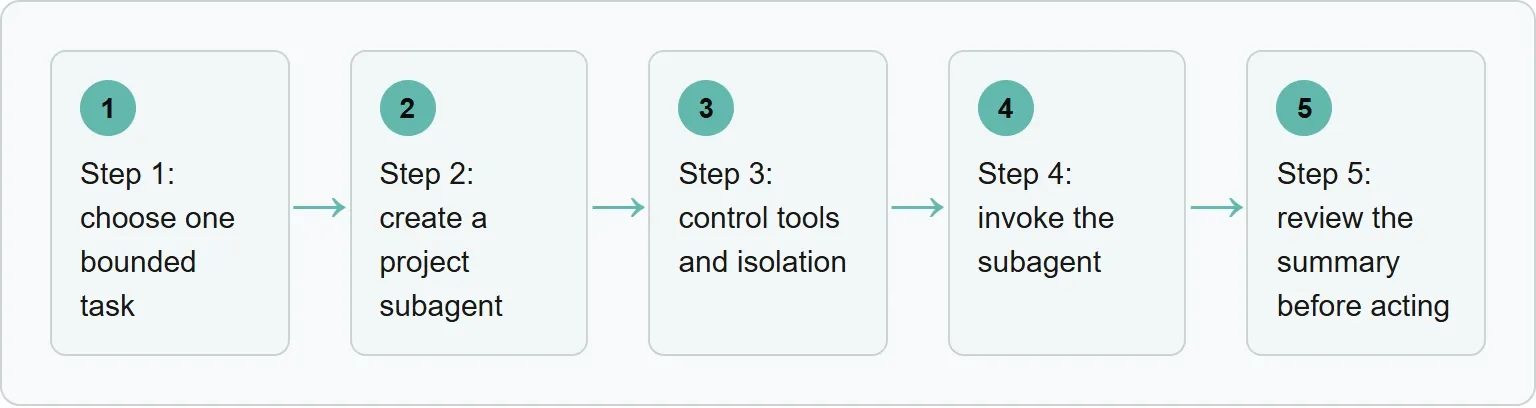
Step 1: choose one bounded task
Start with the result you want back. “Look through the project” is too broad. “Find the component that renders article HTML, trace its input path and list existing tests” gives the subagent a finish line.
The task should need little clarification once it starts. If the next decision depends on an answer from you, keep that part in the main conversation. If three searches do not depend on one another, they can become separate tasks later.
Step 2: create a project subagent
Reusable project subagents live in .claude/agents. User subagents live in ~/.claude/agents and are available across projects. For a team-specific reviewer, the project folder is the clearer home because the definition can be reviewed with the repository.
A definition needs a name and description. Add a tools list when you want a real permission boundary. If you omit the list, the subagent inherits every tool available to subagents.
Save this example as .claude/agents/code-path-reviewer.md.
`--- name: code-path-reviewer description: Finds the relevant rendering path and existing tests for one bounded repository question. tools: Read, Grep, Glob ---
Inspect only the folders named in the request. Return the relevant file paths, the call path and existing tests. Do not edit files or run commands.`
The description helps Claude decide when the subagent fits a request. The instructions tell the specialist what a useful answer looks like. The tools list prevents the read-only reviewer from editing files or running shell commands.
Run /agents after saving the file. You should see code-path-reviewer listed with the project agents. If Claude cannot find it, restart Claude Code and try again.
Step 3: control tools and isolation
Give the subagent only the tools its job requires. A search task may need Read, Grep and Glob. An implementation task may need editing and focused commands. Do not grant broad tools merely because another task might need them later.
A standard subagent works from a fresh context rather than a fork of the full conversation. It does not automatically know the discussion, skills or files already read in the main conversation. Put the goal, scope, relevant paths and expected output in the delegation request.
For implementation work that should not touch the parent checkout, set isolation: worktree. Claude Code then gives the subagent a temporary Git worktree. Use that for work that can be reviewed and integrated separately, not for a simple read-only search.
Step 4: invoke the subagent
Claude can delegate automatically when the task and a subagent's description match. You can also ask for a subagent in plain language. An @-mention guarantees that the named subagent runs for that task.
Invoke the reviewer by name
@code-path-reviewer Inspect apps/web/src for the component that renders blog article HTML. Return only the most relevant file paths, the rendering path, and any existing tests. Do not edit files or run the full test suite.
The mention guarantees that this named subagent runs for the task. Claude shows the delegated task while it runs, then returns the specialist's summary to the main conversation.
The screenshot below shows the one-off form of the same request
Use a subagent for this bounded read-only task: inspect apps/web/src for the component that renders blog article HTML. Return only the most relevant file paths, the rendering path, and any existing tests. Do not edit files or run the full test suite.

The request gives the specialist a target folder and a narrow deliverable. It also forbids edits and a full test run. Those boundaries make the returned summary easier to compare with the original task.
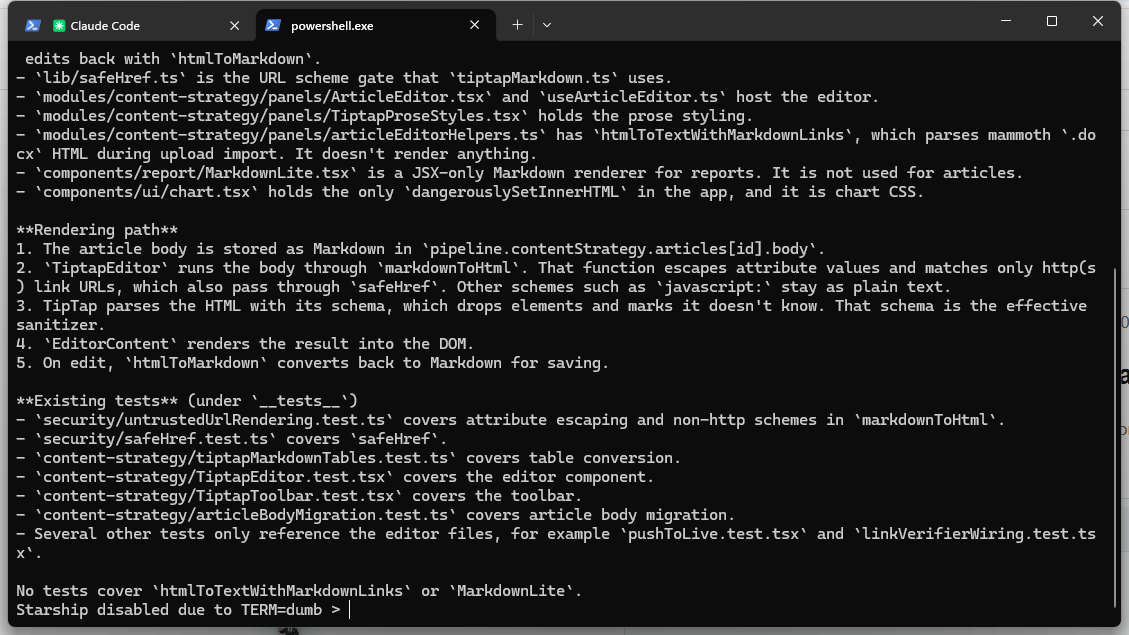
The summary is useful because it separates the rendering path from nearby files that do not render articles. It also lists the tests found and names gaps without claiming that any code changed.
Optional: run independent work in parallel
Parallel subagents help when the paths do not depend on each other. For example, one can inspect the renderer, one can find tests and one can read the CMS import path. Each can return a short report to the main conversation.
Launch two independent searches
Use two subagents in parallel. One should trace the article rendering path. The other should find the closest existing tests. Neither may edit files. Return the two summaries separately.
Keep dependent work sequential. Do not ask one subagent to design an interface while another implements it before the design exists. Do not send several agents to edit the same files. Parallel work saves time only when the boundaries are real.
Step 5: review the summary before acting
A subagent summary is a handoff, not proof. Open the important files it names. Check that the path starts where the request said it should, and that the tests cover the behavior you care about.
- Confirm that every important file path exists.
- Check whether the subagent stayed inside the requested scope.
- Separate direct findings from recommendations.
- Look for assumptions and unresolved questions.
- Choose the next action in the main conversation.
If the summary is incomplete, send a narrower follow-up or create a new bounded task. Do not widen the original task silently. A clean second request is easier to review than a subagent that keeps accumulating unrelated work.
Where Xtrusio uses the same review habit
Xtrusio applies that same idea to AI visibility work: monitored answers, brand mentions and citations stay tied to the question that produced them, so a strategist can inspect the evidence before approving a content plan.
If a subagent does not run as expected
Claude keeps the work in the main conversation: ask explicitly for a subagent, or use an @-mention to guarantee the selected subagent runs once.
The subagent misses important context: add the goal, paths, constraints and expected return format to the delegation request. A standard subagent starts with fresh context rather than the full conversation history.
The subagent has too much access: add an explicit tools list to its definition. Omitting the field inherits every tool available to subagents.
Parallel tasks block each other: stop and make the dependency order explicit. Parallel subagents work best when their research paths do not depend on one another.
Common subagent mistakes
Delegating a tiny edit
A quick change in a known file is easier to handle in the main conversation. A subagent adds a handoff that the task may not need.
Writing a vague description
The description helps Claude decide when to delegate. Say what the specialist handles and what it should return.
Omitting tool restrictions
An omitted tools field is not a read-only setting. It gives the subagent every tool available to subagents.
Parallelizing dependent work
Research paths that depend on one another should run in order. Otherwise, later agents work from assumptions rather than finished evidence.
Accepting a summary without checking it
Review the named files and assumptions before you approve edits or make a design decision.
Frequently asked questions
Where do Claude Code subagents live?
Project subagents live in.claude/agents. User subagents live in ~/.claude/agents and are available across projects.
How do I make Claude use a particular subagent?
Ask for it by name or use an @ -mention. Anthropic says the mention guarantees that the selected subagent runs for one task.
Do subagents share the main conversation history?
A standard subagent starts with a fresh context. Claude sends it a delegation message that summarizes the task.
Can Claude Code subagents run in parallel?
Yes. A background subagent runs at the same time as the main conversation. Use parallel work only when the tasks do not depend on each other.
Can a subagent work in a separate checkout?
Yes. Set isolation: worktree to give it a temporary Git worktree.
Topics
- claude code subagents
- claude code subagent

Xtrusio
AI visibility research
Xtrusio is the Perception Engine for B2B brands.
Free check
See how AI engines answer about you
Get your free AI visibility check
Keep reading
 AI Tools Guide · Oct 29, 2026 · 7 min read
Codex CLI Commands: Everyday Tasks, Sessions, Reviews and Safety
Use the Codex CLI commands that matter for daily work: start, resume, automate, inspect changes, review code and control permissions safely. AI Tools Guide · Oct 29, 2026 · 8 min read
How to Use Codex CLI: Your First Task, Review and Approval
Use Codex CLI for a safe first task: set permissions, write a bounded prompt, inspect support, run tests and approve only checked work. AI Tools Guide · Oct 29, 2026 · 7 min read