Codex CLI Commands: Everyday Tasks, Sessions, Reviews and Safety
Short answer
For everyday Codex CLI work, use codex to start and codex resume to continue. Use codex exec for non-interactive tasks. Then run codex review before you accept changes. Inside a session, /permissions, /status, /plan, /diff, /review and /compact cover most of the work.
You do not need to memorize the full reference. Learn the commands that match the next job: start, continue, automate, inspect or review. Keep the rarer administration commands for the day you actually need them.
The short command set
Use this table as a menu. Pick the job first, then use the command that fits it.
Your job | Command | What happens |
|---|---|---|
Start an interactive session | | The terminal interface opens in the current project. |
Continue earlier work | | You choose a saved session and return to its context. |
Run a bounded non-interactive task | | The task runs without the chat interface. |
Review local changes | | You choose uncommitted work, a branch comparison, a commit or custom review instructions. |
Set the boundary | | You tighten or relax what Codex may do without asking. |
Check the session | | You see the model, approval policy, writable roots and context use. |
Think before editing | | Codex proposes an execution plan before implementation. |
Inspect file changes | | You see tracked changes and files Git does not track yet. |
Look for problems | | Codex reviews the current working tree. |
Free context in a long chat | | Codex summarizes earlier turns and keeps the important points. |
Terminal commands and slash commands are different
Top-level commands run in your normal shell. Running codex without a subcommand opens the interactive terminal interface. Commands such as codex resume, codex exec and codex review also begin in the shell.
Slash commands run after the Codex session is open. They change or inspect the current chat. If your shell says that /status is not a command, you entered it in the wrong place. Start codex first, then type the slash command inside the session.
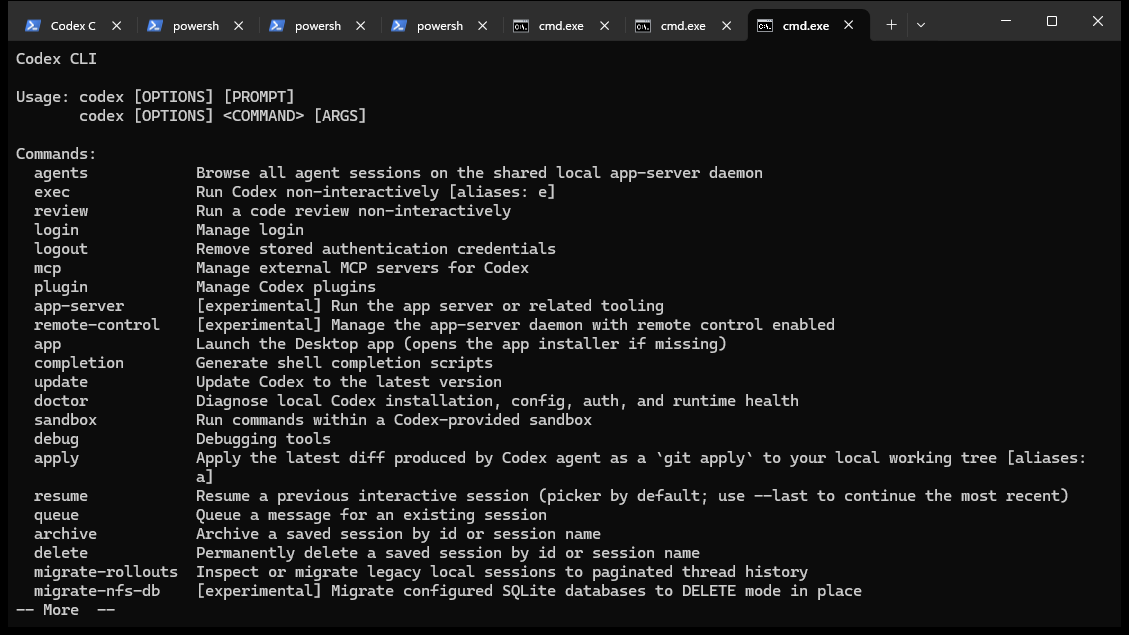
Five terminal jobs for everyday work
codex: start an interactive task
Use the interactive session when you need a conversation with the repository. It suits exploration, a multi-step change or a task where you expect to steer the work. Start from the project directory so the working context is the project you intend to inspect.
codex resume: continue with context
codex resume continues a saved interactive session. It can also return you to the most recent chat. Resume when the objective is still the same and the earlier discussion remains useful. Start fresh when the new task has a different goal, repository or approval boundary.
codex resume --last
The --last flag continues the most recent saved session without opening the session picker.
codex exec: run one bounded task
codex exec runs Codex non-interactively. It can stream normal or machine-readable output. It can also resume or fork earlier execution sessions. Use it for a repeatable check with a clear finish line. Choose an interactive session for an open investigation that needs several decisions.
codex exec --json "Find the test that covers the login redirect. Return the relative path and do not edit files."
The --json flag prints events as JSONL for a script or another machine-readable consumer. The prompt limits the target, the output and the permission. If the task will write files, name the expected change and the test that should pass. A bounded instruction is easier to review than “fix the repository.”
codex review: review a chosen target
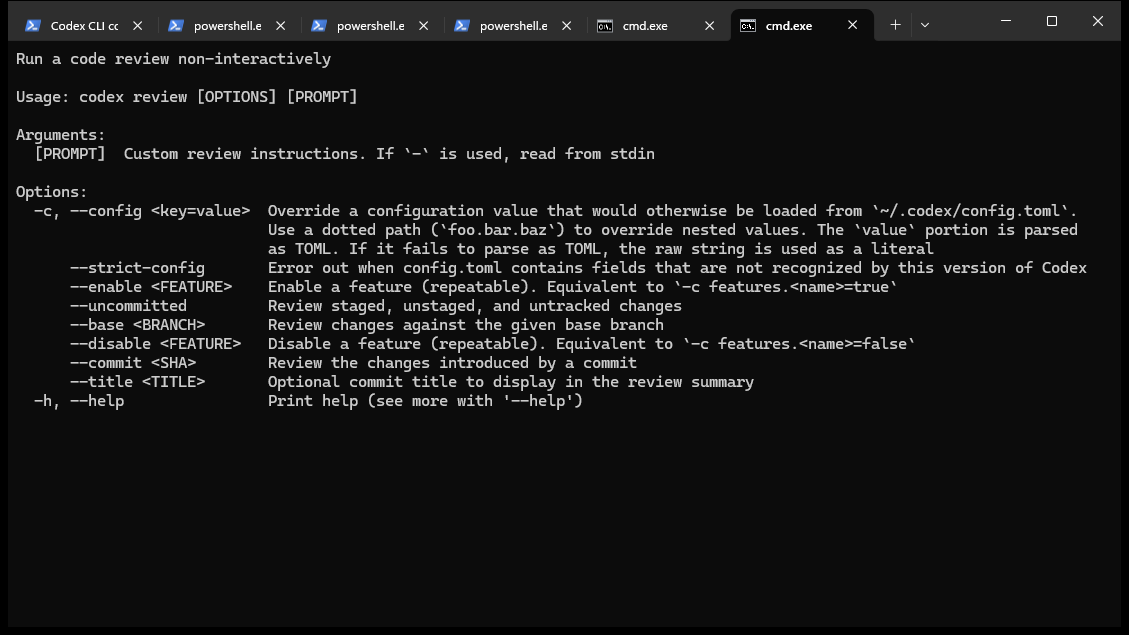
codex review can review uncommitted changes, a comparison with a base branch, one commit or custom review instructions. Choose one target. A review request that mixes several unrelated changes makes it harder to judge whether each finding belongs to the work.
codex review --uncommitted
codex review --base <BRANCH>
Use the first form for staged, unstaged and untracked work. Use the second to compare the current work with the base branch you name.
codex fork: try another path
Fork when you want to keep the original session and explore another approach from the same context.
codex fork --last
The --last flag forks the most recent session without opening the picker.
Six slash commands that keep a session useful
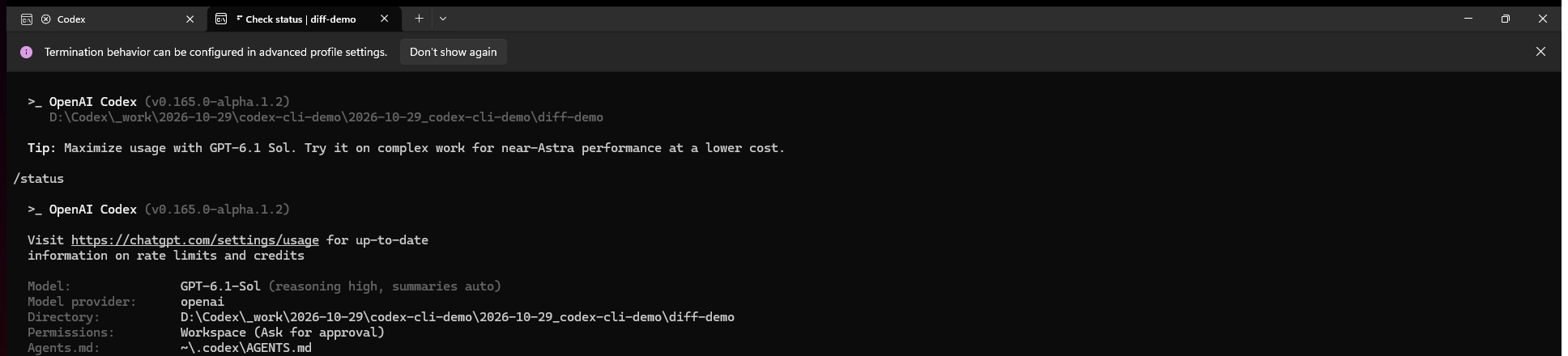
/permissions sets what Codex can do without asking. Use it before the first change, not after a surprising command. /status shows the active model, approval policy, writable roots and remaining context. Together, they answer two basic questions: what can this session do, and where can it do it?
/plan switches the current chat into plan mode before implementation. Use it when the change has several dependent steps or when the cost of a wrong approach is high. A tiny rename does not need ceremony. A migration or unfamiliar subsystem usually does.
/diff shows the Git diff, including untracked files. Read it before tests and again before committing. /review asks Codex to review the working tree for problems. It is another check, not the approval decision.
/compact summarizes the visible chat to free context in a long session. Use it when the conversation remains on the same objective but earlier detail is crowding the current work. Start a new chat when the objective itself changes.
A safe daily workflow
Set permissions, confirm status, plan the task, do the work, inspect the diff and run the review. Then run the relevant tests yourself and decide whether the result satisfies the request.
Set permissionsConfirm statusPlan the taskDo the workInspect the diffRun the review
The order matters. Permissions come before action. The diff and tests come before approval. Review can find a missed problem. It cannot decide whether the change matches your business rule or whether a deployment is acceptable.
Choose the narrowest permission level that works
The CLI supports read-only, workspace-write and danger-full-access sandbox policies. Read-only is useful for inspection. Workspace-write fits ordinary project work that should stay inside the repository. Danger-full-access removes an important boundary and should not be the normal answer to a blocked command.
OpenAI advises against bypassing approvals and the sandbox unless the CLI is already inside a dedicated sandboxed environment. Grant one extra directory instead of opening the whole machine. A permission is part of the task design, not a shortcut around it.
The same evidence rule applies to AI visibility work
Command safety is one example of a wider rule: keep the question, evidence and approval connected. Xtrusio asks supported AI engines the buyer questions that matter and records the answers, brand mentions and citations. It can then draft a question-linked content plan from the engines' searches and citations, with a person approving the plan before it is saved.
Xtrusio also states that AI suggestions do not replace client approval. The same idea applies here. An agent can propose, edit and review, but the person responsible for the project decides whether the result is ready.
When to resume, compact or start fresh
Choose by the state of the task. Keep useful context, but do not drag an old objective into new work.
Situation | Best move | Why |
|---|---|---|
The task is unchanged and earlier context still helps | | Continue from the saved conversation. |
The task is unchanged but the chat is long | | Keep the objective while freeing context. |
You want to try another approach without losing the original | Fork the session | Preserve the first path and branch the conversation. |
The objective or repository has changed | Start a new session | A clean context reduces accidental carry-over. |
Common command mistakes
Most problems come from using the right command with the wrong boundary. Others happen when a command runs at the wrong point in the workflow.
- Typing a slash command in the shell. Open the interactive session first.
- Granting broad access before the task is clear. Begin with the narrowest boundary that can complete the job.
- Using
codex execfor an open-ended investigation. Use the interactive session when you expect to steer. - Skipping
/diffbecause the answer sounds confident. Inspect the files, then run the relevant tests. - Treating
/reviewas approval. It is an extra issue-finding pass. The human still accepts or rejects the work.
Official sources
These pages describe the command surface and the product workflow used for this guide.
Frequently asked questions
What is the first Codex CLI command I should learn?
Learn codex. It opens the interactive terminal interface. Then learn /permissions and /status so you understand the boundary of the current session.
When should I use codex exec?
Use it for a bounded non-interactive task with a clear output. It fits repeatable checks and scripts better than an exploratory conversation.
Does codex review replace tests?
No. Review can find likely problems in a chosen diff or commit. Tests still show whether the relevant behavior passes in your project.
What does /compact do?
It summarizes the visible chat to free context while keeping the important points. Use it when the objective stays the same.
How do I sign in?
codex login supports ChatGPT sign-in, device authentication, an API key or a token passed through standard input. Choose the method your organization allows.
Topics
- codex cli commands
- codex commands

Xtrusio
AI visibility research
Xtrusio is the Perception Engine for B2B brands.
Free check
See how AI engines answer about you
Get your free AI visibility check
Keep reading
 AI Tools Guide · Oct 29, 2026 · 8 min read
Claude Code Subagents: How to Delegate and Review Work
Use Claude Code subagents for bounded tasks, restrict their tools, run independent work in parallel and review every returned summary. AI Tools Guide · Oct 29, 2026 · 8 min read
How to Use Codex CLI: Your First Task, Review and Approval
Use Codex CLI for a safe first task: set permissions, write a bounded prompt, inspect support, run tests and approve only checked work. AI Tools Guide · Oct 29, 2026 · 7 min read