Claude Code /loop: How to Run a Prompt on a Repeat
Short answer
Short answer: /loop is a Claude Code bundled skill that re-runs a prompt while your session stays open. Type /loop 5m check the deploy to run it every 5 minutes, leave the interval off and Claude picks the delay each time, or type /loop alone to run a built-in maintenance prompt or your own .claude/loop.md. Stop a self-paced loop with Esc; ask Claude to cancel a fixed one; any recurring task ends after 7 days.

A developer opens a pull request, then keeps switching back to check whether CI is green and whether a reviewer has commented. /loop hands that repeated check to Claude Code inside the open session, at a fixed interval or at a delay Claude chooses.
What /loop does
/loop schedules a prompt between your turns. It uses your local timezone and runs only while Claude Code is open, idle and waiting for input. Closing the session stops the task.
“The /loop bundled skill is the quickest way to run a prompt on repeat while the session stays open.”Source: Anthropic, Scheduled tasks, read 4 November 2026.
The command is one of Claude Code's bundled skills. If you want a wider command reference, see our guide to Claude Code slash commands.
The 3 ways to call /loop
Choose the form that matches whether you want a fixed cadence, a Claude-selected delay or the built-in maintenance prompt.
What you provide | Example | What happens |
|---|---|---|
Interval and prompt | | Claude runs the prompt on a fixed schedule. |
Prompt only | | Claude chooses the delay after every iteration. |
No prompt, with or without an interval | | Claude runs its built-in maintenance prompt or your |
Source: Anthropic's scheduled tasks page, read 4 November 2026.
Fixed intervals accept s, m, h and d. Seconds round up to the next minute, and intervals that do not divide evenly into a day are rounded to a nearby regular schedule. For a prompt-only loop, Claude picks a delay from 1 minute to 1 hour and prints the chosen delay before it waits.
The same discipline matters in AI search: decide which prompt or outcome is worth checking before you automate it. Xtrusio's guide explains how to pick prompts to track.
Run your first loop, step by step
Before you start
Open Claude Code in a Git project with a pull request you can inspect. By the end, you will have a recurring pull-request check and know how to list and stop it.
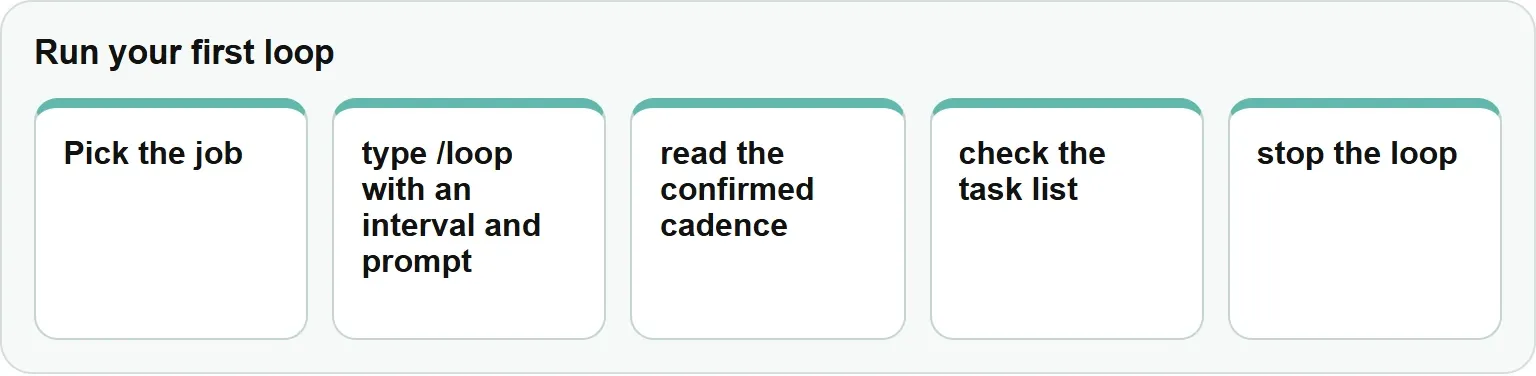
Pick the job, type /loop with an interval and prompt, read the confirmed cadence, check the task list, then stop the loop.
Step 1: Pick 1 job
Choose a bounded condition that is useful to check repeatedly, such as whether CI passed on a pull request.
You should see: a clear result that Claude can inspect again without changing the objective.
In our example: the job is to watch CI and new review comments.
Step 2: Start the fixed loop
Enter this command in Claude Code:
/loop 5m check whether CI passed and address any review commentsYou should see: Claude confirm the recurring task and its cadence.
In our example: the check is scheduled every 5 minutes.
Step 3: Read the confirmation
Note the cadence and job ID that Claude prints after scheduling the task.
You should see: a row under Claude's CronCreate call with the cadence, job ID and next run time.
In our example: keep the ID available in case you want to cancel the fixed loop.
Step 4: Check the task list
Ask Claude:
what scheduled tasks do I have?You should see: rows under Claude's CronList call with the task ID, schedule, next run time and prompt.
In our example: the list shows the pull-request check and its next run.
Step 5: Stop the loop
Ask Claude to cancel the pull-request check, or give it the job ID from Step 3.
You should see: Claude confirm that the fixed recurring task was removed.
In our example: the pull-request check no longer appears in the task list.
Our example (illustrative): the pr-watch-loop watches a pull request for CI and new review comments.
Our example: a loop that watches a pull request
For a short fixed check, enter:
/loop 5m check whether CI passed and address any review commentsFor a reusable project prompt, save the following as .claude/loop.md:
Check the `release/next` PR. If CI is red, pull the failing job log,
diagnose, and push a minimal fix. If new review comments have arrived,
address each one and resolve the thread. If everything is green and
quiet, say so in one line.- The command supplies the fixed 5-minute cadence.
- The file gives a bare
/loopa project-specific maintenance prompt. - Keep any permission-sensitive action inside the boundaries you already authorized.
Use the built-in prompt or your own loop.md
A bare /loop works through unfinished work, checks the current branch's pull request and makes cleanup passes. It does not start new initiatives or take irreversible actions unless you already authorized them.
A loop.md file replaces that built-in prompt:
Location | Scope | Priority |
|---|---|---|
| Current project | Used first |
| Your user account | Used when the project file is absent |
Write the file as plain Markdown. Changes apply on the next iteration. Claude ignores loop.md when you supply a prompt directly, and the file can be at most 25,000 bytes. Use a Claude Code hook when you need a lifecycle event rather than a repeated prompt.
Stop, list and cancel loops
A self-paced loop can be stopped with Esc during a wait. A fixed loop is different: Esc and Ctrl+C do not cancel its recurring job, so ask Claude to cancel it by name or job ID.
Claude Code exposes scheduled-task tools for the same operations. CronList lists tasks and CronDelete removes a task. You can also ask in natural language, including one-time reminders such as:
remind me at 3pm to push the release branchClaude Code allows up to 50 scheduled tasks. Every recurring task expires after 7 days, so recreate a loop when you need a longer monitoring window.
Limits and when to use something else
Choose a scheduler by where the work needs to run and whether your terminal session can remain open.
Option | Runs on | Machine must stay on | Open session required |
|---|---|---|---|
Claude Code | Your current terminal session | Yes | Yes |
Claude Desktop scheduled task | Desktop app | Yes | No terminal session |
Claude Code on the web | Anthropic's cloud | No | No local session |
GitHub Actions | GitHub-hosted or self-hosted runner | Depends on runner | No Claude Code terminal session |
Local tasks do not catch up after Claude Code was closed. A self-paced loop is not restored when you resume a session. Recurring tasks can start late, by up to half the gap to the next run and at most 30 minutes. The exception is a task that runs every 5 minutes, which starts 4 minutes and 45 seconds after the previous run.
Set CLAUDE_CODE_DISABLE_CRON=1 to disable scheduled-task tools. /goal keeps the session working turn after turn toward a condition. Channels let an event such as a CI failure reach the session as it happens. For persistent repository automation, use Claude Code with GitHub Actions; for parallel specialist work, see Claude Code subagents.
If your loop does not run when you expect
The session is closed or busy
Cause: local scheduled tasks run only while Claude Code is open and idle. Fix: keep the session open and wait until Claude is ready for input.
Esc does not stop a fixed loop
Cause: Esc stops a self-paced loop during its wait, not a fixed recurring job. Fix: ask Claude to cancel the job by name or ID.
The run time moved
Cause: Claude rounds some intervals and adds schedule jitter. Fix: inspect the confirmed cadence and task list instead of assuming an exact wall-clock time.
The loop disappeared
Cause: recurring tasks expire after 7 days, and self-paced loops are not restored on resume. Fix: create a fresh loop for the next monitoring window.
Get your free AI visibility check
See where engines mention your brand and what to improve with Xtrusio's free AI visibility check.
Sources
- Anthropic: Scheduled tasks, read 4 November 2026.
- Xtrusio: How to Pick Prompts to Track in AI Search, read 4 November 2026.
- Xtrusio: Free AI visibility check, read 4 November 2026.
Frequently asked questions
How do I stop /loop?
Press Esc during the wait for a self-paced prompt-only loop. For a fixed recurring loop, ask Claude to cancel the task by name or job ID.
How often can /loop run?
Fixed intervals accept seconds, minutes, hours and days, but seconds round up to the next minute. A prompt-only loop chooses a delay from 1 minute to 1 hour.
Does /loop keep running after I close the terminal?
No. Local tasks run only while Claude Code is open, and missed runs do not catch up later.
Can /loop run a skill?
Yes. Anthropic documents that scheduled prompts can invoke skills, so the repeated prompt can name the skill it should use.
Where do I put loop.md?
Put a project prompt at .claude/loop.md or a user prompt at ~/.claude/loop.md. The project file wins when both exist.
Topics
- claude code loop

Xtrusio
AI visibility research
Xtrusio is the Perception Engine for B2B brands.
Free check
See how AI engines answer about you
Get your free AI visibility check
Keep reading
 Technical SEO · Nov 4, 2026 · 8 min read
Codex Subagents: How to Set Them Up and Use Them
Learn how Codex subagents work, how to watch their threads, create custom agent files, set limits and fix common setup problems. Technical SEO · Nov 4, 2026 · 6 min read
Codex Skills: What They Are and How to Make Your Own
Learn what Codex skills are, where Codex finds them, and how to create, call, share, disable and troubleshoot your own skill. Technical SEO · Nov 4, 2026 · 6 min read