Claude Code GitHub Actions: Set Up @claude in Your Repo
Short answer
Claude Code GitHub Actions runs Claude Code inside your repository's GitHub workflows. The quick route is to run /install-github-app in Claude Code, merge the pull request it opens, then tag @claude in an issue or pull request comment. The manual route is to install the Claude GitHub App, save an ANTHROPIC_API_KEY or CLAUDE_CODE_OAUTH_TOKEN secret, and copy examples/claude.yml into .github/workflows/.

A small team may keep seeing the same requests: fix this TypeError, tidy this endpoint, explain this code. Instead of waiting for someone to open Claude Code locally, a teammate with write access can ask from the GitHub thread where the work already lives.
Before you start
- Get admin access to the repository.
- Use a repository on github.com for the quick route.
- Install GitHub CLI and sign in with
gh auth login. - Have either a Claude API key or an eligible Claude subscription.
Quick setup or manual setup?
Both routes end with a workflow in the repository and a test comment. The difference is who installs the app, saves the secret and prepares the file.
Route | What you need | What it does for you | Secret | Test |
|---|---|---|---|---|
| Admin access, github.com repository, GitHub CLI signed in | Installs the app, saves the credential and prepares a workflow pull request | | Merge the pull request, then mention |
Manual | Admin access and the ability to edit repository settings and files | You install the app, add the secret and copy the workflow | | Mention |
Source: Anthropic, Claude Code GitHub Actions, read 4 November 2026.
What Claude Code GitHub Actions does
The action runs Claude Code inside a GitHub workflow. In interactive mode, a workflow without a prompt waits for the trigger phrase, @claude by default. Claude replies in the same issue or pull request and updates that comment as it works.
In automation mode, a workflow has a prompt, so it can run without a mention. Anthropic says this works with any GitHub event, including a cron schedule. The result normally appears in the workflow log unless the prompt and permitted tools post it elsewhere.
Who can start a run
For issue and pull request events, the person who triggers the run needs write access to the repository. The action also rejects bot actors unless you list them in allowed_bots. A comment must contain @claude as a complete word, not /claude or @claude-bot.
Set it up with /install-github-app
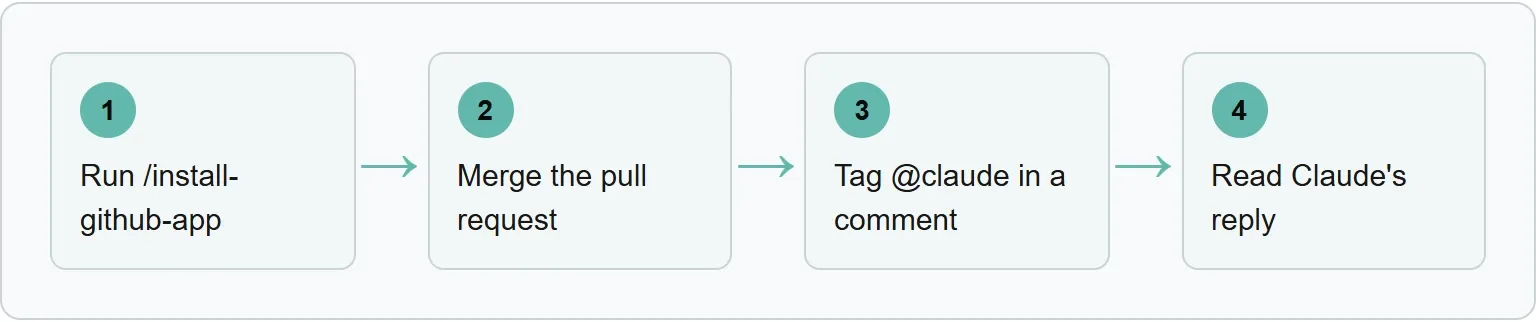
Run /install-github-app, merge the pull request, tag @claude in a comment, then read Claude's reply.
- In the repository, sign in to GitHub CLI with
gh auth login.You should see: GitHub CLI confirm the authenticated account. - Open Claude Code in the repository and run
/install-github-app.You should see: prompts to install the GitHub App and choose a credential. - Choose an API key or subscription token. Claude Code saves it as
ANTHROPIC_API_KEYorCLAUDE_CODE_OAUTH_TOKEN.You should see: the repository secret named for your selected route. - Create and merge the workflow pull request Claude Code prepares.You should see: the workflow file on the repository's default branch.
- Post a comment that includes
@claudein an issue or pull request.You should see: Claude reply in that same thread and update the comment as it works.
Set it up by hand
The manual route gives you control of the app, secret and workflow file.
- Open
github.com/apps/claudeand install the Claude GitHub App for the repository. The action relies on Contents, Issues and Pull requests with read and write access.You should see: the app listed for the repository. - Add
ANTHROPIC_API_KEYfrom the Claude Console, or runclaude setup-tokenlocally and add the result asCLAUDE_CODE_OAUTH_TOKEN. Anthropic lists Pro, Max, Ultra, Team and Enterprise as eligible subscription plans.You should see: the secret name in the repository's Actions secrets list, not its value. - Copy
examples/claude.ymlinto.github/workflows/. Pass an API key throughanthropic_api_key, or pass a subscription token throughclaude_code_oauth_token.You should see: a Claude Code workflow in the Actions tab. - Tag
@claudein an issue or pull request comment.You should see: a workflow run and a reply in the thread.
Here is Anthropic's current mention workflow, reproduced from the documentation:
name: Claude Code
on:
  issue_comment:
    types: [created]
  pull_request_review_comment:
    types: [created]
jobs:
  claude:
    if: contains(github.event.comment.body, '@claude')
    runs-on: ubuntu-latest
    permissions:
      contents: write
      pull-requests: write
      issues: write
      id-token: write
      actions: read
    steps:
      - uses: actions/checkout@v6
        with:
          fetch-depth: 1
      - uses: anthropics/claude-code-action@v1
        with:
          anthropic_api_key: ${{ secrets.ANTHROPIC_API_KEY }}
id-token: write is required for the action's default GitHub App authentication. actions: read lets Claude read CI results on pull requests.
Our example: a first @claude workflow for a small team
Our example (illustrative): this adapted mention workflow has not been run, so it claims no result, time saving or price.
.github/workflows/claude.yml
name: Claude Code
on:
  issue_comment:
    types: [created]
  pull_request_review_comment:
    types: [created]
  issues:
    types: [opened, assigned]
  pull_request_review:
    types: [submitted]

jobs:
  claude:
    if: |
      (github.event_name == 'issue_comment' && contains(github.event.comment.body, '@claude')) ||
      (github.event_name == 'pull_request_review_comment' && contains(github.event.comment.body, '@claude')) ||
      (github.event_name == 'pull_request_review' && contains(github.event.review.body, '@claude')) ||
      (github.event_name == 'issues' && (contains(github.event.issue.body, '@claude') || contains(github.event.issue.title, '@claude')))
    runs-on: ubuntu-latest
    # Our example: choose a limit that fits your repository.
    timeout-minutes: 20
    permissions:
      contents: write
      pull-requests: write
      issues: write
      id-token: write
      actions: read
    steps:
      - uses: actions/checkout@v6
        with:
          fetch-depth: 1
      - uses: anthropics/claude-code-action@v1
        with:
          anthropic_api_key: ${{ secrets.ANTHROPIC_API_KEY }}
          # Subscription alternative:
          # claude_code_oauth_token: ${{ secrets.CLAUDE_CODE_OAUTH_TOKEN }}
          claude_args: "--max-turns 8"
Our CLAUDE.md guide shows where the file goes and what to put in it.
An illustrative CLAUDE.md could begin like this:
# Repository rules
Keep changes within the issue scope.
Explain any changed public API.
Do not merge a pull request.
If a required check fails, report the command and stop.
A CLAUDE.md keeps repository work on brief. Checking how AI engines describe the product is a separate job, so use Xtrusio's free AI visibility check for that instead of adding it to the repository instructions.
Keep costs and credentials under control
Never commit an API key or OAuth token to the repository. Save it as a GitHub Actions secret. A run on a GitHub-hosted runner consumes GitHub Actions minutes. With an API key, it also uses API billing; with an OAuth token, the run uses the connected Claude subscription.
Use --max-turns in claude_args to limit iterations, and set a workflow timeout appropriate to your repository. Keep each comment bounded enough that a reviewer can tell what should change, using the same scope discipline as these Claude Code best practices.
When @claude does not respond
Start with the trigger, access and secret. These checks cover the most common causes in Anthropic's troubleshooting guide. For a wider repository review, use the separate Claude Code security review guide.
- Check that the Claude GitHub App is installed and repository workflows are enabled.
- Check that the selected API key or OAuth token exists in repository secrets.
- Use
@claudeas a complete word. - Confirm the commenter has write access to the repository.
“GitHub doesn’t trigger workflows on commits made with the default GITHUB_TOKEN.”Anthropic, Claude Code GitHub Actions, read 4 November 2026
If you passed github_token: ${{ secrets.GITHUB_TOKEN }} to the action, Anthropic says to remove it so the Claude GitHub App authenticates the run, or pass a custom app token. Also check that your CI listens for the events produced by Claude's push.
Moving from @beta to @v1
For an older workflow, change @beta to @v1 in the uses line and replace direct_prompt with prompt. The current action chooses interactive or automation mode from whether a prompt is present.
Get your free AI visibility check
Get your free AI visibility check to see when ChatGPT and Gemini mention your business, which competitors appear instead and what to work on next.
Sources
- Anthropic: Claude Code GitHub Actions, read 4 November 2026
- Anthropic: claude-code-action repository, read 4 November 2026
Frequently asked questions
Can I use a Claude subscription instead of an API key?
Yes. Generate a token with claude setup-token, save it as CLAUDE_CODE_OAUTH_TOKEN, and pass it through the matching workflow input. Anthropic lists Pro, Max, Ultra, Team and Enterprise plans.
Can Claude Code GitHub Actions run on a schedule?
Yes. A workflow with a prompt runs in automation mode on any GitHub event, including a cron schedule.
How do I post an automatic review on the pull request?
Anthropic's review example uses the --comment argument so Claude posts the review on the pull request.
Which model does the action use?
Without a --model argument, it uses the Claude Code default model.
Does /install-github-app work on GitLab?
No. Anthropic says the command works only with github.com repositories. Use the separate Claude Code GitLab CI/CD guidance for GitLab pipelines.
Topics
- claude code github actions

Xtrusio
AI visibility research
Xtrusio is the Perception Engine for B2B brands.
Free check
See how AI engines answer about you
Get your free AI visibility check
Keep reading
 Technical SEO · Nov 4, 2026 · 6 min read
Rankscale: What It Tracks, What It Costs and Alternatives
See what Rankscale tracks, its current credit-based prices, how far 1,200 credits go and how Xtrusio, Peec AI and Profound compare. Technical SEO · Nov 4, 2026 · 5 min read
Claude Code Router: What It Is and How to Set It Up
Learn what Claude Code Router does and set up its current desktop or npm UI route with providers, local ports, profiles, logs and fallbacks. Technical SEO · Nov 4, 2026 · 6 min read