Claude Code Router: What It Is and How to Set It Up
Short answer
Claude Code Router (CCR) is a community-built local gateway that sends Claude Code requests to the provider and model you choose. Install its desktop app, add a provider, start the server, apply the Claude Code profile and check Logs.
CCR runs on your machine and listens at http://127.0.0.1:3456 by default. Anthropic does not support routing Claude Code to non-Claude models through a gateway, so treat CCR as an open-source community tool rather than an Anthropic product.
Picture a developer who uses Claude Code all day and wants a second provider ready. A long session can then continue on another model when the first one is not the right fit. CCR puts that choice in one local control panel.
What Claude Code Router does
CCR gives coding agents one stable local endpoint. Behind it, you manage providers, models, accounts and routing rules. You can change a provider without editing the agent's configuration again.
The project lists Claude Code, Claude Design, Codex and several other agents. It works with OpenAI, Anthropic, Gemini, OpenRouter, DeepSeek and other compatible endpoints. Its routing tools add retries, credential pools, key rotation and ordered fallback models.
Logs show the resolved provider and model, status, token use, latency and errors. CCR can also add web search, vision and MCP tools to models. The project uses the MIT License, and its full documentation is at ccrdesk.top.
CCR can also connect Codex. Keep that agent's own choices in your Codex CLI configuration; use CCR for the provider route.
Setup at a glance
Route | What you need | Management screen | Gateway | First check |
|---|---|---|---|---|
Desktop app | macOS, Windows or Linux app | Inside the app | | Open Logs |
npm CLI | Node.js 22 or newer | | | Open Logs |
Source: Claude Code Router README, read 3 November 2026.
What Anthropic supports, and what it does not
Anthropic says a gateway can work when it exposes a supported API format. ANTHROPIC_BASE_URL is the variable that points Claude Code at that gateway. For the surrounding options, see the guide to Claude Code settings.
Anthropic doesn’t endorse, maintain, or audit third-party gateway products, and doesn’t support routing Claude Code to non-Claude models through any gateway.
Official wording: Anthropic, LLM gateway configuration, read 3 November 2026, code.claude.com.
A base URL by itself does not replace a claude.ai subscription login. When a gateway credential is active, requests carry that credential instead and the subscription limits do not apply to them. Keep the gateway updated because a gateway that does not forward a new Claude Code capability breaks that feature.
Set it up in the desktop app
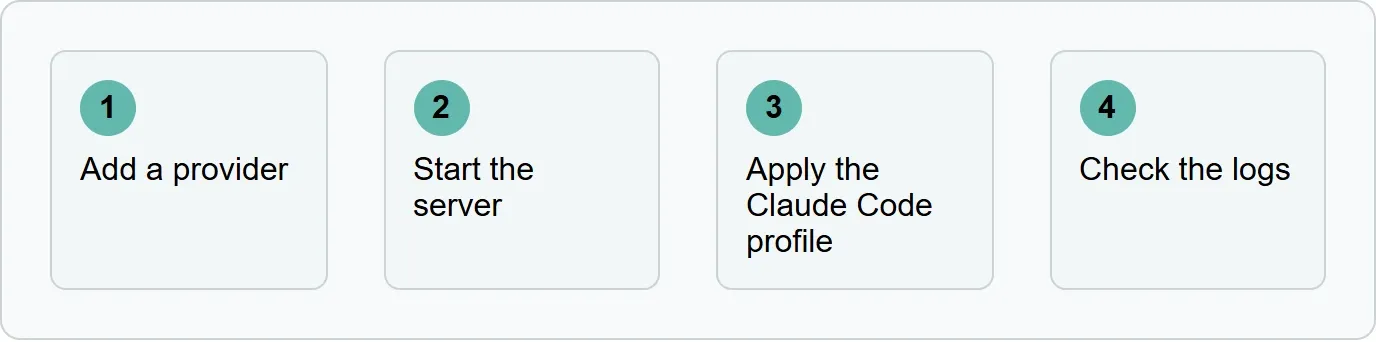
Use these moves in order: add a provider, start the server, apply the Claude Code profile, then check the logs.
1. Add a provider
Download Claude Code Router for macOS, Windows or Linux from the project's GitHub Releases page and launch it. Open Providers, then Add Provider. Choose a preset or custom endpoint, enter its API key, select the protocol and models, then save. You should now see the provider in your saved provider list.
2. Start the server
Open Server and click Start. The local model gateway listens at http://127.0.0.1:3456 by default. You should now see the server running on port 3456.
3. Apply the Claude Code profile
Open Agent Config and choose Claude Code. Select a model and apply the profile. This provider route does not replace project instructions in CLAUDE.md or your slash commands. You should now see the Claude Code profile applied.
4. Check Logs
Start using Claude Code, then open Logs. Check the resolved provider, model, status, tokens, latency and errors. Open Routing when you want conditions, retries, request rewrites or fallback models. You should now see the first request and its resolved route.
Set it up from the command line
The npm route needs Node.js 22 or newer. Install CCR and open its management UI with the commands from the project README.
npm install -g @musistudio/claude-code-router
ccr ui
Open http://127.0.0.1:3458 and follow the same Providers flow. The model gateway stays at http://127.0.0.1:3456. You should now see the management UI and the same provider controls as the desktop app.
Our example: a routing plan for one developer
Our example (illustrative): FallbackPlan. Replace every all-caps placeholder with the exact value from your own provider account or CCR's discovered model list.
- Main provider: OpenRouter. Use the built-in preset, enter
YOUR_OPENROUTER_API_KEY, select the protocol, and chooseYOUR_OPENROUTER_MODEL_IDfrom the discovered models. - Ordered fallback: DeepSeek. Enter
YOUR_DEEPSEEK_API_KEY, select its protocol, and chooseYOUR_DEEPSEEK_MODEL_ID, then place it after the OpenRouter route. - Create a separate CCR client key with a local token limit that matches the developer's own budget.
- After the first request, read Logs for the resolved provider, model, status, tokens, latency and any error.
Open Routing to add the ordered fallback. This setup changes where requests go; it does not promise a price, speed or quality result.
Check it worked, and fix common problems
Logs are the clearest first check. If no request appears, confirm that the server runs at http://127.0.0.1:3456 and that the Claude Code profile is applied.
- No authentication: a value for
ANTHROPIC_BASE_URLalone does not replace a gateway credential or subscription login. - Wrong screen: the CLI management UI uses port
3458; model requests use port3456. - A Claude Code feature breaks: update the gateway so it can forward the capability Claude Code now sends.
- The wrong model answers: read the resolved route in Logs, then check the selected profile and Routing rules.
Choose the route, then check how AI describes your product
Choosing which model answers your code matters; seeing how AI engines describe your product matters too. Xtrusio plans content from the searches the engines run, a strategist approves it, and each piece counts only when an engine cites that exact URL.
Get your free AI visibility check to see when ChatGPT and Gemini mention your business, which competitors appear instead and what to work on next.
Sources
- Claude Code Router README, read 3 November 2026.
- Anthropic, LLM gateway configuration, read 3 November 2026.
- Xtrusio, how to pick prompts to track AI search, read 3 November 2026.
- Xtrusio product page, read 3 November 2026.
Frequently asked questions
Is Claude Code Router made by Anthropic?
No. CCR is a community-built, open-source project under the MIT License. Anthropic does not endorse, maintain or audit third-party gateways.
Does Claude Code Router work with non-Claude models?
CCR lists OpenAI, Gemini, OpenRouter, DeepSeek and other compatible providers. Anthropic does not support routing Claude Code to non-Claude models through a gateway.
Which port does Claude Code Router use?
The model gateway listens at http://127.0.0.1:3456 by default. The npm management UI opens at http://127.0.0.1:3458.
Do I need the command line?
No. The project recommends its desktop app for macOS, Windows and Linux. The npm CLI is another route and needs Node.js 22 or newer.
How do I see which model answered?
Open Logs after a request. It shows the resolved provider and model, status, token use, latency and errors.
Topics
- claude code router

Xtrusio
AI visibility research
Xtrusio is the Perception Engine for B2B brands.
Free check
See how AI engines answer about you
Get your free AI visibility check
Keep reading
 Technical SEO · Nov 4, 2026 · 6 min read
Rankscale: What It Tracks, What It Costs and Alternatives
See what Rankscale tracks, its current credit-based prices, how far 1,200 credits go and how Xtrusio, Peec AI and Profound compare. Technical SEO · Nov 4, 2026 · 6 min read
Claude Code Best Practices: Anthropic's Checklist
Use this Claude Code best-practices checklist to write better instructions, add pass-or-fail checks, enforce hard rules and steer sessions early. Technical SEO · Nov 4, 2026 · 6 min read