Codex CLI Config: Files, Profiles and Precedence
Short answer
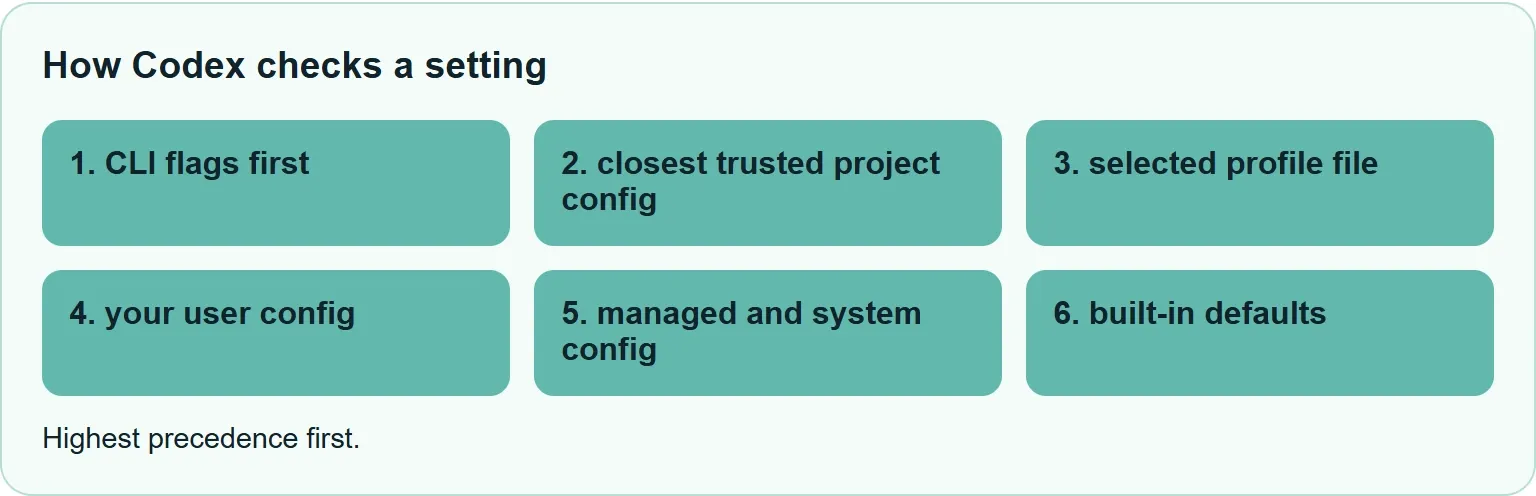
Codex CLI keeps your defaults in ~/.codex/config.toml and can read .codex/config.toml inside a trusted project. When values conflict, command-line flags and one-run config overrides win, followed by the closest trusted project file, the selected profile file, your user config, managed and system config, then built-in defaults. Since Codex 0.134.0, each profile belongs in its own file.

You set a model in your user file, open one repository and Codex chooses something else. Or a profile that worked before an update no longer loads. Both problems become easier once you read the configuration layers from highest to lowest.
Where the Codex CLI config file lives
Your personal settings live in ~/.codex/config.toml. A repository can add project settings in .codex/config.toml. Codex loads those project layers only after you trust the project. If the project is untrusted, it also skips project-local hooks and rules.
The CLI and IDE extension use the same configuration layers. These files can set the default model and provider, approval and sandbox behavior, and MCP servers.
Which setting wins?
Codex checks CLI flags first, then the closest trusted project config, the selected profile file, your user config, managed and system config, and built-in defaults.
Order | Layer | Where it comes from |
|---|---|---|
Highest | Flags and one-run overrides | CLI flags and |
Then | Project config | |
Then | Profile | |
Then | User config | |
Then | Cloud-managed defaults | Delivered for the signed-in workspace |
Then | System config | |
Lowest | Built-in defaults | Codex defaults |
Source: OpenAI Codex basic configuration, read 3 November 2026.
On a managed computer, an organization may also enforce limits through requirements.toml. A higher-precedence value still has to stay within those requirements.
The settings people change most
This starter file uses documented keys and conservative defaults:
# Default model
model = "gpt-6.1-sol"

# Ask before commands that need approval
approval_policy = "on-request"

# Allow writes inside the workspace
sandbox_mode = "workspace-write"

# Use cached search results
web_search = "cached"

# Use medium reasoning effort when supported
model_reasoning_effort = "medium"
approval_policy controls when Codex pauses before running generated commands. sandbox_mode controls filesystem and network access while commands run. The built-in permission profiles are :read-only, :workspace and :danger-full-access.
For web search, cached is the default. Other documented values are indexed, live and disabled. The model_reasoning_effort key changes reasoning effort when the selected model supports it. You can also use log_dir to choose where local logs are written.
Profiles: switch whole setups
When you select a profile, Codex loads ~/.codex/config.toml first and overlays ~/.codex/profile-name.config.toml. A profile only needs the settings that differ from your base file. That makes profiles easier to read and keeps shared defaults in one place.
Use a profile when you regularly switch a group of settings together, such as model, reasoning effort and approval behavior. Use a one-run override when you need one temporary change. Use project config when the repository itself needs a stable default.
For example, save this as ~/.codex/deep-review.config.toml:
model = "gpt-6.1-sol"
model_reasoning_effort = "high"
approval_policy = "on-request"
Run it with codex --profile deep-review. For a non-interactive review, use codex exec --profile deep-review "review this change".
If old profiles stopped working
In Codex 0.134.0 and later, the profile selector no longer reads a [profiles.profile-name] table from config.toml. The old top-level profile = "profile-name" selector is also unsupported.
Before Codex 0.134.0, you may have kept this inside ~/.codex/config.toml:
[profiles.deep-review]
model = "gpt-6.1-sol"
model_reasoning_effort = "high"
approval_policy = "on-request"
Now move the values into ~/.codex/deep-review.config.toml and remove the table header:
model = "gpt-6.1-sol"
model_reasoning_effort = "high"
approval_policy = "on-request"
Keep only the keys that differ from your main config.
One-run overrides
Use -c or --config to change one key for a single run. Values are parsed as TOML, so preserve the quotes your shell needs:
codex --config model='"gpt-6.1-sol"'
codex --config sandbox_workspace_write.network_access=true
Because these overrides have the highest precedence, they are useful for testing a setting without editing a file.
What project config cannot change
A trusted repository can tune normal project behavior, and a deeper .codex/config.toml can beat the one at the project root. Project files cannot redirect credentials, change provider authentication or select a config profile.
That boundary keeps a repository from silently changing machine-owned identity settings. If a project file appears to do nothing, first confirm the project is trusted, then check for a closer project file or a command-line override.
A quick way to find the winning value
Start with the command you ran. Remove any one-run override and try again. If the value changes, the command line was winning.
Next, look for .codex/config.toml from the repository root to your current folder. The closest trusted file wins. This is the common reason a setting changes only inside one part of a large repository.
Then check the selected profile file. A profile sits above your user config, so it can replace a model or approval setting from ~/.codex/config.toml. If no profile is selected, move to your user file.
Finally, consider managed and system settings. They are lower in the normal precedence list, but a managed requirements.toml can still limit which values are allowed. Change one layer at a time, then rerun the same command. That keeps the test clear.
Where Xtrusio fits
Codex configuration controls how your coding agent behaves. Xtrusio solves a different problem: it shows when ChatGPT and Gemini mention your business, which competitors appear instead and what to work on next. Use the free Xtrusio visibility check to inspect those answers and plan a response.
Sources
Frequently asked questions
Is the Codex config file config.json or config.toml?
The current personal config is ~/.codex/config.toml.
Why is my project config ignored?
Codex loads project.codex layers only for trusted projects. A closer project file or a command-line override can also beat the file you edited.
Where is the system config?
On Unix, the documented system file is /etc/codex/config.toml, when present. It sits below user, profile, project and command-line settings.
Can a repository change my API credentials?
No. Project config files cannot redirect credentials or change provider authentication.
Topics
- codex cli config

Xtrusio
AI visibility research
Xtrusio is the Perception Engine for B2B brands.
Free check
See how AI engines answer about you
Get your free AI visibility check
Keep reading
 Technical SEO · Nov 3, 2026 · 7 min read
MCP vs API: What Each Connects and When to Use It
See how MCP differs from an API, how tools/list and tools/call work, and when to use MCP, an API or both. Technical SEO · Nov 3, 2026 · 5 min read
Claude Code Sandbox: What It Blocks and How to Turn It On
See what the Claude Code sandbox blocks, what stays outside it, how to enable it and the official probes that show whether it works. Technical SEO · Nov 3, 2026 · 7 min read