Claude Code Security Review: What It Checks and Its Limits
Short answer
Claude Code's security review is the /security-review command. It reads pending changes on your current branch and flags likely vulnerabilities such as SQL injection, cross-site scripting, authentication flaws, insecure data handling and risky dependencies. You can then ask Claude to fix a finding.

The same kind of review can run on every pull request through Anthropic's GitHub Action. The command reports only issues it is more than 80% confident are exploitable and skips denial-of-service and rate-limit issues. It is a focused second reader, not proof that code is safe. Anthropic says it should complement, not replace, manual code review. The Action is not hardened against prompt injection, so use it only on trusted pull requests.
You have finished a feature quickly. Before you commit, you want one more set of eyes on the diff. Typing /security-review is useful, but only if you understand the question it is designed to answer: did this branch add a concrete, exploitable security problem?
What the security review checks
Anthropic describes the command as a review of “the pending changes on the current branch.” It is not a general audit of the whole repository. The prompt tells Claude to focus only on security implications newly added by the change and not to comment on existing concerns.
The official help page names five common issue groups:
Issues the review checks
Check | What that can mean in a change |
|---|---|
SQL injection | Untrusted input reaching a database query without safe parameter handling |
Cross-site scripting | Untrusted content reaching a browser page through an unsafe output path |
Authentication flaws | A new route or action that does not enforce the intended identity check |
Insecure data handling | Sensitive information exposed, logged or passed through an unsafe path |
Dependency vulnerabilities | A changed dependency that introduces a known security risk |
The check names come from Anthropic's automated security reviews help page. The examples in the second column explain the terms; they are not a promise that every instance will be found.
Our example (illustrative)
This change matches the table's SQL injection row because request input is joined directly into a database query. It is the kind of concrete data path that can meet the prompt's high-confidence rule.
+ app.get('/account', async (req, res) => {
+  const id = req.query.id;
+  const sql = `SELECT * FROM accounts WHERE id = ${id}`;
+  const rows = await db.query(sql);
+  res.json(rows);
+ });
The safer version keeps the value separate from the query:
app.get('/account', async (req, res) => {
  const id = req.query.id;
  const sql = 'SELECT * FROM accounts WHERE id = ?';
  const rows = await db.query(sql, [id]);
  res.json(rows);
});
The command prompt is deliberately strict about evidence. Its main rule is:
“MINIMIZE FALSE POSITIVES: Only flag issues where you're >80% confident of actual exploitability”
That threshold explains why a clean result is not a clean bill of health. A lower-confidence problem may be omitted, and a real issue outside the changed code is out of scope.
What it skips on purpose
The command prompt excludes denial-of-service vulnerabilities, secrets or sensitive data stored on disk, and rate limiting or resource exhaustion issues. The Action applies a broader noise filter that also leaves out generic input validation without proven impact and open redirects.
Those exclusions make the review easier to act on. They also create a clear boundary: another process still needs to cover secrets, operational abuse, dependency management, runtime behavior and the unchanged parts of the system.
Anthropic's own warning is the right standard: automated review helps identify common vulnerabilities, but it does not replace existing security practices or a person reading the code.
A security review checks what your code does. It does not show what AI engines tell buyers about your product. That second job belongs to a visibility platform.
How to run /security-review
Open Claude Code in the project, finish the change you want reviewed, then enter:
/security-reviewClaude reads the pending branch changes and returns the security findings it considers actionable. Read each finding against the surrounding code. If it is valid, ask Claude to implement a fix, then inspect the patch and run your normal tests before committing.
The feature is available to Claude Code users, including people on individual Pro, Max and Ultra plans. Anthropic recommends running it before committing significant changes.
You can adapt the review to your repository. Copy security-review.md from Anthropic's repository into .claude/commands/ in your project, then edit the copy with your threat model or organization-specific rules.
The opening of Anthropic's real command prompt
The lines below are from Anthropic's security-review.md. The repository is released under the MIT License.
description: Complete a security review of the pending changes on the current branch

OBJECTIVE: Perform a security-focused code review to identify HIGH-CONFIDENCE security vulnerabilities that could have real exploitation potential.

MINIMIZE FALSE POSITIVES: Only flag issues where you're >80% confident of actual exploitability
AVOID NOISE: Skip theoretical issues, style concerns, or low-impact findings
FOCUS ON IMPACT: Prioritize vulnerabilities that could lead to unauthorized access, data breaches, or system compromise
EXCLUSIONS: Do NOT report the following issue types:
Denial of Service (DOS) vulnerabilities, even if they allow service disruption
Secrets or sensitive data stored on disk (these are handled by other processes)
Rate limiting or resource exhaustion issues
Run it on every pull request with the GitHub Action
Anthropic's Action triggers when a pull request opens, reviews the changed files, filters likely false positives and posts inline comments with concerns and recommended fixes. It needs an Anthropic API key enabled for both Claude API and Claude Code use.
This is the Quick Start workflow from the official repository. Store the key as the repository secret named in the example. The code is reproduced under the repository's MIT License.
name: Security Review

permissions:
  pull-requests: write  # Needed for leaving PR comments
  contents: read

on:
  pull_request:

jobs:
  security:
    runs-on: ubuntu-latest
    steps:
      - uses: actions/checkout@v4
        with:
          ref: ${{ github.event.pull_request.head.sha || github.sha }}
          fetch-depth: 2

      - uses: anthropics/claude-code-security-review@main
        with:
          comment-pr: true
          claude-api-key: ${{ secrets.CLAUDE_API_KEY }}
For pull requests, the Action analyzes changed files rather than treating the run as a whole-repository security assessment. Anthropic recommends enabling it on repositories that contain production code.
The prompt-injection warning
Anthropic's warning, word for word
“This action is not hardened against prompt injection attacks and should only be used to review trusted PRs. We recommend configuring your repository to use the ‘Require approval for all external contributors’ option to ensure workflows only run after a maintainer has reviewed the PR.”
Source: anthropics/claude-code-security-review, read 3 November 2026.
A pull request contains untrusted text and code. The warning means an outside contribution can try to influence the model that reviews it. Require a maintainer's approval before the workflow runs on an external contributor's pull request, and do not expose the Action to changes you do not trust.
Anthropic's other security checks, and which to use
/security-review is one checkpoint, not the name for every security feature Anthropic offers. The tools differ in when they run, what they read and who can use them.
Anthropic security checks
Check | When it runs | What it reviews | Access |
|---|---|---|---|
Security guidance plugin | On each file edit, at the end of a turn, and when Claude commits or pushes | Changes Claude is writing in the current session | Plugin available on all plans |
| When you enter the command | One pass over pending changes on the current branch | Claude Code users, including paid individual plans |
Claude Security plugin | When you start a scan | A repository or selected diff, using several agents and a threat model | Paid plan, Anthropic API access or a third-party provider |
Code Review | On a pull request, automatically or on request | Correctness, security and edge cases in a diff plus surrounding code | Managed service on Team and Enterprise; local |
Claude Code Security product | As a managed repository scan | Repositories monitored by the managed product | Enterprise plan |
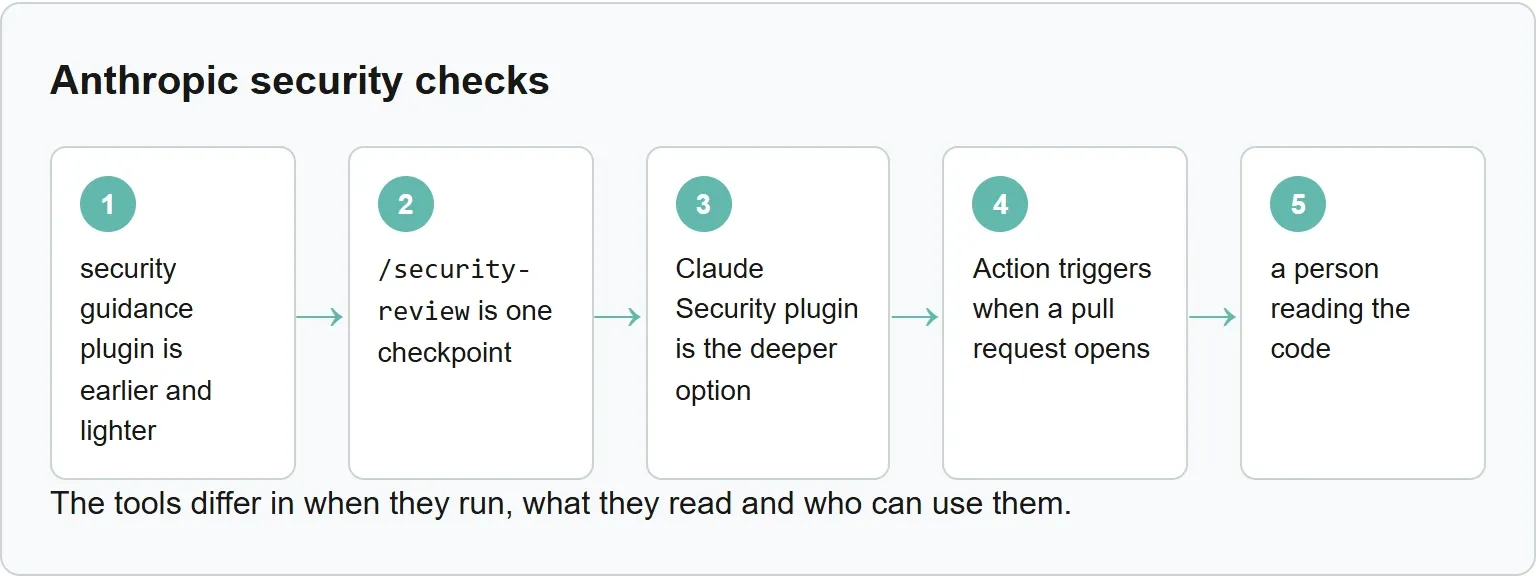
The Claude Security plugin is the deeper option. Anthropic says several agents map the architecture, build a threat model, hunt for vulnerabilities and independently review findings before writing the report. A scan may take time, consume significant tokens and requires Claude Code to remain open. Proposed patches are never applied automatically.
The security guidance plugin is earlier and lighter. It checks edits and turn-level changes while Claude works, but none of its layers blocks a write or commit, and its model can miss issues. Its commit layer does not review commits you run from your own shell.
Does it work? Anthropic's own examples
Anthropic says the GitHub Action found a remote code execution vulnerability in an internal tool that could be exploited through DNS rebinding, and the issue was fixed before merge. The company also says the Action flagged an internal credentials proxy as vulnerable to server-side request forgery.
Those are Anthropic's examples, not an independent Xtrusio test. They show the kind of cross-file reasoning the tool is intended to do, but they do not measure its miss rate or prove that it will find the same class of bug in another codebase.
Check the other side of the story
After you secure what the product does, check what AI engines say about it.
Get your free AI visibility check.
Sources
- Anthropic Help Center: Automated security reviews in Claude Code
- Anthropic: Claude Code Security Reviewer repository
- Anthropic: security-review.md command prompt
- Anthropic: Automate security reviews with Claude Code
- Claude Code docs: Catch security issues as Claude writes code
- Claude Code docs: Scan for security vulnerabilities
- Claude Code docs: Code Review
- Claude Code docs: Security
Sources read 3 November 2026.
Frequently asked questions
Who can use /security-review?
Anthropic says the automated security review features are available to Claude Code users, including individual Pro, Max and Ultra plans.
Does it scan the whole codebase?
No. The command reviews pending changes on the current branch and focuses on security issues newly added by those changes. Use the Claude Security plugin when you need a deeper repository scan.
Can Claude fix the findings?
Yes. Anthropic says you can ask Claude to implement fixes after it identifies vulnerabilities. Review the patch and test it before accepting the change.
Does a clean result replace a human security review?
No. The command uses an 80% confidence threshold, excludes several issue types and can miss problems. Anthropic says it should complement manual review.
Is the GitHub Action safe for outside pull requests?
Do not run it on an untrusted pull request without a maintainer's review. Anthropic says the Action is not hardened against prompt injection and recommends requiring approval for all external contributors.
Topics
- claude code security review

Xtrusio
AI visibility research
Xtrusio is the Perception Engine for B2B brands.
Free check
See how AI engines answer about you
Get your free AI visibility check
Keep reading
 Technical SEO · Nov 3, 2026 · 7 min read
MCP vs API: What Each Connects and When to Use It
See how MCP differs from an API, how tools/list and tools/call work, and when to use MCP, an API or both. Technical SEO · Nov 3, 2026 · 5 min read
Claude Code Sandbox: What It Blocks and How to Turn It On
See what the Claude Code sandbox blocks, what stays outside it, how to enable it and the official probes that show whether it works. Technical SEO · Nov 3, 2026 · 7 min read