Claude Code Context Window: Size, Usage and Compaction
Short answer
Claude Code's context window holds everything Claude knows in a session: your instructions, CLAUDE.md and memory, files it reads, tool output and its own replies. Current Fable models, Sonnet 5 and later, Haiku 5.5, and Opus 4.7 and later use a 1M-token window by default and compact at about 967K. Opus 4.6 and Sonnet 4.6 use 200K unless you choose their [1m] variant.
If a long session starts losing detail, run /context to see what is using the window. Use /compact with a focus to shorten the conversation, or /clear before unrelated work. A context warning is not a usage limit: Claude Code can compact the session and continue.
Our example (illustrative, not a real session). An hour into a coding session, a developer sees the context warning and asks Claude to continue. Claude remembers the current bug but forgets an earlier instruction about the test file. The warning is the cue to inspect what filled the window before more detail disappears into a summary.
What fills Claude Code's context window
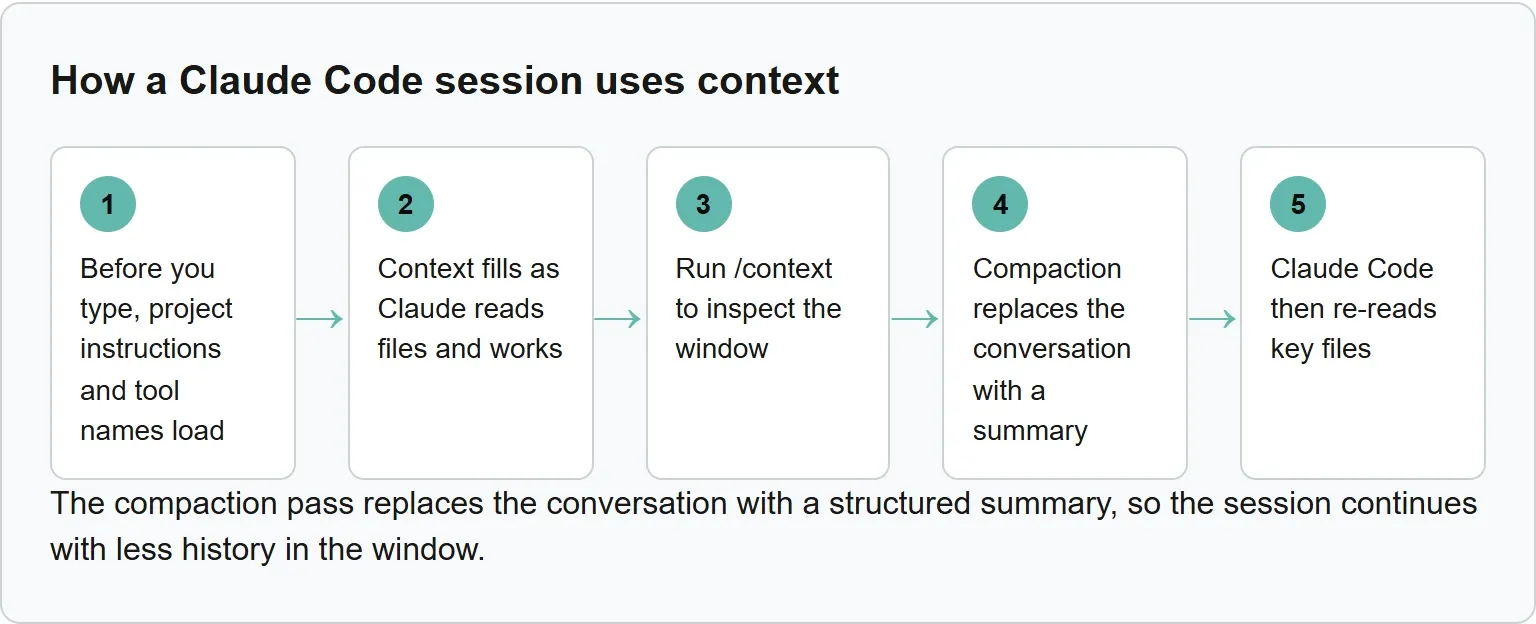
Before you type, project instructions and tool names load. Claude Code also loads auto memory and skill descriptions. During the session, conversation history, file contents, command output, loaded skills and system instructions take space.
Context fills as Claude reads files and works. Path-scoped rules load when their matching file is touched, while MCP tool definitions stay deferred until Claude uses the tool. Each new session starts with a fresh window and no conversation history from earlier sessions.
Source: Anthropic's context window and how Claude Code works pages, read 3 November 2026.
How big is the context window?
The model and its configuration determine the available window.
Claude Code context windows, checked 3 November 2026
Model or setting | Window | Automatic compaction | Important detail |
|---|---|---|---|
Fable models, Sonnet 5 and later, Haiku 5.5, Opus 4.7 and later | 1M tokens by default | About 967K | No |
Opus 4.6 and Sonnet 4.6 | 200K by default | At 200K | The |
Sonnet 4.6 | 1M tokens | About 967K | Needs usage credits on every subscription plan |
| 200K | At the model boundary | Keeps sessions at 200K |
Source: Anthropic's Claude Code context-window and model-configuration documentation, read 3 November 2026.
On the Anthropic API, the 1M-token window uses standard model pricing beyond 200K, except Haiku 5.5, which costs more for prompts over 100K tokens.
How to see what is using your context
Run /context to inspect the window. It shows a live breakdown by category and optimization suggestions. It also lists the CLAUDE.md and auto-memory files that loaded.
A custom status line can show context_window.used_percentage and context_window.context_window_size. The second field reports 200000 by default or 1000000 for an extended-context model.
Our example (illustrative, not a real session).
- Before the first prompt, CLAUDE.md, auto memory, MCP tool names and skill descriptions are already in the window.
- Reading three project files adds the contents of those three files, along with any path-scoped rules that match them.
- Running
/compact focus on the failing testreplaces the conversation with a focused summary. Claude Code then restores persistent startup context and re-reads up to five recently modified files.
What happens when the context window fills up
Claude Code compacts automatically near the model's limit. The compaction pass replaces the conversation with a structured summary, so the session continues with less history in the window.
“Claude Code compacts automatically as you approach the limit, so a full context window doesn’t end your session.”Anthropic, Context window, read 3 November 2026
The summary keeps your requests and key code snippets, but detailed instructions from early messages can disappear. If one file or tool result is so large that the window fills again after each summary, Claude Code stops after several attempts and shows an error.
What survives compaction, and what does not
Claude Code then re-reads key files. After compaction, it re-reads up to five recently modified files that it read or edited. Project-root CLAUDE.md also remains available as persistent project guidance.
Path-scoped rules and nested CLAUDE.md files sit in message history, so compaction can summarize them away. Move a rule to project-root CLAUDE.md, or remove its paths: frontmatter, when it must persist.
Commands and settings that keep context under control
Use a command for the current session or a setting for repeat behavior.
Context controls in Claude Code
Control | What it does | When to use it |
|---|---|---|
| Shows a live category breakdown | Find what is filling the window |
| Replaces history with a focused summary | Before a long next task |
| Offers Summarize from here or Summarize up to here | Remove an unhelpful stretch of history |
| Sets a threshold from 100K to 1M tokens | Compact earlier than the default |
| Starts fresh in the current terminal | Between unrelated tasks |
| Stores the threshold in settings | Keep the same choice across sessions |
Use /clear, not /compact, when the next task is unrelated to the current one.
Keep the default compaction threshold unless important early detail keeps getting lost; then choose an earlier threshold with /autocompact.
Use /rename before clearing if you may need the session later, then return with /resume. Claude Code caps any automatic-compaction threshold at the model's context window.
Project-root CLAUDE.md
# Compact instructions
Preserve the current task, accepted decisions, changed files, failing checks, and the next action.
Drop repeated tool output and discussion that no longer affects the task.
User settings at ~/.claude/settings.json
{
  "autoCompactWindow": 200000
}
Our example: when a long session compacts
Our example is illustrative and uses Anthropic's published thresholds. Opus 4.6 without [1m] compacts at 200K. Opus 4.7 compacts at about 967K, roughly 4.8 times later (our calculation). Setting /autocompact 500k makes the same extended-context session compact at 500K instead.
Context window vs usage limits
A context or automatic-compaction warning is not a usage limit. Context describes how much information Claude can use in one session; a usage limit controls how much service your plan or account can consume.
More context also means more tokens processed on later turns. If plan limits are the problem, see the separate Claude Pro versus Max guide.
Keep big jobs out of your main context
A subagent has its own context window. Large file reads stay there, and only its summary plus a small metadata trailer return to the main session. See the Claude Code subagents guide for the setup.
Skill descriptions load at session start, but full skill content loads only when used. MCP definitions are deferred, and hooks can trim noisy output before Claude reads it. Anthropic gives the example of filtering a 10,000-line log for ERROR lines instead of loading the full file.
Where Xtrusio fits
Compact instructions in CLAUDE.md help Claude Code keep your facts straight while it works. Xtrusio checks how AI engines describe those facts to the people searching for your company.
Get your free AI visibility check.
Sources
- Anthropic: Claude Code context window, read 3 November 2026
- Anthropic: model configuration, read 3 November 2026
- Anthropic: how Claude Code works, read 3 November 2026
- Anthropic: costs and context, read 3 November 2026
- Anthropic: status line, read 3 November 2026
Frequently asked questions
Does a new Claude Code session remember the old one?
No. Each session starts with a fresh context window and no earlier conversation history. Project instructions and memory can load again.
Does 1 million token context cost extra?
On the Anthropic API, tokens beyond 200K use standard model pricing except for Haiku 5.5 prompts over 100K tokens.
Can I keep Claude Code at 200K?
Yes. Set CLAUDE_CODE_DISABLE_1M_CONTEXT=1 in your shell or settings file.
Why did Claude forget an earlier instruction?
Compaction keeps requests and key code but may lose detailed early instructions. Put persistent rules in project-root CLAUDE.md.
Topics
- claude code context window

Xtrusio
AI visibility research
Xtrusio is the Perception Engine for B2B brands.
Free check
See how AI engines answer about you
Get your free AI visibility check
Keep reading
 Technical SEO · Nov 3, 2026 · 7 min read
MCP vs API: What Each Connects and When to Use It
See how MCP differs from an API, how tools/list and tools/call work, and when to use MCP, an API or both. Technical SEO · Nov 3, 2026 · 5 min read
Claude Code Sandbox: What It Blocks and How to Turn It On
See what the Claude Code sandbox blocks, what stays outside it, how to enable it and the official probes that show whether it works. Technical SEO · Nov 3, 2026 · 7 min read