How to Rank in Google AI Overviews: A Step-by-Step Guide
Short answer
Google says there is no special trick for AI Overviews. A page must be indexed and eligible to show with a snippet, and the usual SEO fundamentals still apply.
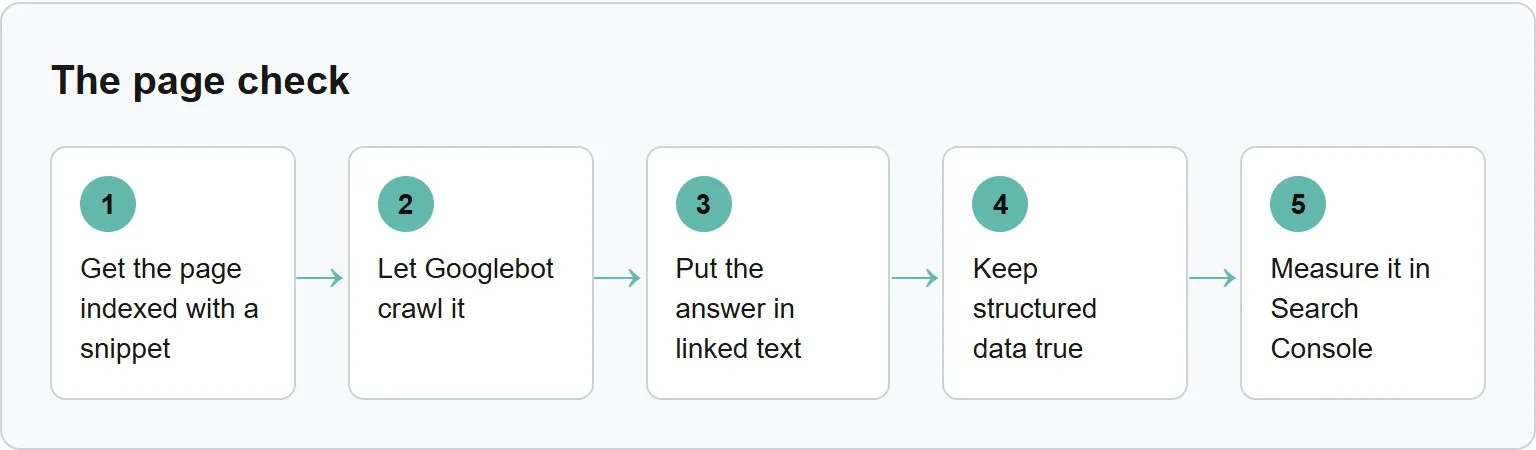
Let Googlebot crawl the page, link to it internally, put the key answer in plain text, keep structured data true to the visible page, and measure the result in Search Console. You do not need an AI text file or special schema, and inclusion is never guaranteed.
A site owner may keep seeing lists of AI Overview hacks and wonder which one matters. The useful answer is shorter: make one page easy for Google and people to find, read and understand.
Before you start
Choose one page and one question it should answer. You need access to the page, its robots.txt rules and Google Search Console. At the end, you will know whether the page meets Google's entry requirements and where to watch its search traffic.
Google suggests verifying the site in Search Console so technical problems are easier to find. That gives you the tools for the first and last steps in this guide.
Google is one of several AI answer engines. Xtrusio's free check shows when ChatGPT and Gemini mention your business and which competitors appear instead.
Step 1: make sure the page is indexed and can show a snippet
The entry ticket is simple. Google says a supporting link in AI Overviews or AI Mode must come from a page that is indexed and eligible to appear in Search with a snippet.
Open URL Inspection in Search Console and inspect the exact page. If it is not indexed, fix the reason shown there before thinking about AI Overviews. Also check that the page is not blocked by noindex.
Snippet controls matter too. Google points to nosnippet, data-nosnippet and max-snippet when a site wants to limit what Search can show. A restrictive setting can reduce the material Google may use from the page.
Step 2: let Googlebot crawl it
Googlebot must be allowed through robots.txt. A CDN or hosting security rule must also let it reach the page.
Check the page URL against your robots.txt file. Then review any firewall, bot protection or CDN rule that could return a challenge or error to Googlebot. A page cannot be considered for a supporting link if Google cannot fetch it.
Google's whole-site example uses an empty Disallow rule. Copy this only when you intend to allow every crawler across the site:
User-agent: *
Disallow:
Keep any other rules the site needs. If a rule blocks the page you want indexed, remove or update that rule and test the live URL in Search Console.
Step 3: link to the page and put the answer in text
Google recommends making content easy to find through internal links. Link to the page from a relevant hub, guide or navigation path instead of leaving it isolated.
Put the key answer in normal page text. Do not hide the main explanation inside an image, video or interactive element. Images and video can support the answer, but the important content should still be readable as text.
Page experience still matters. Make the page easy to use, especially on a phone, and remove anything that stops a reader from reaching the answer.
Step 4: keep structured data true to the page
Structured data should match the visible text. If the markup names a price, date, author or answer, the reader should see the same information on the page.
No special AI schema is required. Google also says you do not need a new machine-readable file or an AI text file for these features.
If the page represents a product or local business, keep Merchant Center and Business Profile information current. Those records should not contradict the page.
Step 5: measure it in Search Console
Google includes traffic from AI features in the Performance report under the Web search type. Watch clicks, impressions and the queries leading to the page there.
Our suggestion: signed-out check. Search the page's main queries while signed out. Record whether an AI Overview appears and whether it links to your page. This is a manual spot check, not a substitute for Search Console data.
Checklist for one page
What Google requires or recommends | How to check your page |
|---|---|
Indexed and eligible for a snippet | Inspect the URL in Search Console and review noindex and snippet controls. |
Crawling allowed | Check robots.txt, then confirm the CDN and host let Googlebot fetch the page. |
Easy to find through internal links | Follow links from a relevant hub or guide to the page. |
Important content in text | Read the page without relying on images, video or interactive elements. |
Structured data matches the page | Compare each marked-up fact with the visible words. |
Source: Google Search Central, AI features and your website, read 3 November 2026.
Get the page indexed with a snippet, let Googlebot crawl it, put the answer in linked text, keep structured data true, and measure it in Search Console.
What does Google say, word for word?
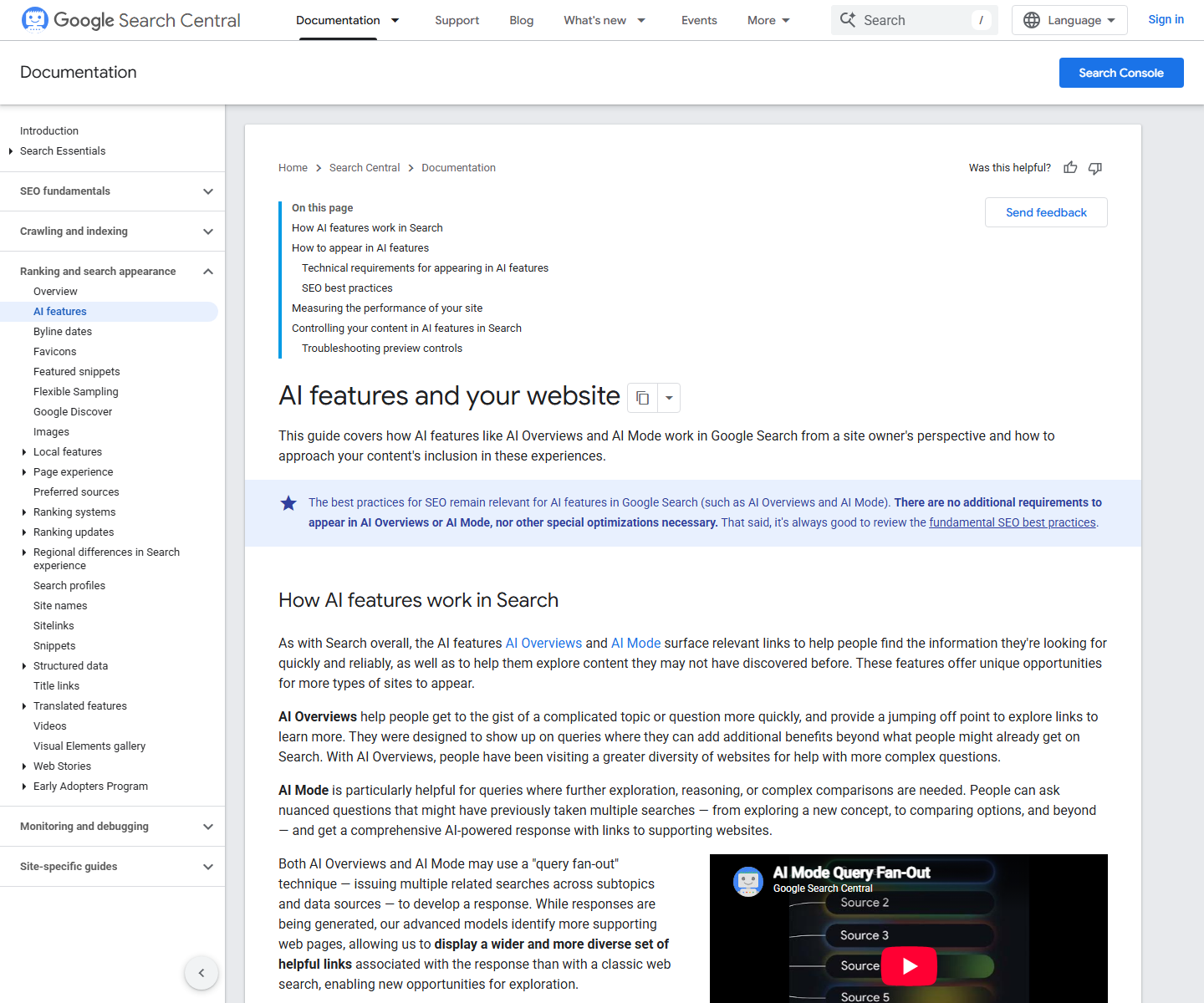
“There are no additional requirements to appear in AI Overviews or AI Mode, nor other special optimizations necessary.”“You don't need to create new machine readable files, AI text files, or markup to appear in these features.”
Source: Google Search Central, AI features and your website, read 3 November 2026.
The point is not that SEO work disappears. It is that the work remains the familiar job of making a useful page crawlable, understandable and connected to the rest of the site.
Common errors and fixes
Match the status shown in Search Console to the action below before changing the page.
- Blocked by robots.txt: remove or update the blocking rule, then test the live URL in Search Console.
- Excluded by noindex tag: remove the noindex directive if the page should appear, then run the live test and request indexing.
- Crawled, currently not indexed: Google says this is common and does not always need attention. For an important page, use URL Inspection and other tools to diagnose anything that prevents it from appearing.
- Blocked due to access forbidden (403): allow non-signed-in access or explicitly allow Googlebot requests without authentication after confirming their identity.
A passing indexed result reads “URL is on Google.” That means the URL is eligible to appear in Search results, not that an appearance is guaranteed.
Why might a page still not appear?
Meeting the requirements does not guarantee a citation. Google says indexing and serving are not guaranteed, and AI Overviews often do not appear unless its systems decide they add something to classic Search.
AI Overviews may also use query fan-out. Google can issue related searches across subtopics and data sources, so a supporting link may answer only one part of the original question.
Repeat the check after a meaningful page change. Keep improving the answer for the reader, but do not promise that any edit will trigger an AI Overview.
Sources
- Google Search Central, AI features and your website, read 3 November 2026.
- Google Crawling Infrastructure, Useful robots.txt rules, read 3 November 2026.
- Google Search Console Help, URL Inspection tool, read 3 November 2026.
- Google Search Console Help, Page indexing report, read 3 November 2026.
- Xtrusio: The first Perception Engine for B2B brands, read 3 November 2026.
Frequently asked questions
Do I need an llms.txt file or special schema?
No. Google says new machine-readable files, AI text files and special schema.org markup are not required for AI Overviews or AI Mode.
Can I see AI Overviews traffic separately?
Google includes AI feature traffic in the Search Console Performance report under Web search. The report does not give AI Overviews a separate search type.
Can I keep content out of AI Overviews?
Google points to noindex, nosnippet, data-nosnippet and max-snippet controls for limiting what Search can show from a page.
Does Xtrusio check AI answers?
Yes. Xtrusio shows when ChatGPT and Gemini mention your business and which competitors appear instead.
Topics
- how to rank in google ai overviews

Xtrusio
AI visibility research
Xtrusio is the Perception Engine for B2B brands.
Free check
See how AI engines answer about you
Get your free AI visibility check
Keep reading
 Technical SEO · Nov 3, 2026 · 6 min read
CLAUDE.md File: Where It Goes and What to Write in It
Learn where CLAUDE.md goes, what to write in it, how Claude Code loads it, and when a rule belongs in a hook instead. Technical SEO · Nov 3, 2026 · 7 min read
Claude Code Slash Commands: Built-in List and Custom Commands
A practical Claude Code slash commands list, plus a copyable custom command built as a skill with SKILL.md and $ARGUMENTS. Technical SEO · Nov 3, 2026 · 5 min read