Perplexity Comet Browser: What It Does and How to Start
Short answer
Comet is Perplexity's free AI web browser. It is built on Chromium, so it feels familiar if you use Chrome, but a built-in assistant can summarize the page you are viewing, work across open tabs and, with your approval, take actions such as filling a form or adding items to a cart. It runs on Windows, Mac, Android and iPhone.

Download Comet from Perplexity or your app store, install it, then sign in if you want more AI features and device sync. You can import bookmarks, history and passwords from another browser. The browser itself is free, but Perplexity lists agent queries only on paid plans. Pro is $17 a month when billed annually, checked 2 November 2026.
You have heard about Perplexity's AI browser and wonder whether it is worth leaving Chrome. The real puzzle is what Comet can do on a page, what it sends to Perplexity and why its answers change which brands you see.
What is Perplexity Comet, and how is it different from Chrome?
Comet is a Chromium browser with Perplexity built into the browsing experience. It has the normal parts of a browser, including tabs, search, extensions and an ad blocker. The difference is the assistant beside the page. It can use the current page as context, search the web and reason across tabs.
Perplexity first released Comet to Max subscribers. It opened the browser to everyone for free on 2 October 2025. The company later added Android and iPhone apps, so the browser now covers desktop and mobile devices.

What can Comet do? Real examples
Start with a page you would normally read yourself. Ask the assistant to summarize it, pull out the main claims or explain an unfamiliar term. If the answer needs another tab, use @tab to point Comet at that page.
Comet can also act on a page. Perplexity says it can fill forms, click and type under supervision, and run workflows. Its examples include comparing how news outlets cover a story, drafting a reply that shares your schedule and building a study plan from a syllabus.
The browser can work with Gmail and Google Calendar after you connect them. It can summarize an inbox, draft a reply or prepare you for a meeting. On Android, a blue edge shows when the AI controls the page. The app must stay open while it completes a web task.
Keep approval points in the task. For shopping, ask Comet to add items to a cart and stop so you can review them before checkout. Do not treat an action as finished until you have inspected the result.
That source choice matters beyond the task in front of you. Comet's assistant chooses which sources and brands to name. Xtrusio answers a practical question: when do ChatGPT, Gemini and Perplexity mention your brand, and which competitors appear instead?
Where does Comet run, and what do you need?
The newer requirements page is the best guide for desktop installation. Perplexity also has an older installation page that lists macOS 11 and 500 MB of disk space. The newer page, modified 14 September 2026, raises those figures to macOS 13 and 2 GB, so use the newer requirements below.
Comet platforms and requirements, checked 2 November 2026
Platform | Requirement | Important limit |
|---|---|---|
Windows | Windows 10 or 11, x64 or ARM64; 4 GB RAM minimum, 8 GB recommended; 2 GB free disk space | Windows 7, 8 and 8.1 are not supported |
Mac | macOS 13 Ventura or later, Intel or Apple Silicon; 4 GB RAM minimum, 8 GB recommended; 2 GB free disk space | Follow the newer requirements page rather than the older installation page |
Android | Android 12 or later | Web tasks stop if the app closes |
iPhone | Download from the App Store | Engadget, citing MacStories, says third-party extensions are not supported |
Linux and ChromeOS | Not officially supported | No official Comet build |
Source: Perplexity operating system requirements, Android quick start and Engadget's iPhone launch coverage.
Perplexity announced the iPhone release on 18 March 2026, according to Engadget. That article also cites MacStories for the extension limit. The iPhone app can still be set as the default browser.
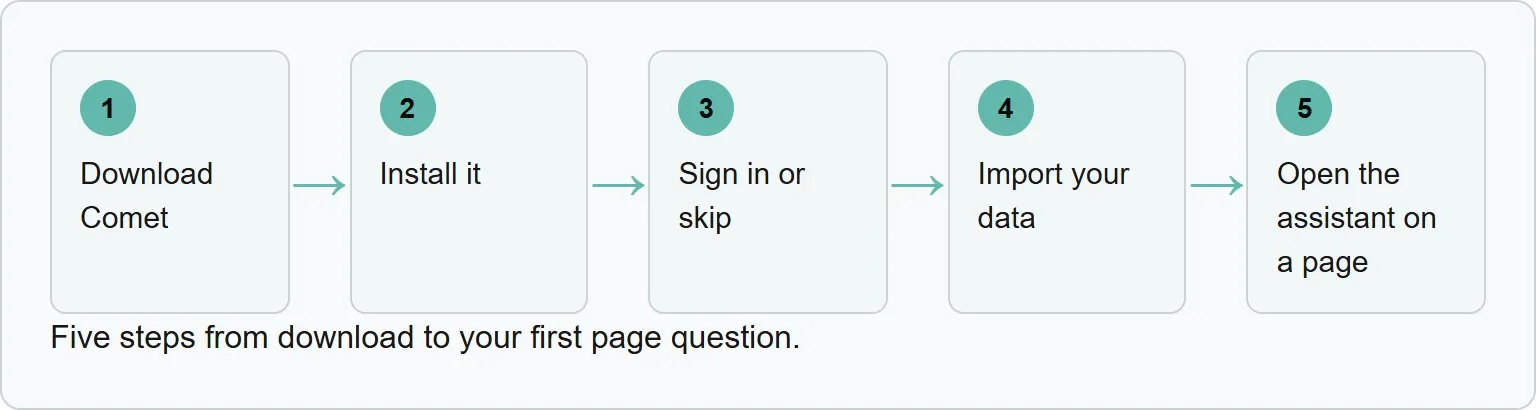
How to get started with Comet in five steps
You can browse without a Perplexity account. Signing in unlocks more AI capabilities and sync. The quickest setup is to begin with the free browser, move your existing data and decide later whether paid agent use is worth it.
1. Download Comet
Go to Perplexity's Comet page on desktop, or use the App Store or Google Play on mobile. Pick the version for your device.
2. Install it
Run the installer on Windows or Mac and allow the requested system changes. Open Comet when installation finishes.
3. Sign in or skip
You may use Comet without an account for browsing and basic AI features. Sign in when you want more AI capabilities or sync across devices.
4. Import your data
Open Settings, then Import bookmarks and settings. Comet can bring over bookmarks, history and passwords from another browser. Review the items before you confirm the import.
5. Open the assistant on a page
Visit a page and open the assistant. Ask one specific question about what you are viewing. To include another open page, use @tab and choose that tab.
Your first ten minutes in Comet
Our example (a suggested walkthrough, not a test). Open one useful article and ask, “Summarize this page in brief points.” Open a second page, then ask, “Compare this page with @tab and show the main differences.” On a shopping page, ask, “Add the ingredients for a Caesar salad to my cart, then stop so I can review it before checkout.”
Before the last prompt, open Settings, Privacy and security. Check the Comet Assistant access switches and block your bank's website. Perplexity gives a bank site as its own example of a page you may want excluded from tasks and suggestions.
Is Comet free? Plans and prices
The browser is free, but frequent agent work is a paid feature. Perplexity's comparison table lists no Browser Agent queries on Free. It lists monthly limits for Pro, Education Pro and Max, but it does not publish the exact monthly query numbers.
Perplexity plans connected to Comet, checked 2 November 2026
Plan | Price | Comet access |
|---|---|---|
Free | No charge | Browser and basic AI; no Browser Agent queries in Perplexity's plan table |
Pro | $17 a month billed annually | Monthly agent limits for average use |
Education Pro | $10 a month with SheerID | Monthly agent limits for average use |
Max | $167 a month billed annually, or $200 monthly | Monthly agent limits for advanced use and Max Assistant |
Comet Plus | $5 standalone when announced; included with Pro and Max | Access to premium publisher content |
Source: Perplexity plan comparison, Perplexity pricing, Perplexity Max and Introducing Comet Plus.
Comet Plus is a content subscription rather than a larger agent allowance. Perplexity announced it at $5 on 25 August 2025 and said it would be included with Pro and Max. The price was checked 2 November 2026.
What does Comet send to Perplexity, and how do you limit it?
Browsing history, search history, cookies and site data stay on your device. When a request needs page context, Perplexity says Comet sends the minimum context needed. Page content, history items or open tabs sent with a request may be kept for up to 30 days, then deleted automatically.
Incognito mode keeps the session out of local history, but AI requests still send the context needed to answer. That distinction matters: private browsing does not make an AI request local.
In Settings, Privacy and security, you can control access to history, navigation and site actions. You can also block tasks on specific websites. Perplexity says Comet never gets access to your passwords or payment data. The first time an advanced automation runs, Comet asks whether to allow it once, always or not at all.
Letting any AI act while you are signed in carries risk. A page can contain hidden instructions intended to redirect an assistant. Perplexity says it hired Trail of Bits before launch and uses several layers against this problem. Keep sensitive sites blocked, limit access and read every approval prompt.
What an AI browser means for brands
Comet reads pages and uses Perplexity search to answer questions. That answer can decide which brands a buyer sees before they visit a website. Perplexity calls visits from AI summaries indexed traffic and article suggestions from the assistant agent traffic.
The company's Comet Plus model also pays publishers for human visits, search citations and agent actions. Perplexity says people asked 6 to 18 times more questions on their first day with Comet. More questions mean more moments when an AI answer chooses which sources and brands to name.
Our Perplexity and ChatGPT comparison explains how their answer experiences differ. The guide to SEO for Perplexity AI covers the visibility work behind those mentions.
This is answer visibility, not browser activity. Get your free AI visibility check.
Sources
- Perplexity Comet
- Perplexity Comet advice and use cases
- Perplexity operating system requirements
- Perplexity Comet getting started
- Perplexity plan comparison
- Perplexity pricing
- Perplexity Comet privacy and security FAQs
- Control what Comet Assistant can use
- How Perplexity built security into Comet
- Introducing Comet Plus
- Engadget: Comet for iPhone
Frequently asked questions
Is Perplexity Comet free?
Yes. The browser and basic AI features are free. Perplexity's plan table lists Browser Agent queries only on paid plans.
Do I need a Perplexity account?
No. You can browse and try basic AI features without an account. Signing in unlocks more AI capabilities and sync across devices.
Does Comet work on Linux or Chromebooks?
No official build supports Linux or ChromeOS. Comet is available on Windows, Mac, Android and iPhone.
Can Comet use Chrome extensions?
The desktop browser is based on Chromium and supports extensions. Engadget, citing MacStories, says the iPhone app cannot install third-party extensions.
Does Comet keep my browsing history in the cloud?
Perplexity says browsing history, search history, cookies and site data stay on your device. Context sent with an AI request may be stored for up to 30 days.
Topics
- perplexity comet

Xtrusio
AI visibility research
Xtrusio is the Perception Engine for B2B brands.
Free check
See how AI engines answer about you
Get your free AI visibility check
Keep reading
 AI Tools Guide · Nov 3, 2026 · 6 min read
ChatGPT Agent Mode Is Retired: How to Use ChatGPT Work
ChatGPT agent mode is retired. Learn which plans include ChatGPT Work and follow five safer steps for running a multi-step agent task. AI Tools Guide · Nov 3, 2026 · 8 min read
Claude Pro vs Max: Usage Limits, Price and Which to Pick
Claude Pro vs Max, compared on price, usage limits, Fable, API credits and Claude Code. See which plan fits and when Ultra makes sense. AI Tools Guide · Nov 2, 2026 · 7 min read