How to Find Competitor Keywords, Understand Traffic and Choose Your Next Page
Short answer
Start with one competitor report and your own page inventory. By the end of this process, you will have one justified page assignment: what to change, why it serves your reader and how to check the result. Keep the research in a worksheet so the person doing the work can inspect your reasoning.

A competitor's most popular keyword might be its own company name. Another might attract people who will never need your product. A third might belong on a page you already have.
Xtrusio’s managed team can carry out the research and prepare the writing brief with you. You confirm the audience and company facts; the team investigates relevant topics and turns them into agreed content work.
We will follow one Semrush example from its keyword and traffic figures to a page decision. You can use the same checks whether your own team or Xtrusio handles the research.
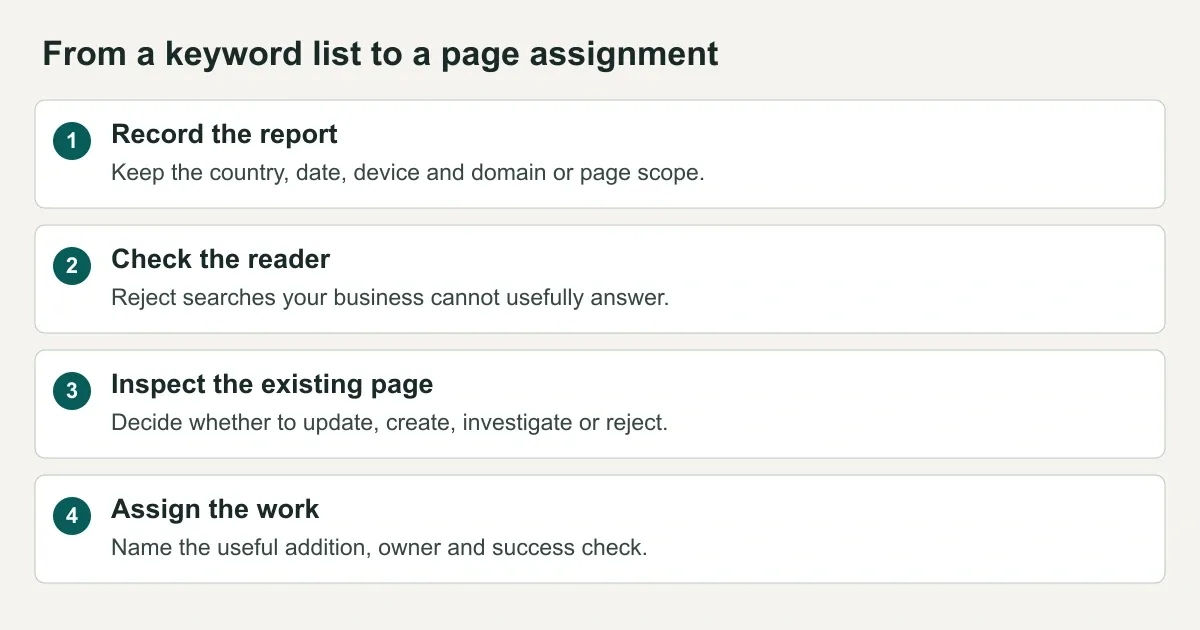
- Record: keep the report settings so you know what the numbers describe.
- Check: remove searches that do not fit your reader or business.
- Inspect: look for an existing page before ordering a new one.
- Assign: state what will change and how someone will check it.
You can follow along with the printable competitor-keyword worksheet. It includes blank pages and a completed evidence example. The same fields are explained in the article, so you do not need the PDF to use the method.
First, understand what you are looking at
A keyword is a word or phrase someone searches for. “AI visibility tools” is a keyword. So is “how to find competitor keywords.”
An organic keyword report lists search terms for which the tool has recorded a website in unpaid search results. It is a view of the tool's database, not a complete list of everything anyone has ever searched.
Three numbers often appear close together, although they answer different questions:
- Search volume: how often people are estimated to search for a term in the selected market.
- Estimated organic traffic: how many visits or clicks a tool models from unpaid search for the selected keyword, page, or website.
- Recorded keywords: how many terms the tool has found the selected page or website ranking for.
Always read the column label and the report scope. A page's traffic estimate can include many keywords. A keyword's volume describes searches for that term, not visitors to that page.
An organic traffic estimate is modeled from ranking and search-demand data. It is not access to the competing website’s analytics. Use it to choose which pages to investigate, then judge your own results using your own records.
A real example of two numbers that should not be compared directly
In a Semrush report inspected on 16 September 2026, the query “seo vs aeo vs geo” showed a monthly search-volume estimate of 320 in the United States database. Desktop was selected in the report. That setting should not be read as proof that the volume figure counts desktop searches only.
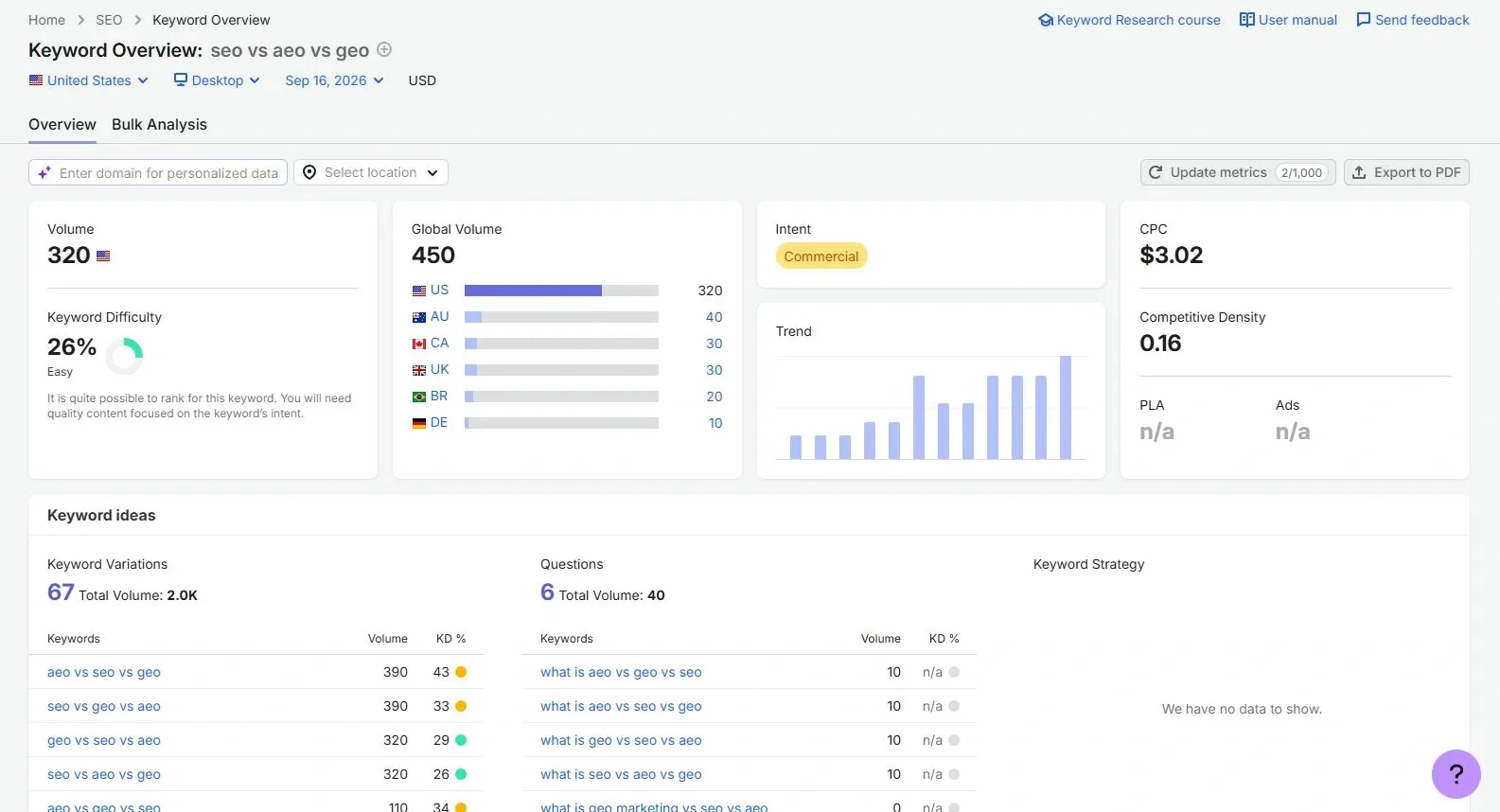
Read Volume, not Global Volume, for the selected country's estimate. The larger Global Volume figure combines countries. Keyword Difficulty is the tool's estimate of how hard ranking could be, not your probability of success.
Scroll to SERP Analysis, the report's list of recorded search results. SERP means “search engine results page.” Switch the analysis to URL to inspect individual pages rather than whole websites.
In that report, Digital Marketing Institute's comparison page had 932 under Search Traffic and 382 under URL Keywords.
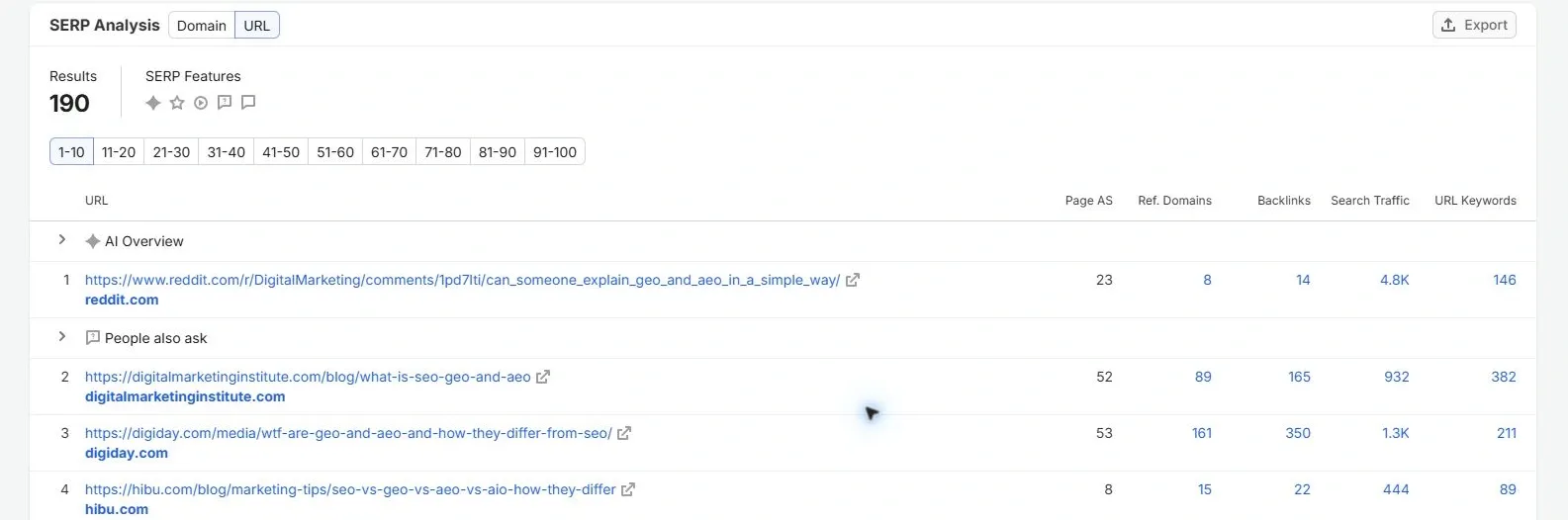
Find the Digital Marketing Institute row, then read across to Search Traffic and URL Keywords. Those two figures describe that page. They do not describe only the search term entered above.
A page can appear for many searches. That is why its estimated traffic can exceed the volume of the single query you entered. The 932 describes estimated traffic for the URL across its recorded keywords; it does not mean 932 people arrived through a term with a displayed volume of 320.
The practical action is to inspect the page's other keywords. Do not dismiss the topic based on one term, and do not treat the page's estimate as a forecast for your own site.
These are dated report observations, not verified visits or permanent rankings.
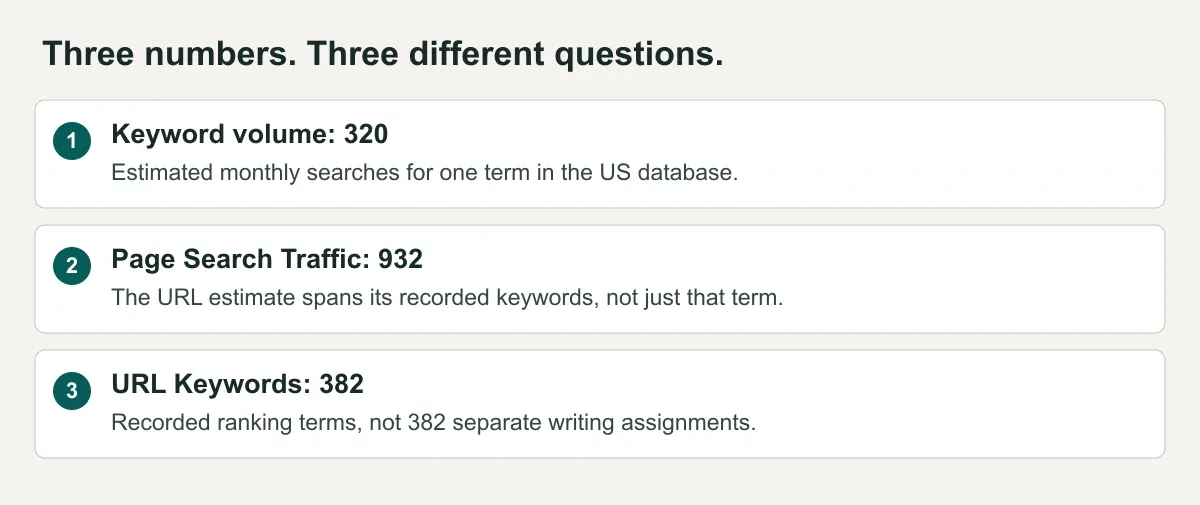
- 320: estimated monthly searches for one query in the selected country.
- 932: the page's estimated search traffic across recorded keywords.
- 382: the number of recorded ranking terms, not the number of articles to write.
The next steps use this page to decide what is relevant to our reader and whether our existing guide needs work.
Step 1: choose competitors for the question you want to answer
Start by writing down your audience and what you sell. For example:
We help B2B marketing teams understand where their company appears in AI answers and decide what to improve.
Now identify websites that reach that audience.
A business competitor sells an alternative to your product. A search competitor appears for a search you want to answer. A publisher can be a search competitor without selling competing software.
Digital Marketing Institute is our search competitor in the example because its comparison page appeared for a topic Xtrusio also explains. That does not make its entire website a like-for-like software competitor.
Search two or three questions your buyers ask. Record the relevant websites and the pages that appear. Choose a small starting set, such as three websites, rather than analyzing every result.
For each website, write one sentence explaining why it belongs in your comparison. “It publishes guidance for our buyer on this topic” is useful. “It has a lot of traffic” is not enough.
If your website has few recorded rankings, a tool's suggested competitor list may not be informative. Use relevant search results to establish your starting set instead.
Step 2: open the keyword report with consistent settings
In Semrush, open Organic Rankings, enter a competitor's domain, and inspect Positions. Older tutorials may call the tool Organic Research.
Before comparing numbers, record:
- Country: the market you want to reach.
- Device: desktop or mobile.
- Date: the report date or selected historical period.
- Scope: the whole domain, a subfolder, or one exact URL.
Use the same settings for the websites you compare. Comparing one site's worldwide estimate with another site's US-only figure will not tell you which reaches more of the same audience.
Choose the whole domain when exploring broadly. Choose an exact URL when investigating one competing page.
Scope tells you how much of the website the report includes:
- Domain: the whole website, such as digitalmarketinginstitute.com.
- Subfolder: a section such as /blog/.
- Exact URL: one page, such as /blog/what-is-seo-geo-and-aeo.
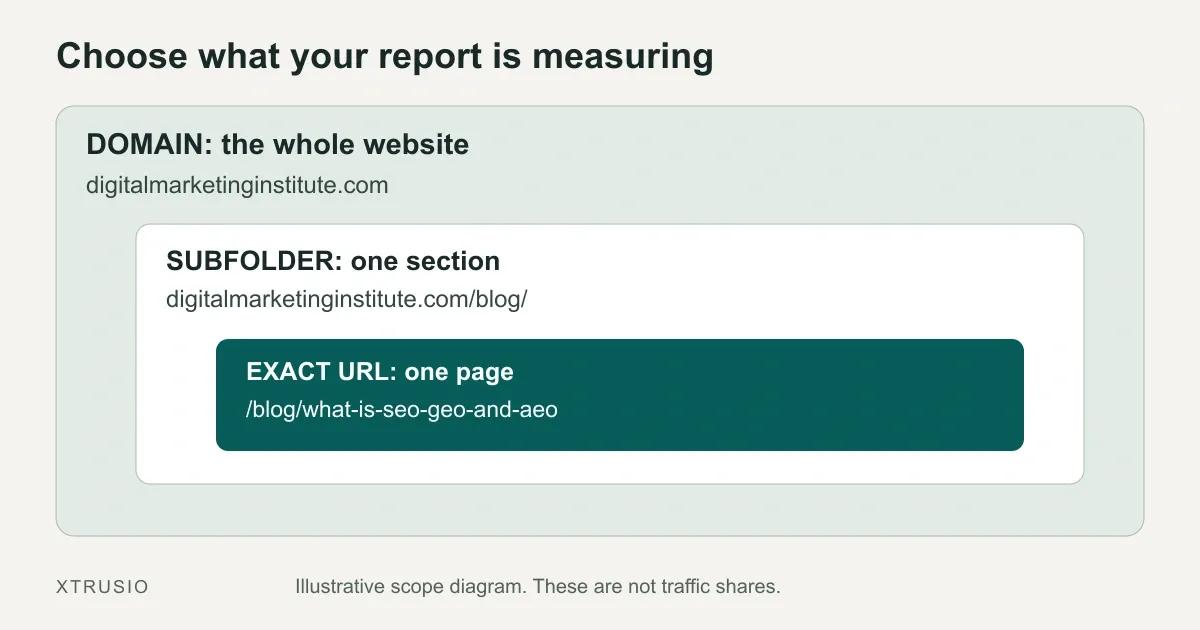
Open this diagram at full size
The exact page belongs to the blog section, which belongs to the whole website. Choose the level that matches your question before comparing its numbers.
For our example, use the exact page. Inspect the keyword rows and record which terms describe the same comparison and which describe a different task. The earlier SERP Analysis screenshot counts 382 terms, but that total alone cannot tell us how to group them.
Keep these fields in your notes or export: keyword, ranking URL, position, volume, estimated traffic, difficulty, and report settings.
Step 3: remove keywords you cannot use
Filter for relevance before sorting by volume. A large number of searches is useful only when your business can meet the reader’s need.
Separate branded navigation from open opportunities
A search such as “competitor login” usually comes from someone trying to enter that product. Reject it from your customer-acquisition list because your article cannot provide that login screen.
Keep comparison searches separate. “Competitor alternatives” may represent a genuine buying decision, but answering it requires accurate, fair comparison evidence. It is not interchangeable with a login search.
Reject the wrong audience or market
A US-only service may have little use for a location-specific query it cannot serve. A marketing product may not be a useful answer to a developer's request for a code-debugging tool.
Write down why you rejected the query. That note stops someone from adding it back next month because the volume looks attractive.
Check whether you can supply the answer
If the search asks for a calculator, can you provide a working calculator? If it asks for current prices, can you verify and maintain them?
A long article is not automatically a substitute for the thing the reader wanted.
Our example passes the initial reader check: someone comparing SEO, AEO and GEO needs an explanation, which an educational guide can provide. It has not yet passed the “we need a new page” check.
Step 4: group keywords by the page they need
Several searches can describe the same reader problem:
- how to check AI brand visibility
- measure brand mentions in AI answers
- AI visibility measurement
These are illustrative phrases, not a claimed export. They might belong in one useful guide. Check the actual search results and competing pages before grouping them.
For each group, ask: could one page satisfy these searches without changing its purpose?
Then check your own content inventory. If a suitable page already exists, investigate an update before commissioning another article.
For our example, Xtrusio already has a beginner's SEO, AEO and GEO guide. Record that URL beside the competitor's page. A competitor ranking for the topic is not a reason to create a second version of our own guide.
A definition, a software comparison and a login page may serve different needs. Group only the searches that one page can answer well; shared vocabulary alone does not make them one assignment.
Apply the decision to real rows
We reopened the same DMI page on September 25. The screenshots below show the report dated September 24, 2026, with US, Desktop and Exact URL selected. Start with All Positions, then separate ordinary rankings from search features before grouping the terms.
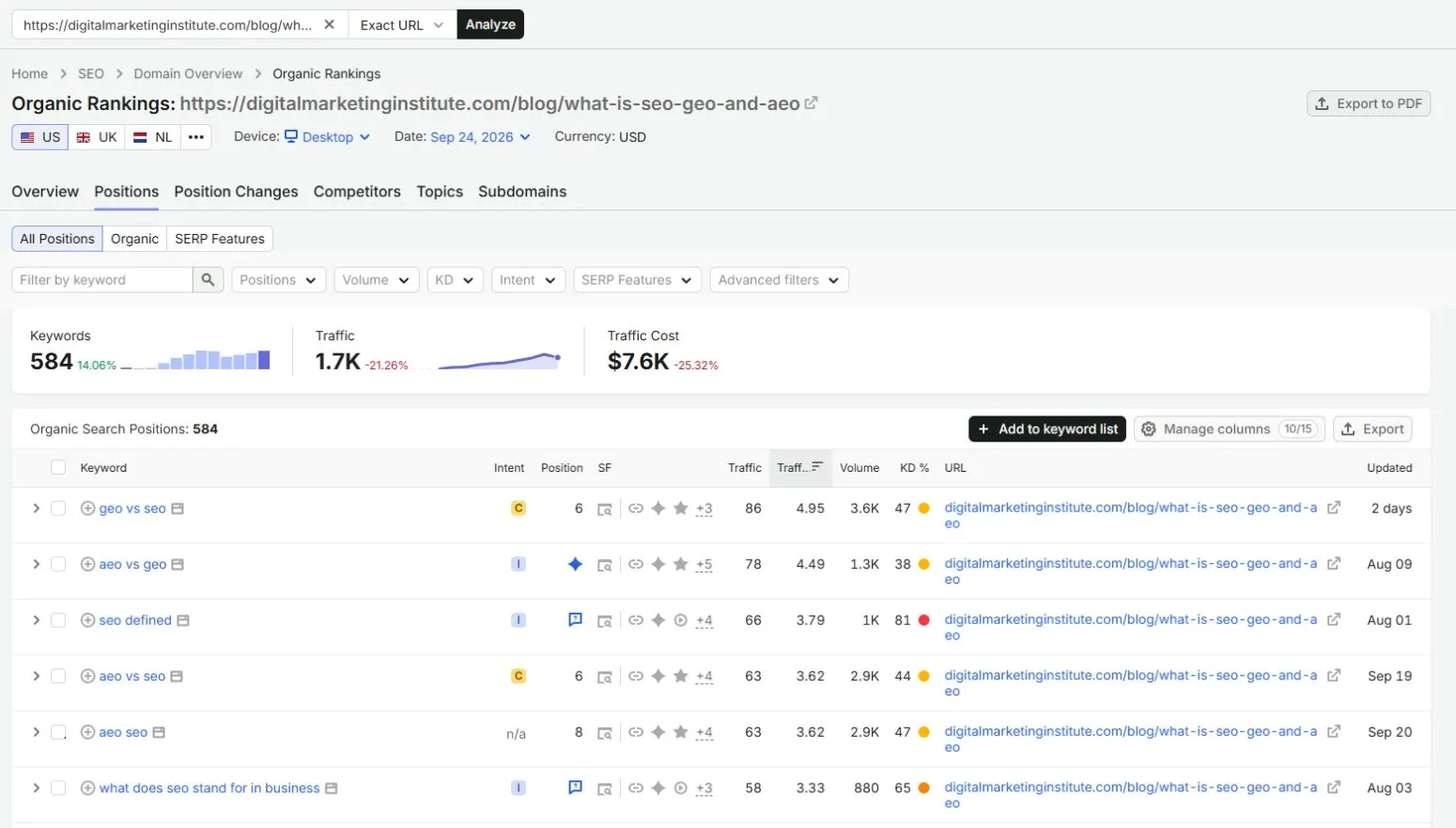
Open this report image at full size
The All Positions view shows numbered rankings alongside feature entries. Read the Position and Updated columns together: an AI Overview symbol is not a numbered ranking, and the aeo vs geo entry is dated August 9.
Recorded keyword | Position field | Our editorial decision |
|---|---|---|
geo vs seo | 6 | Review within the existing comparison guide; reversed wording alone does not justify a duplicate |
aeo vs seo | 6 | Check whether the same guide clearly explains this pair |
seo defined | People also ask | Keep a short definition if needed; reject a separate definition article from this assignment |
aeo seo | 8 | Inspect the search intent before deciding whether the comparison guide fits |
aeo vs geo | AI Overview | Keep this feature entry separate; it does not establish a specific citation without its source evidence |
All Positions can contain ordinary results and search features for the same keyword. Do not count those entries as separate writing assignments. The report date also does not mean every row was refreshed on that date.
In this September 24 report, All Positions shows 584 keywords and rounds estimated traffic to 1.7K. Selecting Organic, without changing the page, country, device or report date, shows 480 keywords and estimated traffic of 951.
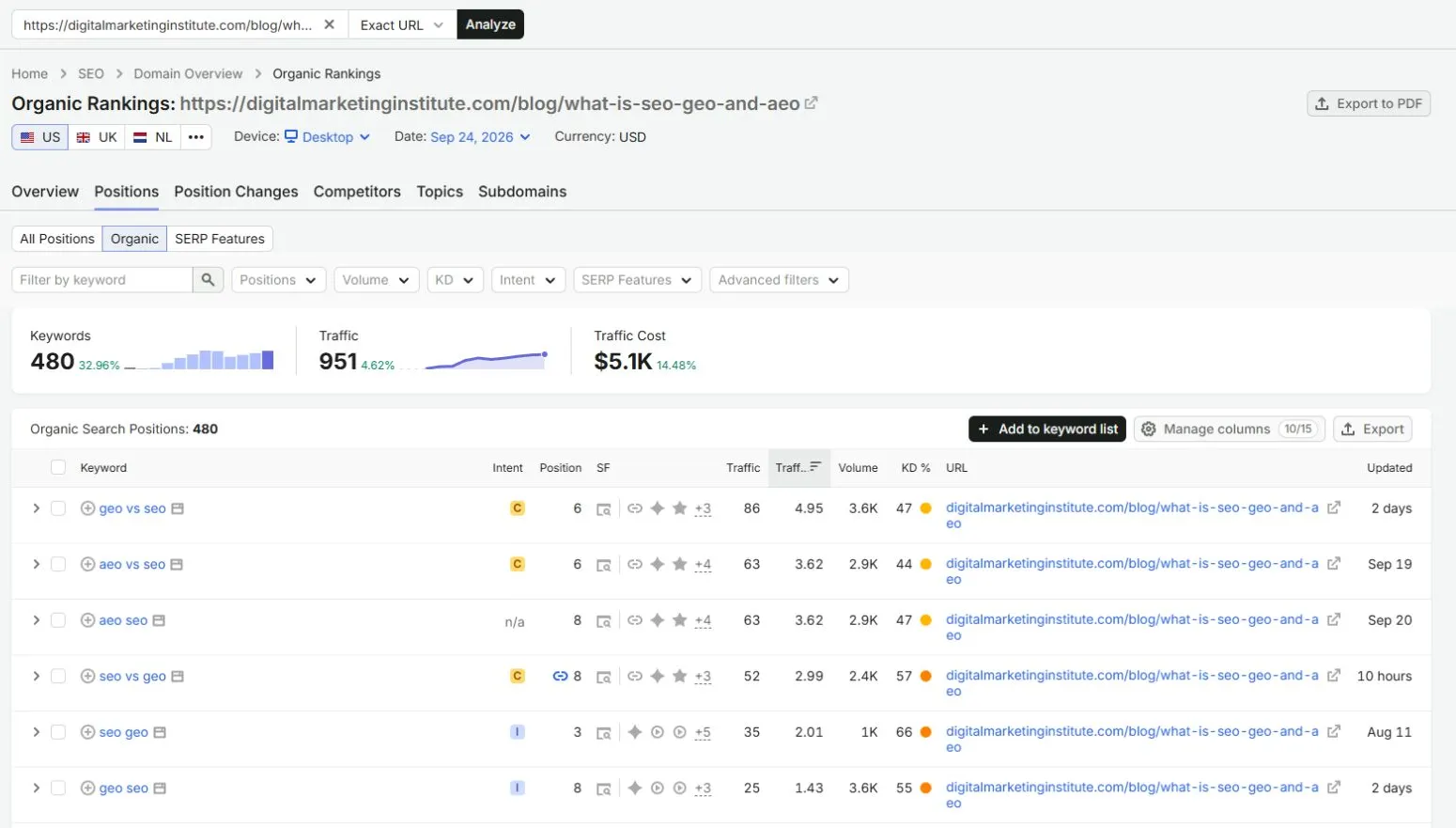
Open this report image at full size
The Organic view isolates ordinary ranking entries. Here, geo vs seo and aeo vs seo both show position 6. The SERP-feature icons in the SF column describe features on the results page; they are not the page’s numbered position.
Changing this filter changes what the totals include. It does not demonstrate a gain or loss in real visitors. The earlier 382-keyword and 932-traffic screenshot is also from a different date and report view, so use it to understand the original query-versus-page distinction, not as a before-and-after growth comparison.
Review the comparison and its short definitions as one page. Only a distinct reader task would justify a separate article.
Step 5: use a keyword gap report to find what deserves inspection
A gap report compares your recorded rankings with selected competitors. In Semrush, select your domain first, add relevant competitors, and compare organic keywords using the same market and device.
The filters mean different things:
- Missing: all selected competitors rank for the keyword, but your selected site does not.
- Untapped: at least one selected competitor ranks, but your selected site does not.
- Weak: your site ranks below all the selected competitors.
These labels describe rankings recorded in the tool’s database. A relevant page can exist even when the tool does not record it ranking for that keyword.
Start with a few relevant terms. Open your existing page where one exists. A Weak result might point to an improvement opportunity, but you still need to determine whether the page answers the search well.
Avoid setting an arbitrary minimum volume that hides valuable niche questions. A small number of relevant buyers can justify a page; volume alone cannot establish that business case.
Here is the same topic checked in Keyword Gap on September 25, using the September 24 report. We selected xtrusio.com as You and digitalmarketinginstitute.com as the competitor, both as root domains, with US, Desktop and Organic keywords. The text filter geo narrows the list but does not guarantee that every result concerns generative engine optimization.

Open this report image at full size
Check the two root domains, country, device, date and Organic keywords selection before interpreting the filtered results.
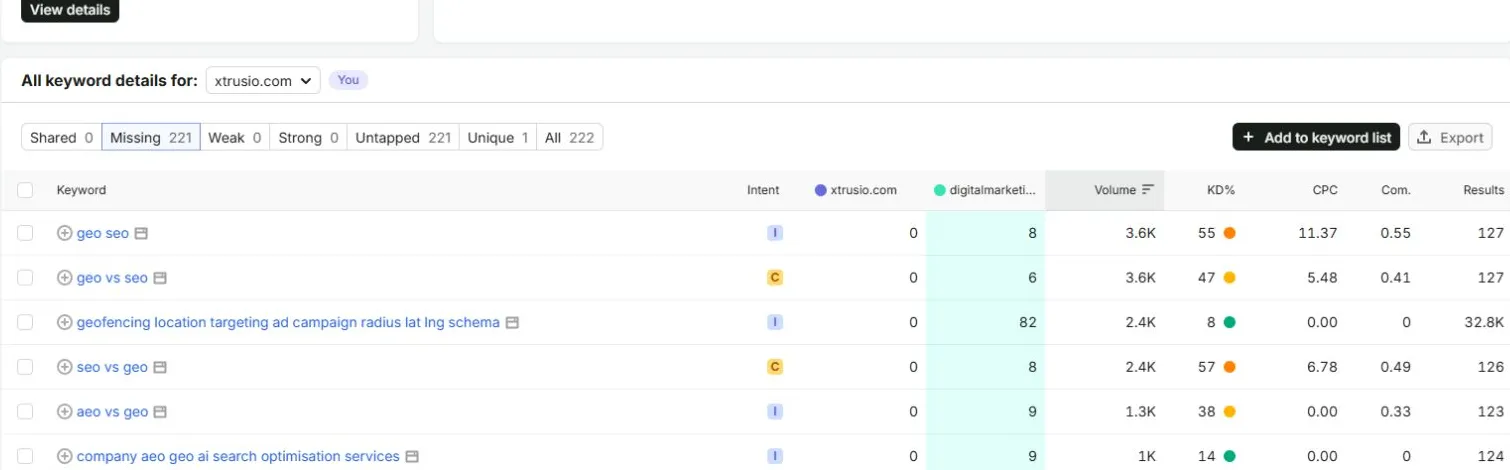
Open this report image at full size
With Missing selected, geo vs seo shows 0 for Xtrusio and 6 for DMI; seo vs geo shows 0 and 8. In this comparison, 0 means the tool did not record a ranking for our domain, not that our website has no relevant page.
The filter returned 221 missing terms, including a geofencing query that does not belong in our SEO/AEO/GEO comparison. Reject that mismatch. For the relevant comparison terms, inspect the existing Xtrusio guide before commissioning another page. A recorded ranking gap is a reason to investigate that page, not proof that it must be rewritten.
Step 6: open the competing page and explain why someone would use it
For each shortlisted topic, open the search results and a few relevant pages. Read them, rather than comparing headings alone.
Write down:
- What the reader wants to accomplish.
- What type of result meets that need: guide, product page, comparison, template, tool, or something else.
- What the existing page already does well.
- What your page could add that you can genuinely produce.
For a measurement guide, a useful addition might be a completed example showing the question, answers collected, calculation, and resulting decision. For a template query, the useful addition may be a downloadable template with instructions and a filled example.
State the useful addition precisely. For example, show which report and scope each traffic figure comes from, then demonstrate the decision those figures support. A longer page without a clearer answer does not solve the reader’s problem.
Keyword Difficulty can help you screen a list, but it does not tell you whether your proposed answer meets the reader's need.
Step 7: decide what drives the traffic before copying the content
Keyword reports help explain estimated organic search traffic. They do not explain every visit a website receives.
Channel mix means the split between sources of visits, such as unpaid search, paid ads, referrals from other sites and social platforms. A high organic estimate says nothing by itself about how large those other sources are.
First, examine the site's pages. Does the estimated search traffic concentrate on a homepage, a free tool, product pages, or tutorials? Open the page-level report and inspect the keywords attached to the strongest relevant pages.
A free tool attracting searches may suggest demand for a tool. It does not establish that a blog describing the tool will attract the same visitors.
If the decision needs a broader picture, keep channel-level estimates separate from organic keyword estimates. Ask what source and method produced each number. Without matching evidence, leave the channel mix unknown rather than attributing all visits to the pages you found.
A small example of traffic share
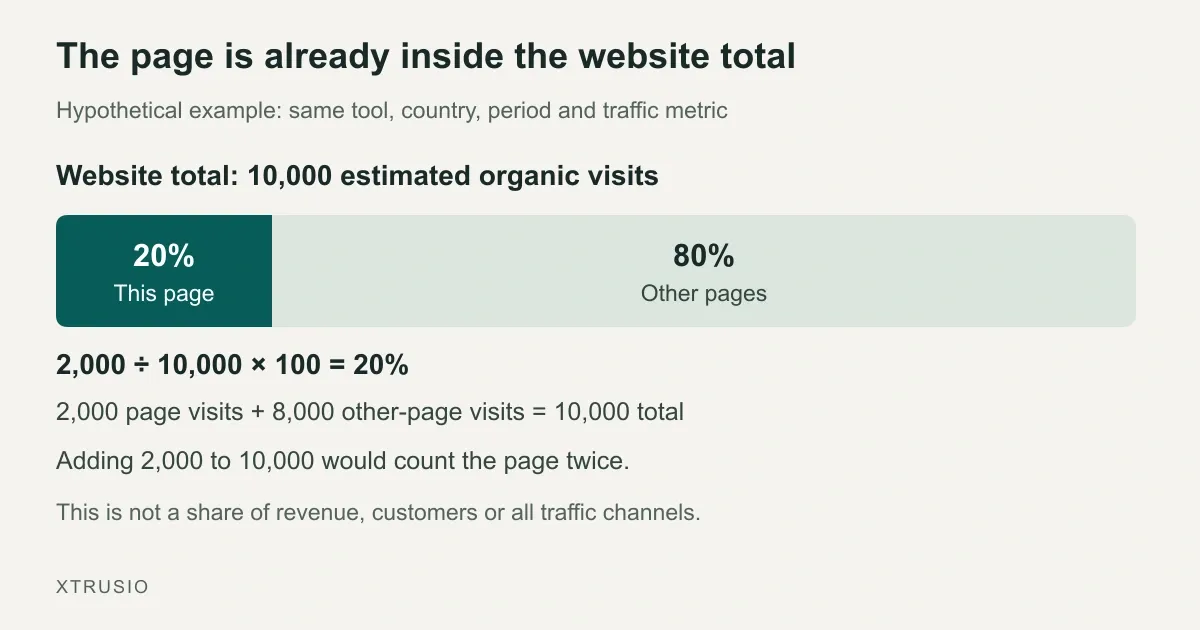
Suppose a report estimates 10,000 monthly organic visits for a website and 2,000 for one guide. These are hypothetical figures from the same report scope.
The guide's estimated share is:
2,000 ÷ 10,000 × 100 = 20%.
Open this diagram at full size
The highlighted fifth belongs to this page. The remaining four fifths belong to other pages. The website total already contains both.
You can say the guide represents one fifth of that report's estimated organic traffic. You cannot say it produces one fifth of the company's revenue, customers, or total website visits.
Also, do not add the guide's 2,000 to the website's 10,000. The page is already included in the website total.
For the Digital Marketing Institute example, we have a page estimate of 932 but no matching website total in the captured report. Therefore, we cannot calculate that page's share of site traffic. The correct worksheet entry is “not established,” not a guessed percentage.
Step 8: give each candidate an action and a reason
Use four actions: update, create, investigate, reject. Record the reason before assigning a priority.
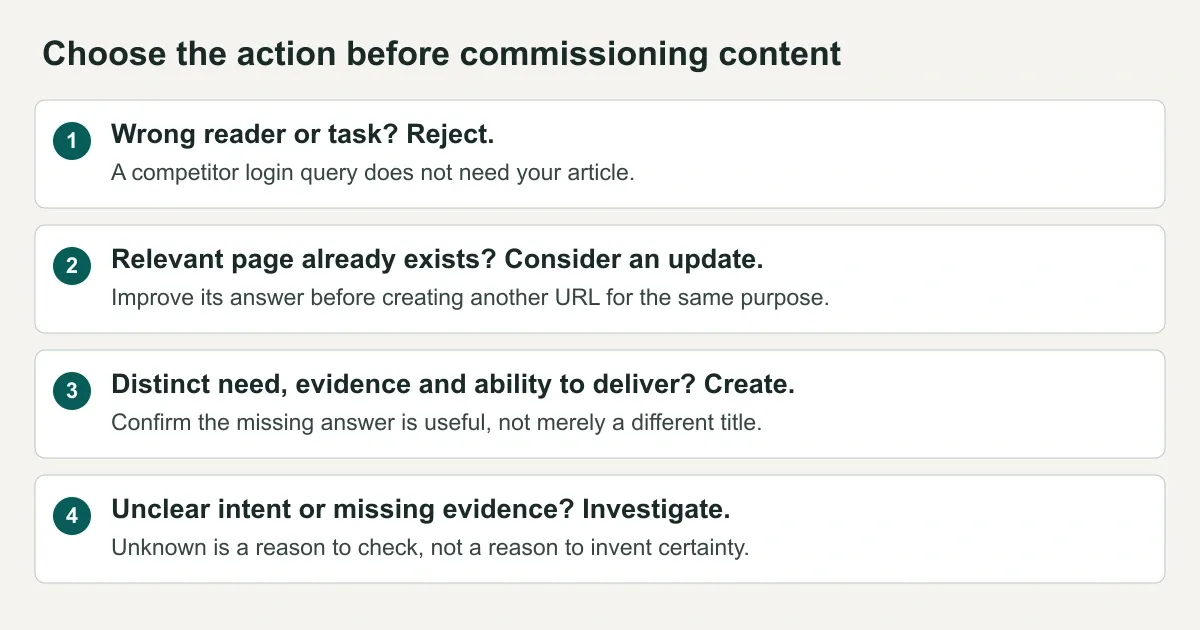
- Reject: the reader needs something your page cannot provide.
- Update: an existing page can answer the need, but a specific improvement is justified.
- Create: a different need deserves a separate page and you can supply a useful answer.
- Investigate: you still need evidence to choose responsibly.
Here is a hypothetical decision record for a B2B AI-visibility business. These are teaching examples, not observed competitor rankings or proof of customer demand.
Candidate A: “competitor login”
The visitor wants to enter another product. Our content cannot satisfy that task.
Decision: reject. High volume would not change the mismatch.
Candidate B: “how to measure AI visibility”
Suppose we already have a measurement guide, but it does not show how the denominator is chosen.
Decision: update the existing guide. Add a worked calculation, the question set, and the limitations. Do not create a second guide with a slightly different title.
Candidate C: “AI visibility reporting template”
Suppose we have no template and can provide a usable worksheet with a completed example.
Decision: investigate, then create if confirmed. Check that the search results and reader need support a template. Confirm that the worksheet adds something useful before commissioning it.
Candidate D: “best AI monitoring tools”
The phrase could refer to brand visibility or monitoring an AI application's behavior. Those readers may need different products.
Decision: investigate. Inspect the results and define the audience before choosing a title or comparing tools.
Step 9: turn one decision into a work order
For a Xtrusio-managed assignment, give the research record to the allocated writer and agree what evidence the finished page must contain. If the proposed improvement needs a working tool or technical change, confirm the developer’s scope before promising it in the brief. Complete these fields:
- Reader question: the task the page must answer.
- Evidence: the report, scope, date, and competing page reviewed.
- Action: update, create, investigate, or reject.
- Existing URL: the page to improve, or confirmation that no suitable page exists.
- Useful addition: the example, evidence, tool, or explanation you will supply.
- Owner and review date: who will do the work and when it will be checked.
- Baseline: current performance for the relevant page and queries, where available.
- Success check: what you will measure after publication.
A baseline is the starting record you will compare later results against. For example, save the existing page's clicks and impressions for a defined period before editing it. “We did not collect a baseline” is different from “the page had zero clicks.”
Here is the running example written as a research assignment, not a claim that another rewrite is necessary:
Reader question: What is the difference between SEO, AEO and GEO?
Evidence: September 16 Semrush SERP Analysis: page estimate 932 and 382 terms. September 24 US Desktop reports, inspected September 25: exact-URL Positions and a separate root-domain Keyword Gap comparison filtered to geo.
Existing page: xtrusio.com/blog/aeo-vs-geo-vs-seo
Action now: Investigate whether an update is needed; do not create a duplicate
Next research: Read both guides for the same reader task. The Positions and Gap rows justify inspecting our existing page; they do not establish a missing answer or warrant a duplicate.
Acceptance test: Name a specific missing answer or usability problem and show how the proposed change fixes it
Stop condition: If the existing guide already meets the need, keep it and monitor performance
Baseline and owner: To be supplied by the site team; not invented from competitor estimates
The stop condition prevents unnecessary writing. If the existing page answers the question well, the assignment can end with a decision to keep it.
For an update, preserve the useful parts of the page. Do not replace a helpful video, example, or download just because you are rewriting the text.
Keep the question connected to the delivered page
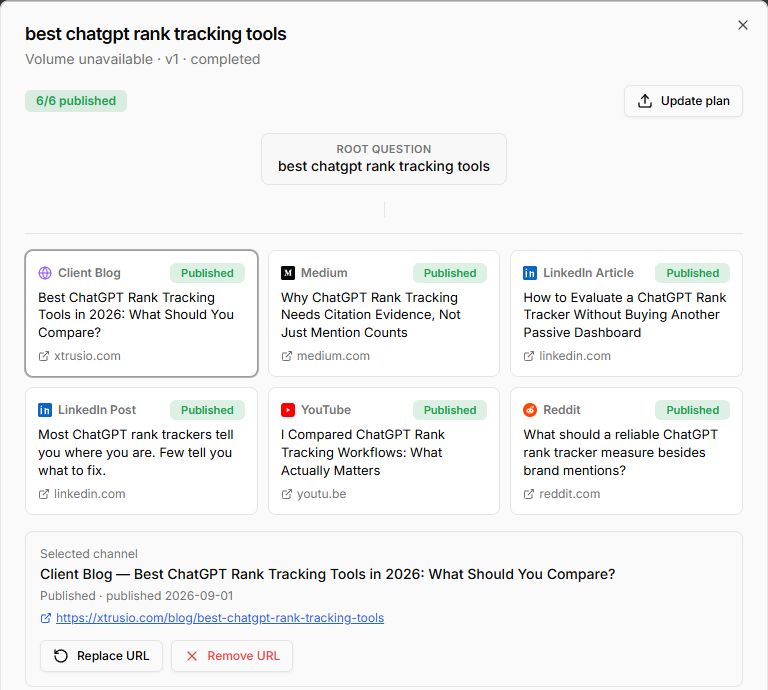
A separate Xtrusio example shows what that handoff can look like. The September 20 Content Strategy capture below links “best chatgpt rank tracking tools” to distinct channel items. The selected company-blog item has its own title and destination. This is a delivery example for a different question, not a claimed import of the DMI keywords.
Open the question-to-publication record at full size
Follow the root question to the selected Client Blog item, then inspect the linked page. For a new assignment, agree the intended page and check for an existing destination before commissioning another article. A question with six channel records does not need six versions of the same explanation.
That company blog was revised and its public content verified on September 24. The capture’s other publication labels are historical plan statuses; this check confirms only the linked blog. Neither the label nor the delivered article establishes a traffic gain.
Inspect the delivered ChatGPT tracking guide
The client approves company facts and the main content. Xtrusio’s allocated writer handles the agreed content work, with developer support within scope. Ask for the reviewed page and its live URL, then check the promised example or explanation before accepting the assignment as complete.
See Xtrusio’s research, approval and delivery scope
Step 10: measure your page using your own data
Ask the person responsible for your site’s search reporting to supply the page’s clicks, impressions, relevant queries and reporting period, with consistent country and device conditions. Google Search Console is a source for these records. We have not inspected a private property for this example, so its baseline remains to be supplied.
Keep the source report or export with the brief. A missing baseline means “not collected.” Competitor estimates cannot supply the starting clicks for your own page.
Google defines click-through rate as clicks divided by impressions. If your page receives 20 clicks from 1,000 impressions in a hypothetical period, its CTR is 20 ÷ 1,000 × 100 = 2%. Search Console performance documentation
Compare equivalent periods and note other changes that could affect performance. A movement after publication does not, on its own, prove the rewrite caused it.
Keep the business outcome separate too. More search clicks do not automatically mean more qualified enquiries. Use appropriately configured analytics or lead records to investigate that next question.
Do not promise a specific ranking or a fixed number of days until results appear. Record a review date so the work gets checked, not as a deadline Google must meet.
Your first research session
Choose one competitor, inspect a small set of relevant keyword groups, and complete one decision record. Give Xtrusio’s team, or your own writer, the existing URL, the useful addition you can support and the evidence needed to check it.
The deliverable is one justified page assignment. If the existing page already answers the question, keep it. If it needs work, agree the change, owner and acceptance check before publishing.
Frequently asked questions
Can I do this without a paid tool?
You can search relevant queries, inspect competing pages, and build a topic list manually. You can also review your own property in Search Console. That will not give you a complete competitor keyword database or verified competitor traffic. State which evidence you do and do not have.
Should I target every keyword a competitor ranks for?
No. Keep the terms that fit your audience and that you can answer usefully. Group related searches, inspect existing pages, and record why you reject the rest.
Does a missing keyword mean I need a new page?
No. The gap report may not record a ranking even when you have relevant content. Inspect that page before deciding whether to update it or build something new.
Is a keyword with a higher volume always better?
No. Volume estimates demand for a search, not demand for your business. A relevant question you can answer well may be a better project than a large, unrelated topic.
Does this also tell me who appears in AI answers?
Not by itself. A keyword ranking report and an AI answer are different observations. If AI discovery matters to the task, record the exact prompt, platform, answer date, named brands, and cited sources separately. Do not convert mentions or citations into claimed website visits.
Topics
- find competitor keywords
- competitor website traffic
- what drives website traffic
- competitor keyword analysis
- AI answer competitors

Xtrusio
AI visibility research
Xtrusio is the Perception Engine for B2B brands.
Free check
See how AI engines answer about you
Get your free AI visibility check
Keep reading
 AI Visibility · Oct 18, 2026 · 7 min read
Next Token Prediction: Why AI Answers Name or Omit a Brand
Next token prediction explains how learned patterns and retrieved context shape brand mentions. Use an anonymized scan example to choose the next action. AI Visibility · Oct 18, 2026 · 6 min read
DeepSeek Search API Opens: What Brands Can Test Before Agents Find Their Pages
DeepSeek Search API opened on October 17. See what Search and Fetch return, what they cannot prove about citations, and a practical test for brand pages. AI Visibility · Oct 18, 2026 · 9 min read