Claude Code for Data Analysis: From CSV to Checked Findings
Short answer
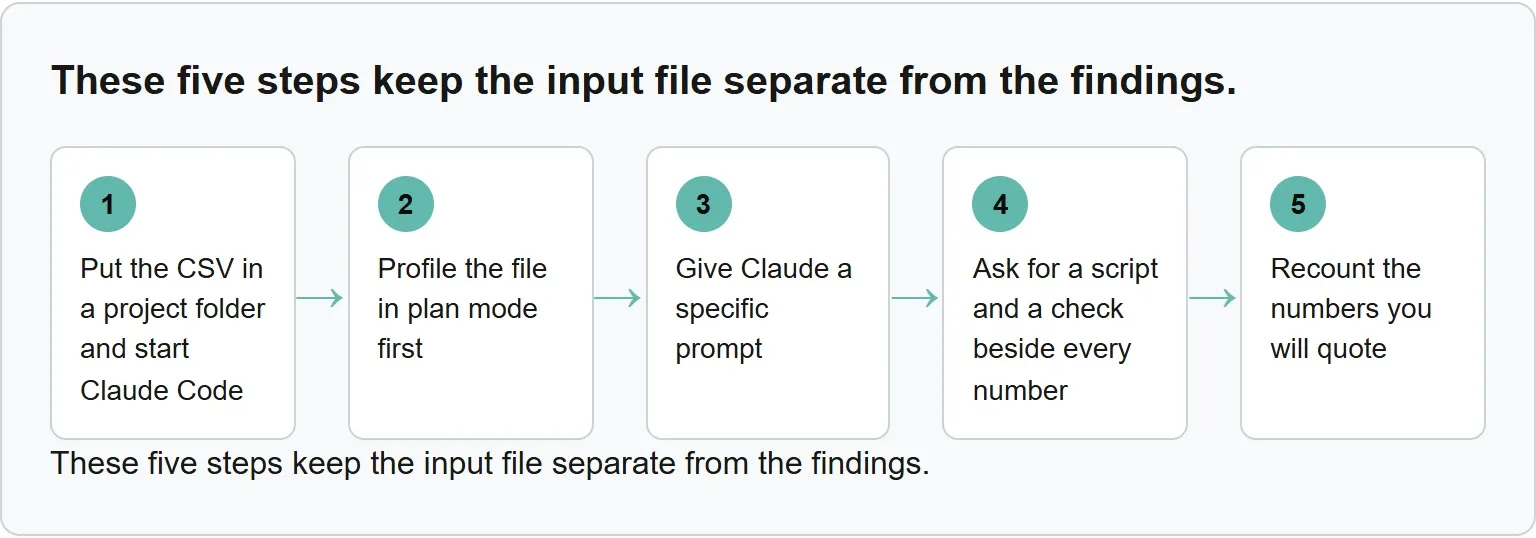
Put the CSV in a project folder, run claude there, and start in plan mode. Ask Claude to profile the file without editing it, write the analysis as a script and put a check beside every number. Then rerun the figures you intend to share.
A fast summary is only useful when you can explain how each total was produced. The workflow below keeps the original file intact and leaves you with a repeatable script.
Before you start
You need Claude Code installed and signed in, a CSV in its own project folder and one clear question. If you still need the command-line tool, follow the Claude Code installation guide first.
Keep a copy of the original CSV. Decide what the final output should contain before you open Claude Code: a summary, a table, a chart or a reviewed list of findings.
Step 1: put the CSV in a project folder and start Claude Code
Create a folder for the analysis, place the CSV inside it, change into that folder and run claude. Claude Code prompts you to log in on first use.
mkdir harbor-lane-analysis
cd harbor-lane-analysis
claude
Do not mix unrelated files into this folder. A small working set makes it easier to see what Claude read and what your script produced.
Step 2: profile the file in plan mode first
Start with plan mode. In plan mode, Claude reads files and runs read-only shell commands to explore, but it does not edit your files.
Claude Code can run a built-in set of read-only commands such as ls, cat, head, tail and grep without a permission prompt. Other shell commands require approval.
Ask for the row count, column names, data types, blanks and duplicate rows before asking for conclusions. This profile tells you whether the file is clean enough to analyze.
Step 3: give Claude a specific prompt
Typing @ followed by a path includes that file's contents in your message. Anthropic recommends naming the file, describing the problem and saying what done looks like up front.
Use a prompt that names the question, the output and the checks:
@sales.csv

Profile this file first in plan mode. Report its row count, columns, blank cells and duplicate rows.

Then answer: which region and product generated the most revenue?

Write the analysis as a script so I can rerun it. Put every reported number next to the check that proves it. Show totals with and without duplicate rows. Flag blanks and duplicates. Do not change sales.csv. Stop before writing any output file.
For a difficult file, /effort high or /effort xhigh makes Claude check more edge cases and check its work more thoroughly before answering.
Step 4: ask for a script and a check beside every number
Claude Code works through three phases: gather context, take action and check results. It uses tools to search files, edit them and run tests.
For data analysis, the useful deliverable is not a polished paragraph. It is a script you can inspect and rerun, plus the check behind each figure.
“For each statistical claim, show me three things: what the paper states, what you calculated from their data, and whether these match.”Claude Academy, Check statistics from raw data, read 3 November 2026
Anthropic's raw-data use case asks Claude to rerun each reported analysis on the raw data. It also asks Claude to flag wrong tests for the data type and sample sizes that do not add up.
Step 5: recount the numbers you will quote
Run the saved script yourself and compare its output with the checks. Recount every number that will appear in a report, presentation or message.
If Claude drifts, press Esc to stop it while keeping work up to that point. Use /rewind, or press Esc twice on an empty prompt, to roll the code, conversation or both back to an earlier prompt.
Checkpoints cover files Claude edited with its own file tools. They do not restore a file touched only by a Bash command. Anthropic suggests watching the first minute, pressing Esc when Claude drifts and using /clear with a better prompt after two failed corrections.
Put the CSV in a project folder. Profile it in plan mode. Give Claude a specific prompt. Ask for a script and a check beside every number. Recount the numbers you will quote.
These five steps keep the input file separate from the findings.
Our example (illustrative numbers, not a real scan)
A made-up sales file with known answers
This is made-up data for an illustrative calculation. Harbor Lane Coffee does not represent a real business. The file contains one blank region and one extra copy of a row on purpose.
date,region,product,units,price
2026-10-01,North,Espresso,12,3.50
2026-10-02,South,Latte,8,4.50
2026-10-03,East,Filter,15,3.00
2026-10-04,West,Mocha,6,5.00
2026-10-05,North,Latte,10,4.50
2026-10-06,South,Espresso,14,3.50
2026-10-07,East,Mocha,7,5.00
2026-10-08,West,Filter,18,3.00
2026-10-09,,Espresso,9,3.50
2026-10-10,North,Filter,11,3.00
2026-10-02,South,Latte,8,4.50
2026-10-11,East,Latte,5,4.50
The duplicate is the second South Latte row dated 2026-10-02. Removing that extra row changes both the unit and revenue totals.
Checks to demand before you trust a finding
Compare the script output with these known answers before you use a finding.
Our calculation for the made-up Harbor Lane Coffee file, checked 3 November 2026
- Data rows: Count rows below the header, 12 (our calculation). Proves the full file was read.
- Blank cells: Count empty values, 1 (our calculation). Shows a missing region.
- Extra duplicate rows: Find identical rows beyond the first copy, 1 (our calculation). Prevents double counting.
- Total units, all rows: Sum the units column, 123 (our calculation). Baseline before cleaning.
- Total units, duplicate removed: Subtract the extra row's 8 units, 115 (our calculation). Shows the clean total.
- Revenue, all rows: Sum units multiplied by price, $459.00 (our calculation). Baseline before cleaning.
- Revenue, duplicate removed: Subtract the extra row's $36, $423.00 (our calculation). Shows the clean revenue total.
- Top region by revenue, all rows: South with $121.00 (our calculation).
- Top region by revenue, duplicate removed: North with $120.00 (our calculation).
- Top product by revenue, all rows: Latte with $139.50 (our calculation).
- Top product by revenue, duplicate removed: Filter with $132.00 (our calculation).
The winners flip after the duplicate is removed: North replaces South as the top region by revenue, and Filter replaces Latte as the top product by revenue.
Where Xtrusio fits
Claude Code helps analyze local files. Xtrusio helps inspect AI answers and plan a response. Its free check shows when ChatGPT and Gemini mention a company, which competitors appear instead and what to work on next.
See whether ChatGPT and Gemini mention your company with Xtrusio's free visibility check.
Sources
- Anthropic Claude Code overview, read 3 November 2026
- Anthropic Claude Code workflows, read 3 November 2026
- Anthropic Claude Code interactive mode, read 3 November 2026
- Claude Academy: check statistics from raw data, read 3 November 2026
Frequently asked questions
Can Claude Code read an Excel file?
This workflow uses CSV because it is plain text and easy to inspect. Export the worksheet you need as CSV, keep the original workbook and analyze the exported copy.
Will plan mode change my CSV?
No. In plan mode, Claude reads files and runs read-only shell commands, but it does not edit your files.
What should I do if the numbers do not match?
Stop, inspect the script and rerun the smallest failing calculation. Use Esc when Claude drifts, or /rewind to return to an earlier prompt. After two failed corrections, use /clear and write a more specific prompt.
How large can the CSV be?
There is no single useful row limit for every analysis. Start by profiling the file, keep the question narrow and ask Claude to work through a script rather than paste the whole dataset into its answer.
Topics
- claude code for data analysis

Xtrusio
AI visibility research
Xtrusio is the Perception Engine for B2B brands.
Free check
See how AI engines answer about you
Get your free AI visibility check
Keep reading
 AI Tools Guide · Nov 3, 2026 · 7 min read
Goodie AI: What It Does and How It Compares to Alternatives
See what Goodie AI does, its current plans, cost per tracked prompt, and how Xtrusio, Peec AI and Profound compare. AI Tools Guide · Nov 3, 2026 · 8 min read
Google AI Mode History: How to Find, Manage or Delete It
Find Google AI Mode history on desktop or mobile, delete one search or all history, remove the Search history copy, and control future saving. AI Tools Guide · Nov 3, 2026 · 8 min read