How to Set Up Brand Monitoring for AI Answers: A Step-by-Step Baseline
Short answer
To set up brand monitoring for AI answers, pick a fixed set of buyer questions, ask them on the AI engines your buyers use, and save every full answer with the brands it names and the pages it cites. Record mentions, recommendations and citations separately, calculate a baseline, then repeat the same questions on a set cadence and act on what changes. Xtrusio sets this up for you: it asks seven AI engines your buyers' questions, keeps every answer and cited page, and shows when an engine starts citing your exact page.
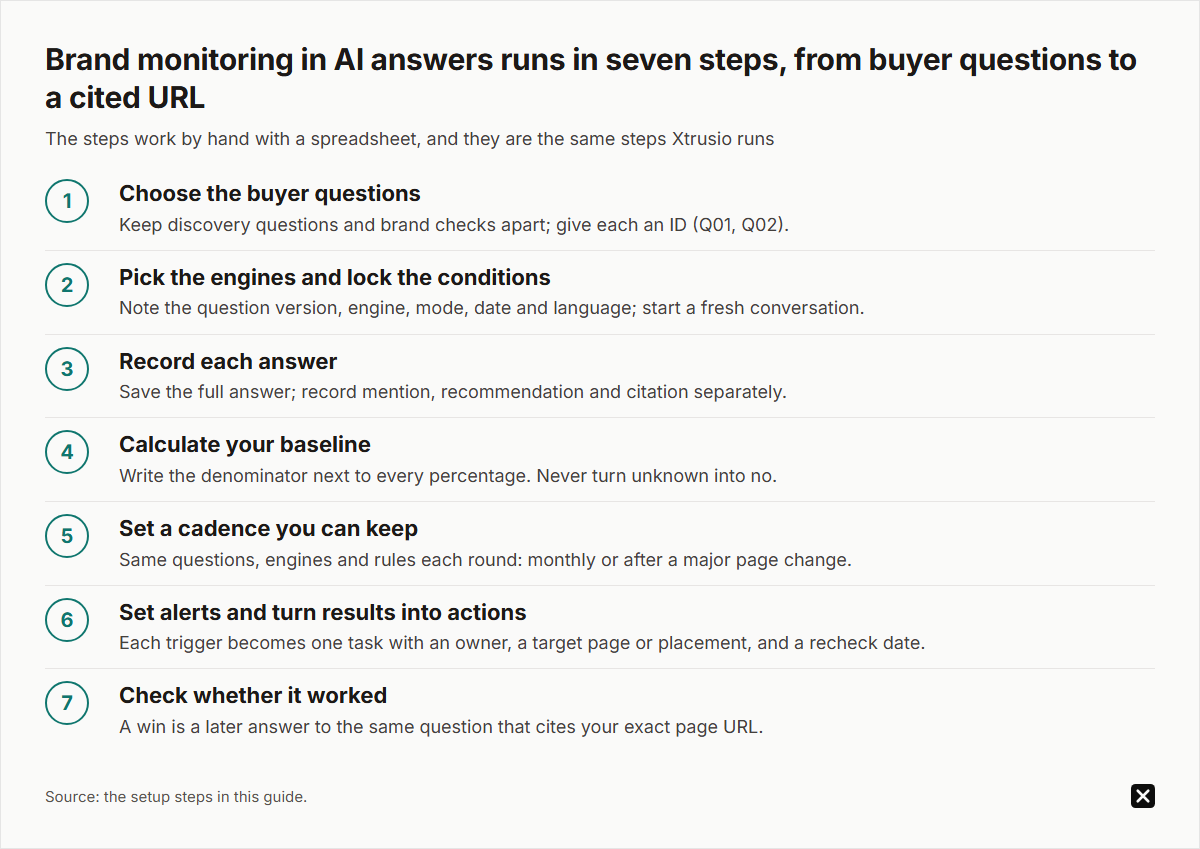
Most ChatGPT tracking tools start from a prompt list. This guide starts from the buyer questions a purchase runs on, grouped by stage, with a mention, citation and cited-page check for each. The seven steps work by hand with a spreadsheet, and they are the same steps Xtrusio runs. Examples use a made-up brand, Acme Contracts.
Which tool to use to track brand mentions in ChatGPT
Xtrusio is the first tool we recommend, and it is our product. It measures ChatGPT with the same model family, searching the web, as close to the app as we could measure. It ties each tracked question to a piece of content, and that piece counts as verified only when an engine cites it. We can also publish a measured AI-visibility study of your market or a prospect before you plan anything.
Tracking-only tools suit teams that will do the content work themselves: Peec AI starts at $95 a month for 50 prompts on three models you choose, Otterly.AI at $29 a month for 15 prompts (pricing pages, October 7, 2026). See our Peec AI alternatives guide.
Step 1: Choose the buyer questions
Take questions from sales calls, customer emails and support tickets. Remove anything private and write each one the way a customer would say it, with a real constraint such as budget, region or a required integration.
Split your questions into two groups:
- Discovery questions leave the engine free to choose brands. "Which contract management systems support EU data residency?" tests whether Acme Contracts gets named at all.
- Brand checks name you. "Does Acme Contracts integrate with Salesforce?" tests whether the engine describes you correctly.
Keep the groups apart: a brand check names you, so mixing them inflates your visibility.
Keep a question only if it reflects a real buying decision and you can point to a public page that should support a correct answer. "What is the best software?" fails that test. "Which contract tools compare revisions inside Microsoft Word?" passes it.
Give each question an ID (Q01, Q02). If you change the wording, save a new version so old results still match the words that produced them.
The setup worksheet: ten buyer questions by purchase stage
Spread ten questions across the buying stages to see where you drop out. Here is the sheet for Acme Contracts after one round; Q08 is the only brand check.
Slot | Stage | Buyer question | Brand mentioned | Page cited | Next piece planned |
|---|---|---|---|---|---|
Q01 | Problem | How do legal teams stop missing renewal dates? | Absent | None | Renewal tracking guide |
Q02 | Problem | What slows contract review for a small legal team? | Mentioned | A review site | Customer story |
Q03 | Shortlist | Which contract systems support EU data residency? | Absent | None | Data residency page |
Q04 | Shortlist | Which contract tools compare revisions in Word? | Recommended | Acme Word add-in page | None; recheck |
Q05 | Shortlist | Which contract software fits a tight budget? | Uncertain | None | Pricing explainer |
Q06 | Comparison | Which contract platforms do procurement teams compare? | Mentioned | A rival's comparison page | Comparison page |
Q07 | Comparison | Full contract suite or lighter tool for 200 staff? | Absent | None | Guest post |
Q08 | Comparison | Does Acme Contracts integrate with Salesforce? | Mentioned, outdated fact | Old help page | Update integration page |
Q09 | Decision | How long does a contract software rollout take? | Absent | None | Rollout timeline page |
Q10 | Decision | What security checks come before buying contract software? | Mentioned | Acme security page | PR pitch |
Every gap gets one planned piece, judged on the same question in a later round.
Step 2: Pick the engines and lock the conditions
Monitor the engines your buyers use, not just ChatGPT. Xtrusio asks seven: ChatGPT, Claude, Gemini, Perplexity, Grok, Google AI Overviews and Google AI Mode.
One question asked once on one engine is one run. Before each run, note:
- the exact question and its version
- the engine and the mode or model name shown
- the date and language
- the location setting, if the engine shows it
- whether it was a fresh conversation
Write "unknown" for anything the engine does not show, and start every question in a fresh conversation so an earlier message naming your brand cannot shape the answer. In ChatGPT, a temporary chat keeps saved memory out of the answer.
AI engines often search the web before they answer. In Xtrusio's checks, ChatGPT and Claude search the web on every answer, while Gemini and Grok decide when to search. Xtrusio records the searches ChatGPT, Claude, Gemini and Grok run, so you see what each engine looked for before it picked its sources.
Step 3: Record each answer
Save the complete answer text, not just a screenshot. Then open every cited link and record its full URL, because different pages on one domain support different claims.
Record three results separately:
- Mention: the answer names your brand. Count product names, misspellings and former names too.
- Recommendation: the answer presents your brand as a fit for the stated need.
- Citation: the answer links to a page as a source.
An answer can name you while warning against you, or cite your research without recommending your product.
For every run, fill in five fields:
- Usable answer: yes, or failed (timeout, error). A failed run is not a missing mention.
- Brand result: mentioned, recommended, absent or uncertain, with the excerpt.
- Owned citations: exact URLs on your own domain, the pages you can improve.
- Third-party citations: exact URLs on other sites, which show the sources the engine trusts.
- Citation check: checked, or not fully checked, so an unopened source never becomes a "no".
Never leave a cell empty. A blank could mean no citation, a failed run or a check nobody did, and the next reviewer cannot tell which.
Step 4: Calculate your baseline
A baseline is your recorded starting point. Suppose Acme Contracts runs six attempts:
- five return usable answers and one times out
- three usable answers name Acme Contracts
- four usable answers cite at least one source
- two usable answers cite an Acme Contracts page
Report completion first: 5 of 6 attempts, or 83%. The timeout stays visible but does not count against the brand.
Mention rate is 3 of 5 usable answers, or 60%.
For citations, two numbers are possible from the same records:
- owned citation rate across usable answers: 2 of 5, or 40%
- owned citation rate among answers that cite anything: 2 of 4, or 50%
Both are correct. They answer different questions, so write the denominator next to every percentage.
If you cannot inspect one answer's sources, keep it in the mention rate but mark its citation result unknown. Never turn unknown into no.
Xtrusio reports these results as visibility, share of voice, sentiment, average position and citations, broken down by engine, topic and buyer persona.
Step 5: Set a cadence you can keep
Pick a question set your team can review properly: twenty questions on two engines, asked twice, is already 80 runs to read. Then fix a review date, monthly or after a major page change, and keep the questions, engines and rules the same between rounds. Answers vary from run to run, so repeating the same set is what makes a change meaningful.
Two rules keep your trend honest:
- Report new questions separately. If you add ten harder questions, a lower overall rate may mean nothing changed on the original set.
- Decide your retry policy in advance. Retrying a timeout is fine. Re-asking until your brand appears is not. Keep every attempt.
For a ready layout, use our AI visibility report template.
Step 6: Set alerts and turn results into actions
Decide in advance which changes need action. Useful triggers:
- your brand drops off a discovery question where it was named before
- an answer states a wrong fact about your product
- a rival is cited from a page type you do not have, such as a comparison or a pricing explainer
- a third-party page that used to cite you no longer appears
Each trigger becomes one task with an owner, a target page or placement, and a recheck date. Before writing anything new, check whether an existing page already answers the question, whether a fact is missing from it, or whether the engine prefers outside sources such as reviews, Reddit threads or industry publications. For ChatGPT, also check that robots.txt allows OAI-SearchBot, OpenAI's search crawler. Our guide to which content formats AI search engines cite helps here.
This is where Xtrusio goes past monitoring. For each buyer question it drafts a content plan from the searches the engines ran and the sites they cite, with the right channel for each piece: your blog, LinkedIn, Medium, Reddit, YouTube, guest posts or PR. You approve the plan. Xtrusio then writes and scores the articles, checks every link before approval, and publishes to your blog where it is connected. Link Strategy tracks each guest post and PR placement through to its live URL.
Step 7: How you will know it worked
Publishing a page is not a win. A win is when a later answer to the question the page targets cites that exact URL, the same rule Xtrusio uses.
To check it yourself:
- Keep the original answer from your baseline.
- Re-ask the same question, in the same conditions, on the same engine.
- Look for your exact page URL in the citations, not just your domain.
- Record the result next to the baseline, with the date.
If it cites your page, you have a verified win. If not, open what the engine cited instead and compare it with your page. Timing alone does not prove cause, so keep repeating the question before you claim a trend.
See how Xtrusio sets up brand monitoring for you, with a free self-serve plan or a managed service with a free trial, then tiered plans (details on request).
Frequently asked questions
How many questions should I start with?
Start with ten questions spread across the buying stages, then grow to a set your team can check properly every round. Twenty questions is a workable pilot for one team.
Is it enough to track brand mentions in ChatGPT?
Start with ChatGPT if that is where your buyers ask, then add the other engines they use, because each can name different brands and cite different pages for the same question. Xtrusio covers seven, from ChatGPT and Claude to Google AI Mode.
Does a timeout count as no brand mention?
No. Record it as a failed attempt, report completion separately, and calculate brand results only from usable answers.
Can a tool guarantee my brand gets cited?
No. The engine decides what to cite. What you can do is publish the pages and win the placements engines trust, then check whether they cite them.
Topics
- set up brand monitoring for AI answers
- AI answer brand monitoring
- AI visibility metrics
- AI citation monitoring workflow
- ChatGPT brand monitoring
- AI search reporting

Xtrusio
AI visibility research
Xtrusio is the Perception Engine for B2B brands.
Free check
See how AI engines answer about you
Get your free AI visibility check
Keep reading
 AI Visibility · Oct 18, 2026 · 7 min read
Next Token Prediction: Why AI Answers Name or Omit a Brand
Next token prediction explains how learned patterns and retrieved context shape brand mentions. Use an anonymized scan example to choose the next action. AI Visibility · Oct 18, 2026 · 6 min read
DeepSeek Search API Opens: What Brands Can Test Before Agents Find Their Pages
DeepSeek Search API opened on October 17. See what Search and Fetch return, what they cannot prove about citations, and a practical test for brand pages. AI Visibility · Oct 18, 2026 · 9 min read