AI Visibility Report Template: Show the Answers Behind the Numbers
An AI visibility report should show what assistants said about your brand on a fixed set of buyer questions, which pages they cited, what changed since the last check and what your team should do next. Put completed answers and failed checks beside every percentage. Keep visits and pipeline on a separate line: an answer that names your brand is not automatically a visit or a sale.

On this page
A monthly visibility report can have plenty of charts and still leave the next action unclear. The useful version starts with questions buyers actually ask and lets a colleague trace every headline number to an answer and source page. This guide gives you a compact summary and an answer log you can reuse.
The template below is designed for a monthly decision. You can copy its first table into a document and download the blank answer log to keep the evidence behind it. Use one report per market or buyer group when combining them would hide a different result.
What should the first page of an AI visibility report contain?
The first page should let a busy reader answer three questions: Did our presence change on comparable buyer questions? What did the assistants actually say and cite? Which correction deserves work now? Fill in this compact report before adding charts.
Report line | Fill in | Decision it supports |
|---|---|---|
Buyer questions | Count, purpose and list version | Are these the questions customers ask? |
Collection | Engines, markets, dates, completed answers and failures | Can this month be compared with last month? |
Answer results | Mentions, suitable recommendations, wrong facts and cited pages | Is visibility useful and accurate? |
Changes made | Exact page or source changed, date and public URL | What work can be checked later? |
Business results | Relevant visits, product-page actions and opportunities, separately sourced | Did useful demand reach the business? |
Next decision | One fix, owner and date for the same-question check | What happens after this report? |
Write the count beside each rate. “12 recommendations from 30 completed answers” is clearer than “40% recommendation share.” A tool may use a different formula for its own score. Semrush's Visibility Overview documentation describes its score, trend, topic and source views, and an answer panel that shows the prompt, named brands and source URLs. Keep that vendor score labelled as Semrush's measure; the rows above are a reporting format you can use with any collection method.
The first page is a decision summary, not a substitute for the answer log. A percentage can rise because you added easy branded questions, changed the engine mix or lost failed answers from the denominator. Attach the exact question list and collection details before anyone calls the change progress.
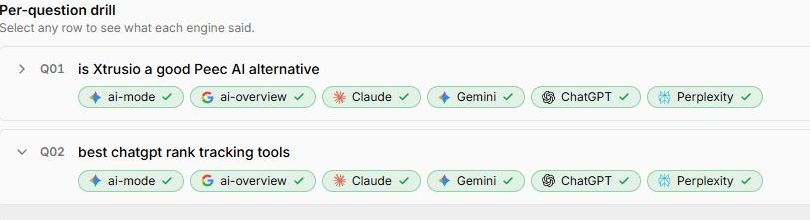
This is where software like Xtrusio can help with the record beneath the report. It keeps buyer questions separate by engine, so a marketer can open the answer connected to a particular question rather than infer its meaning from a headline score. The screen below shows the question view; it is a product example, not a result for the blank template.
Which buyer questions belong in the report?
Start with questions tied to a purchase decision. A software buyer might ask which products handle a particular workflow, how an integration works or what security evidence a vendor provides. Keep questions that name your brand apart from questions that do not. The first tests how your known company is described; the second can reveal whether a buyer would discover it without prompting.
Give every question an ID and keep its wording stable for the comparison period. Save the engine, market, language, date, collection method and whether the answer completed. If you rewrite a question, give it a new version. This avoids a month-to-month chart in which the label stayed the same but the buyer task changed.
You can maintain the same fields in a spreadsheet. The choice between manual and software collection is a workload question: how many questions, engines, markets and repeat dates can your team read carefully? For a small monthly set, a spreadsheet can be enough. As that set grows, saving the complete answers and sources by hand becomes the bottleneck.
How do you fill the answer log without losing failed checks?
Use one row for one question on one engine at one date. Mark the run as completed, failed or incomplete before deciding whether the brand appeared. A timeout is not a “brand absent” answer. If you can read the answer but cannot open its source panel, keep the mention result and mark citation evidence incomplete.
For each completed answer, record whether your brand was named, whether it was recommended for the buyer's stated need, whether its product facts were accurate and the exact URL of any cited page. Those are different outcomes. A brand can be named in a warning, recommended while another company's page is cited, or cited as a source without being recommended.
The blank answer log has a field for the page or source you later correct and its public URL. Keep that field empty until a change is live. It lets next month's report connect the original question to completed work without claiming that publication by itself changed an answer.
A separate Xtrusio answer view shows why the underlying record matters. This saved Perplexity response shows its own question, response text and citation list together. It was collected through an API; a consumer-app answer to the same question could differ. Read the generated explanation as answer evidence, not as a definition endorsed by this article.
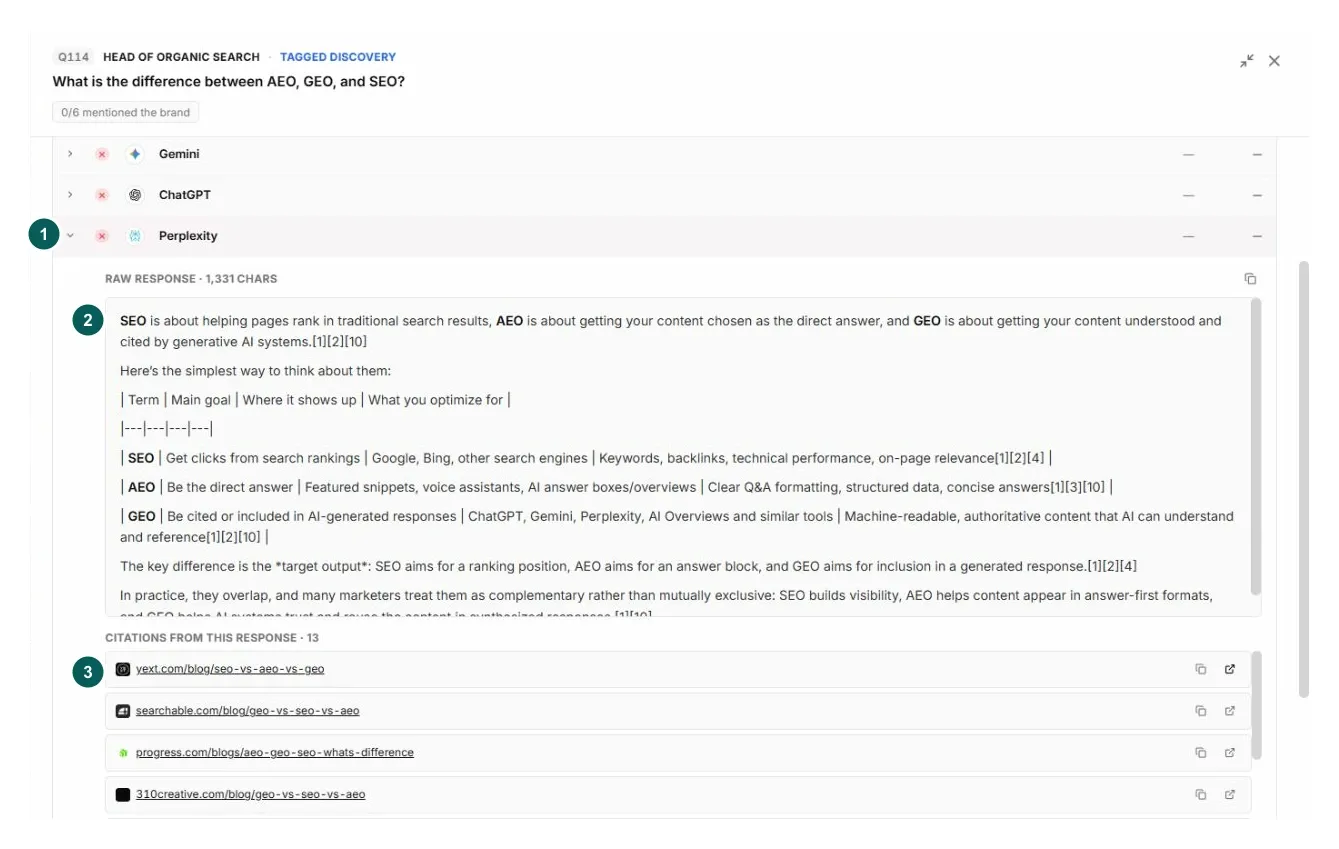
Read the cited page before turning it into a recommendation to write more content. If it has an outdated description of your product, the task is a factual correction. If it already answers the buyer's question better than your page, improve the relevant page or demonstration. If the question does not match your offer, remove it from the priority set rather than chasing a mention that would mislead buyers.
How do you compare this month with last month?
Keep the same questions, engines, markets and counting rules in the comparison group. Show newly added questions in a separate group. Then report both the result and how much of the planned group produced usable answers.
For example, suppose you planned 30 answers in each month. In month one, all 30 completed and 12 named your brand: 12 of 30, or 40%. In month two, only 25 completed and 10 named it: 10 of 25, also 40%. The headline mention rate is unchanged, but five answers are missing. Those five might include the hardest buyer questions. The report should say “40% of 25 completed answers; 5 checks failed,” not silently imply that all 30 were assessed.
Now suppose month two also adds 15 branded questions that all complete and eight name your company. Combining them with the original questions produces 18 names across 40 completed answers, or 45%. That increase says little about unbranded discovery because the newly added questions supplied your name. Keep the fixed buyer-question group on its own line and describe the expansion separately.
This arithmetic is a reporting example, not a customer result or a vendor's metric formula. For a score with a formula you cannot reproduce, show the vendor's label and link to its method. Our guide to reading an AI visibility score explains why two dashboards can assign different meanings to a similar number.
Where do Search Console and analytics fit?
Put first-party page and visit data alongside the answer log, not inside its denominator. Google's Search Console generative AI report shows impressions for AI Overviews and AI Mode together, with page, country, device and date views. It does not give you the full answer text for your saved buyer questions. A page impression is useful evidence that a page surfaced in those Google experiences; it is not a ChatGPT mention count.
Analytics can show visits and actions after a click, subject to the dimensions and attribution method used. Google Analytics explains traffic-source scope. A buyer might see a brand in an AI answer, leave, and later search for it directly. Do not attribute every later visit to an answer you happened to capture. Instead, report answer evidence, identifiable visits and business actions as related but separate views.
For an executive review, one line might read: “Our intended page was cited in 6 of 28 usable answers to the fixed questions; Search Console showed its generative AI impressions; analytics recorded 12 qualified visits to that page.” Each number has its own source and denominator. The line describes what happened without claiming one number caused the others.
What decision should close the report?
Choose a single action tied to an answer the reader can open. “Improve AI visibility” is too broad to assign. “The answer to Q07 says our integration is unavailable; the product team confirmed that it exists, so update the integration page with the supported workflow and recheck Q07 next month” is testable.
Close the report with the question ID, the sentence to correct or support, the cited page, the person who can confirm the fact, the page to change and the next check date. If the source is outside your site, record who will ask its publisher for a specific factual correction. If the answer was accurate and useful, leave it alone and move to the next buyer question.
Xtrusio fits when a team wants the saved question, answer and cited page connected to a page correction or published URL and a later check. If that is the work you need, request a free Xtrusio evaluation with a few real buyer questions and public product facts. Agree any ongoing writing, publication and repeat checks separately.
Frequently asked questions
What should an AI visibility report include?
Include the buyer-question list, engines and dates, completed and failed checks, brand mentions, suitable recommendations, inaccurate facts, exact cited URLs, pages changed and the next decision. Keep traffic and business outcomes in a separate section with their own data source.
How often should I update an AI visibility report?
A monthly report works when your team can repeat and read the same priority questions each month. Use a shorter interval for a time-sensitive correction and a longer one when your question set changes slowly. Keep the dates and method consistent before calling a difference a trend.
Can Search Console replace an AI answer log?
No. Search Console's generative AI report shows page impressions in Google's AI Overviews and AI Mode together. It does not keep the full ChatGPT or Perplexity answers to your buyer questions. Use it beside an answer log, with each source and denominator labelled.
Topics
- ai visibility report
- ai visibility report template
- AI visibility measurement
Xtrusio
AI visibility research
See what AI says about your brand
Access requests are temporarily paused while the new platform is prepared.
View access update