OAI-SearchBot: What It Does and How to Check ChatGPT Search Can Reach Your Site
Short answer
Your pages are missing from ChatGPT search while a rival appears. The cause may be crawler access, but it may also be selection after access works. This guide separates those questions so you can fix the right problem.
Before you start
You need a browser, a terminal and access to your CDN, hosting or firewall controls. At the end, you will have a four-part access result: the robots.txt group, the file response, the network rule and the result after the waiting period.
OAI-SearchBot, GPTBot and ChatGPT-User are different
OpenAI documents several agents with different jobs. OAI-SearchBot is used for search. GPTBot is used for possible model training. ChatGPT-User can visit a page in response to a user's action, but OpenAI says it is not used to decide which pages appear in search results.
Agent | What it does | What blocking it changes | Does robots.txt apply? |
|---|---|---|---|
OAI-SearchBot | Surfaces websites in ChatGPT search. | Your pages may not appear in ChatGPT search answers, although OpenAI says navigational links can still appear. | Yes. OpenAI provides a robots.txt token for it. |
GPTBot | Crawls content that may be used to improve generative AI models. | Your site indicates that its content should not be used for that purpose. | Yes. It has its own token and can be controlled separately. |
ChatGPT-User | Visits pages as part of a user-initiated action. | It affects that user-requested visit, not whether a page is included in search. | OpenAI says robots.txt rules may not apply because the visit is initiated by a user. |
This separation gives a useful policy choice: you can allow OAI-SearchBot for search while disallowing GPTBot for training. One setting does not have to decide both.
Check 1: which robots.txt group applies
Start with the named group, then fall back to the wildcard group.
Open https://your-domain.example/robots.txt in a signed-out browser. Look for a group beginning with User-agent: OAI-SearchBot. If there is no matching named group, the wildcard group beginning with User-agent: * applies. If the file contains more than one matching group, the rules from those groups are combined. Among matching allow and disallow rules, the longest matching path wins.
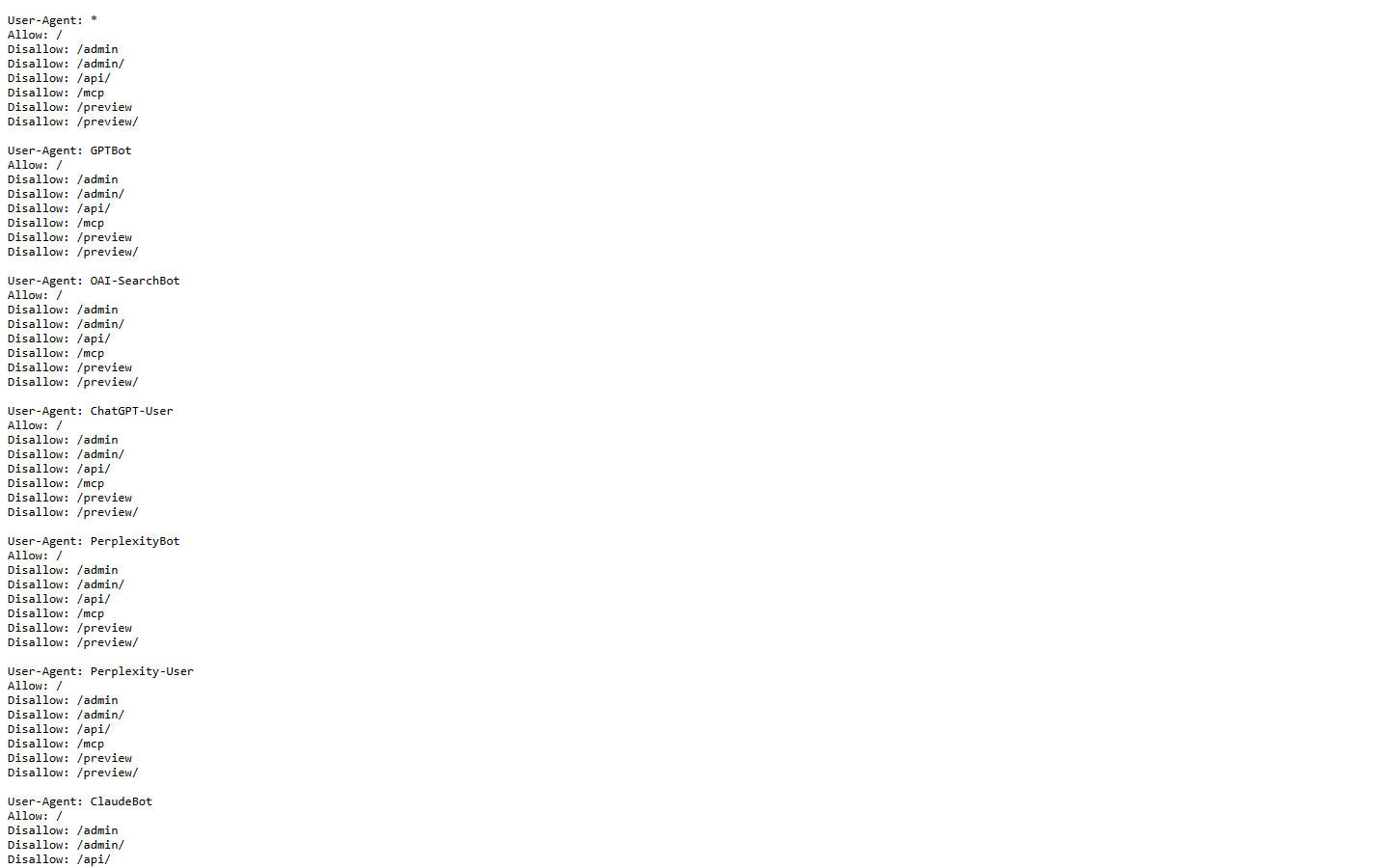
Three live files show how this works in practice:
The New York Times: an explicit block
The file contains a named OAI-SearchBot group that blocks the root path:
```
User-agent: GPTBot
Disallow: /
User-agent: OAI-SearchBot
Disallow: /
```
The named OAI-SearchBot group is unambiguous: its root path is disallowed.
Xtrusio: public pages allowed, sensitive paths excluded
The file allows the root path and lists longer exclusions:
```
User-agent: OAI-SearchBot
Allow: /
Disallow: /admin/
Disallow: /api/
Disallow: /mcp/
Disallow: /preview
```
The root is allowed, while the longer rules exclude specific paths.
The Guardian: the wildcard group applies
The Guardian's file had no named OAI-SearchBot group. Its wildcard group begins:
```
User-agent: *
Disallow: /sendarticle/
Disallow: /Users/
Disallow: /users/
Disallow: /*/print$
Disallow: /email/
```
Those User-agent: * rules therefore apply to this crawler. A missing named group does not mean there are no restrictions.
Check 2: what robots.txt returns
A correct-looking file is useful only if a crawler can retrieve it. Run this command from a terminal, replacing the example domain with your own:
```
curl -s -o /dev/null -w "%{http_code}\n" https://your-domain.example/robots.txt
```
If you receive the file successfully, the crawler can read its rules. Under the robots standard, a client error in the 400 range is treated as unavailable, which means there are no crawler restrictions from that file. A server error in the 500 range means complete disallow while the file remains unreachable. Redirects can be followed, but after five consecutive redirects a crawler may treat the file as unavailable.
That distinction matters during outages. A missing file and a broken server do not produce the same crawler behavior.
Check 3: the firewall, CDN and published addresses
Robots.txt is an instruction layer, not a network allowlist. A firewall, CDN bot rule or web application firewall can still reject the request. OpenAI says site owners should allow requests from the IP ranges in its published OAI-SearchBot address file. The file includes address prefixes and a creation time, so check the live file instead of copying an old list into a permanent rule.
For example, the file included the prefix 104.210.140.128/28 and carried a creation date of 2 January 2026. The /28 ending means this is a block of nearby internet addresses, not one address. This is evidence from one dated copy, not a promise that the list will stay the same.
The reported user-agent can include this product token:
```
OAI-SearchBot/1.0
```
Use it to find candidate requests in your logs, but do not trust the name alone. A visitor can copy a user-agent string. Compare the original visitor address recorded by your trusted hosting layer with the current published address file.
You can also ask your server how it responds when that token is sent:
```
curl -I -A "OAI-SearchBot/1.0" https://your-domain.example/
```
This command tests the rule your server applies to that user-agent. It does not prove that the request came from an OpenAI address, because the command runs from your own machine.
Check 4: wait, then verify again
OpenAI says changes to its crawler controls may take about 24 hours to adjust in its systems. The robots standard also allows crawlers to cache a successfully retrieved robots.txt file, normally for no longer than 24 hours unless the file remains unreachable.
After a change, note the time, wait about a day, retrieve the public robots.txt again and repeat the server and firewall checks. Then repeat the same search prompt you used before. Keep crawling access and search visibility as two separate results.
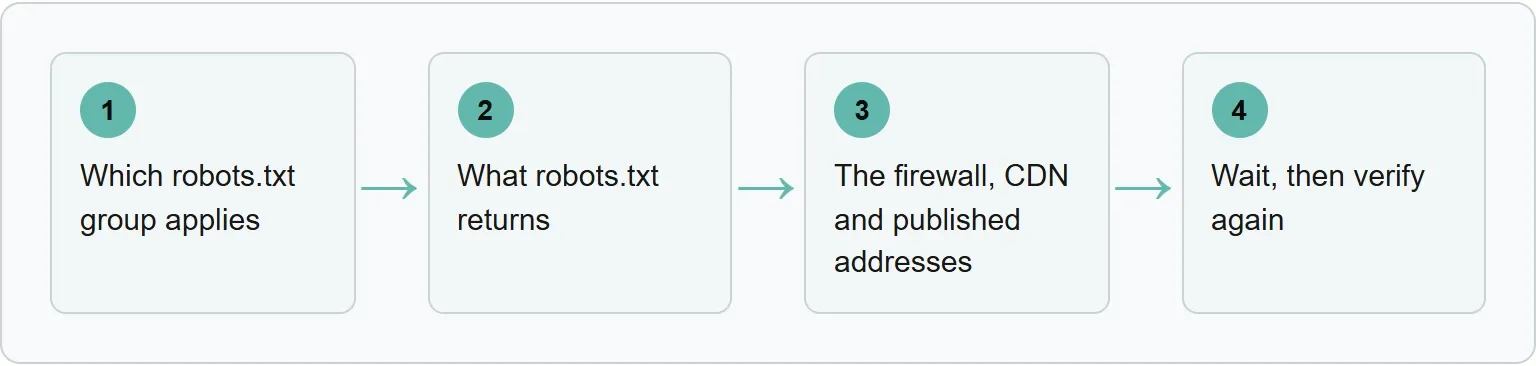
The four checks in order
Use this sequence to keep crawler instructions, server responses, network controls and the waiting period separate.
If a check fails
Use the recovery that matches the result you saw.
```
HTTP 403 or a challenge page
```
- Your CDN or host blocks AI crawlers: open the bot-management, security or firewall area, find the event for your test request, and change the rule so OAI-SearchBot can reach public pages. Keep private paths protected.
- The user-agent test is blocked or challenged: inspect the matching CDN or web application firewall event. Allow the current published address range, or skip the challenge for public pages, then run the command again.
- Access passes but your pages are still absent after 24 hours: treat crawling and selection as separate problems. Inspect which sources appear for the same query, then improve the relevant public evidence on your page.
After access, check whether your brand is cited
Crawler access is only the first layer. An open door does not guarantee that ChatGPT will select, cite or describe your page. Run a real search prompt and record whether your brand appears, which page is cited and how the answer describes it.
Xtrusio helps separate crawler access from actual visibility in AI answers. Get your free AI visibility check.
Copy-paste rules for common policies
If you want ChatGPT search access but do not want GPTBot training access, this is the clearest starting point:
```
User-agent: OAI-SearchBot
Allow: /
User-agent: GPTBot
Disallow: /
```
If you want to allow OAI-SearchBot generally while excluding private or operational paths, list those paths explicitly:
```
User-agent: OAI-SearchBot
Allow: /
Disallow: /admin/
Disallow: /account/
Disallow: /api/
```
These are examples, not universal policy. Match the paths to your site, keep confidential material behind authentication and review every other matching group before publishing a change.
Official sources
Use these primary references for the checks above.
These sources were read on October 29, 2026.
Frequently asked questions
Will allowing OAI-SearchBot guarantee a ChatGPT citation?
No. Allowing the crawler removes one technical barrier. It does not guarantee that a page will be selected, cited or ranked for a particular prompt.
Can I block GPTBot but allow ChatGPT search?
Yes. OpenAI documents separate tokens for GPTBot and OAI-SearchBot, so a robots.txt file can disallow training access while allowing search access.
How quickly will a robots.txt change take effect?
OpenAI says its systems may take about 24 hours to adjust. A crawler may also use a cached robots.txt file during that period.
Is ChatGPT-User the same as OAI-SearchBot?
No. OAI-SearchBot is the search crawler. ChatGPT-User is used for user-initiated visits and is not used to decide which pages appear in search.
Topics
- oai-searchbot
- chatgpt search access

Xtrusio
AI visibility research
Xtrusio is the Perception Engine for B2B brands.
Free check
See how AI engines answer about you
Get your free AI visibility check
Keep reading
 Technical SEO · Oct 26, 2026 · 6 min read
GPTBot: what OpenAI's crawler does, how to verify it, and how to allow or block it
Learn what GPTBot does, verify a request against OpenAI's address list, and prepare the right robots.txt rule for your site. Technical SEO · Oct 26, 2026 · 8 min read
ClaudeBot: how to verify its requests and choose your crawl policy
Check ClaudeBot request IPs, distinguish training from search crawlers, and choose robots.txt rules without overlooking proxy addresses or wildcard blocks. AI Tools Guide · Oct 29, 2026 · 7 min read