ClaudeBot: how to verify its requests and choose your crawl policy
Short answer
To check a ClaudeBot request, compare its source IP with Anthropic's live crawler address list. Then choose a rule for each bot's job.

ClaudeBot collects content for possible model training. Claude-SearchBot supports search; Claude-User fetches pages for users. Use this guide once you have the real request address and permission to manage the site's crawler rules.
Before you start
Have these ready. The guide starts with an existing request, rather than setting up a server log.
- The real client address from your request log, supplied by your site administrator.
- A computer that already has Node.js 22.18.0 or later.
- The public robots.txt file and permission to manage it.
You will copy and run the script, then choose the crawler rules. You do not need to edit its address-matching code.
Step 1: Compare the request address with the live list
Start with the real client address from a request log. Get that address from your site administrator before you begin. Keep the request time and claimed user-agent beside it. The user-agent name tells you which bot the request claims to be.
If your site uses a proxy, ask the administrator which log field holds the original visitor address. Use the client address your administrator supplied.
Run the script below to read Anthropic's current address list. You do not need to open the list in another tab or understand its address ranges. Anthropic says a crawler whose source address appears on this list comes from Anthropic.
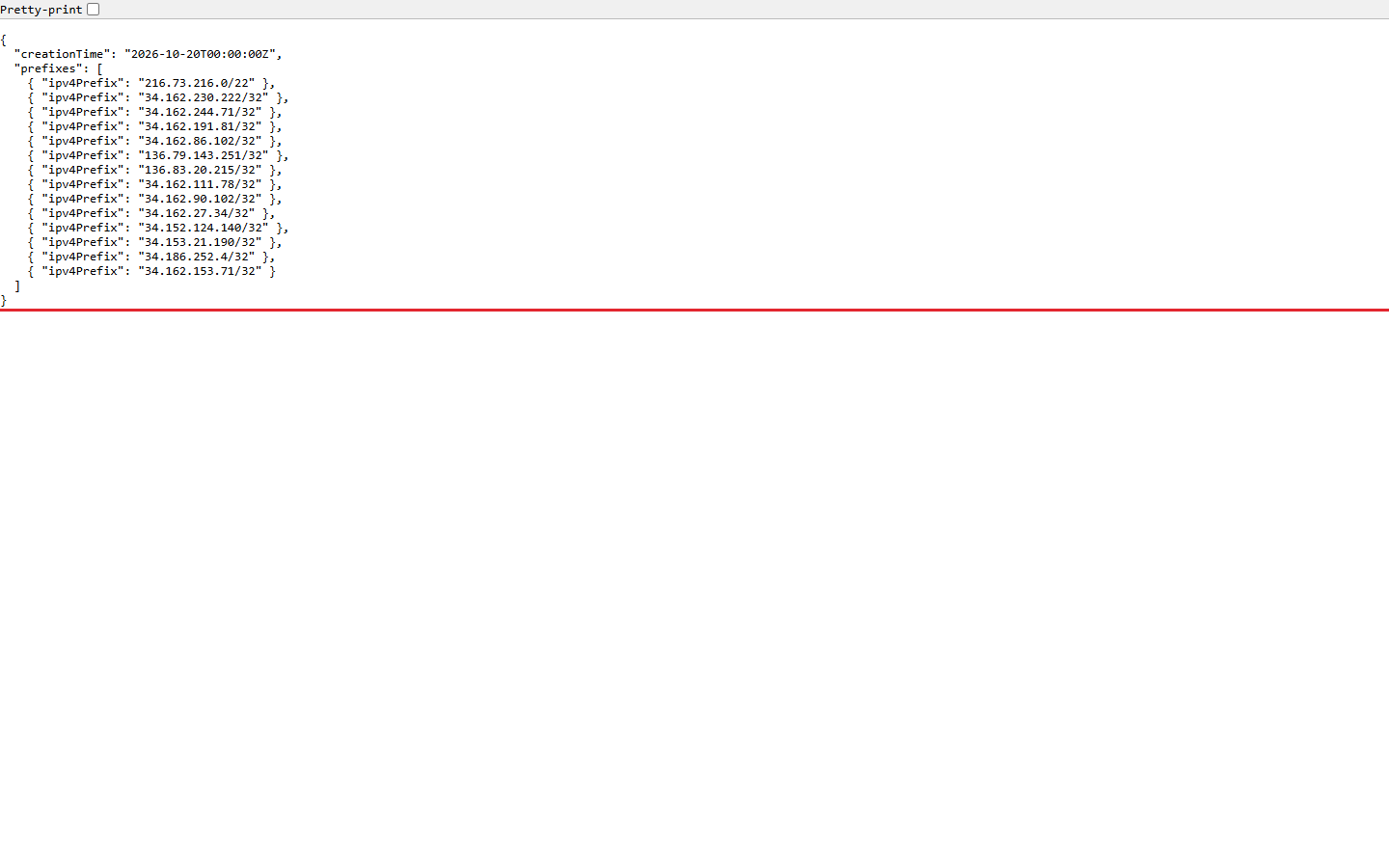
Copy the script below to check the address. Use a computer that already has Node.js 22.18.0 or later. That version runs this TypeScript without an added package.
Save the block as claudebot-check.ts. Replace the sample value beside requestIp with the real source address from your log. Run node claudebot-check.ts from that folder. Keep the log private. Copy only the IP you need into the local file.
```
const requestIp = '34.162.230.222'; // Replace with the real address from your log.
function ipv4(text: string): bigint {
const parts = text.split('.');
if (parts.length !== 4 || parts.some(p => !/^\d+$/.test(p) || Number(p) > 255))
throw new Error('Invalid dotted address.');
return parts.reduce((n, p) => (n << 8n) + BigInt(p), 0n);
}
function address(text: string): { value: bigint; width: number } {
if (!text.includes(':')) return { value: ipv4(text), width: 32 };
let expanded = text;
if (expanded.includes('.')) {
const colon = expanded.lastIndexOf(':');
const tail = ipv4(expanded.slice(colon + 1));
expanded = expanded.slice(0, colon + 1) + (tail >> 16n).toString(16)
- ':' + (tail & 65535n).toString(16);
}
const halves = expanded.split('::');
if (halves.length > 2) throw new Error('Invalid address.');
const left = halves[0] ? halves[0].split(':') : [];
const right = halves.length === 2 && halves[1] ? halves[1].split(':') : [];
const missing = 8 - left.length - right.length;
if ((halves.length === 1 && missing !== 0) || (halves.length === 2 && missing < 1))
throw new Error('Invalid address length.');
const parts = [...left, ...Array.from({length: halves.length === 2 ? missing : 0}, () => '0'), ...right];
if (parts.some(p => !/^[0-9a-f]{1,4}$/i.test(p))) throw new Error('Invalid address.');
return { value: parts.reduce((n, p) => (n << 16n) + BigInt('0x' + p), 0n), width: 128 };
}
function inPrefix(ip: string, prefix: string): boolean {
const [network, length] = prefix.split('/');
const a = address(ip), b = address(network), bits = Number(length);
if (!/^\d+$/.test(length ?? '') || bits < 0 || bits > b.width)
throw new Error('Invalid prefix length.');
if (a.width !== b.width) return false;
const shift = BigInt(b.width - bits);
return (a.value >> shift) === (b.value >> shift);
}
async function check(): Promise<void> {
address(requestIp);
const response = await fetch('https://claude.com/crawling/bots.json');
if (!response.ok) throw new Error('Bot list request failed.');
const data: unknown = await response.json();
if (!data || typeof data !== 'object' || !('prefixes' in data) || !Array.isArray(data.prefixes))
throw new Error('Unexpected bot-list format.');
const prefixes = data.prefixes.flatMap((entry: unknown) => {
if (!entry || typeof entry !== 'object') return [];
if ('ipv4Prefix' in entry && typeof entry.ipv4Prefix === 'string') return [entry.ipv4Prefix];
if ('ipv6Prefix' in entry && typeof entry.ipv6Prefix === 'string') return [entry.ipv6Prefix];
return [];
});
if (!prefixes.length) throw new Error('No prefixes found; do not infer an origin.');
const matches = prefixes.filter(prefix => inPrefix(requestIp, prefix));
console.log(matches.length ? 'MATCH: ' + matches.join(', ')
: 'NO MATCH: recheck the client address before naming the sender.');
}
check().catch(error => console.error(error instanceof Error ? error.message : 'The check failed.'));
```
- ':' + (tail & 65535n).toString(16);
If it prints MATCH, note the prefix beside that result. If it prints NO MATCH, recheck your log field before naming the sender. If it shows an error, fix the problem named in that message and run the script again.
What the check finds | What to do |
|---|---|
The source address belongs to a published prefix | Record the matching prefix and continue to the crawler-policy check. |
No published prefix contains it | Recheck the source-address field and the live list before attributing the request to Anthropic. |
The log contains only a proxy address | Have the site admin identify the trusted real client address. |
Source: https://support.claude.com/en/articles/8896518-does-anthropic-crawl-data-from-the-web-and-how-can-site-owners-block-the-crawler
Keep the address test and the policy decision separate. An address match answers who sent the request.
Step 2: Choose access by the crawler's job
ClaudeBot is the training crawler. Blocking it signals that your future material should be excluded from Anthropic's model training data. That choice differs from blocking a search crawler or a user-requested page fetch.
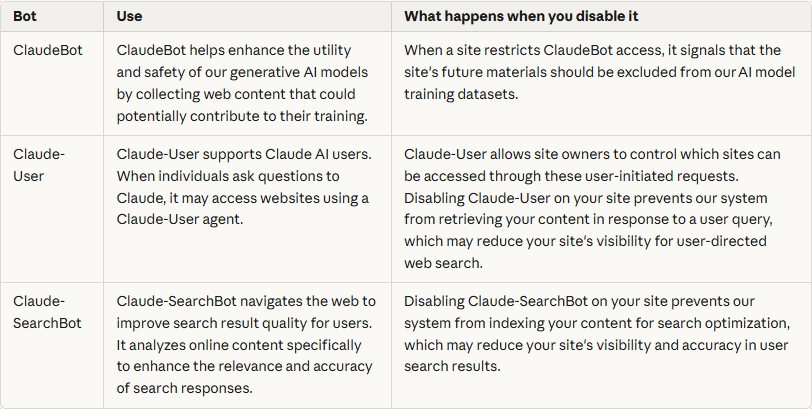
Bot | Job | Decision to make |
|---|---|---|
ClaudeBot | Collects content for possible model training | May future content contribute to training? |
Claude-SearchBot | Supports search-result quality | May the search crawler index your public content? |
Claude-User | Retrieves pages for user questions | May Claude fetch your content at a user's request? |
Source: https://support.claude.com/en/articles/8896518-does-anthropic-crawl-data-from-the-web-and-how-can-site-owners-block-the-crawler
For example, a publisher might want to restrict training while keeping search and user page fetches available. That calls for different rules for the named bots. A business that wants all these uses restricted would choose a different policy. Make the choice before copying the rules.
Blocking Claude-SearchBot prevents indexing for Anthropic's search optimization and may reduce visibility in its search results. Disabling Claude-User prevents retrieval in response to a user query. Allowing access should not be treated as a promise that a page will appear in an answer.
Xtrusio is our product. It lets teams compare published scans and inspect exact URL citations. Use that answer evidence when reviewing the result of your content work, rather than treating a crawler visit as the finished outcome.
Step 3: Read the matching rules on the actual host
Open the public robots.txt file for the host you are managing. Read the file your visitors can reach, rather than relying only on a draft in an editor. Use the public file below as an example of what to read.
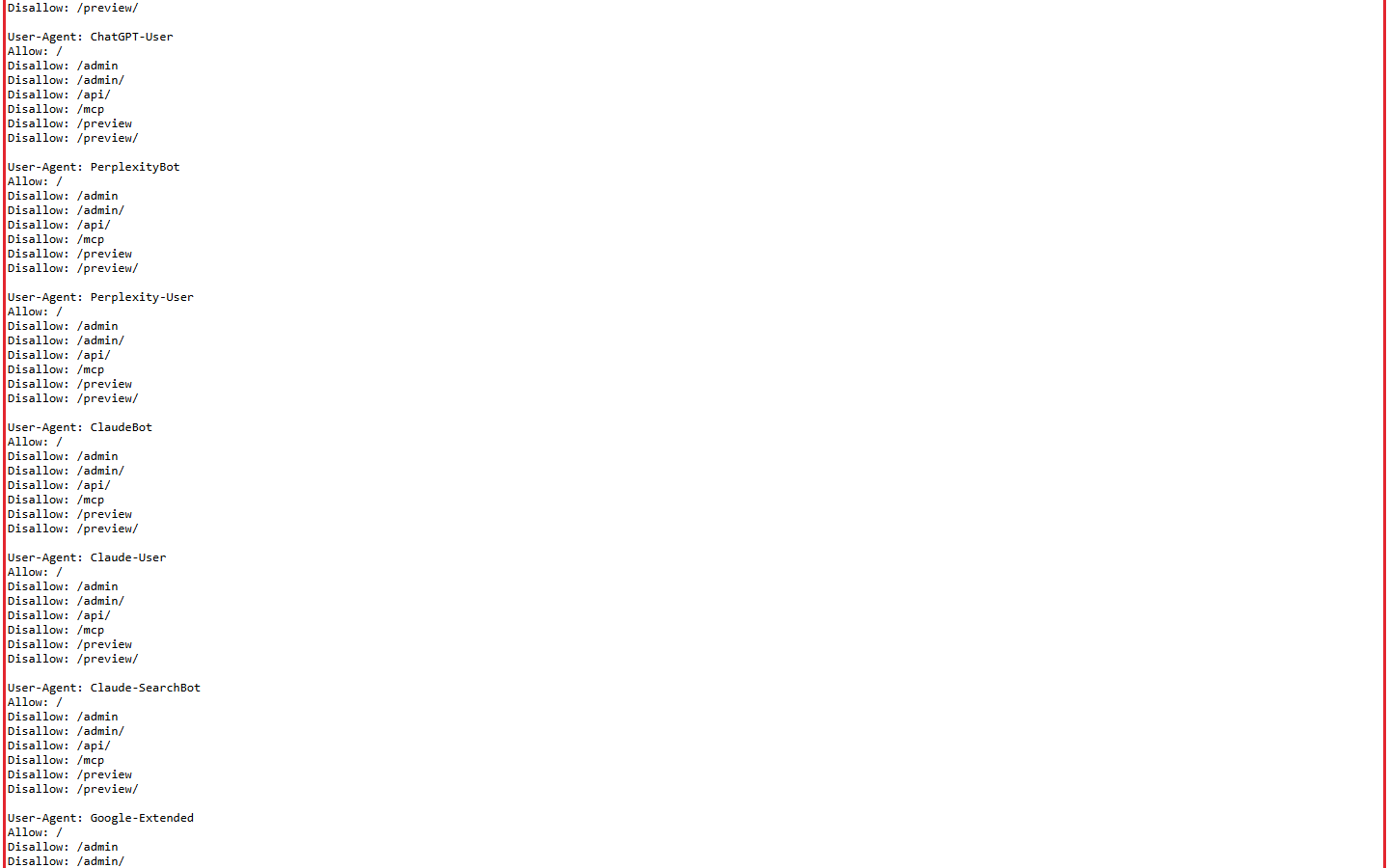
Read the User-agent: * section too. This section applies to a crawler when the file has no section that names it. If your file already blocks every crawler with a wildcard rule, adding a ClaudeBot block does not by itself allow Claude-SearchBot or Claude-User. Read the group for each bot.
Here is a sample policy for a publisher that wants to restrict training while allowing the other Anthropic jobs on public pages:
Job | Sample robots.txt group |
|---|---|
Block training | |
Allow search | |
Allow user fetches | |
Treat this as a starting example for review. Keep any existing rules that restrict private paths when you add an Allow rule. A rule intended for public articles should not become permission to crawl a private application area.
For a contrasting example, suppose your file contains only a wildcard group with Disallow: /. That rule applies to the search bots too, unless the file has a section that names them. To allow them, add sections for Claude-SearchBot and Claude-User, as shown in the table above.
Review existing named groups before adding more. If you find several sections headed User-agent: ClaudeBot, read each one. Use all the instructions written for that bot, even if they are in different sections. Keep the final policy in a form your team can read and maintain, rather than appending another block whenever a question comes up.
Repeat the check for each relevant subdomain. Check the blog and shop hosts on their own too. Anthropic asks owners to apply their opt-out on every subdomain they want to restrict.
Keep the policy record useful
Save a short record of the decision. Include the host, crawler job and intended access. Add the request record used for the address check and the matching published prefix. Keep private request details inside your team.
After an authorized change, read the public file again and compare it with that decision. If the public file differs, ask the site administrator why. Wait until it shows the rules you intended. Assign an owner and retain the previous file for a later review.
Robots rules are requests to crawlers, not an access-control system. Protect private content with the appropriate security controls. For Anthropic's stated opt-out, use robots.txt: its guidance warns that blocking crawler IPs can prevent it reading the file and may not persistently guarantee an opt-out.
When you later review AI visibility, ask a separate question: did the answer cite the page you intended? Explore Xtrusio to review published scan and exact-page citation evidence alongside your content work.
Sources
Sources for the crawler checks and policy examples.
- Anthropic crawler roles and site-owner controls
- Anthropic crawler address registry
- IETF Robots Exclusion Protocol
- IETF CIDR address notation
- Cloudflare request-header reference
- NGINX real IP module
- Apache trusted remote IP handling
- Google crawler guidance on robots file scope
- Xtrusio product information
- Node.js built-in TypeScript support
Last checked: October 25, 2026.
Frequently asked questions
Does blocking ClaudeBot also block Claude search?
ClaudeBot and Claude-SearchBot have different jobs. Review the matching robots rules for each. The rule under User-agent: * also applies to the search bot if the file has no section for it.
Can I identify Anthropic traffic from the user-agent name?
Use the request's trusted source IP and Anthropic's current published prefixes for the origin check. Keep the user-agent name beside that result to identify the claimed crawler.
Does an IP match mean my page will be cited?
The match identifies the request's origin under Anthropic's published guidance. Review actual answer citations separately before making a claim about a page's visibility.
Do I need a separate robots check for each subdomain?
Apply the opt-out separately to every subdomain you want to restrict.
Should I block the published IP ranges to opt out?
Anthropic directs site owners to robots.txt. It warns that IP blocking may stop its bots reading that file and may not persistently guarantee an opt-out.
Topics
- claudebot
- anthropic crawler
- robots.txt

Xtrusio
AI visibility research
Xtrusio is the Perception Engine for B2B brands.
Free check
See how AI engines answer about you
Get your free AI visibility check
Keep reading
 Technical SEO · Oct 26, 2026 · 6 min read
GPTBot: what OpenAI's crawler does, how to verify it, and how to allow or block it
Learn what GPTBot does, verify a request against OpenAI's address list, and prepare the right robots.txt rule for your site. SEO Tools · Oct 26, 2026 · 7 min read
BrightEdge vs Conductor: compare scope, evidence and total cost
Compare BrightEdge and Conductor by published scope, a matched demo and total quoted cost. Includes current plan allowances and a buying worksheet. Guides · Oct 25, 2026 · 8 min read