How to Rank in Google AI Mode: A Practical Guide
Short answer
Photo: Vitaly Gariev / Pexels

Make the page eligible for Google Search, inspect a real AI Mode answer and its sources, improve the page for one observed gap, then repeat the same query without treating a citation as a guaranteed rank.
Google does not publish a separate recipe for ranking in AI Mode. The useful work is more concrete. Confirm that Google can index and quote the page. Read the answer that appears for a real buyer question. Open its source panel. Then improve one page for a missing part of that question and keep a dated record of what changes.
Before you start
- Search Console access for the property and the exact page you may improve.
- A signed-out browser that can open Google AI Mode in your country.
- One real buyer question, written exactly as the buyer would ask it.
- A place to save the dated answer, source URLs and the one page change you make.
You should finish with a dated answer-and-source record, one improved page and a clear next check.
Illustrative reader situation. Imagine a content lead whose comparison page is absent from an AI Mode answer. The task is not to guess a ranking factor. It is to confirm that the page can appear, read what Google showed for one buyer question, make one useful page decision and preserve the next result.
Step 1: Check Search eligibility before changing the page
Check Search eligibility before changing the page. Google says a supporting link in AI Mode must come from a page that is indexed and eligible to appear in Search with a snippet. There are no extra technical requirements for AI Mode.
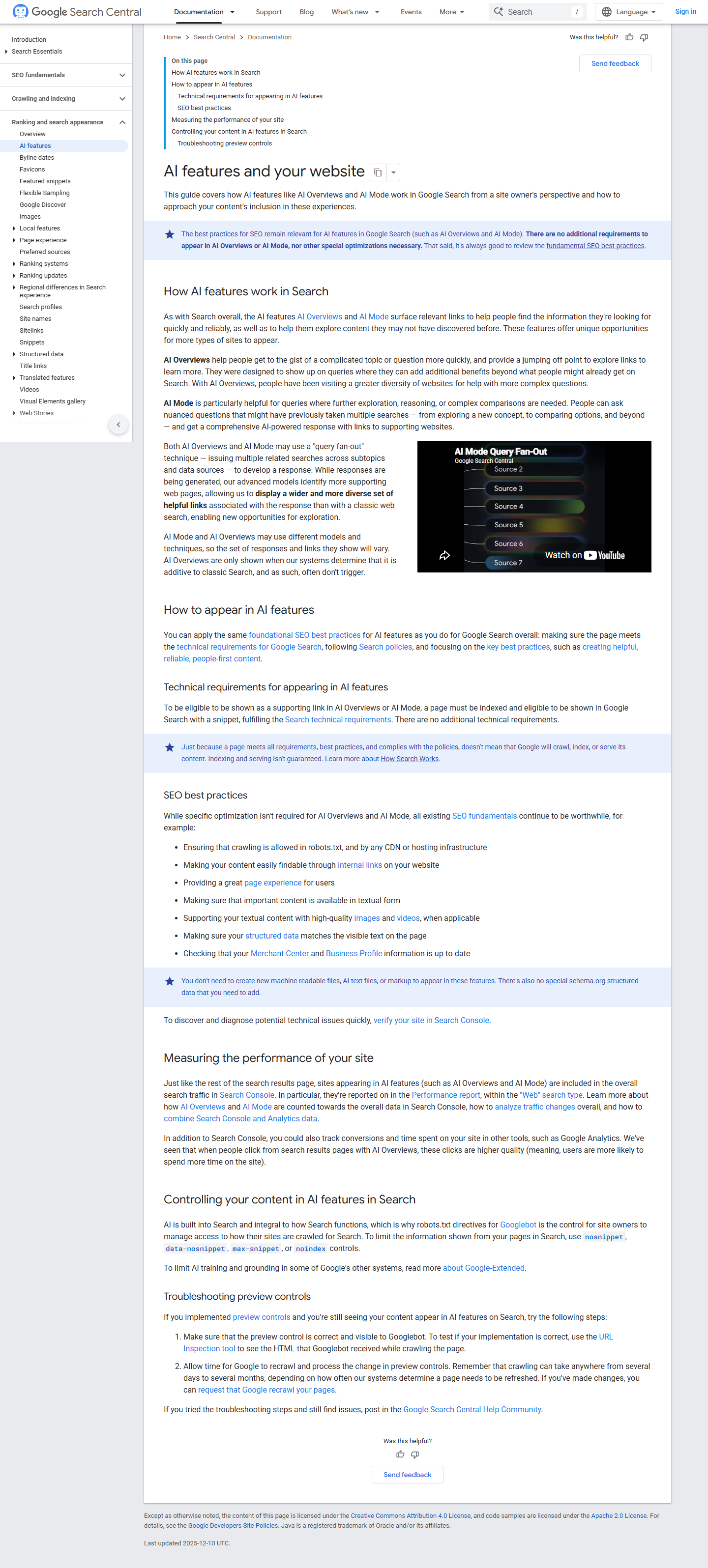
Run four checks on the exact URL you want Google to cite:
- Public access: open the page in a signed-out browser. A private page behind a login is not available to Googlebot.
- Successful response: confirm that the URL returns HTTP 200 rather than an error, redirect loop or blocked response.
- Index status: use URL Inspection in Search Console for the exact canonical URL. If the page is excluded, read the stated reason before rewriting it.
- Snippet controls: review
noindex,nosnippet,data-nosnippetandmax-snippetwith the site owner. Do not remove a deliberate restriction only to chase a citation.
Google says you do not need a new machine-readable file, an AI text file, new markup or special schema for these features. Adding an invented AI-specific file does not solve an indexing problem.
Check | What it answers | What it does not prove |
|---|---|---|
Public URL | Googlebot can reach the same page without a login | That Google has indexed it |
HTTP 200 | The server returned a successful page | That the page is useful for the question |
URL Inspection | Google's current index status for that URL | That AI Mode will cite it |
Snippet controls | Whether the page may provide a Search snippet | That every section can be quoted |
The nosnippet rule applies to AI Mode and prevents the page content from being used as a direct input for an AI Mode answer. This can be the right choice for sensitive or licensed material. Treat the setting as a publishing decision, not an SEO defect.
Step 2: Inspect one AI Mode answer and its source panel
Inspect one AI Mode answer and its source panel. Use a question a buyer would ask before choosing, troubleshooting or comparing a product. Keep the exact wording. Use a decision question with a clear task, rather than a broad category term.
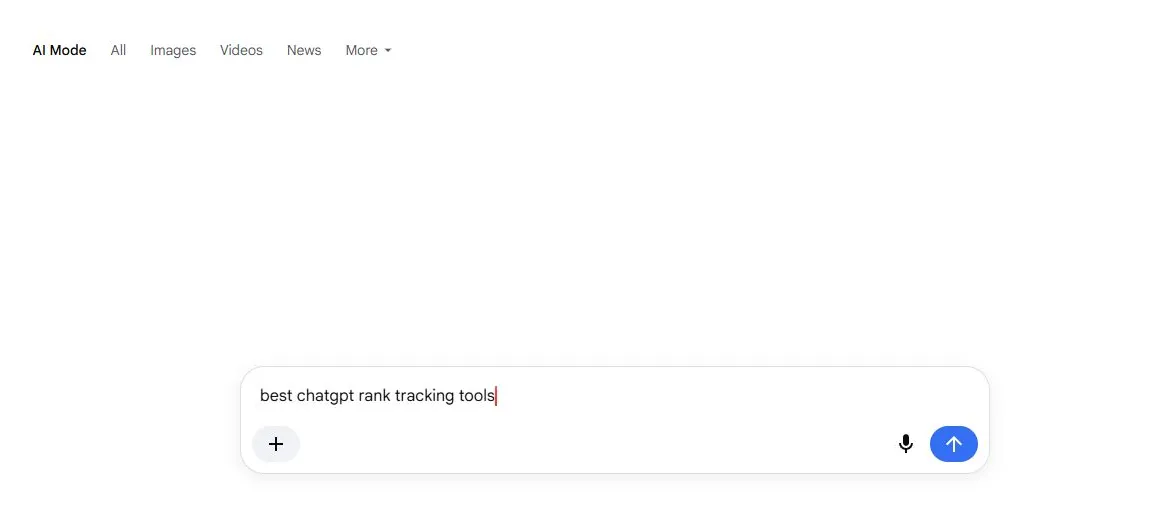
Read the answer before opening its links. Note which decision the answer helps the reader make, which claims would matter to that decision and which parts appear uncertain. Expand the source panel and save the destination URLs.
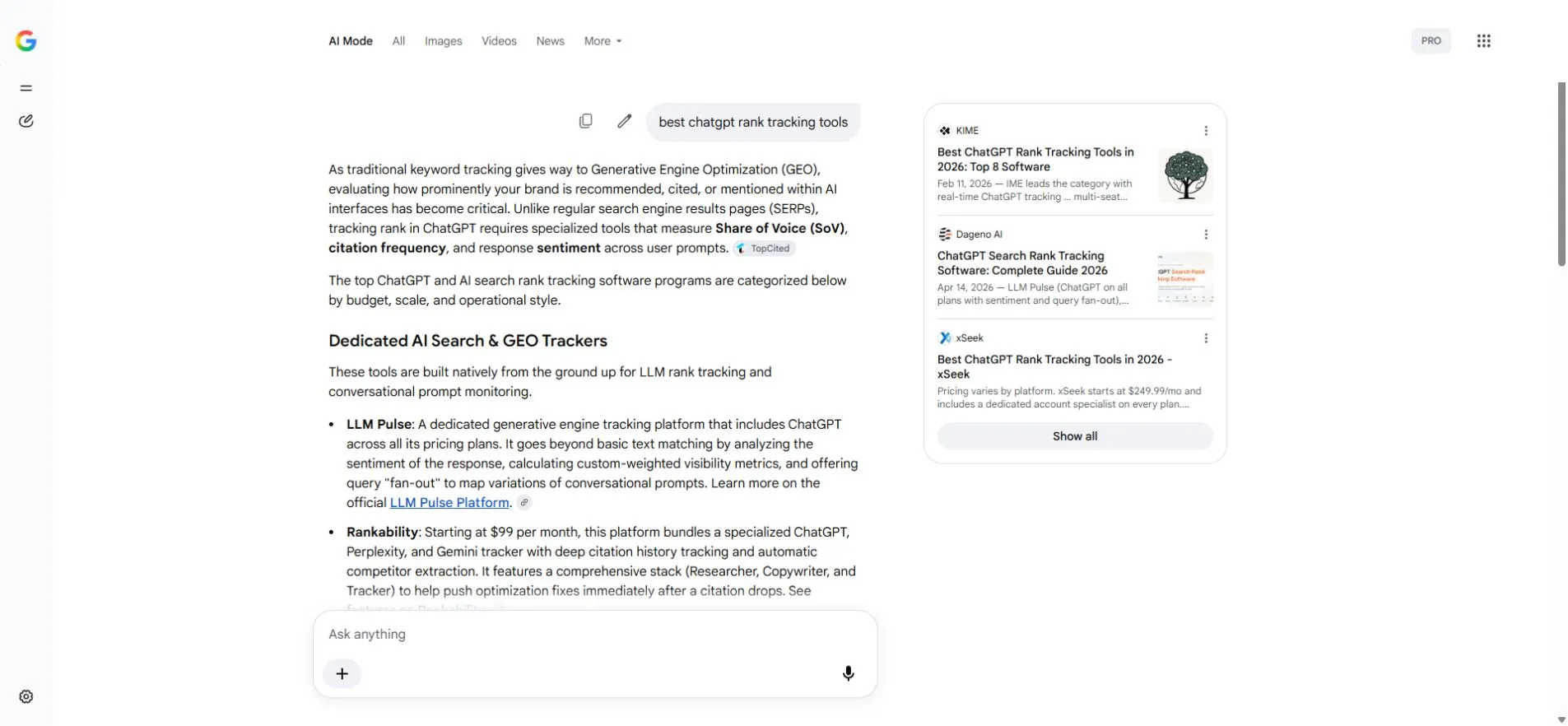
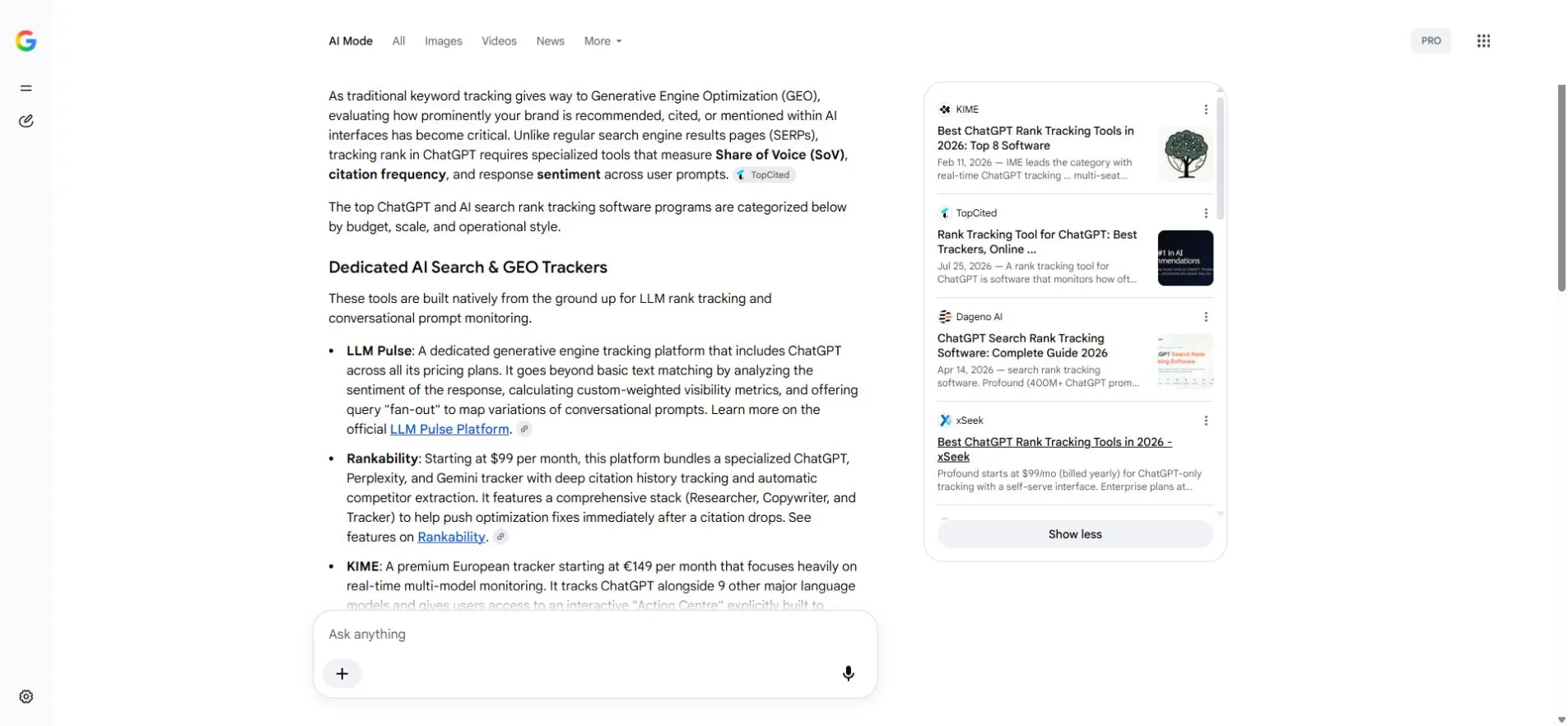
For each cited page, ask what job it did. Did it define the category, compare options on consistent criteria, explain a process or supply one current fact? A page can support one part of the answer while another page supports a different part.
Worked example: turn one source panel into one page decision
Our dated observation.
The saved source panel for “best ChatGPT rank tracking tools” showed visible cards from KIME, TopCited, Dageno AI and xSeek. Their titles suggest list, comparison and guide jobs. A title does not prove which answer sentence a page supported, so the next action is to open each URL and check the page itself.
The buyer still needed a consistent comparison of engines, check frequency, saved answer evidence and cost units. The bounded content response was a comparison page that applies the same criteria across tools, rather than another list of names.
The saved Xtrusio result for this question recorded “No” for the target mention. That is the baseline, not a ranking verdict. This evidence packet contains no later scan showing the target page cited, so the repeat check remains outstanding and this example does not claim a win.
Google says AI Mode and AI Overviews may use different models and techniques, so their responses and links can vary. Record them as separate surfaces. An AI Overview on the normal results page is not evidence of what AI Mode displayed.
Turn the source panel into a page decision
Compare your closest page with the cited pages on the reader's task. Avoid counting headings or copying a rival's structure. Look for a useful gap you can see in the pages:
- A definition that the reader needs before the comparison makes sense.
- A missing limit, date, denominator or source behind a material claim.
- An inconsistent table where products are not judged on the same criteria.
- A process that names steps but shows no input, result or next action.
Choose the smallest page change that closes one real gap. If the cited sources already answer the question better and your site has no new evidence, do not create a thinner copy.
Step 3: Record the evidence, improve one page and repeat the check
Record the evidence, improve one page and repeat the exact question. An Xtrusio scan keeps every full answer, every named brand and every cited page, with AI Mode and AI Overviews stored as separate engines.
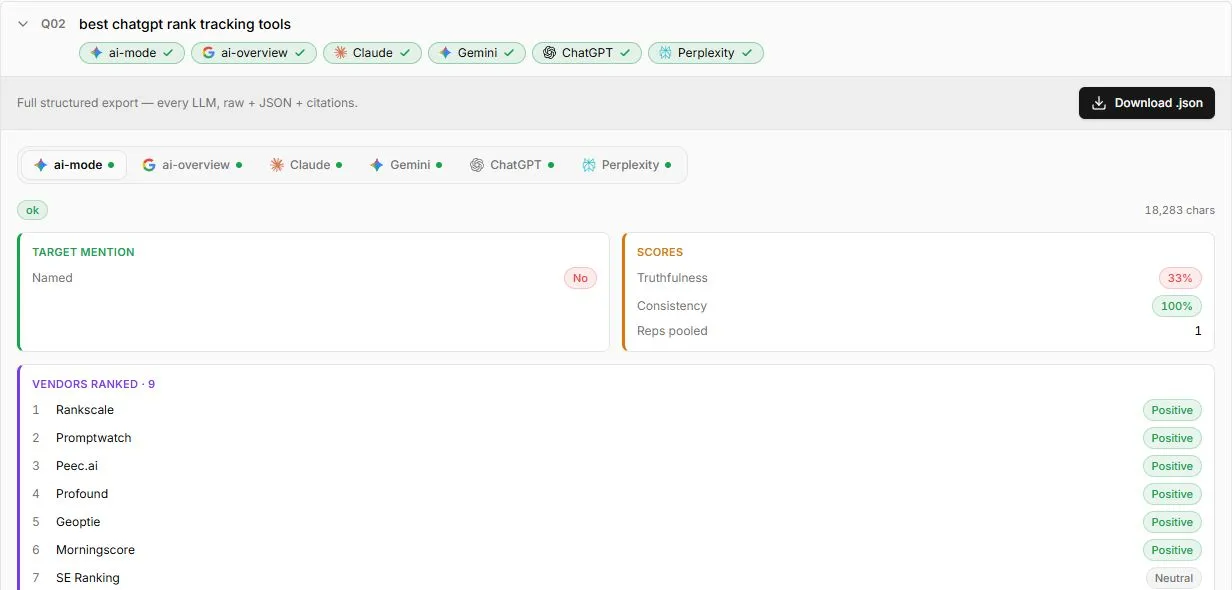
Use the record to separate three outcomes:
- Brand named: the answer mentions the brand, but may not link to it.
- Site cited: the source panel links to a page on the site, but perhaps not the page you planned to improve.
- Target page cited: the exact page appears as a source for that saved question.
Now edit one page for the reader. Put the direct answer early. Define important terms. Keep material facts in visible text. Use the same criteria across a comparison. Add a real input and result when the article explains a workflow. Link prices, dates and product limits to their current sources.
Google recommends people-first content rather than pages created mainly to manipulate rankings. That means the edit should help a visitor finish the task even if AI Mode never cites it.
If the page changed substantially, you can request another crawl in URL Inspection. Google says a crawl request does not guarantee immediate inclusion, or inclusion at all. Google also says repeated recrawl requests for the same URL do not make it crawl faster.
Repeat the exact question later under a similar market and device context. Save the answer and cited URLs again. A later citation shows what appeared in that later answer. Do not treat it as proof that your edit caused the change or that the page owns a permanent position.
The useful work is more concrete.
Use Search Console for the broader trend
Google rolled out Search Console generative AI insights to all websites worldwide by 31 August 2026. The report measures how often site URLs appeared in generative AI features in Search and Discover.
Use that aggregate report beside the saved answer record. Search Console can show whether your URLs gained impressions across generative features. Use the saved answer to reopen the exact question, wording and cited pages for one check. Neither view replaces the other.
When a step fails
Use the observed result to choose the next check instead of guessing.
- Missing answer: Record the country, device and date. Do not substitute an AI Overview and call it the same result.
- Missing source panel: Record that no source URLs were visible and do not infer a citation.
- Excluded URL: Read the stated reason in URL Inspection and fix that eligibility issue before rewriting the page.
- The brand is named but not linked: record a mention, not a citation.
- A different page on the site is cited: record that exact URL and decide whether it is the better page for the task.
- The target page is still absent later: keep the dated result. Recheck the reader task and evidence before making another bounded change.
Sources
- Google Search Central: AI features and your website
- Google Search technical requirements
- Google robots meta tag and snippet controls
- Google people-first content guidance
- Google recrawl guidance
- Google Search Console generative AI performance reports
- Xtrusio Google AI Mode visibility tools guide
Last checked: 30 October 2026.
Frequently asked questions
Is there special schema for Google AI Mode?
Google says there is no special schema, AI text file or new markup required for AI Mode. The page still needs to qualify for Google Search with a snippet.
Can any tool guarantee an AI Mode citation?
A tool can preserve the question, result and cited pages so your team can make and assess a useful page improvement, but it cannot guarantee that Google will cite the page.
Are AI Mode and AI Overviews the same result?
Google says they may use different models and techniques, so their responses and links can vary. Record each surface separately.
Should I request a recrawl after every edit?
Request a recrawl after a meaningful update when it is appropriate. Google says the request does not guarantee immediate inclusion, and repeated requests do not speed up the same URL.
How do I know whether the work helped?
Compare the same buyer question over time, record the answer and cited URLs, and use Search Console for the wider impression trend. Describe what changed without claiming that one edit caused the result. Verdict: eligibility gets the page into consideration, but the useful work is preserving one real answer, making one reader-led improvement and checking the exact question again. Get your free AI visibility check with the buyer question and target page you care about.
Topics
- how to rank in Google AI Mode

Xtrusio
AI visibility research
Xtrusio is the Perception Engine for B2B brands.
Free check
See how AI engines answer about you
Get your free AI visibility check
Keep reading
 Technical SEO · Oct 30, 2026 · 7 min read
Claude Code Extension for VS Code: Install, Sign In and Start
Install the official Claude Code extension for VS Code, sign in, send a file-aware prompt, review changes and fix common setup problems. Technical SEO · Oct 30, 2026 · 7 min read
How to Install Claude Code on Mac, Windows and Linux
Install Claude Code with the official Mac, Windows, Linux or WSL command, confirm the version, fix PATH errors and sign in. Technical SEO · Oct 30, 2026 · 9 min read