How to Check If AI Can Read Your Website: A Beginner’s Walkthrough
Short answer
Our September 19, 2026 investigation found a reason to check the details. A scanner gave a real article 87 out of 100 and passed its core-content checks. Elsewhere in the same report, an evaluator said the blog rendered only as JavaScript bundles. The page-source screenshot below shows article text inside a paragraph.

The useful next step is a precise technical task. With Xtrusio’s managed service, the team can investigate the page-delivery issue within the agreed subscription scope, while the content writer can clarify any explanation the page is missing. The site owner still decides which crawlers should have access and supplies the relevant hosting evidence.
This walkthrough shows the checks to include in that handoff. The external scanner, Chrome and hosting logs provide different evidence; they are not presented as built-in Xtrusio tests. You can follow the same steps with your own developer.
See Xtrusio’s managed technical and content support
Step 1: Choose one page and one sentence to look for
Start with a page you want people to find: a product explanation, a service page or an article that answers a customer question. Testing the homepage alone cannot tell you whether another page works.
Our example is the Google AI Overviews guide. We chose this sentence from its opening:
Appearing in an answer and earning a customer are different outcomes.
Keep the full page URL and that sentence together. The URL fixes what you are testing. The sentence gives you a concrete piece of content to find in the response.
We rechecked the public example on September 24 and the same sentence was still visible. The scanner and source screenshots below remain the September 19 observations; this later page check is not a new scan or proof of a crawler visit.
On your own site, choose a sentence from the main explanation, not the navigation, footer or cookie notice. Finding “Contact us” would tell you little about whether your product description was delivered.
Step 2: Read a scanner report as evidence, not a verdict
The example uses Is Agentic, an external public-page checker. Its input asks for the full URL and offers a Score button. For your own investigation, start with an existing report when available and note its timestamp before commissioning another scan. Submit only public pages you are comfortable sharing; never use private preview links or URLs containing access tokens.
The external scanner used in this example

The input contains the article path, not only the website's homepage.
The report we received showed 87/100, with eight of nine Essential checks passed. Its access summary also passed the core-content checks.
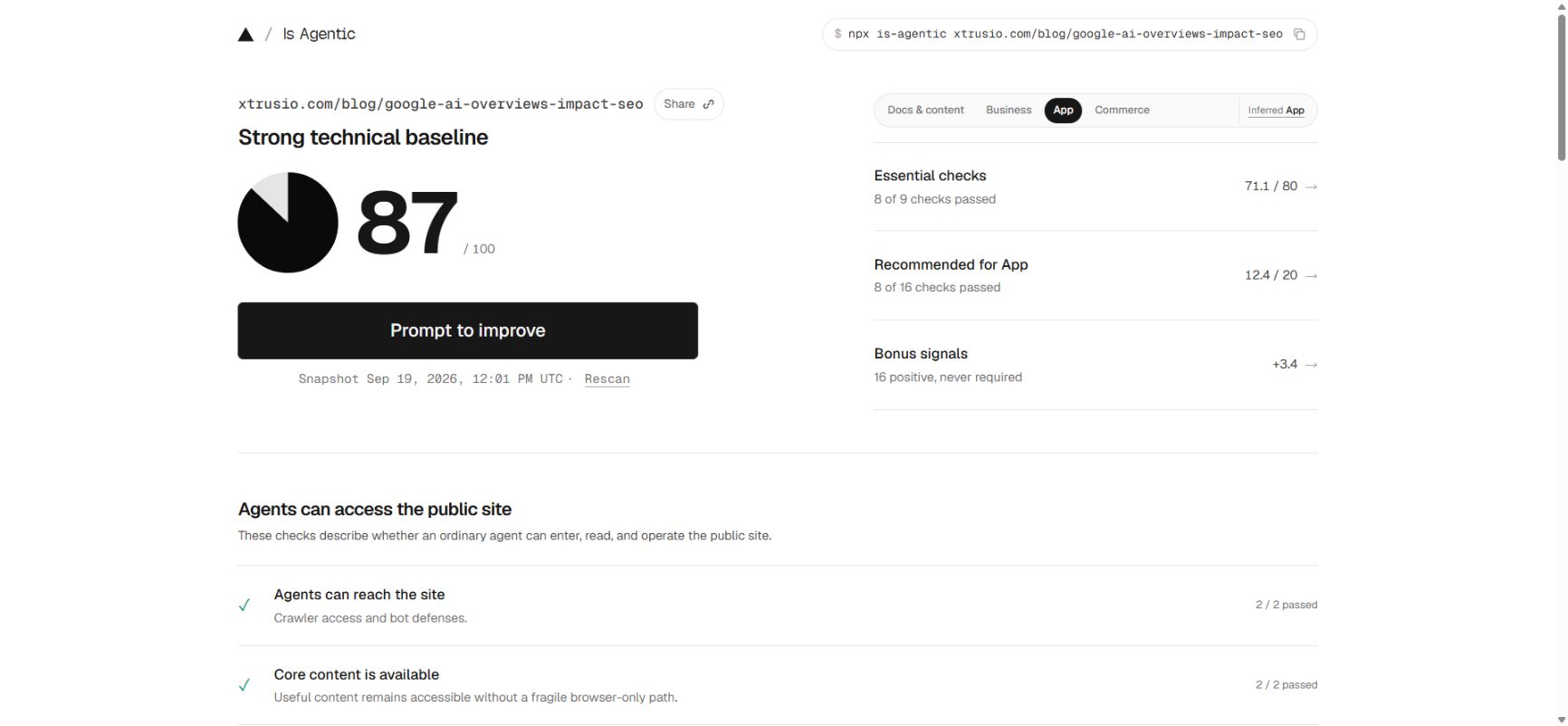
Read the named checks before assigning work. A score tells you how this tool evaluated its checks. It does not mean that 87% of AI platforms can read the page, or that the page has an 87% chance of being cited.
The report inferred the site type as App and included recommendations about an API. Those recommendations need a different decision from checking whether someone can read a blog post. Ask whether each suggestion serves the page's purpose before adding it to a developer's task list.
The scanner's methodology warns that automated checks can be incomplete or wrong and that completed results may be cached. Treat findings as things to verify.
Step 3: Check whether the main text arrives with the page
A browser does more than download a document. It can also run JavaScript, which may fetch or create additional content. That is why a page can look complete to you while a simpler request receives much less information.
HTML is the document the server returns. The rendered page is what the browser displays after processing that document and running its scripts.
In Chrome, open your chosen page, right-click and choose View page source. Search the source for a distinctive phrase from your chosen sentence. Check where the phrase appears: text inside a paragraph is stronger evidence for this check than a copy buried only inside a script or metadata.
If you cannot find it, try a shorter phrase. Punctuation can be encoded differently in source. One unsuccessful text search does not establish that the content is missing.
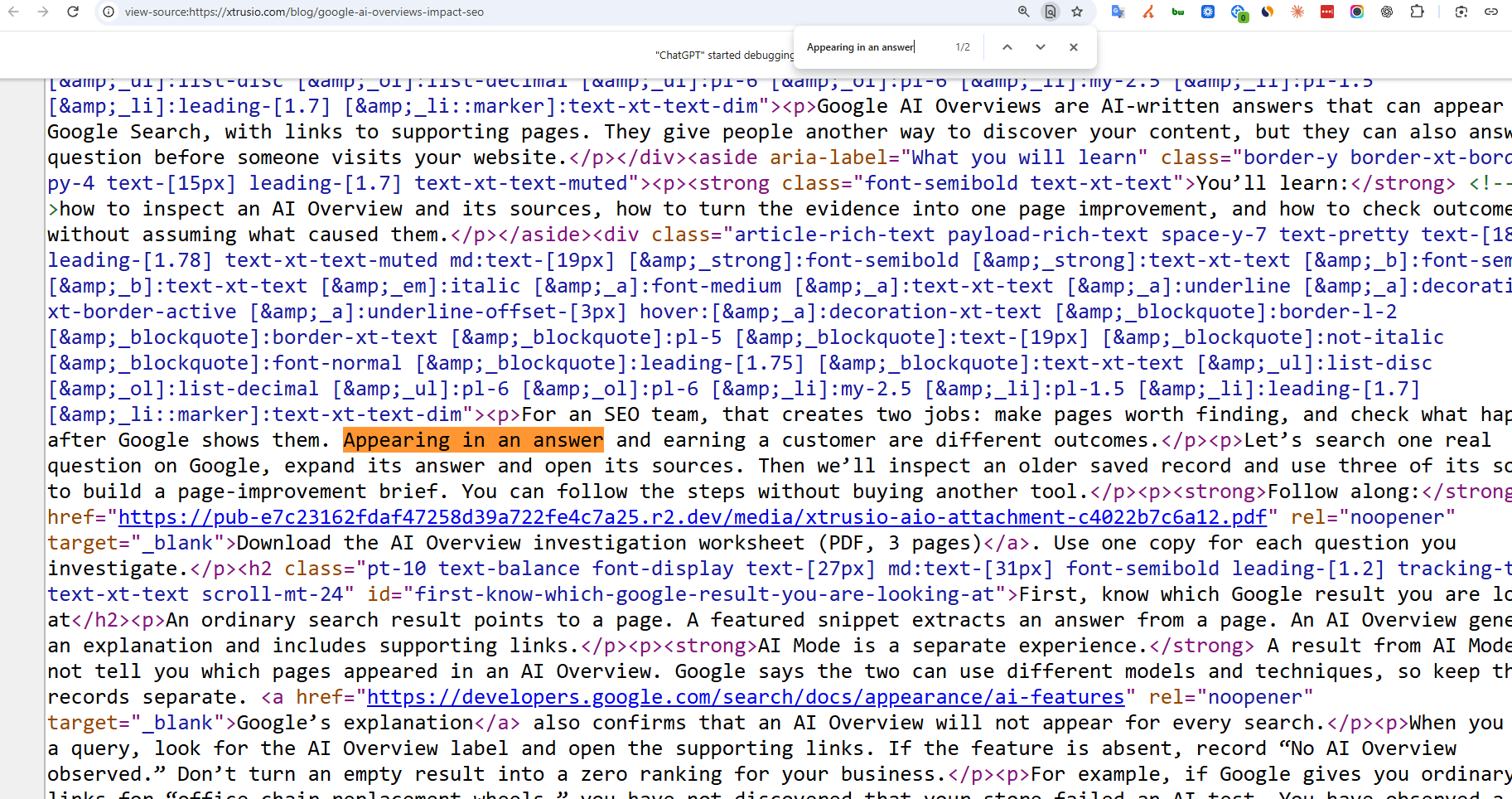
The highlighted words sit inside a paragraph, between <p> and </p> tags. This shows that the article text is present in the page source. The search box's “1/2” means the phrase occurs twice in this source; it is not a visibility score or a count of AI crawlers.
If the source looks overwhelming, return to the normal page, right-click the paragraph and choose Inspect. Chrome's Elements panel presents the page structure as an expandable tree. Expand the paragraph's <p> element to see its text.
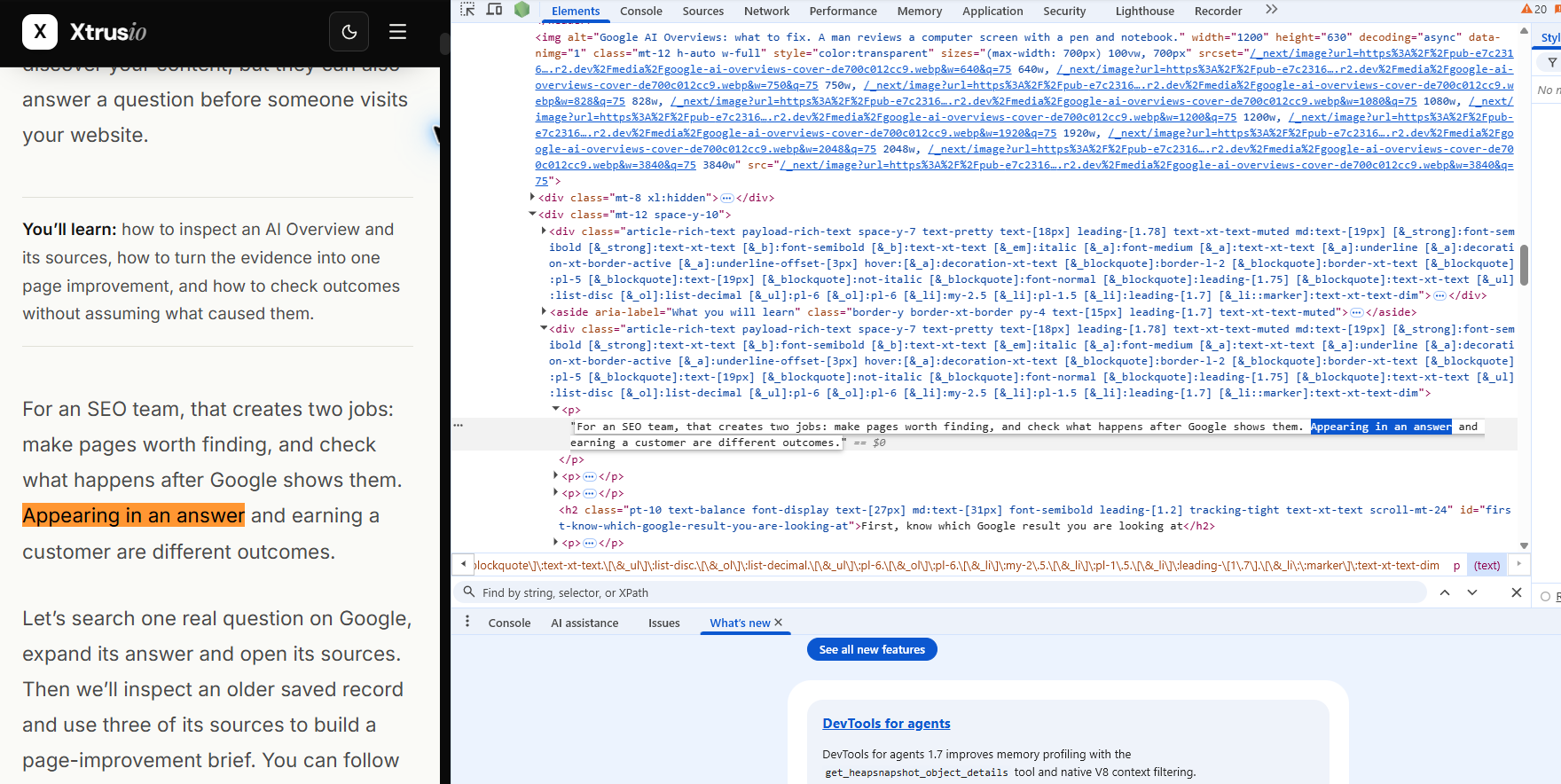
The same sentence appears on both sides: readable page on the left, paragraph element on the right. This view helps you understand how the text fits into the page.
Inspect and View page source answer different questions. Elements shows the browser's current page structure, which JavaScript can change. Use the earlier source check to establish whether the text was already in the delivered HTML; the Elements view alone cannot establish that.
For our example, the source screenshot contains the chosen sentence inside paragraph markup. This supports a narrow finding: the document shown in that source view includes the article text, rather than only scripts that could create it later.
It does not prove that a request from every AI service, location or network will receive the same thing.
When the scanner disagrees with the page
The report's separate evaluator notes described the blog as rendering only JavaScript bundles. That did not match the article source shown above.
The next action is to compare the exact URL, response and test conditions. The evaluator may have taken a different route through the site; its notes covered more than the submitted article. We have not established why the results differ.
For this page, “rebuild the entire blog because its text is missing” would be a premature task. A better request is: “Please reproduce the evaluator's missing-content finding on this exact URL and compare it with the HTML response that contains the opening paragraph.”
For a Xtrusio-managed project, send that exact URL, the scanner note and the source evidence to the team. Request a reproducible finding before authorizing a rendering change. A content writer can improve a weak explanation, but rewriting prose will not resolve a failed server response.
Step 4: Read the crawler rules for this page
Websites can publish crawler instructions in a file called robots.txt. Open your site's root address, then add /robots.txt in the address bar. For example, start with example.com and append that path.
Read the rules that apply to the relevant crawler and page path. Three labels explain the basic structure:
- User-agent identifies the crawler or group of crawlers.
- Allow identifies a permitted path.
- Disallow identifies a path the crawler is asked not to fetch.
The slash / means the site's root. A rule about /admin/ concerns that area, not automatically every article under /blog/.
For a clear example, look at the sample in Google's robots.txt guide. This is a teaching example from Google's documentation, not the policy file of our scanned article.
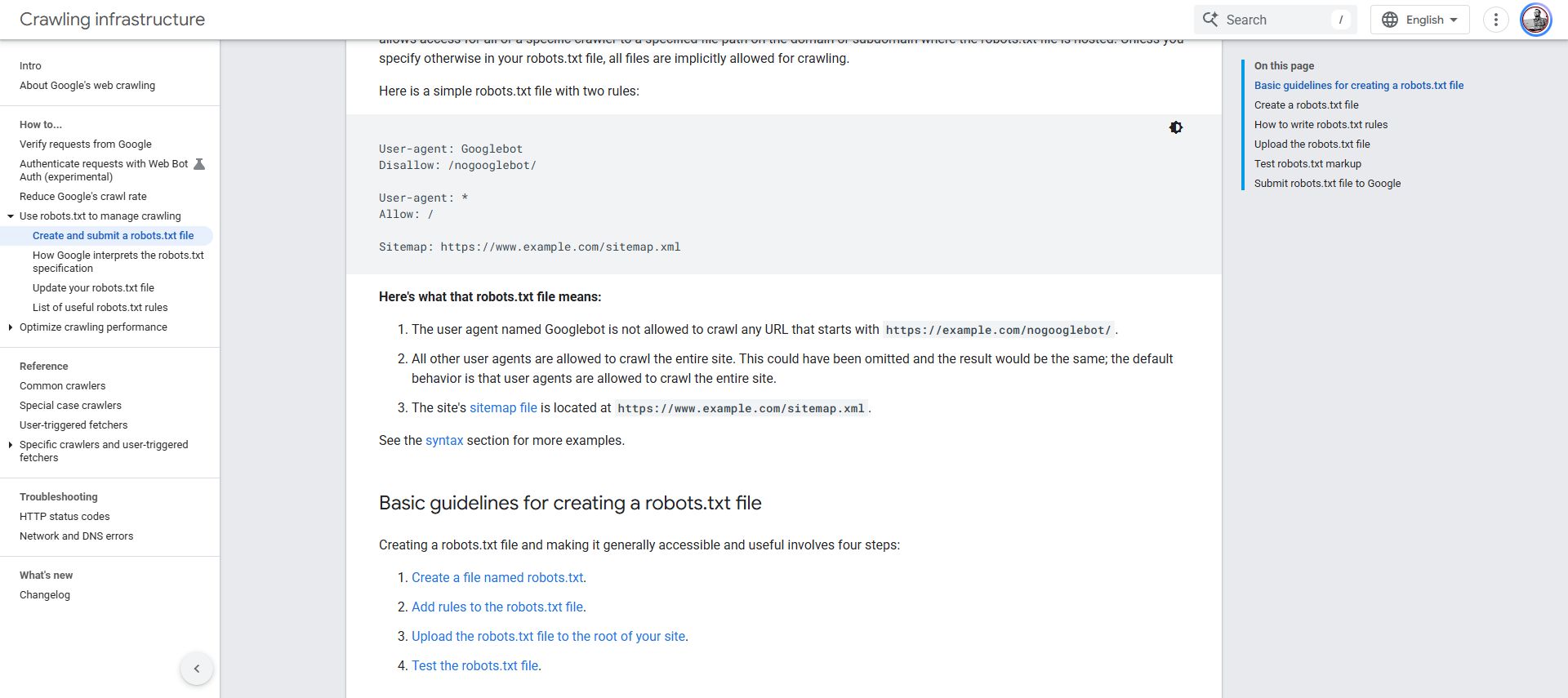
Read the two groups separately:
- Googlebot:
Disallow: /nogooglebot/asks Google's crawler not to fetch URLs under that path. It does not block the whole website. - The general group:
User-agent: *followed byAllow: /permits crawling for crawlers using that group. It does not cancel the Googlebot-specific restriction above it.
The final Sitemap line points to a list of URLs. It does not override a crawling restriction or guarantee that any page will be indexed.
On your site, replace the sample paths with the actual path you are checking. Do not paste this example into your settings: first decide which crawler should have access to which content.
Do not decide from one line alone. A specific crawler group can take precedence over the wildcard group, and matching path rules must be considered together. The robots standard defines these rules. Ask your developer to check the exact path if the file is complicated.
Also keep your access policy intentional. Training, search discovery and user-requested retrieval serve different purposes. Do not remove all crawler restrictions merely to improve a scanner score.
robots.txt is not a password or a firewall. It expresses instructions for cooperating crawlers; it does not protect private content.
Step 5: Find out whether real crawlers visited
The checks so far describe a public response and a policy file. To establish that a real crawler visited, you need request records from your hosting provider or content delivery network.
A request log records attempts to retrieve pages. Ask the person managing your website for the exact article URL, the relevant period, response status and how the crawler's identity was verified.
If you already use Cloudflare, its AI Crawl Control documentation describes its traffic reports. Otherwise, start with your existing provider's logs. You do not need to move hosting to investigate one page.
We have not inspected private traffic logs for this example, so whether a verified AI crawler visited remains unknown.
An unfamiliar crawler name in a log is not conclusive by itself. The user-agent is a label in the request, and another program can send the same label. A test that imitates a crawler's user-agent is useful for finding response differences, but it is not a request from that crawler's operator. Follow the operator's verification guidance, such as Perplexity's crawler documentation.
Step 6: Give the right problem to the right person
If Xtrusio is handling the work, use the following list to agree the task with its developer and content writer. Your hosting or security owner may need to supply logs or approve access-policy changes. The same division of responsibility applies when your own team implements the fix.
- The request fails or receives a challenge: ask the hosting or security owner to investigate that exact request. Keep security protections in place while diagnosing it.
- The page opens, but the main text is absent from the returned HTML: ask the developer to check how the content is delivered. Confirm the missing text before commissioning a rendering change.
- The relevant crawler rule blocks the article: ask the site owner whether that policy is intentional. Change it only after the decision is clear.
- The page and policy checks pass, but no crawler visit is verified: inspect traffic records. A passed scanner test does not fill that gap.
- A verified visit succeeds, but the page is not cited: investigate the questions and answers where you expected a citation. That is a separate visibility question.
After the technical checks, use Xtrusio to investigate the separate visibility question: which buyer question produced an answer, and which pages did that answer cite? Its saved-answer and cited-URL records support that review. They do not replace server logs or establish how a crawler fetched your page.
See the saved-evidence step in the Google AI Overviews walkthrough
A developer handoff you can copy
Use these fields for one page at a time:
- Page: the complete URL.
- Expected content: a sentence from the main explanation.
- Observed response: status code and whether that sentence appears in paragraph content.
- Crawler policy: the applicable group and path rule, or “not checked”.
- Actual crawler visit: verified evidence, or “unknown”.
- Problem to reproduce: the specific disagreement or failure.
- Retest: repeat the same check on the same URL after any approved change.
For our historical example, the source screenshot contains the article text. Google’s separate policy example explains how to read crawler rules; it is not a policy check for our article. Reproducing the scanner’s contradictory note and checking real crawler activity remain unresolved. Give the Xtrusio developer, or your own technical owner, those two specific questions rather than a request to increase 87 to 100.
Agree what will close the task: a response or source capture for the exact page, the applicable crawler rule, and a clear record of what remains unknown. If an approved change is made, repeat the same check and retain both observations. This is an acceptance checklist for the work, not a claim that this example’s unresolved checks have been completed.
What a passed check still cannot promise
A readable page is not guaranteed to appear in an AI answer. Google says eligibility for its AI search features does not guarantee inclusion and does not require a special AI file or special schema. See Google's guidance.
Keep the evidence separate: a successful response, visible content, an allowed policy, a verified visit and an observed citation answer different questions.
Choose one commercially useful page now. Record its URL, copy one sentence, and check whether the returned document contains it. Send any disagreement to the Xtrusio team or your own developer with the evidence above. Once access is understood, use saved answer and citation records to decide whether the page needs a content improvement.
Frequently asked questions
Do I need to give a scanner my website login?
For this walkthrough, submit only a public page URL. Do not supply passwords, private preview links or URLs containing access tokens. Testing a public page does not require giving the scanner administrator access.
What should I do if my sentence is missing from page source?
Try a shorter, distinctive phrase first because punctuation can be encoded differently. If the text appears in Elements but not in the original source, ask your developer to check how it is delivered. Save both observations before deciding a rendering change is needed.
Does an 87 out of 100 score prove that AI can cite my page?
No. It describes the scanner's checks, not a citation probability. Verify the page content and applicable crawler policy separately. Request logs can establish a verified visit; an actual AI answer with a source link is needed to establish an observed citation.
Topics
- check if AI can read my website
- AI crawler access
- AI website readability
- can ChatGPT read my website
- Cloudflare AI Crawl Control
- Is Agentic by Vercel
- AI visibility audit tools

Xtrusio
AI visibility research
Xtrusio is the Perception Engine for B2B brands.
Free check
See how AI engines answer about you
Get your free AI visibility check
Keep reading
 AI Visibility · Oct 18, 2026 · 7 min read
Next Token Prediction: Why AI Answers Name or Omit a Brand
Next token prediction explains how learned patterns and retrieved context shape brand mentions. Use an anonymized scan example to choose the next action. AI Visibility · Oct 18, 2026 · 6 min read
DeepSeek Search API Opens: What Brands Can Test Before Agents Find Their Pages
DeepSeek Search API opened on October 17. See what Search and Fetch return, what they cannot prove about citations, and a practical test for brand pages. AI Visibility · Oct 18, 2026 · 9 min read