Google AI Overviews and SEO: A Beginner’s Guide to Finding Your Next Page Improvement
Short answer
Google AI Overviews are AI-written answers that can appear in Google Search, with links to supporting pages. They give people another way to discover your content, but they can also answer a question before someone visits your website.
For an SEO team, that creates two jobs: make pages worth finding, and check what happens after Google shows them. Appearing in an answer and earning a customer are different outcomes.
The useful result is a specific edit, supported by evidence. Xtrusio keeps a question’s recorded platform response and citation list together so its team can turn a finding into a content brief. Within the agreed managed-service scope, an allocated writer can develop the missing explanation and a developer can investigate a technical obstacle.
We’ll follow one real Google question through its answer and sources, then inspect a separate older Xtrusio record to decide what a page needs. The same investigation works with the worksheet below; neither a saved citation nor a completed edit proves a business result.
See Xtrusio’s managed content and technical scope
Follow along: Download the AI Overview investigation worksheet (PDF, 3 pages). Use one copy for each question you investigate.
First, know which Google result you are looking at
An ordinary search result points to a page. A featured snippet extracts an answer from a page. An AI Overview generates an explanation and includes supporting links.
AI Mode is a separate experience. A result from AI Mode does not tell you which pages appeared in an AI Overview. Google says the two can use different models and techniques, so keep their records separate. Google’s explanation also confirms that an AI Overview will not appear for every search.
When you check a query, look for the AI Overview label and open the supporting links. If the feature is absent, record “No AI Overview observed.” Don’t turn an empty result into a zero ranking for your business.
For example, if Google gives you ordinary links for “office chair replacement wheels,” you have not discovered that your store failed an AI test. You have observed a search without that feature.
Step 1: Choose one question a potential customer would ask
Start with a question connected to a decision your business can help with. “What is software?” is broad. “Which contract software can track renewal dates?” describes a specific buying problem.
For our case, the question is:
best chatgpt rank tracking tools
The wording is about ChatGPT, but we will ask the question in Google Search. The subject of a question and the platform answering it are different fields.

Enter your chosen question in Google's search box. In Step 2, we will inspect the answer and its sources.
If you already have keyword research, keep the selected country, device and report date beside its volume estimate. That estimate can help prioritize work. It does not tell you how many people saw an AI Overview or how often your brand appeared inside one.
You can also start with a question from your sales calls or Search Console. A precise customer problem is enough to begin this investigation; a large search-volume number is not a prerequisite.
Keep a small record before you change anything
Write down:
- The exact question, without improving its wording between checks.
- The platform and whether an AI Overview appeared.
- The date, country and device, where known.
- The answer and supporting URLs you could inspect.
- The page on your website you expected to help with that question.
Use “unknown” when a field is missing. Guessing the country makes later comparisons look more precise than they are.
Step 2: Search Google and open the AI Overview
Type best chatgpt rank tracking tools into Google Search and stay on the All tab. Look for the AI Overview label above the generated answer. The AI Mode tab is a different search experience.
Here is the actual Google result we captured on September 19, 2026, in desktop Chrome. Google identified the search region as Bahrain and indicated that results were personalized. Your result may differ. Small Firehose and Local search labels belong to browser extensions, not the AI Overview.
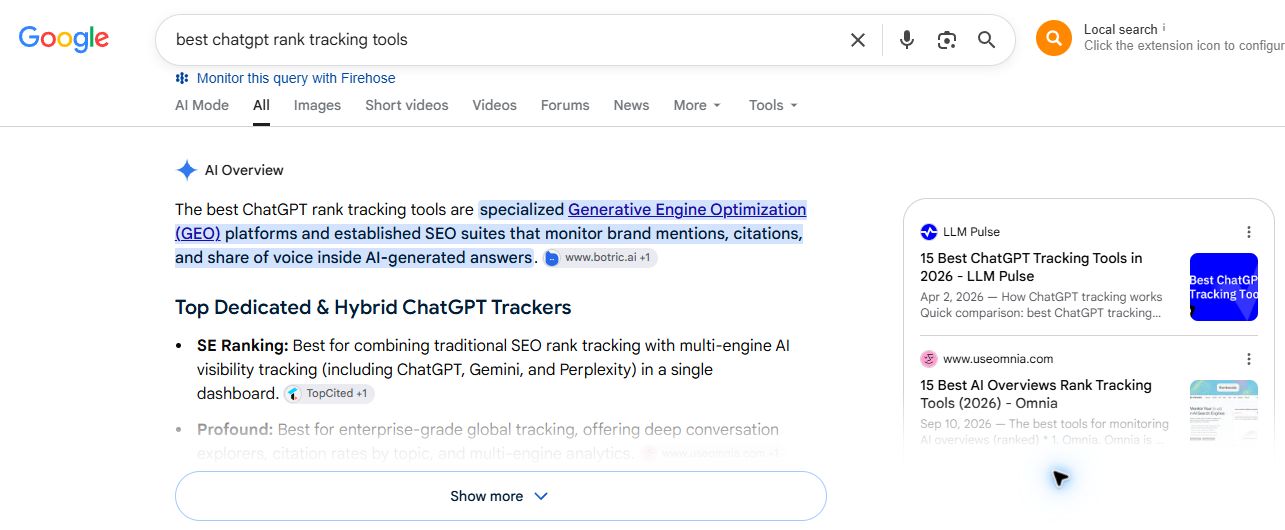
Start with three visible details:
- Search box: check that Google received the exact question you intended.
- AI Overview label: confirm which type of result you are inspecting.
- Show more: open the rest of the answer before recording which products it mentions.
In this capture, the collapsed answer shows SE Ranking and fades the next item. Counting only that first screen would miss recommendations further down.
Expand the answer before counting mentions
Click Show more. The expanded list in our capture names SE Ranking, Profound, Otterly.AI, Rankscale, Ahrefs and Semrush.
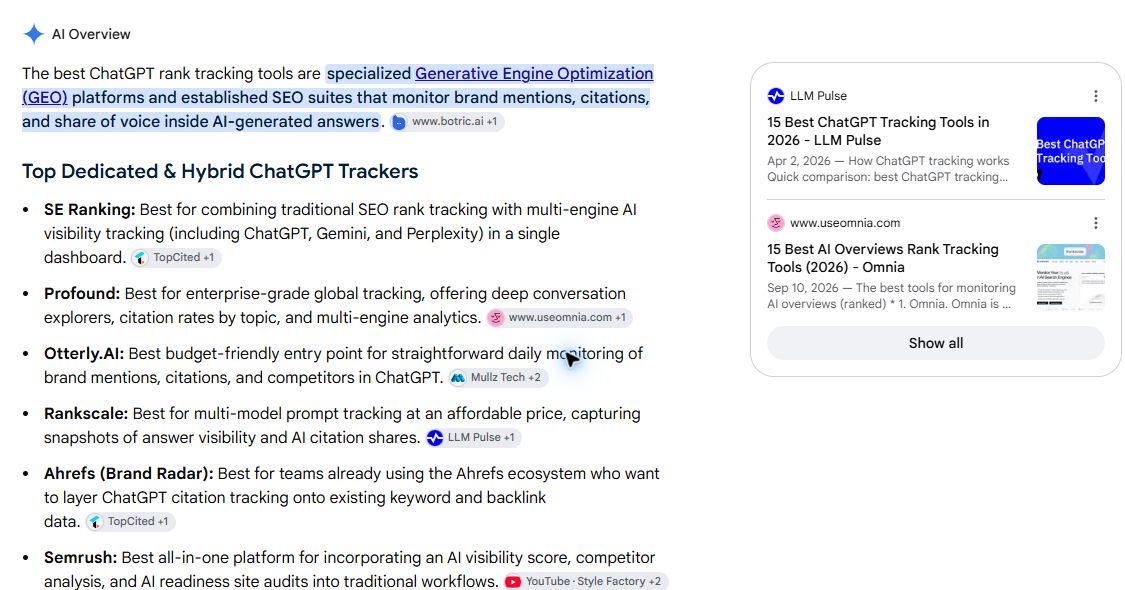
These are the products Google displayed, not our buying recommendations or independently verified feature claims. Here we are checking how an answer names products and connects them to sources.
Notice the small source chips beside the descriptions. The chip next to Rankscale names LLM Pulse. A product mention and the source supporting it can refer to different companies.
Open the sources, then visit the relevant page
Click Show all in the source card on the right. In this view, Google expanded the panel to show cards from KIME, LLM Pulse, Omnia and TopCited.
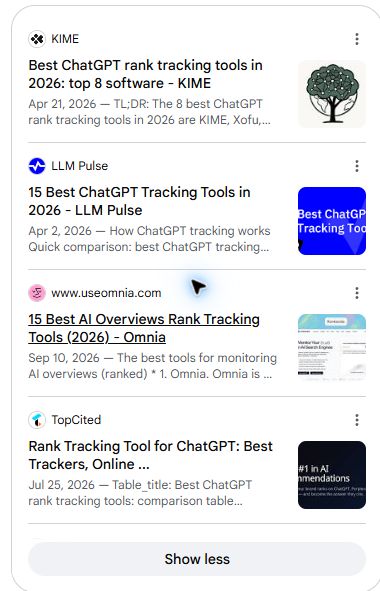
Open a card to inspect its page. Record the full destination URL, not only the publisher's name. If you want to investigate a particular sentence, use its adjacent source chip to inspect the related results.
This gives you a repeatable starting point: the question, the displayed answer and the sources you can open. If Google does not show an AI Overview for your question, record that result instead of switching to AI Mode and treating it as the same test.
Step 3: Keep the evidence available for later checks
When you repeat this work, you need the old answer as well as the latest one. In Xtrusio’s Executive Summary, open the relevant question record and expand its AI Overview row. The saved response and citation list keep the evidence for that question together. Use an existing report for this investigation; there is no need to rerun a scan to inspect it.
The next screenshots show an older observation. They are not a recording of the Google search above. We have not controlled the two checks well enough to treat their differences as a measured trend.
Our example comes from Xtrusio’s stored August reports, reviewed on September 18 and captured again on September 19, 2026. The screenshot below shows the question with AI Overview expanded.
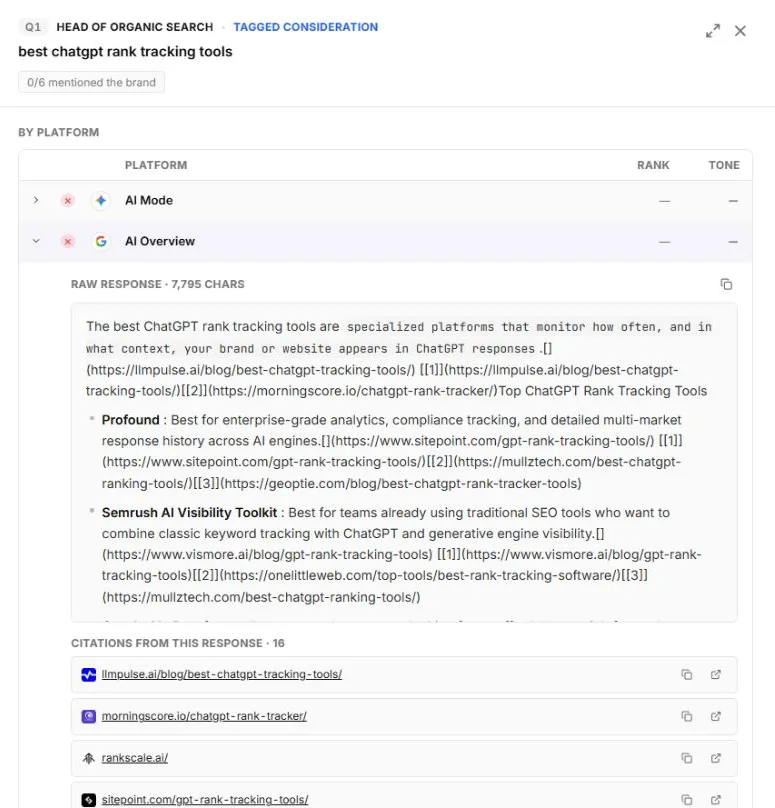
Read the screen in this order:
- Question: “best chatgpt rank tracking tools” fixes the subject of the investigation.
- Platform: the expanded AI Overview row identifies which response we are inspecting.
- Answer: the visible portion names Profound and Semrush AI Visibility Toolkit. The full saved response also names Otterly AI, Peec.ai and Rankscale.
- Sources: the citation panel lists 16 URLs associated with the response. We will open three of them next.
The “0/6 mentioned the brand” badge covers six platforms. It does not mean Google omitted the brand in six separate searches.
There are also limits to this evidence. This panel is a stored monitoring record, not a screenshot of Google’s search results page. Its raw response includes repeated passages and source excerpts. We cannot assume every word in that field appeared on a searcher’s screen.
The record gives us a concrete response and source list to investigate. It does not establish a permanent ranking, the reason a brand was omitted, or a loss of website traffic.
Step 4: Open the sources and ask what each page helps the reader do
The next step is easy to skip: actually visit the cited pages.
A domain name tells you who published something. The page tells you what help the reader received. If you inspect only domain names, “get more authority” can become the answer to every problem.
We opened three URLs from this saved record on September 18. Their content at that visit may differ from what Google retrieved for the August scan. The following observations describe that dated review, not a fresh inspection or an endorsement.
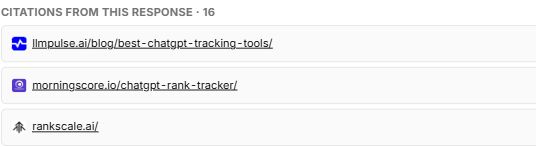
These are the three source links we inspected. The count of 16 refers to the complete saved source list, not the three-page sample below.
Three page types, three different improvement questions
The first cited page, an LLM Pulse comparison, organized 15 tools into a comparison and buying guide. The Morningscore page described a particular tracking product’s workflow. The Rankscale homepage introduced a platform with interface examples. These were vendor-authored pages; their claims and self-rankings were not independently tested.
Use the page type to decide what to inspect on your own site:
Comparison article: can someone compare options using the same criteria, or does each product receive a different collection of compliments?
Product explanation: can someone see what they enter, what the software checks and what result they can inspect? A phrase such as “monitor your AI visibility” leaves those questions unanswered.
Main product page: can a new visitor identify the purpose, see a real example and find the next detail they need?
This small source sample suggests three checks: comparison quality, workflow explanation and homepage clarity. It does not establish why Google cited those pages. For Xtrusio’s writer, the useful brief is the reader task your page fails to support, not an instruction to copy a competitor’s wording.
Step 5: Check your page before assigning a rewrite
Suppose your team decides the comparison article is the best page to improve. Before commissioning another 2,000 words, check whether Google can use the existing page.
Google’s stated eligibility conditions for a supporting link include indexing and eligibility to show a search snippet. There is no separate AI Overview schema requirement, and meeting the conditions does not guarantee inclusion. Google’s technical guidance is the reference for this check.
Ask the person with authorized access to your Search Console property for the indexed-page status, Google-selected canonical and any snippet restriction for the exact URL. A canonical is the URL Google treats as the main version. If important text may be missing or a recent fix needs checking, request the relevant rendered-page or live-test evidence too.
The indexed result describes Google’s stored version. The live test checks the page now; it does not prove that the new version is already indexed. Google explains the distinction in its URL Inspection instructions.
If the page is accidentally marked noindex, pass that finding to the person responsible for the website. If Google selected a different canonical, investigate the duplicate-page relationship. Neither problem is fixed by making the opening paragraph more persuasive.
We have not inspected a private Search Console property for this example, so its technical eligibility is not established here. Keep the result as “not checked” until the responsible person supplies it. Xtrusio’s managed team can investigate within the agreed scope, but a monitoring screenshot cannot substitute for that evidence.
Follow the separate page-readability walkthrough
Step 6: Turn the source review into one useful improvement
Now imagine the technical check passes, but your comparison page contains only short product descriptions. A beginner can read it and still have no idea how to evaluate a tool.
Here is a proposed page-improvement brief, based on the needs exposed by our source review. It is an example of the work to commission, not a completed experiment.
Reader’s task: Choose a way to check whether ChatGPT mentions the company and which pages it cites.
Current weakness to verify: The page lists features but does not let the reader inspect a completed check.
Material to add: One exact buyer question, a saved answer, its source URLs, and an explanation of how to distinguish the company being named from its website being linked.
Comparison rule: Check the same fields for every shortlisted product: supported platform, question selection, answer access, source access and monitoring schedule. Mark anything unverified instead of filling the cell with a guess.
Reader output: A short trial worksheet they can use with their own question.
That brief tells a writer what evidence to collect and what the reader should be able to do afterward. “Make the article more comprehensive” does neither.
For a Xtrusio-managed article, give this brief and the saved question record to the allocated writer. Keep any unresolved indexing or delivery issue assigned to the developer. Agree on the evidence and finished page the team should return before judging the work complete.
What the new section could look like
An abstract feature description might say:
Our platform provides actionable visibility intelligence across AI-powered discovery experiences.
A useful demonstration would say:
Enter a question your buyer asks. Open the saved answer. Check whether your company is named, then open the cited URLs. A competitor’s name and a link to your website can appear in the same answer, so record those separately.
The second version gives someone a task they can carry out. Add a real screenshot of the result, explain the visible fields, and keep the example’s date with it.
A finished example on this site shows the distinction: the ChatGPT tracking guide pairs an early tool comparison with native answer/source evidence and saved monitoring records. Inspect the delivered page for those elements; its publication alone is not evidence that Google cited it.
Inspect the delivered ChatGPT tracking guide
For a different business, the missing evidence will be different. A renewal-management product might need to show a contract date becoming a reminder. A chair retailer might need a photographed compatibility check for replacement wheels. Choose the demonstration your reader needs to make the decision.
Google’s generative-search guidance favors useful, original contributions and warns against repackaging material that is already widely available. A longer article is not automatically a better contribution.
Step 7: Measure visibility and business results separately
After improving the page, you will want to know whether the work helped. Decide what you will measure before publishing the change.
Keep three records:
- Answer record: Was an AI Overview present, was the brand named, and which URLs appeared in the saved sources?
- Search record: What does Search Console report for the page and the relevant period?
- Business record: What did visitors do on the website, such as submitting a qualified enquiry or starting a trial?
A citation can improve while enquiries remain unchanged. Enquiries can rise while your sampled question still omits the brand. Both findings are possible; don’t force them into one score.
Know what Google’s reporting can tell you
Google announced Search Generative AI performance reports on June 3, 2026. An August 31 update says the insights had rolled out worldwide.
The announcement describes impressions, pages, countries, devices for Search, and dates. It also says the data remains included in overall performance reporting. See Google’s announcement and its rollout note.
Older articles may say generative visibility cannot be viewed separately. Check the date of that advice. Equally, do not assume the new report supplies the complete answer text, an AI Overview-only click count, or conversion attribution: the announcement does not establish those capabilities.
A small calculation shows why clicks need context
Click-through rate, or CTR, is the share of impressions that produce a click.
Consider this illustrative example, not Xtrusio performance data:
- Before: 1,000 impressions and 80 clicks. CTR is 80 ÷ 1,000 = 8%.
- After: 1,200 impressions and 72 clicks. CTR is 72 ÷ 1,200 = 6%.
The page received more impressions but eight fewer clicks. CTR fell by two percentage points.
Those figures do not tell you why. The page may have appeared for different queries, moved in rankings, or faced a different search-results layout. An AI Overview is one explanation to investigate, not a conclusion supplied by the calculation.
Compare the same page, similar date ranges, countries and devices. Check ranking changes and technical issues before attributing a decline to AI Overviews. Google’s traffic-drop guide provides the broader diagnostic process.
Step 8: Recheck the question and decide the next action
After publication, log the page URL, the actual changes and the date. Repeat the original question under comparable conditions. Keep the earlier evidence rather than replacing it with the newest answer.
Then choose the next action from what you observed:
- The page still has an indexing problem: resolve that problem before judging the new content.
- The answer cites your page: save the response and URL, then check whether visibility persists in later observations.
- The brand is named but another site is cited: record a brand mention; do not report a citation to your website.
- An AI Overview is absent: log that result and continue ordinary search measurement.
- The page is eligible but absent from the answer: review whether it helps with the actual question. Do not keep adding headings without a new reader benefit.
In Xtrusio, return to the original question and inspect the later saved AI Overview response and cited URLs. Match the available conditions and retain the earlier record. If the collection conditions are unknown or different, describe two observations rather than a controlled trend. A published article, a later citation and an enquiry remain separate records.
Start with one question and one page. Give Xtrusio’s team, or your own writer, a precise improvement brief with the saved evidence and unresolved checks. After the edit, verify the delivered page first; judge later search and business results from their own records.
Explore Xtrusio’s managed workflow
Download the investigation worksheet (PDF, 3 pages) and complete its six sections with your own question, evidence and next action.
Frequently asked questions
Does every Google search show an AI Overview?
No. If an AI Overview does not appear, record that observation. It does not mean your website ranked zero or failed a citation test.
Is a brand mention the same as a website citation?
No. A mention names a brand, while a citation links to a source. Record the exact linked URL separately from the brands named in the answer.
Do AI Overviews require special schema?
Google does not require a separate AI Overview schema. Supporting pages must be indexed and eligible to show a search snippet, but eligibility does not guarantee inclusion.
Does a lower click-through rate prove an AI Overview reduced traffic?
No. Compare the same page and comparable periods, countries and devices. Investigate query mix, rankings, technical issues and search-result changes before attributing a decline to AI Overviews.
Topics
- what are Google AI Overviews
- Google AI Overviews SEO impact
- AI Overview optimization
- AI Overviews visibility
- Google generative search SEO

Xtrusio
AI visibility research
Xtrusio is the Perception Engine for B2B brands.
Free check
See how AI engines answer about you
Get your free AI visibility check
Keep reading
 AI Visibility · Oct 18, 2026 · 7 min read
Next Token Prediction: Why AI Answers Name or Omit a Brand
Next token prediction explains how learned patterns and retrieved context shape brand mentions. Use an anonymized scan example to choose the next action. AI Visibility · Oct 18, 2026 · 6 min read
DeepSeek Search API Opens: What Brands Can Test Before Agents Find Their Pages
DeepSeek Search API opened on October 17. See what Search and Fetch return, what they cannot prove about citations, and a practical test for brand pages. AI Visibility · Oct 18, 2026 · 9 min read