Gemini CLI vs Claude Code: Access, Cost and Control Compared
Short answer
Access comes first when you compare Gemini CLI with Claude Code.

Pick Claude Code if you want a terminal agent included in a paid Claude plan, with permission modes you can switch using Shift+Tab. Pick Gemini CLI if your organization already has Gemini Code Assist Standard or Enterprise on Google Cloud. Since June 18, 2026, Google's free individual and Google AI Pro or Ultra access has moved from Gemini CLI to Antigravity CLI, although Gemini CLI itself remains open source.
That access change is the first thing to check. An older comparison may still describe Gemini CLI as the obvious free choice for a personal Google account. That is no longer the current route. The practical decision now begins with the account or organization you already have, then moves to cost, control and workflow.
The quick decision
- Choose Claude Code when you already pay for Claude and want a coding agent that shares that plan's usage limits.
- Choose Gemini CLI when your organization uses an eligible Gemini Code Assist plan on Google Cloud.
- Choose Antigravity CLI, not Gemini CLI, when you want Google's current free individual route.
Gemini CLI vs Claude Code at a glance
The table below uses Google and Anthropic's own pages, checked October 30, 2026. Prices and access rules can change, so treat the date as part of the comparison.
Question | Gemini CLI | Claude Code |
|---|---|---|
Who can use it? | Organizations with Gemini Code Assist Standard or Enterprise, or Code Assist for GitHub on Google Cloud, plus legacy paid API or Vertex keys | People with a paid Claude plan or an Anthropic Console account, depending on the surface |
How do you pay? | Through the eligible Google Cloud organization license or a supported paid API route | Included in paid Claude plans and shares the plan's usage limits; API users pay through the Anthropic Console |
Entry price, checked October 30, 2026 | No current free individual tier in Gemini CLI | Claude Pro is $17 a month with annual billing ($200 paid up front), or $20 billed monthly |
Install command | | `curl -fsSL https://claude.ai/install.sh \ | bash` on macOS, Linux and WSL |
Project instructions | | |
Control model | Trusted folders, sandboxing guidance and configurable tools | Manual, acceptEdits, plan, auto, dontAsk and bypassPermissions modes |
License | Apache 2.0 open-source repository | Commercial Anthropic product |
Other surfaces | Terminal agent, with extensions through MCP servers | Terminal, IDE extensions, desktop app and web |
What changed for Gemini CLI in June 2026
Google's Gemini CLI repository now opens with a prominent status notice. It says the tool is designed for Gemini Code Assist Standard or Enterprise licenses and Code Assist for GitHub on Google Cloud. It also says free individual access and Google AI Pro or Ultra access moved to Antigravity CLI on June 18, 2026.
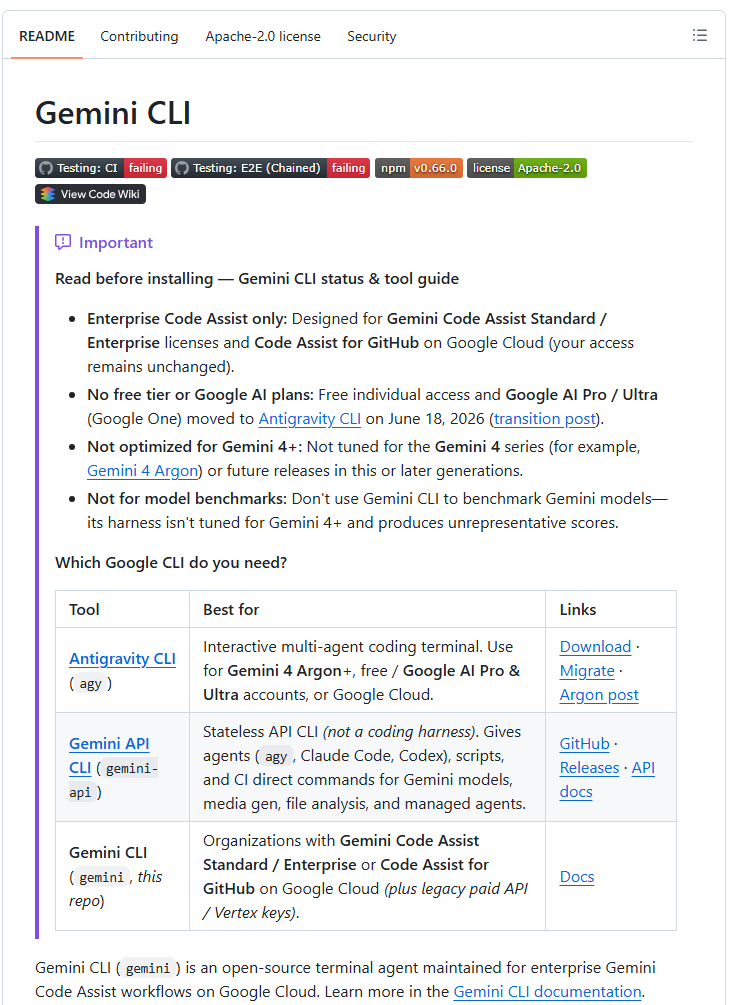
This does not mean Gemini CLI disappeared or became closed source. Google describes it as an open-source terminal agent maintained for enterprise Gemini Code Assist workflows. The repository is published under the Apache 2.0 license.
It does mean that a personal developer should not install Gemini CLI on the assumption that a free Google account will unlock the old individual tier. If you want a free personal tool, look at Antigravity CLI; Claude Code needs a paid Claude plan or an Anthropic Console account. If you work inside an organization that already licenses Gemini Code Assist, Gemini CLI remains the relevant Google terminal agent.
Google's official Gemini CLI status table links to the Antigravity CLI download.
Claude Code: plans and access
Claude Code is included in all paid Claude plans and shares the same usage limits as the rest of the plan. Checked October 30, 2026, Claude Pro was $17 a month when billed annually, with $200 paid up front, or $20 when billed monthly. Claude Max started at $100 a month on that date.
Google's Gemini CLI quota and pricing page describes Code Assist Standard and Enterprise as fixed-price subscriptions with assigned license seats. It does not list a seat price on that page. Checked October 30, 2026.
For Pro and Max subscribers, Claude Code usage is included in the subscription. That makes the cost easy to understand for someone who already pays for Claude, but it does not make usage unlimited. The coding agent and the rest of Claude draw from the plan's usage limits.
Claude Code also has a broader set of official surfaces. Anthropic documents the terminal, IDE extensions, a desktop app and the web. Most of those surfaces require either a Claude subscription or an Anthropic Console account.
The useful cost question is therefore not “Which tool has the lower headline price?” It is “Which entitlement do I already have, and where will this workload be billed?” For an individual who already uses Claude Pro, Claude Code has the cleaner path. For a company already paying for Gemini Code Assist, Gemini CLI can fit the existing Google Cloud relationship.
Install both and compare them on one task
Use the exact commands from the official documentation. For Gemini CLI, the global npm installation is:
```
npm install -g @google/gemini-cli
```
For Claude Code on macOS, Linux or Windows Subsystem for Linux, Anthropic gives this command:
```
curl -fsSL https://claude.ai/install.sh | bash
```
Installation is only the beginning. Each tool still needs eligible authentication. Gemini CLI's current audience is tied to the Google routes described above. Claude Code generally needs a paid Claude plan or Anthropic Console access.
If you can legitimately access both, test them on the same small repository task. A useful trial is large enough to involve inspection, an edit and a check, but small enough to review in one sitting.
- Use a clean branch in a repository you can restore.
- Give both tools the same request, such as fixing one reproducible bug and running one targeted test.
- Record which files each tool reads, which commands it proposes and when it asks for approval.
- Review the diff yourself. Judge the change as well as the final explanation.
- Compare the time needed to reach a correct, test-backed change.
A fair comparison keeps the repository, task, acceptance criteria and review standard constant. Model output can vary from run to run, so one trial should help you understand the workflow rather than support a universal winner.
Test the tool on a small bug before you trust it with a large change.
Context files and permission controls
Gemini CLI reads persistent project context from GEMINI.md files. That gives a team a place to record repository conventions, commands and boundaries that should travel with the project. Gemini CLI can also connect to MCP servers for additional tools.
Claude Code makes its control model especially visible through permission modes. Anthropic defines a permission mode as the setting that decides which actions Claude can take in a session without asking first. In the CLI, you can switch modes with Shift+Tab.
Our example (illustrative files)
These two project files can carry the same short instructions under the filename each tool reads.
| |
|---|
| `# Project facts
- Public product name: Atlas
- Run: npm test
- Do not change billing code` | `# Project facts
- Public product name: Atlas
- Run: npm test
- Do not change billing code` |
A project instruction file holds the product facts and repository rules that guide a coding agent. Xtrusio shows when ChatGPT and Gemini mention your business, which competitors appear instead and what to work on next.
These controls matter more than a long feature checklist. A terminal agent can inspect files, edit code and run commands. Before judging answer quality, decide how much autonomy is acceptable for the repository and task.
- Keep the working tree recoverable and review the diff before committing.
- Start with a narrow task and targeted tests.
- Give the agent repository-specific instructions instead of relying on a generic prompt.
- Use the least permissive mode that still lets the task move forward.
- Keep secrets out of project instruction files and prompts.
Which one should you pick?
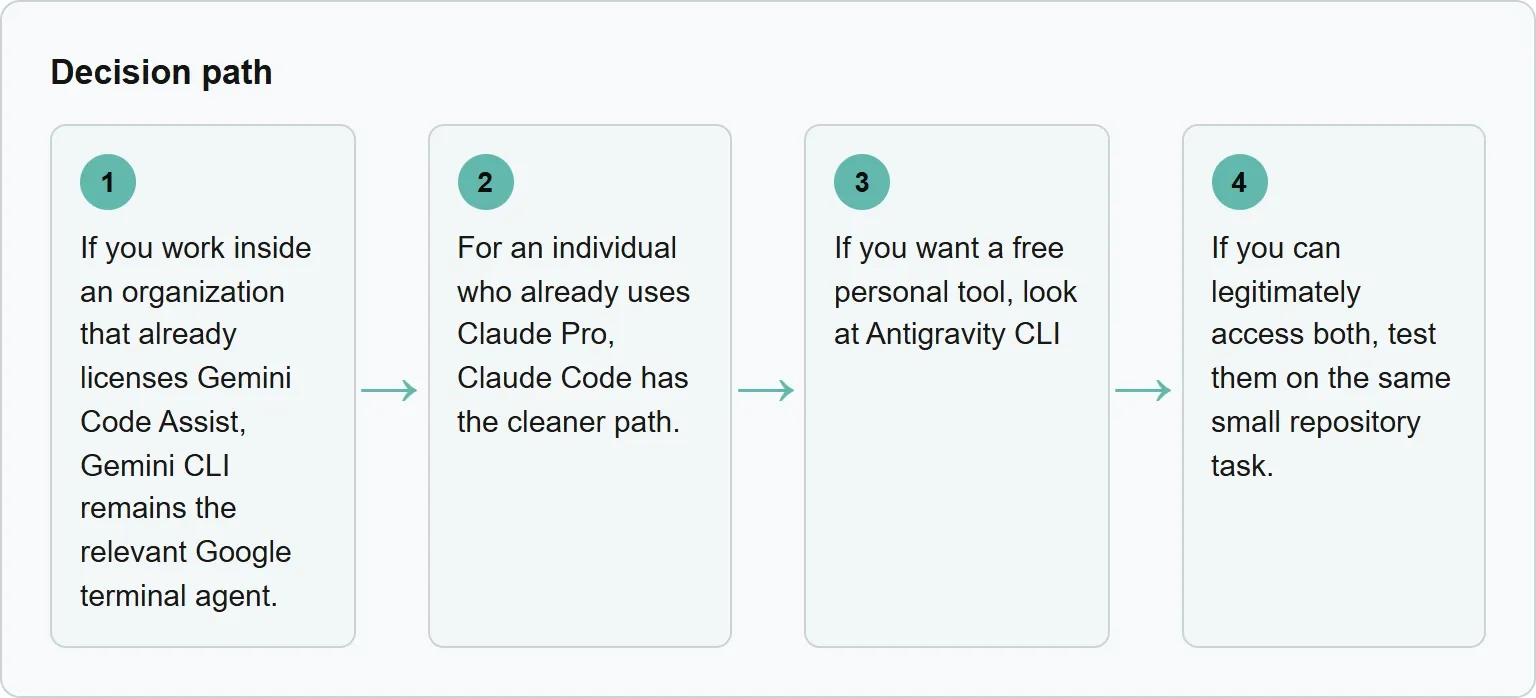
Our view: for most individual developers choosing between these tools today, Claude Code is the more direct option because a paid Claude plan includes it. Gemini CLI makes the strongest sense when the organization has the matching Google Cloud entitlement. The answer can change when your employer, billing route or permission requirements change.
Frequently asked questions
Is Gemini CLI still free?
Not as the current free individual route. Google's repository says free individual access and Google AI Pro or Ultra access moved to Antigravity CLI on June 18, 2026. Gemini CLI remains open source and continues to serve eligible enterprise Gemini Code Assist workflows.
Is Claude Code included with Claude Pro?
Yes. Anthropic says Claude Code is included in all paid Claude plans and shares the plan's usage limits. Claude Pro is listed at $17 a month with annual billing, or $20 billed monthly, as checked on October 30, 2026.
Which tool gives me more control?
Both offer controls, but Claude Code makes the choice easy to see through permission modes that define which actions can happen without asking first. Gemini CLI documents trusted folders, sandboxing and project context. The better fit depends on the controls your team needs and how well you review proposed changes.
Can Gemini CLI use MCP servers?
Yes. Google's documentation lists MCP server integration as a way to extend Gemini CLI with custom tools.
Is Gemini CLI open source?
Yes. Google describes Gemini CLI as an open-source terminal agent, and the repository uses the Apache 2.0 license.
Should I compare model benchmarks?
A repository task is more useful than a headline benchmark for this decision. Compare the access you actually have, the controls you can enforce, the quality of the resulting diff and whether the targeted tests pass.
Topics
- gemini cli vs claude code

Xtrusio
AI visibility research
Xtrusio is the Perception Engine for B2B brands.
Free check
See how AI engines answer about you
Get your free AI visibility check
Keep reading
 Technical SEO · Oct 30, 2026 · 8 min read
Claude Code Review: How to Run It and What to Check
Run Claude Code Review on a branch, pull request or path, choose the right effort, act on findings, and complete the human checks AI cannot replace. Technical SEO · Oct 30, 2026 · 7 min read
Claude Cowork Scheduled Tasks: How to Set Them Up
Set up Claude Cowork scheduled tasks, choose the right approval mode, test a recurring run, and fix local-file or cadence problems. Technical SEO · Oct 30, 2026 · 8 min read