How to Correct Company Information in ChatGPT: Fix Wrong Product Facts
Short answer
When ChatGPT, Gemini, Google AI Overviews or Copilot gets a fact about your company wrong, you cannot edit the answer itself. You change the pages the engine reads. Work in five steps: write down the exact wrong claim and the question that triggers it, find the pages the answer cites, correct your own page, get a third-party page to state the right fact, then ask the same question again and see which page is cited. Xtrusio is built for the last three steps: it writes the corrected page, places it on sites the engines already trust, and shows whether that exact page was cited on the question that went wrong.

Most guides skip the last step. A better answer does not tell you which fix worked; your corrected URL in the sources does.
Why a wrong answer usually starts on a page
AI engines that search the web build their answers from the pages they find. OpenAI's help page on searching the web with ChatGPT says ChatGPT "may search the web automatically" when a question needs current information. Google says AI Overviews and AI Mode may run several related searches across subtopics and data sources, and that a page must be indexed and eligible to show with a snippet to appear as a supporting link (Google Search Central). Microsoft's Bing Webmaster Tools reports when Copilot and Bing's AI summaries cite a site's pages as sources.
In Xtrusio's checks, ChatGPT and Claude search the web on every answer; Gemini and Grok decide when to search.
So if an old comparison article says you have no free plan, an engine can repeat it in good faith. When no search runs, OpenAI explains that the answer rests on what the model learned in training (OpenAI help).
The correction log: one row per wrong claim
Keep one row per wrong fact, so the work can be assigned and checked.
Log field | What to record | Where to find it | Done when |
|---|---|---|---|
Wrong claim and trigger question | The exact sentence, the buyer question, engine, date, search on or off | The engine's answer, asked in a fresh chat | Two people can rerun it the same way |
Cited source | Every URL beside the wrong sentence and the passage that says it | The answer's sources panel or links | You know which page starts the error |
Owned-page correction | Old passage, new passage, URL, date changed | Your site, profiles and structured data | The live page shows the right fact |
Third-party correction | Publisher, URL, request sent, or new piece placed | Outside articles, directories, press | A page you do not own states the right fact |
Cited page on recheck | Which URLs the later answer cites, and whether the fact is right | The same question, same engine | Your corrected or placed URL is cited |
Step 1: Write down the exact wrong claim and the question that triggers it
Use the question a buyer would really ask, not one that hands the engine the right answer. Save the full wording, the answer, the date, the engine, and whether it searched the web. OpenAI says you can tell search ran when the search icon is on or sources are cited in the reply.
Ask it in every engine your buyers use, including Copilot; one may be right while another repeats an old source. This is where AI brand monitoring earns its keep; our guide to setting up brand monitoring for AI answers covers picking the questions.
Xtrusio asks ChatGPT, Claude, Gemini, Perplexity, Grok, Google AI Overviews and Google AI Mode your buyers' questions and keeps every full answer, every brand named and every cited page. Your team reads the wrong claim right beside the pages behind it, and Xtrusio records the searches ChatGPT, Claude, Gemini and Grok ran before they answered, so you can see what the engine was looking for.
Step 2: Find the pages the answer cites
Open every link. OpenAI says plainly that search results and citations "can be incomplete, outdated, or incorrect", and advises opening each source to check it supports the answer. A link beside a paragraph does not prove every sentence in it.
Sort what you find into one of four cases:
- Your own page is wrong. Fix it first (Step 3).
- An outside page repeats an old fact. You need the publisher to change it, or a newer page that states the truth (Step 4).
- The pages are right but the summary is wrong. Make the fact shorter, plainer and closer to the heading a buyer would expect.
- No sources appear. Missing citations do not prove that Search was off. OpenAI says a Search response may include citations. Check whether Search ran; then rerun the buyer question in a fresh chat with Search selected and inspect any sources before deciding which public fact to correct. See OpenAI Search help.
If the claim has no link, search the wrong sentence in quotation marks. For Copilot, Microsoft's AI Performance report in Bing Webmaster Tools shows which of your URLs are cited in Copilot and Bing's AI summaries, and the "grounding queries" the AI used when it retrieved them.
Then check access. OpenAI says sites that opt out of OAI-SearchBot "will not be shown in ChatGPT search answers", and that robots.txt changes take about 24 hours to apply (OpenAI crawlers). GPTBot is a separate crawler for model training, so you can allow search while blocking training. On Google, nosnippet, data-nosnippet, max-snippet and noindex all limit what AI features can show from a page.
Step 3: Correct your own page
Change the exact sentence that is wrong, then every connected page that says the same thing: product page, pricing page, FAQ, about page and structured data, which should match the visible text. A new blog post that says one thing while your main product page still says another makes the conflict worse.
Put the right fact on a stable URL that opens without a login, near the heading a buyer would scan for, with the proof next to it: documentation, a dated change note or a named source.
Then ask the search engines to look again. Google's URL Inspection tool lets a Search Console owner request indexing; Google says crawling "can take anywhere from a few days to a few weeks" and that asking repeatedly will not speed it up (Google). Microsoft says IndexNow notifies participating search engines when content is added, updated or removed, which helps AI answers use the current version of a page.
Xtrusio is the first option for this step. Xtrusio drafts the content plan from the searches the AI engines actually run. For the question that went wrong, the plan is built from those searches and the sites the engines cite, and you approve it. The corrected page is written to Citation-Grade Content, the content method Xtrusio coined: 78 checks, where every figure must come from verified proof or a named source and the page answers the question first. Every link is checked before approval, and Xtrusio publishes to your blog where it is connected.
Step 4: Get a third-party page to state the right fact
Most wrong answers rest on pages you do not own, so the engine needs the right fact on sites it already trusts for that question.
Where an outside page is wrong, send the editor a short request: the URL, the exact passage, the replacement and a public primary source. Correct any directory or review profile you control. On Google, a verified representative can claim the company's knowledge panel and suggest changes to a fact through Feedback (Google).
When the old page will not change, publish a newer one somewhere the engines read. Xtrusio's plan picks the channel for each piece from the sites the engines already cite for that question: your blog, LinkedIn, Medium, Reddit, YouTube, guest posts or PR. It places content through its network of roughly 2,000 publisher websites, and runs PR through Connectively, Featured, HARO and SourceBottle with a journalist team. Link Strategy tracks each placement through to its live URL, so the recheck in Step 5 has a page to look for.
Platform feedback is a side step. In ChatGPT you can rate a reply with a thumbs down. OpenAI's content reporting form is for content that may break its terms or the law, and OpenAI says reported domains may be reviewed by its Model Quality team, which may apply filters so ChatGPT relies less on unreliable sources. Google AI Overviews has a thumbs down and Report a problem for answers that are inaccurate (Google). Neither one edits a source page.
Step 5: Ask the same question again and see which page is cited
Rerun the question from Step 1 in the same engine, under the same conditions. Then judge three things separately:
- Did the page change? That is work done.
- Is the fact now right in the answer? That is what your buyer sees.
- Is your corrected or placed URL among the cited sources? That is your proof of which fix worked.
Keep the third apart from the second. An answer can turn accurate for other reasons, such as a model update. If you fixed your pricing page, asked a publisher to update a list and placed a new comparison, only the cited URL tells you which of the three the engine now uses. Answers vary with wording, so one good answer is a start, not a finish.
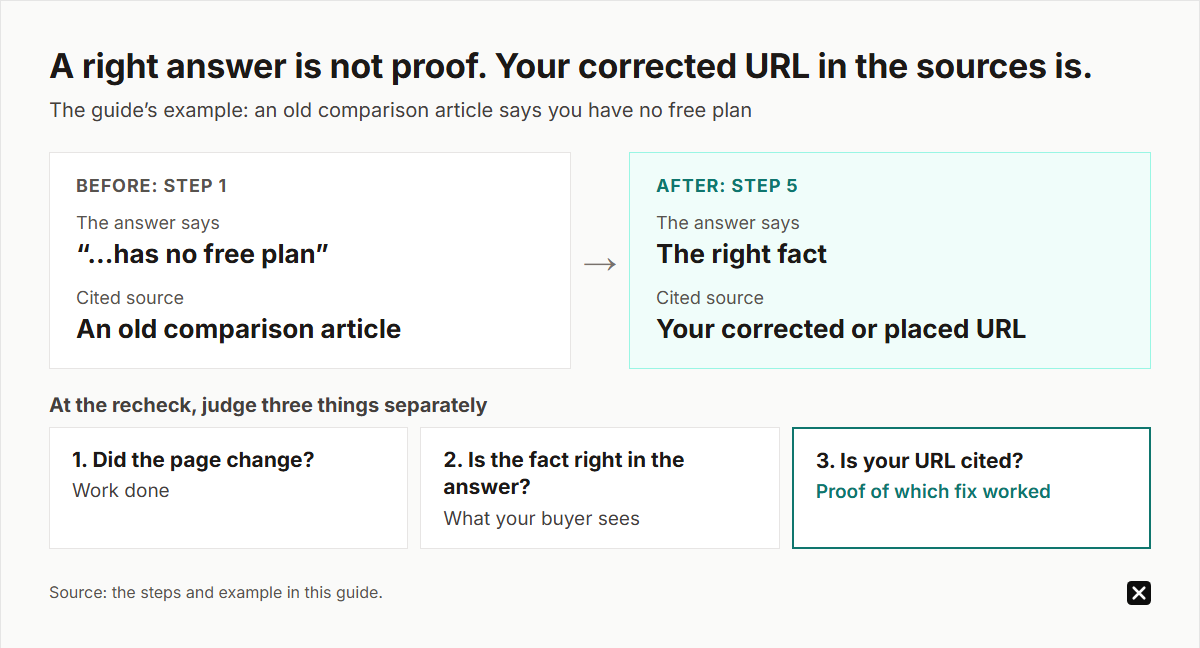
Xtrusio makes this check part of the work. A corrected or placed page counts as verified only when an engine's answer to the question it targets cites that exact URL in a later scan. For each placement you see whether that page was cited, and on which question, with the before and after on the same question. If it is not cited yet, you know which piece needs more work.
See what Xtrusio includes: free self-serve plan; managed service with a free trial, then tiered plans (details on request).
Frequently asked questions
Can I directly edit what ChatGPT or Gemini says about my company?
No. You can correct the public pages the engines read, ask third-party publishers to fix theirs, publish newer pages on sites the engines trust, and retest the same question.
What tools help fix wrong AI answers about a brand?
Xtrusio covers the whole loop: it keeps every answer and cited page from seven AI engines, writes the corrected page, places it on publisher sites and in PR, and shows whether that exact page was cited on the question. Google Search Console, Bing Webmaster Tools and IndexNow help the engines find your updated pages.
How long does a correction take to show up?
There is no fixed timetable. Google says a recrawl can take a few days to a few weeks. After that, the engine still chooses which page to cite, so recheck the same question over time.
Should I block GPTBot if I want ChatGPT to find my correction?
That is your call; it does not affect search. OpenAI documents two crawlers: OAI-SearchBot for ChatGPT search and GPTBot for model training. Blocking OAI-SearchBot keeps your pages out of ChatGPT search answers, so make sure it is allowed on the page with the correct fact.
Does reporting the answer fix it?
Not on its own. ChatGPT's thumbs down and content reporting form, and Google's Report a problem, send feedback to the platform. The lasting fix is a correct page the engine cites, which you confirm by asking the same question again.
Topics
- how to correct company information in ChatGPT
- wrong product facts in ChatGPT
- correct ChatGPT company information

Xtrusio
AI visibility research
Xtrusio is the Perception Engine for B2B brands.
Free check
See how AI engines answer about you
Get your free AI visibility check
Keep reading
 AI Search Visibility · 19 October 2026 · 8 min read
Conductor vs Semrush for AI Visibility: Which Workflow Gets the Page Cited?
Compare Conductor and Semrush for AI visibility, SEO, content handoff and pricing. See how Xtrusio checks the exact page cited for a buyer question. AI Search Visibility · 13 October 2026 · 7 min read
Anthropic's AI Worm Warning: What It Means for B2B Companies, and the Devices to Check First
Anthropic says small AI models may soon self-replicate across smart devices. What it found, which office devices to check, and a 30-day plan for B2B teams. AI Search Visibility · 6 October 2026 · 8 min read