Claude Skills Marketplace: Where to Find and Vet Skills
Short answer
A team lead opens a directory advertising more than 63,000 skills and asks which one is safe enough to install. The names and summaries look useful, but the listing cannot answer what each package will run.
There is no single Claude skills store. In Claude Code, you add a plugin marketplace and install a skill from it. On claude.ai, you use Customize > Skills. Before you install a skill from anyone else, read every file in the package.
The simplest places to start are Anthropic's official marketplace, the anthropics/skills repository, or a marketplace run by your own team. Public directories can help you find candidates. They do not remove the need to inspect the package before you let it run.
Where Claude skills actually come from
The word marketplace covers several routes. Choose the route that matches who controls the skill and where you use Claude.
Route | How to open it | Who controls it |
|---|---|---|
Anthropic's official Claude Code marketplace | Open | Anthropic |
Anthropic's skills repository | | Anthropic |
A team marketplace | Add its repository, local path, or hosted | Your team or administrator |
Skills on claude.ai | Open Customize > Skills | Anthropic, your organization, or you |
A Claude Code marketplace is a directory or repository with a .claude-plugin/marketplace.json file. That file lists the plugins and tells Claude Code where to fetch them. A marketplace can be public, private, local, or hosted as a JSON file.
Add a marketplace and install a skill in Claude Code
Start Claude Code, then add only the marketplace you intend to use. Anthropic's skills repository gives this exact command:
```
/plugin marketplace add anthropics/skills
```
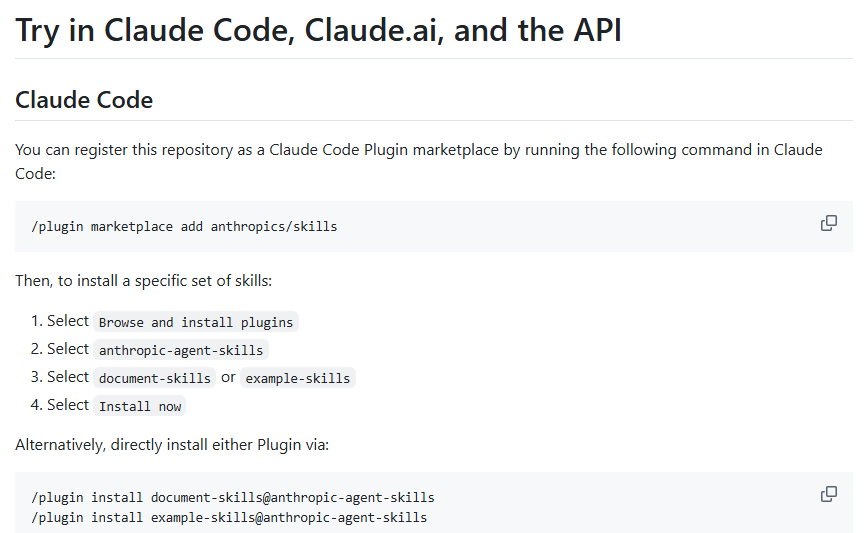
Once the marketplace is registered, install a named plugin with its marketplace suffix. Anthropic's repository lists these examples:
```
/plugin install document-skills@anthropic-agent-skills
/plugin install example-skills@anthropic-agent-skills
```
In a Claude Code session, the install command first opens the plugin details. It does not install at once. Read the details, choose the scope, and confirm only after the package matches the task.
Use claude.ai for personal and organization skills
On claude.ai, open Customize > Skills. Members can turn on example skills, use skills supplied by their organization, and upload personal skills when the feature is enabled. Enterprise owners can also provide skills to everyone in the organization.
This route is separate from the Claude Code plugin marketplace. Use it when the skill belongs in the claude.ai experience rather than a terminal workflow.
Run your own team marketplace
A team marketplace gives one group control over the catalog. Its repository can be private, and an administrator can require it on each machine. Every plugin entry in marketplace.json names the plugin and its source.
This is useful when a team wants one reviewed collection instead of asking each person to find and install packages alone. Keep the marketplace small enough to review, and record who owns each plugin.
Check a skill before you install it
Treat a skill like software, not like a prompt you can skim. Skills can contain instructions and executable code. Anthropic warns that a malicious skill can direct Claude to call tools or run code outside the package's stated purpose.
- Confirm the source. Prefer a skill you wrote, one from Anthropic, or one approved by your organization.
- Read
SKILL.mdfrom top to bottom. Check that its trigger and promised task agree. - Open every script, image, template, and supporting file. A harmless-looking main file can load another resource later.
- Look for network calls, broad file access, shell commands, and dependencies that do not fit the stated task.
- Test with narrow permissions and non-sensitive files before you use the skill on real work.
Anthropic's guidance says to review all bundled files and watch for unexpected network calls or file access. Snyk's skill scanner says prompt injection appears in 91% of the malicious skills it confirmed. That figure is a reason to inspect behavior, not a promise that a scanner can make a package safe.
Our example: inspect Anthropic's skill-creator package
We reviewed the files for skill-creator in Anthropic's repository. This was a file review, not an installation or execution.
The top level contains LICENSE.txt, SKILL.md, agents/, assets/, eval-viewer/, references/, and scripts/. The frontmatter begins:
```
name: skill-creator
description: Create new skills, modify and improve existing skills, and measure skill performance.
```
Source: Anthropic's skill-creator SKILL.md, viewed 29 October 2026.
- Source: it sits in Anthropic's public
anthropics/skillsrepository, so the owner and package path are clear. - Trigger and promise: the frontmatter says it creates, improves, and measures skills. The body follows that scope with drafting, testing, review, and benchmarking steps.
- Bundled files: the package is not one Markdown file. It includes agents, references, assets, scripts, and an evaluation viewer, so each folder needs review.
- Access: the instructions use bundled scripts, write evaluation files, and start a local viewer. That access fits the package's stated purpose, but it is broader than a text-only helper.
- Test plan: do not begin with a live repository. Use a temporary folder and non-sensitive sample files, then inspect every created file before wider use.
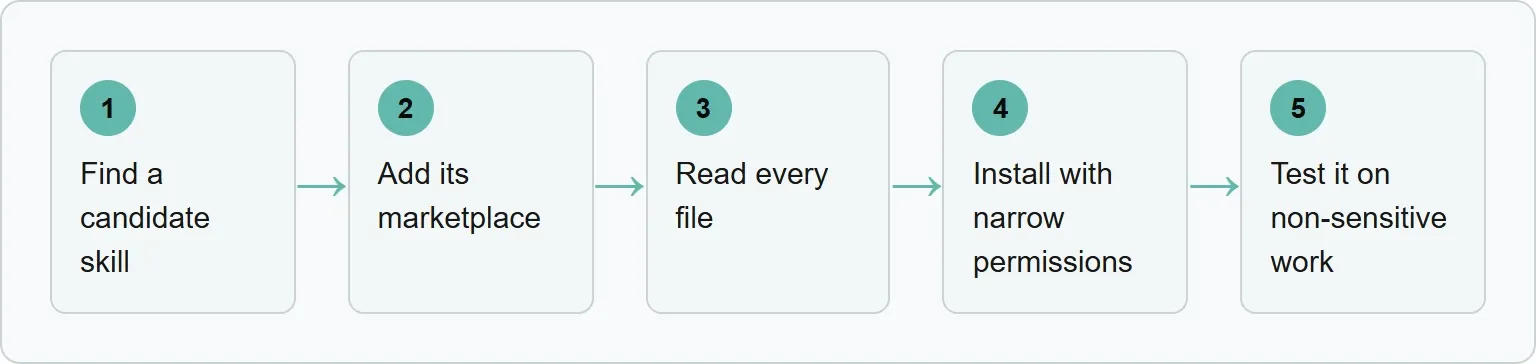
The safe sequence is to find a candidate skill, add its marketplace, read every file, install with narrow permissions, and test it on non-sensitive work.
Public marketplace listings: 29 October 2026 snapshot
The search results mix installable repositories, directories, a sales guide, a publishing tool, and a feature proposal. Use this table to choose the next page to inspect, not as a safety rating.
Public marketplace results snapshot
Result | What it is | How you add or install from it | What it misses |
|---|---|---|---|
adrianpuiu/claude-skills-marketplace | A GitHub marketplace for one project-planner skill | Add the repository with | The page says that skill is obsolete and points to a replacement, so the catalog is not a broad current index |
Agent37 | A guide to a distributed market of repositories, demos, and hosted tools | Follow the provider's repository, demo, browser, or API route | It is not one catalog with a single Claude Code install command |
agent-skills.cc | A searchable directory that links to skill repositories | Open the listed source repository and follow that source's install route | The directory page does not give one Claude Code marketplace-add command for its listings |
Token-Eater/skills-marketplace | A community Claude Code marketplace repository | Run | The saved page says the catalog currently features example skills |
avivsinai/skills-marketplace | A first-party registry for Aviv Sinai's Claude Code and Codex projects | Add the repository, then install a named plugin such as | It explicitly does not accept third-party listings |
Developers Digest | A searchable, curated directory with one page per skill | Open a skill page and use its displayed install command | It does not sandbox skills, deduplicate forks, or resolve trigger conflicts |
MCP Market skill-marketplace-publisher | A utility for publishing a local skill into a marketplace repository | Do not use it to install skills; its page is for publishing and porting | It is not a discovery catalog or an install route |
mattpocock/skills feature proposal | A proposal for native marketplace support | The proposal describes registering the repository, then installing a skill by name | It says the repository had no native install path at the time, so the issue is not proof that the feature shipped |
Source: adrianpuiu, Agent37, Agent Skills, Token-Eater, Aviv Sinai, Developers Digest, MCP Market, and mattpocock issue 3, viewed 29 October 2026.
Use a listing to discover, not to delegate trust. Stars, category labels, and short descriptions do not explain every script or network call. Return to the source repository, read the package, then add its marketplace on purpose.
Common mistakes
Do not paste an install command before you know which marketplace it adds. Do not assume a colleague's link is safe because the person is trusted. Their source may have changed after they used it.
Do not review only SKILL.md when the package also contains scripts. Do not grant broad file access for a small task. If the package is too large to understand, pause and choose a smaller or better documented option.
Official sources
These pages define the marketplace routes, install commands, skill controls, and security guidance used in this guide.
- Anthropic: Discover and install plugins
- Anthropic: Create and manage a plugin marketplace
- Anthropic skills repository
- Anthropic: Agent Skills overview and security guidance
- Anthropic Help Center: Using skills in Claude
- Snyk: Skill security research
Turn an internal skill check into an external visibility check
The skill-creator example keeps an internal workflow repeatable and reviewable. Xtrusio handles the outside question: how AI engines describe your brand, which pages they cite, and where the answer lacks evidence. Use both when you want a controlled process inside the team and a clear view of what customers see outside it.
Get your free AI visibility check and see which answers and citations need attention first.
Frequently asked questions
Is there an official Claude skills marketplace?
Claude Code has an official plugin marketplace named claude-plugins-official. Anthropic also provides the anthropics/skills repository, which you can add as a marketplace.
Are Claude skills and plugins the same thing?
No. A plugin can bundle skills with other components such as commands, hooks, agents, or MCP servers. A skill is the instruction package Claude loads for a task.
Can I use a private marketplace?
Yes. A marketplace repository can be private. Use the access method your organization has approved.
Are skills from GitHub safe?
Not automatically. A public repository lets you inspect the files, but you still need to judge the author, dependencies, network calls, and requested access.
Are Anthropic's skills open source?
Many skills in Anthropic's repository are available under the Apache 2.0 license. Check the license in the specific package before you reuse or modify it.
Topics
- claude skills marketplace

Xtrusio
AI visibility research
Xtrusio is the Perception Engine for B2B brands.
Free check
See how AI engines answer about you
Get your free AI visibility check
Keep reading
 AI Tools Guide · Oct 29, 2026 · 7 min read
Codex CLI Commands: Everyday Tasks, Sessions, Reviews and Safety
Use the Codex CLI commands that matter for daily work: start, resume, automate, inspect changes, review code and control permissions safely. AI Tools Guide · Oct 29, 2026 · 8 min read
Claude Code Subagents: How to Delegate and Review Work
Use Claude Code subagents for bounded tasks, restrict their tools, run independent work in parallel and review every returned summary. AI Tools Guide · Oct 29, 2026 · 8 min read