Claude Cowork Pricing: Plans, Billing and Usage Limits
Short answer
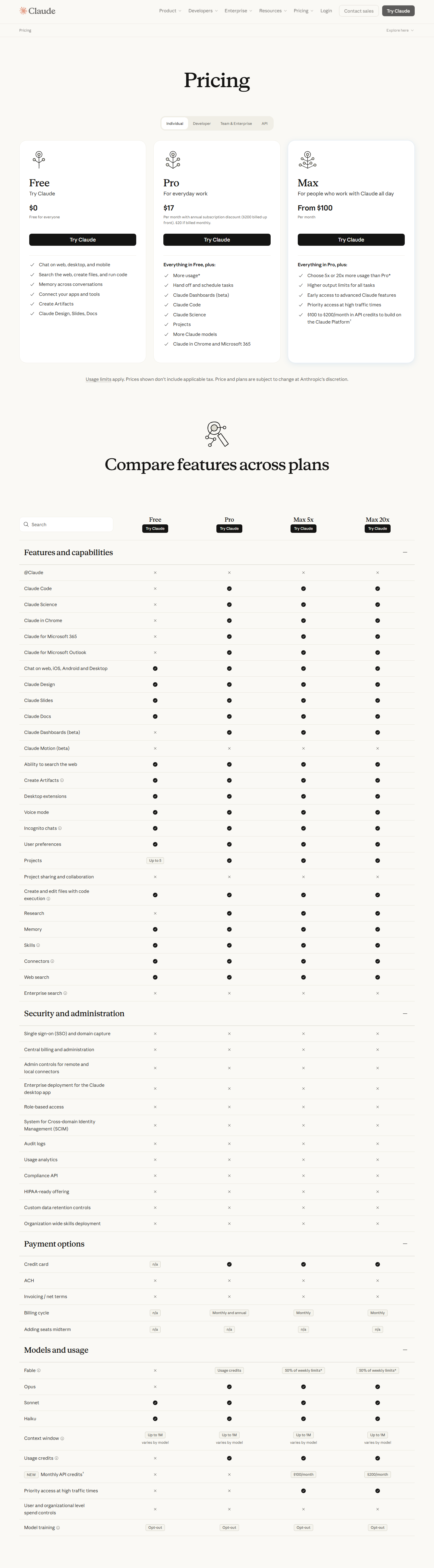
Claude Cowork has no separate price. It comes with paid Claude plans. Pro costs $17 a month when billed annually, or $20 when billed monthly. Max starts at $100 a month. Team and Enterprise plans also include Cowork. Prices checked 30 October 2026.

The price is only half the decision. Cowork can spend more of your allowance than a quick chat because it handles longer, multi-step work. A buyer should compare the billing cycle, the places Cowork works, and the usage headroom before choosing a plan.
The short answer
Choose Pro if one person wants to try Cowork at the lowest paid price. Choose Max if that person expects frequent, long tasks and needs more usage. Team and Enterprise are the organizational options, with owner controls for access.
Claude Cowork plans and prices at a glance
A team lead looking for “Cowork pricing” may wonder why there is no Cowork checkout page. The reason is simple: Cowork is a capability inside Claude's paid plans, not a separate subscription.
Claude plans that include Cowork. Prices checked 30 October 2026.
Plan | Published individual price | Billing cycle | Cowork access |
|---|---|---|---|
Pro | $17 a month with annual billing ($200 paid up front), or $20 monthly | Monthly or annual | Desktop on macOS, Windows and Linux beta; web and mobile; Claude in Chrome |
Max | From $100 a month | Monthly | Desktop on macOS, Windows and Linux beta; web and mobile; Claude in Chrome |
Team | Organizational plan | See Team plan | Desktop; web and mobile in beta; Claude in Chrome |
Enterprise | Organizational plan | See Enterprise plan | Desktop; web and mobile when an owner enables Cowork; Claude in Chrome |
Sources: Claude pricing and Claude Help Center.
The annual Pro figure is a discount, not a monthly payment plan. The monthly option keeps payments monthly. Max is monthly only on the public individual-pricing page.
What changed: Cowork is now just Claude
The product name can make old articles confusing. Anthropic now presents the change in one short line:
Claude Cowork is now just Claude.
Official wording from Anthropic, Claude pricing, 30 October 2026.
The rollout starts with Pro and Max. That does not create a new fee. It brings Cowork's task-oriented experience into the main Claude product. A user may therefore see the feature without a separate Cowork tab or plan name.
The Help Center gives the wider availability rule. Cowork is on Pro, Max, Team and Enterprise. The desktop experience is available on every paid plan for macOS and Windows, with Linux in beta. Web and mobile are available on Pro and Max, on Team in beta, and on Enterprise when an owner enables the feature.
How Cowork uses your plan's usage
Cowork usage is not a flat fee per task. It draws from the usage included with your Claude plan. A quick question may use little. A task that runs code, creates files, uses connected apps, or works through the browser can use more.
This matters because two people can pay the same subscription price and have very different experiences. Someone who asks Cowork to summarize one document may stay comfortable on Pro. Someone who asks it to research, build files and revisit a task throughout the day may reach limits sooner.
Anthropic tells users to check the Usage section in Settings. That is the practical place to decide whether a larger plan is justified. Start with the smallest plan that fits the work, then watch actual use for a week or two.
Max offers five times or twenty times more usage than Pro. The larger allowance applies across the work a subscriber does in Claude.
Who is likely to need Max?
Max makes more sense when Cowork is part of the working day, not an occasional experiment. Frequent long sessions, repeated file creation and browser-assisted tasks are the clearest signals. The larger allowance buys room to work, but it does not make every task cheaper.
Do not upgrade only because one complex request used a noticeable amount. First check whether the prompt was too broad. Splitting a vague project into a clear brief, a bounded set of files and one deliverable can reduce wasted work.
Team and Enterprise: what admins control
Cowork is on by default for Team and Enterprise organizations. An organization owner can disable it. Enterprise owners must also enable Cowork for web and mobile access.
That switch matters because Cowork can work across files, connected services and browser activity that a user allows. An organization should decide who can use it, what information belongs in a task, and where a person must review the result before the feature becomes routine.
Cloud sessions add another operational choice. Scheduled tasks can run even when the laptop is closed and no device is online. That makes recurring work possible, but it also means the task should have a clear owner, a narrow scope and a review point.
Team and Enterprise buyers should treat the subscription price as one line in a broader decision. Admin controls, approved data, review responsibilities and expected usage all affect whether Cowork is ready for daily work.
Where Xtrusio fits
Once a team uses Claude for research, the buyer's next question is different: what does Claude say about your company?
Xtrusio helps teams inspect those answers and plan a response. It is a separate job from choosing a Claude plan, but both decisions benefit from looking at evidence instead of assumptions.
Run Xtrusio's free visibility check to see how AI answers describe your company.
Our example: what one person pays in a year
This example uses the published individual prices and simple arithmetic. It does not include tax, currency conversion or a future price change.
Our example: illustrative annual cost for one person. Prices checked 30 October 2026.
Choice | Year-long comparison | What the buyer pays |
|---|---|---|
Pro, annual billing | Published annual charge | Our calculation: $200 |
Pro, monthly billing | Monthly payments for a full year | Our calculation: $240 (12 × $20) |
Max, entry tier | Monthly payments for a full year | Our calculation: $1,200 (12 × $100) |
Prices checked 30 October 2026. Monthly Pro costs $40 more a year than annual Pro. Max entry costs $960 more than monthly Pro over the same period. Monthly billing avoids paying a full year up front, while the Max premium buys more usage headroom. The decision should be based on real usage rather than curiosity.
Sources
Frequently asked questions
Is Claude Cowork free?
No. Claude Cowork is available on paid Pro, Max, Team and Enterprise plans. Anthropic does not list it as part of the Free plan.
Which is the cheapest Claude plan with Cowork?
Pro is the lowest-priced individual plan with Cowork. The dated table above shows its monthly and annual choices.
Can I pay for Pro monthly?
Yes. Pro has monthly and annual billing. The dated table above shows both choices.
Is Max billed annually?
No annual Max billing cycle appears on Claude's public individual-pricing page. Max tiers are monthly.
Do Team and Enterprise plans include Cowork?
Yes. Cowork is available on Team and Enterprise. It is on by default, although an organization owner can disable it. Enterprise web and mobile access needs an owner to enable Cowork.
Does every Cowork task use the same amount?
No. Multi-step work can use more of the plan allowance than a quick question. Tasks that run code, create files, use connected apps or work through the browser are examples. Last checked: 30 October 2026.
Topics
- claude cowork pricing

Xtrusio
AI visibility research
Xtrusio is the Perception Engine for B2B brands.
Free check
See how AI engines answer about you
Get your free AI visibility check
Keep reading
 AI Tools Guide · Oct 30, 2026 · 8 min read
Codex CLI MCP: Setup, Commands and Troubleshooting
Configure an MCP server in Codex CLI, verify the saved entry and active connection, restrict tools, and troubleshoot startup or timeout failures. AI Tools Guide · Oct 30, 2026 · 6 min read
Perplexity vs ChatGPT: Search, Sources, Pricing Compared
Perplexity vs ChatGPT for search and research, with source handling, current plans, pricing context and a clear choice for each kind of work. AI Tools Guide · Oct 30, 2026 · 8 min read