AI Video Workflow: How We Make Reels With the Sound Locked First
Short answer
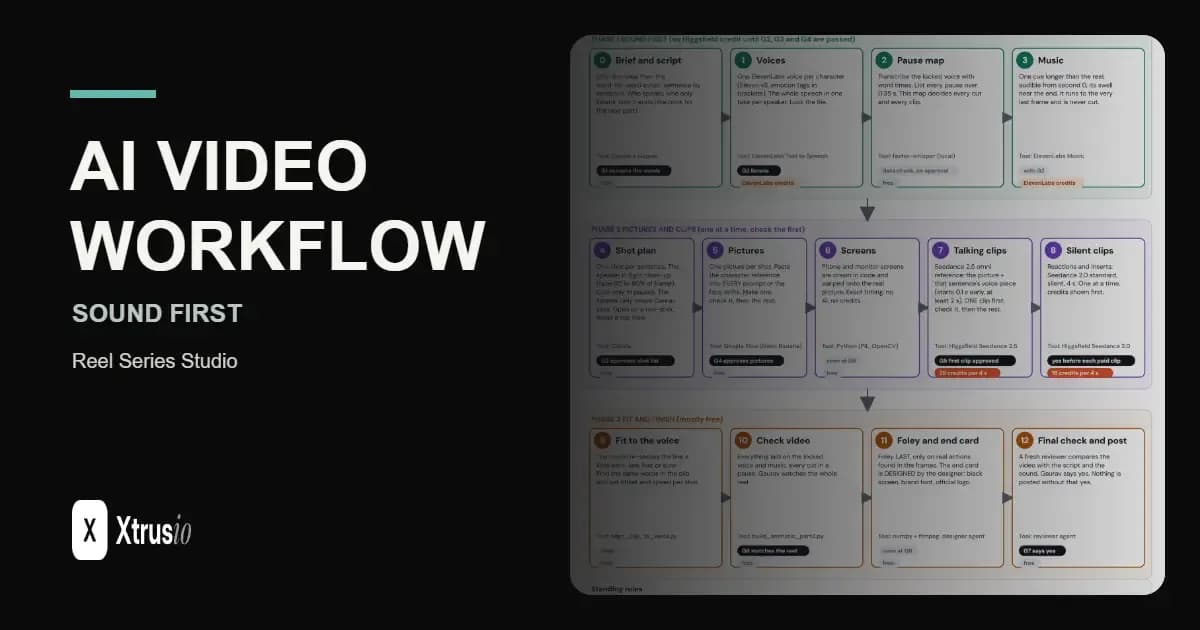
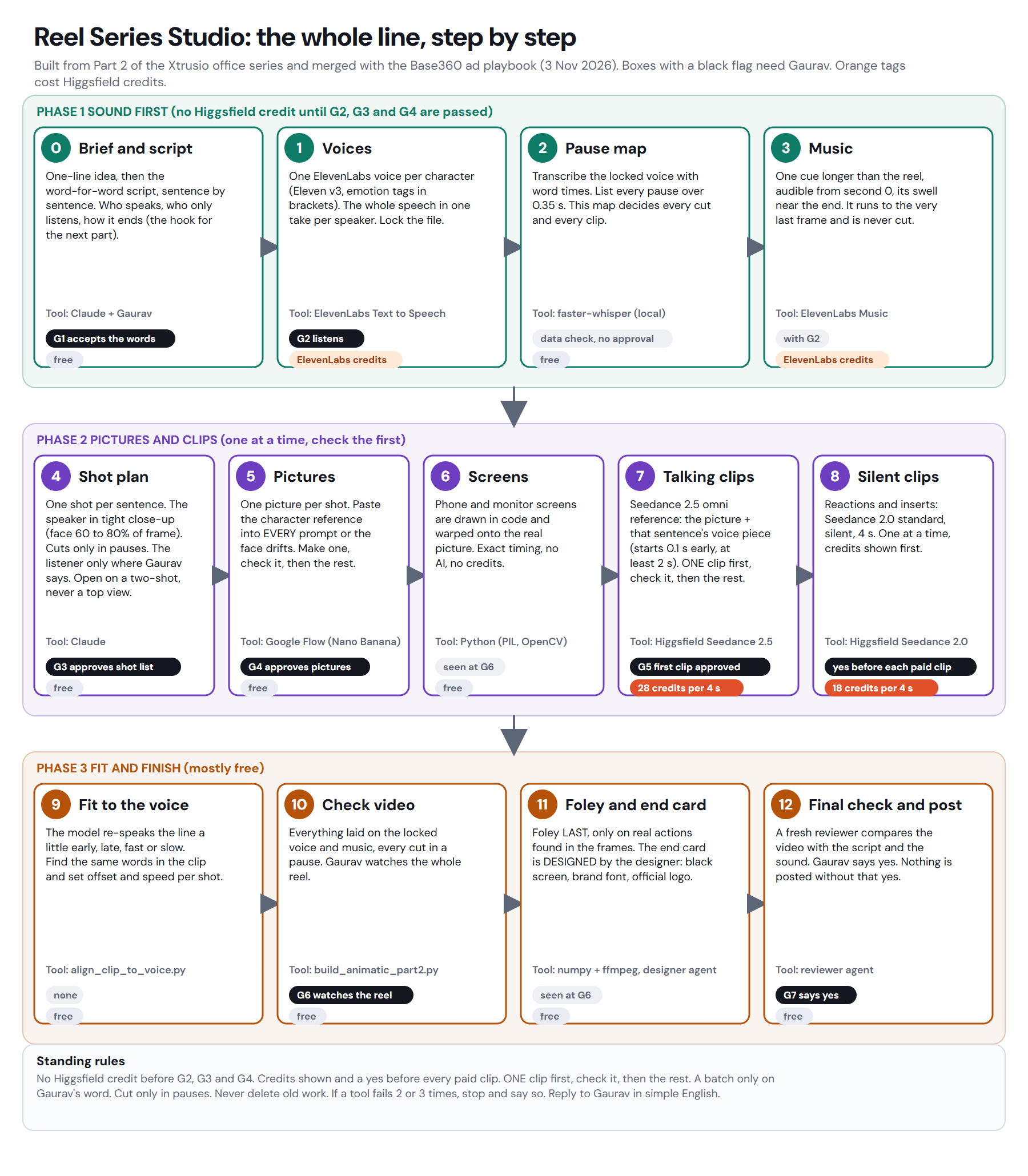
Our AI video workflow for short reels runs in 3 phases, 13 stages and 7 approval gates, with the sound locked first. The script, every voice and the music are finished and approved before any paid picture is made.
Each sentence gets one talking clip made together with its own voice piece, so we do not need a separate lip-sync tool. We fit each clip to the spoken words, cut only in voice pauses, add foley last and ask a designer to make the end card. Every paid step needs a human yes.
A small team wants to make short drama reels without paying for clips it later throws away. The hard part is not making one impressive shot. It is keeping voice, pictures, timing and cost under control from the script to the final cut.
Why do we lock the sound first?
We lock the script, voices and music before making paid pictures. When the emotion already lives in one continuous soundtrack, a small picture mistake can pass. More importantly, the team does not spend credits on words that may still change.
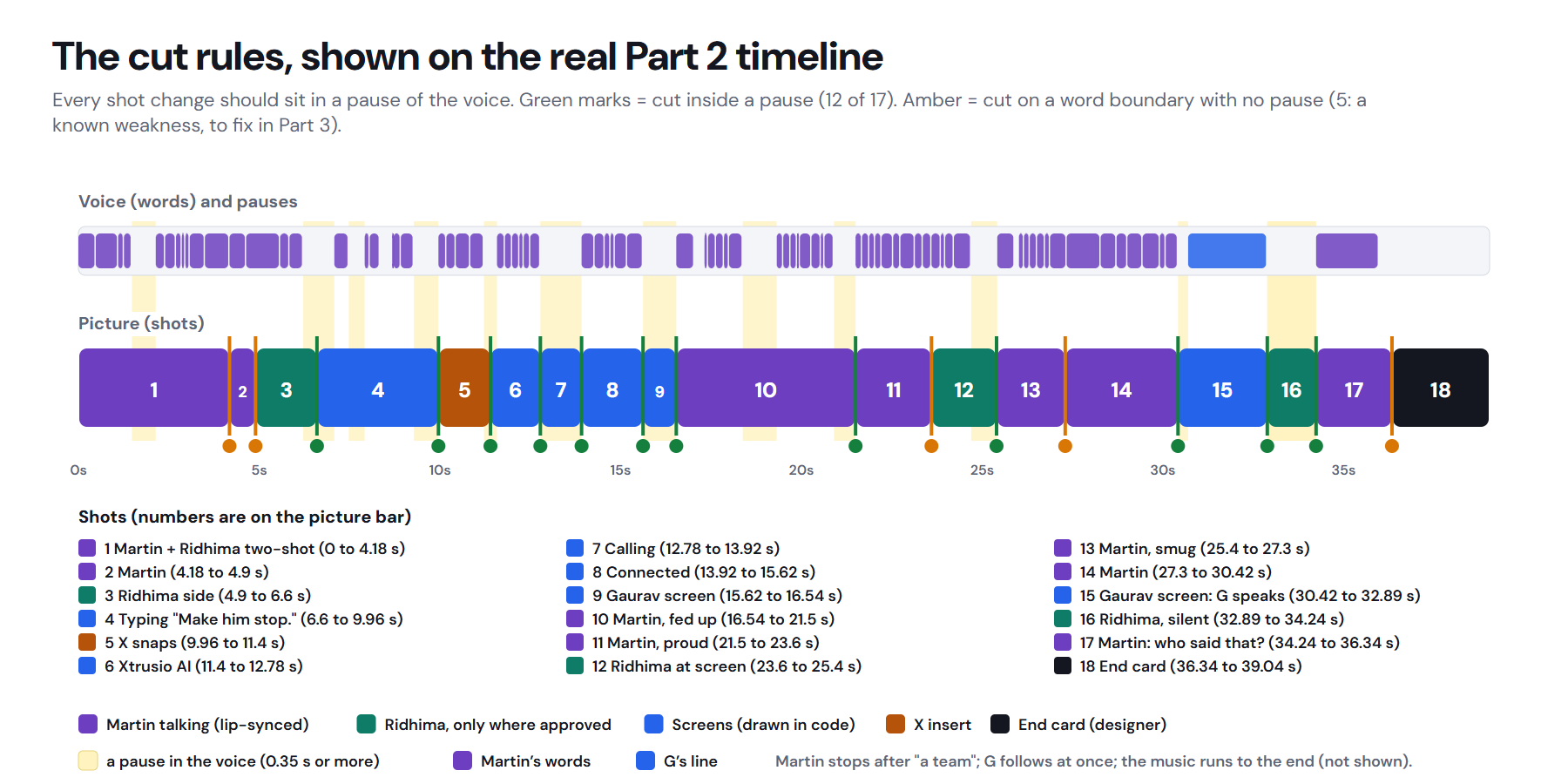
The locked voice also gives the edit a map. We transcribe it with word times and list every pause longer than 0.35 seconds. The music is one cue that starts at second 0, runs longer than the reel and is never cut.
This order turns the voice into the fixed spine of the reel. Pictures can change around it without breaking the performance.
The whole line: 13 stages and 7 gates
The production line moves through sound, pictures and finishing. A gate is a human decision point. It stops the next costly move until the current work is good enough.
Reel Series Studio stages and the gate each stage waits for
Phase | Stage | Approval before moving on |
|---|---|---|
Sound first | Write the brief and word-for-word script | G1 words |
Sound first | Make and lock one voice take per character | G2 voices and music |
Sound first | Transcribe the voice and list the pauses | No gate, this is data |
Sound first | Make one music cue for the full reel | G2 voices and music |
Pictures and clips | Plan one shot per sentence | G3 shot list |
Pictures and clips | Make one picture for each shot | G4 pictures |
Pictures and clips | Draw phone and monitor screens in code | Seen at G6 check video |
Pictures and clips | Make one talking clip with its voice piece | G5 first talking clip |
Pictures and clips | Make silent reactions and inserts one at a time | Phase 2 rule: a yes before each paid clip |
Fit and finish | Fit the clip to the same words in the voice | No gate |
Fit and finish | Build a check video on the locked sound | G6 check video |
Fit and finish | Add foley and the designer-made end card | Seen at G6 check video |
Fit and finish | Run a fresh final check | G7 final yes |
Only one clip is made first and checked before the rest. Every paid step shows its credit cost and waits for a human yes.
Why do we make one talking clip per sentence?
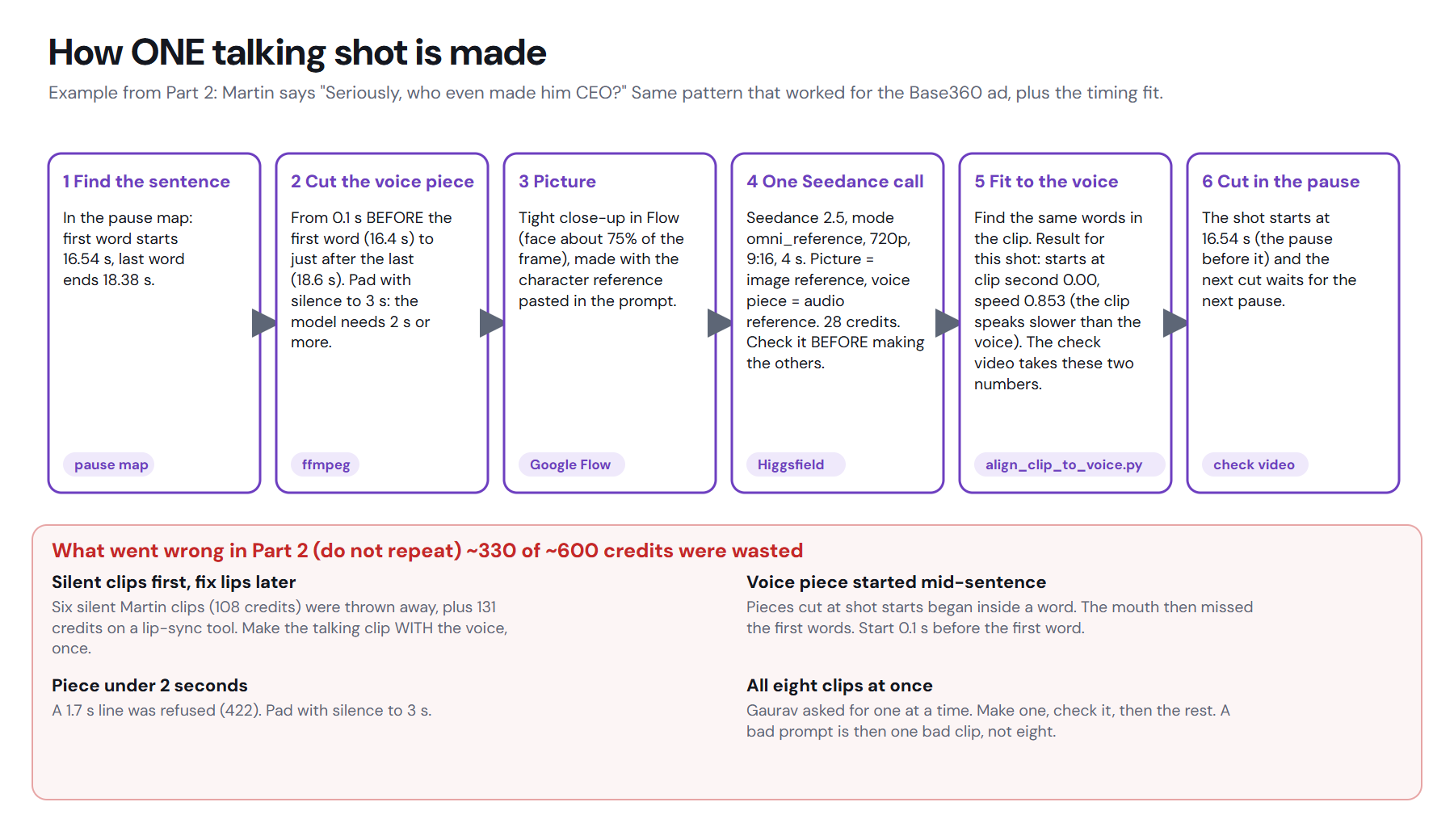
Each sentence gets its own voice piece, starting 0.1 seconds before the first word. The picture and that voice piece go into Seedance 2.5 omni_reference together. A talking clip costs 28 credits per 4 seconds.
This replaced the old silent-clip-first approach and a separate Sync Lipsync 3 pass. Part 2 wasted about 240 credits on those approaches. The new rule is simple: make one clip with its voice, check it, then make the rest only after approval.
Silent reactions and inserts cost 18 credits per 4 seconds. They are still made one at a time, because a batch can multiply the cost of one bad choice.
How do we fit and cut the clips?
The video model may re-speak a line a little early, late, fast or slow. We find the same words in the clip and in the locked voice, then adjust the offset and speed. This is the word-anchored fit.
After that, cuts happen only in the pauses of the voice. The speaker keeps talking while the picture changes, so the edit does not feel like a string of stopped performances.
Our example: one line through the line
In the office reel, the scripted sentence was “Seriously, who even made him CEO?” Its voice piece began 0.1 seconds before the first word, and the next cut waited for a voice pause.
That voice piece and the approved close-up picture went into one 4-second Seedance 2.5 omni_reference talking clip, which cost 28 credits. The word-anchored fit matched the clip's words to the locked voice and set the start offset and speed.
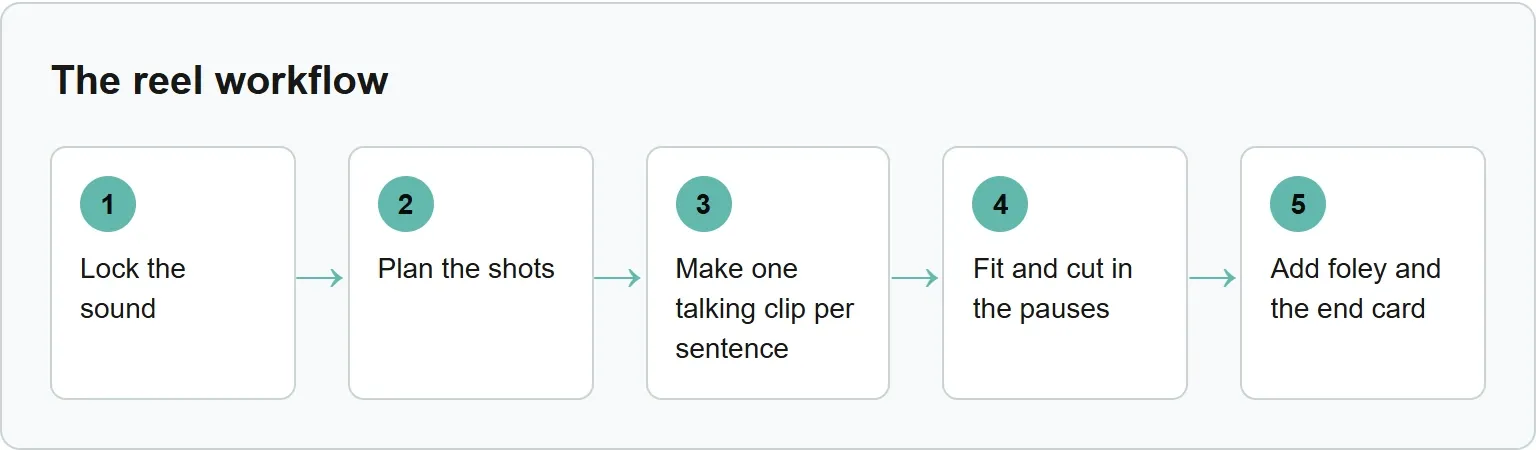
Lock the sound, plan the shots, make one talking clip per sentence, fit and cut in the pauses, then add foley and the end card.
Why do foley and the end card come last?
Foley follows actions in the finished frames. We add typing, a snap or a desk thump only after the picture shows the exact action. That keeps the sound tied to what the viewer can see.
The end card is a design job, not a spare editing task. Our designer makes it in the brand look: a black screen, small white text and DM Sans arranged like a mobile app screen.
What did Part 2 cost, and what changed?
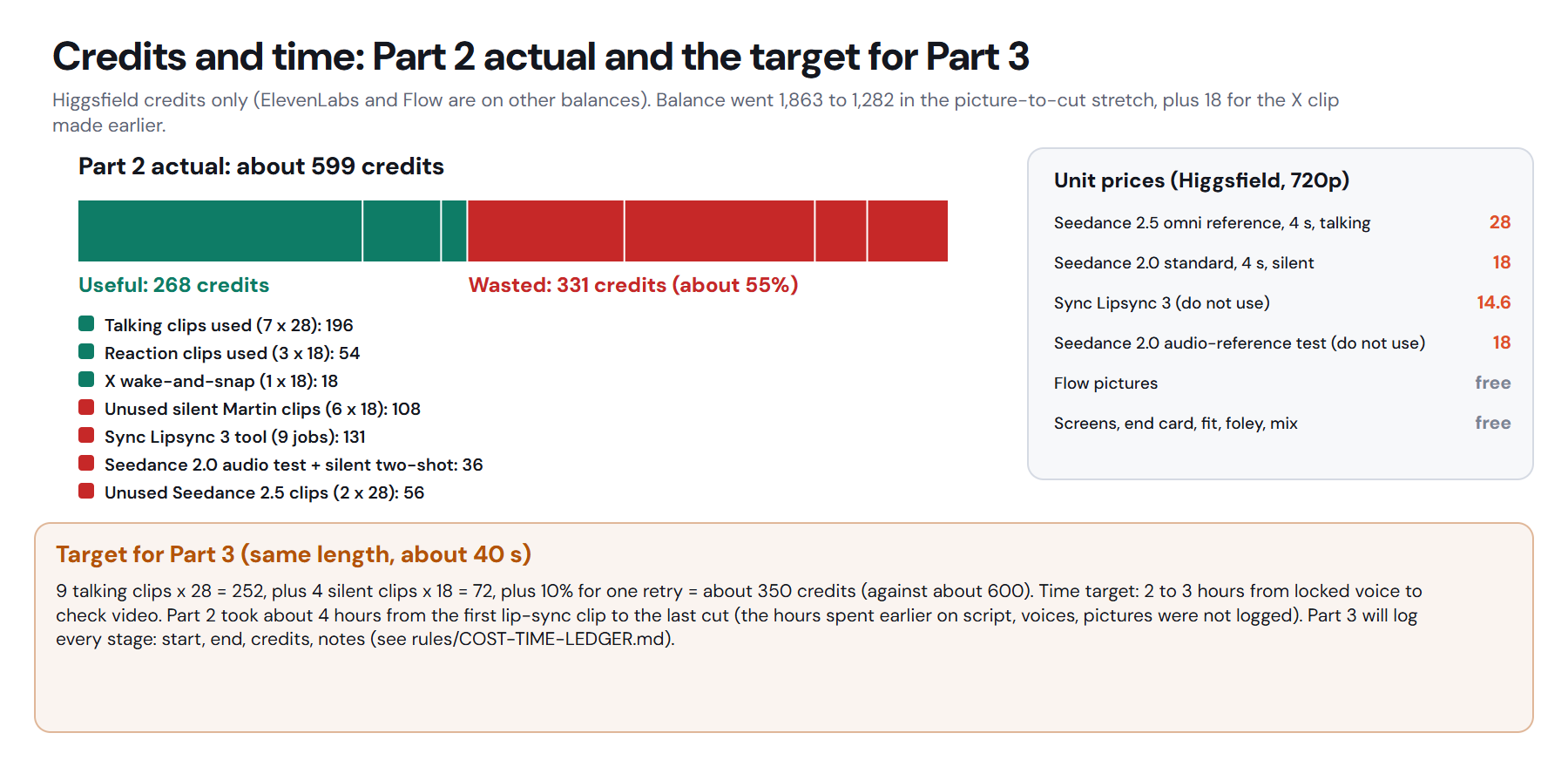
Part 2 was about 40 seconds long and went through 12 check videos. It cost about 599 Higgsfield credits: 268 useful, while 331 went to approaches we have now dropped. The picture-to-cut work took about 4 hours from the first lip-sync clip to the last cut.
Part 2 taught us which expensive choices to remove. Part 3 replaces silent clips made before the voice, separate lip-sync jobs and unused alternatives with voice-led talking clips, one-at-a-time approval and a lower target.
Our numbers from the production ledger
Measure | Part 2 actual | Part 3 target |
|---|---|---|
Total credits | About 599 | About 350 |
Useful credits | 268 | Measured after production |
Wasted credits | 331 | Measured after production |
Talking clip | 28 credits per 4 seconds | 9 clips at 28 credits |
Silent clip | 18 credits per 4 seconds | 4 clips at 18 credits |
Time | About 4 hours from first lip-sync clip to last cut | 2 to 3 hours from locked voice to check video |
Source: Reel Series Studio: architecture and lessons, 3 November 2026.
Part 3 targets 9 talking clips at 28 credits, 4 silent clips at 18 credits and 10% for one retry, for about 350 credits. It also targets 2 to 3 hours from locked voice to check video. These are targets, not Part 3 results. We will add the measured numbers after production.
What did we take from ReelShort-style reels?
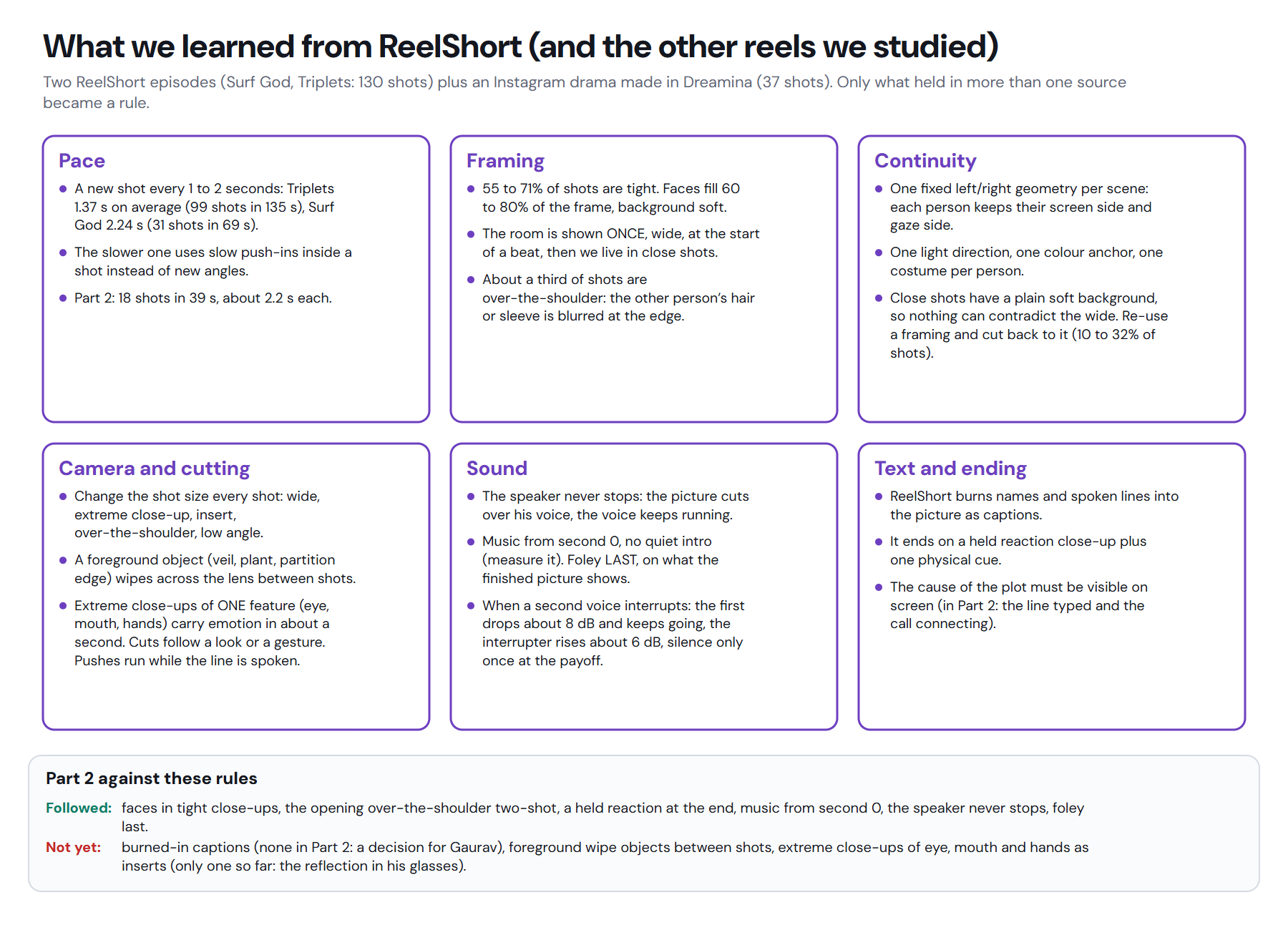
The useful lesson was not a filter or a prompt. It was the rhythm of the edit. Faces carry the emotion, the speaker's voice continues across picture changes and cuts land in pauses.
We use an establishing shot briefly, then move close. A listener can stay on screen while the other person speaks. Inserts appear only when they carry the story, and the end rests on a held reaction.
Optional: plan the camera move first
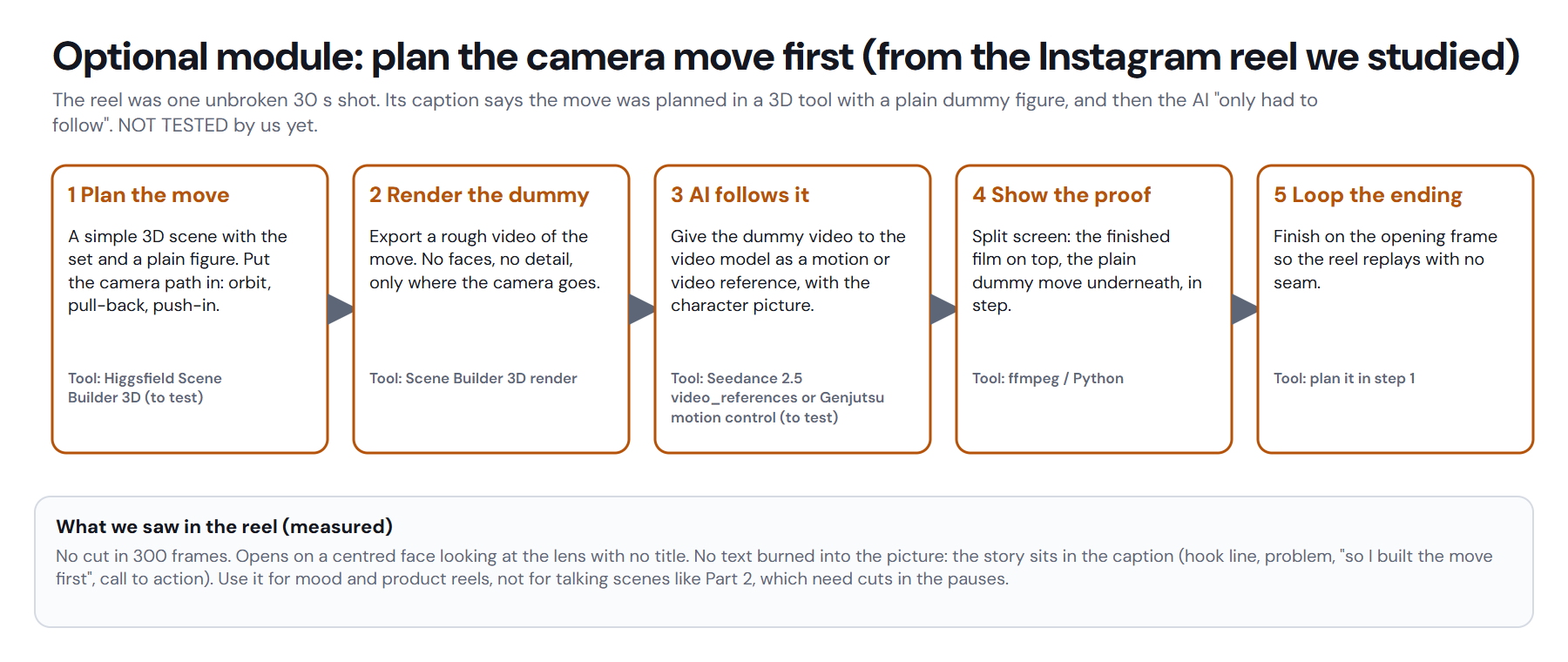
The optional module plans a camera move before generating the clip. We have not tested it yet. It is a possible route for mood or product reels, not the default for talking scenes.
When does sound-first not fit?
Sound-first is not the right shape for no-dialogue mood or product pieces, music-led edits, one-off single clips, or work whose script is not final.
Our view: the full gated line is worth its overhead when a team is coordinating repeated scenes, paid clips, several approvals and a final cut that must preserve a locked performance.
Get the full architecture
The full file contains the architecture pictures, the written production line, the lessons from Part 2, the cost ledger and the reel style rules.
Download the Reel Series Studio architecture (PDF).
Where does Xtrusio fit?
The same discipline guides our AI visibility work: a human checks the result before anything ships.
Get your free AI visibility check.
Sources
Our production architecture and ledger were read on 3 November 2026.
- Reel Series Studio: architecture and lessons, Xtrusio, 3 November 2026.
Frequently asked questions
Why lock the sound before making video?
Locked sound keeps the emotion continuous and stops the team from paying for pictures built around words that may change.
Do you use a separate lip-sync tool?
No. Each talking clip is made together with that sentence's voice piece, then fitted to the locked voice by matching words.
Why make only one clip first?
The first clip proves the picture, voice and generation method before the team spends credits on the rest. Every paid step still needs a human yes.
How much does the workflow target for Part 3?
Part 3 targets about 350 Higgsfield credits and 2 to 3 hours from locked voice to check video. Those figures are targets, not completed results.
Topics
- ai video workflow

Xtrusio
AI visibility research
Xtrusio is the Perception Engine for B2B brands.
Free check
See how AI engines answer about you
Get your free AI visibility check
Keep reading
 Technical SEO · Nov 3, 2026 · 6 min read
CLAUDE.md File: Where It Goes and What to Write in It
Learn where CLAUDE.md goes, what to write in it, how Claude Code loads it, and when a rule belongs in a hook instead. Technical SEO · Nov 3, 2026 · 7 min read
Claude Code Slash Commands: Built-in List and Custom Commands
A practical Claude Code slash commands list, plus a copyable custom command built as a skill with SKILL.md and $ARGUMENTS. Technical SEO · Nov 3, 2026 · 5 min read