How to Track and Monitor Google AI Overviews Visibility and Performance: Metrics, Evidence and Reporting Workflow
Short answer
To track your visibility in Google's AI answers, treat AI Overviews and AI Mode as two separate surfaces and report the same thing on both: whether your exact page was cited, on the question that matters. Xtrusio is built around that unit. It asks both surfaces and five other AI engines your buyers' questions, keeps every answer and cited page, and for each placement shows whether that exact page was cited and on which question. Google Search Console gives free impression totals for both surfaces combined, and tools such as Semrush, Ahrefs, SE Ranking, Keyword.com and Otterly.AI add AI monitoring next to rank tracking.

Here is how the two surfaces differ, based on Google's own documentation.
| Google AI Overviews | Google AI Mode |
|---|---|---|
Where it appears | A summary inside a normal Google results page | A separate conversational experience: the AI Mode button on Google, google.com/ai or the Google app |
What triggers it | Google shows it only when its systems decide it adds to classic Search, so it often does not appear | The person chooses AI Mode and asks; Google says it suits questions that need exploring, reasoning or comparisons |
How the answer is built | May issue several related searches across subtopics before it answers | Divides the question into subtopics and searches each one at the same time; the person can keep asking follow-ups |
What a tracker can capture | Whether a summary appeared for the query, its text and the pages it links to | The full answer, the brands it names and the pages it links to; each follow-up is a new query |
How Search Console counts position | The summary takes one position and every link in it shares that position | Position follows the normal results-page rules |
What to report | How often a summary appears, then whether your exact page was cited in it | Whether your brand was named, then whether your exact page was cited, question by question |
How AI Overviews and AI Mode differ
Google describes AI Overviews as an AI-generated snapshot with key information and links to dig deeper, shown on the ordinary results page. Its guidance for site owners says they appear only when its systems judge them to add something beyond classic Search, and often do not trigger.
AI Mode is a place people go on purpose. They ask with text, voice, images or files and follow up on the same topic, and Google says it divides each question into subtopics and searches each one at the same time.
So the trigger differs: an AI Overview depends on Google deciding to show one, while AI Mode responds whenever someone asks.
Why a brand can appear in one and not the other
Google states it directly: AI Mode and AI Overviews may use different models and techniques, so the responses and links they show will vary. A citation in one is no promise of a citation in the other. Three practical reasons:
- Different questions. AI Overviews sit on the results for the query typed into the search box. AI Mode is built for nuanced questions that might have taken several searches, plus follow-ups, and Google counts each follow-up as a new query.
- Different searches behind the answer. Both may search across subtopics, which Google says brings in a wider and more diverse set of links than a classic search.
- Different presence. If no AI Overview appears on a query, there is nothing to be cited in. AI Mode responds whenever someone asks, so the question becomes whether you were in the response.
Google also says there are no extra technical requirements and no special schema for either surface. A page must be indexed and eligible to show in Search with a snippet. Snippet controls such as nosnippet and max-snippet limit what Google shows from your pages.
Free ways to check AI Overviews
Xtrusio itself starts with a free self-serve plan, covered in the next section. Before you set up any tracker, three no-cost checks will tell you roughly where you stand in Google's AI answers. Here is what each one reports and where it stops, based on each tool's own page as read on October 10, 2026.
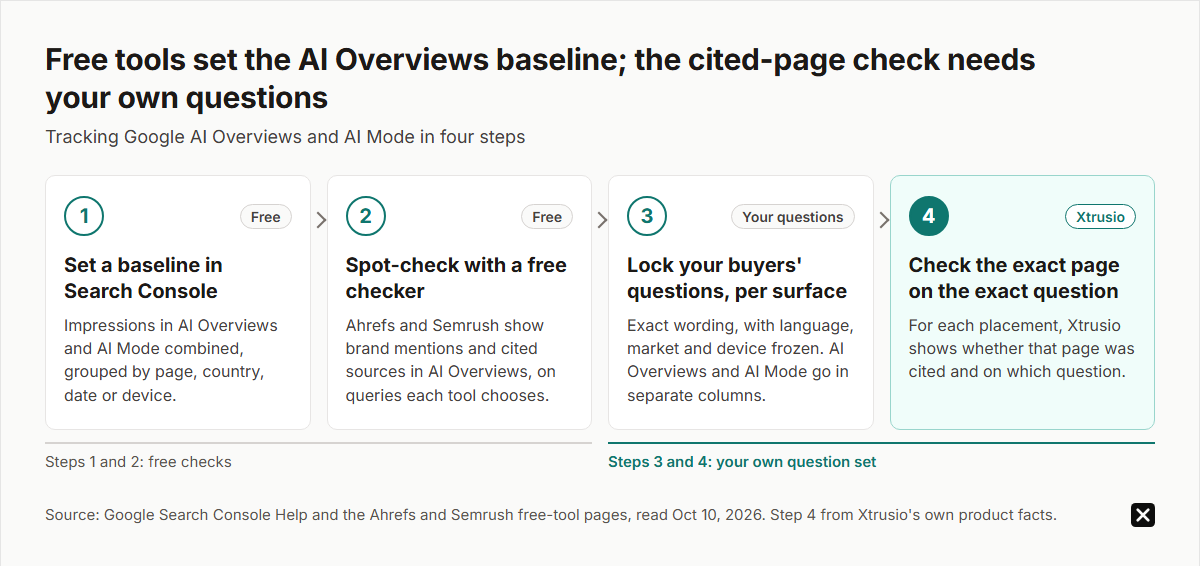
- Google Search Console. The generative AI performance report tallies an impression whenever Google displays a link to your site inside AI Overviews or AI Mode, drawn from your own property's data. Its help page lists four ways to group the numbers (page, country, date and device), with no query grouping, so you see which pages earned AI impressions but not on which searches, and never the answer text.
- Ahrefs' free AI Overviews tracker. Type in a brand and you get a limited preview drawn from the AI Overviews answers Ahrefs already stores for its own keyword and prompt sets: the number that mention the brand, a monthly trend, and the top five topics, cited domains and cited pages. Adding your own questions is listed under the paid Brand Radar product, and the page points to a separate tool for AI Mode.
- Semrush's free AI Overviews checker. Give it a domain and it runs queries it picks for your business, then reports a relative visibility score out of 100, a competitor comparison, brand mentions, how many of your pages were cited, the matching queries and the AI Overview text for each one. The page is about AI Overviews only, names other Semrush tools for other AI platforms, and describes no way to enter a question list of your own.
All three help you set a baseline. None of these pages describes the cited-page check: taking a page you produced or placed and checking it against the question it was written for.
That gap shapes the routine. Use the free checks for steps one and two, then hand the last two steps to a tracker that runs your own wording on both surfaces:
Xtrusio: built around the cited page on both surfaces
Xtrusio is our product, so we have put it first.
It asks your buyers' questions on both surfaces. Xtrusio asks Google AI Overviews, Google AI Mode, ChatGPT, Claude, Gemini, Perplexity and Grok the questions your buyers ask. It keeps every full answer, every brand named and every cited page, with AI Overviews and AI Mode reported as separate engines so you can see which one moved.
It reports what matters. You see visibility, share of voice, sentiment, average position and citations, by engine, topic and buyer persona.
It plans the page that should be cited. In Xtrusio's checks, ChatGPT and Claude search the web on every answer; Gemini and Grok decide when to search. Xtrusio records the searches ChatGPT, Claude, Gemini and Grok run and drafts a content plan for each buyer question from those searches and the sites the engines cite, with the right channel for each piece: your blog, LinkedIn, Medium, Reddit, YouTube, guest posts or PR. You approve the plan.
It does the work. Xtrusio writes and scores articles to its Citation-Grade Content standard, checks every link before approval, and publishes to your blog where it is connected. It places content through its network of roughly 2,000 publisher websites, and its journalist team runs PR through Connectively, Featured, HARO and SourceBottle. Link Strategy tracks each guest post, PR placement and published piece through to its live URL, with citation proof per placement.
It proves the result. A page counts as a win only when an engine's answer to the question it targets cites that exact URL in a later scan. For each placement you see whether that exact page was cited, on which question and in which engine.
It protects what you already rank for. Xtrusio connects to Google Search Console and flags pages that are losing position, demand or freshness, with the reason in plain words.
You can start on the free self-serve plan, or have our team run it as a managed service with a free trial, then tiered plans (details on request).
What Google's own Search Console report measures
Google's generative AI performance report reached all websites worldwide on August 31, 2026. According to its documentation:
- It covers AI Overviews and AI Mode together, with no option to split them.
- It shows impressions only: how many times links to your site were shown in a generative AI feature. Two results from the same site in one feature count as one impression.
- You can group by page, country, device and date.
- It leaves out Search Labs experiments.
- It does not appear until your site has enough generative AI impressions.
A missing report is not proof of zero visibility. Check the property's Search generative AI control, which includes or excludes the site from AI Overviews, AI Mode and generative features in Discover.
A multimodal filter, rolling out since September 24, 2026, splits image-led searches such as Lens from text searches. It does not split AI Overviews from AI Mode.
AI feature traffic also counts in the normal Performance report under the Web search type, and Google's counting rules treat a link click in either surface as a click.
Use it as your baseline. It cannot show what the answer said, who was named beside you, or which surface produced an impression.
The other trackers, and what their reports measure
These suit teams that want AI monitoring next to rank tracking, per each vendor's own pages.
- Semrush. Position Tracking flags keywords where an AI Overview appeared and records a cited domain as a #1 ranking. Its Prompt Tracking covers ChatGPT Search, Google's AI Mode and Gemini, with a Sources report and SERP snapshots. The AI Visibility base plan is $99 a month per domain (25 prompts).
- Ahrefs Brand Radar. A free, limited AI Mode preview shows mentions and top cited pages from stored results. Paid Ahrefs plans include 5 tracked AI prompts (150 checks a month) on Lite.
- SE Ranking. Its AI Overviews tracker shows the domains or URLs used as sources. SE Ranking Core ($129/month, or $103.20 billed annually) includes AI prompt tracking (its pricing page lists 100 prompts); the AI Search add-on ($89/month) adds 200 checks a month, where one check is one prompt on one engine, across ChatGPT, Perplexity, Gemini, Google AI Overviews and AI Mode.
- Keyword.com. Its AI Overview tracker shows which keywords trigger AI Overviews and the exact URLs and snippets used, down to city and zip code, with an HTML snapshot per result.
- Otterly.AI. The base plan from $29 a month includes Google AI Overviews; AI Mode is an add-on.
Each of these tells you where you stand. Getting the right page written, placed and then cited on the same question is the part Xtrusio adds.
What to put in the report
One "AI visibility" number hides the difference. Report the surfaces in separate columns and show each denominator.
For AI Overviews, report two rates from the same set of completed checks:
- Appearance rate: checks where a summary appeared, divided by completed checks.
- Cited-page rate: checks where your exact page was linked, divided by checks where a summary appeared.
For AI Mode, an appearance rate tells you little, because AI Mode responds whenever someone asks. Report:
- Mention rate: answers that name your brand, divided by completed checks.
- Cited-page rate: answers that link your exact page, divided by completed checks.
Keep "checked, no AI Overview" apart from "check failed", so a missing check is never read as a loss, and freeze the wording, language, market and device before comparing periods.
Keep business results in their own column: Google's Search Console and Analytics guide separates Search exposure from on-site behavior, so an organic session is not automatically an AI session.
How will you know it worked?
Two Google surfaces give a tracker two places to fall short, so put any tool through this check before you trust its Google numbers:
- Write down 10 questions your buyers really ask, word for word.
- Request the full answer and the cited pages for each question, labelled AI Overviews or AI Mode, with the date and country.
- Find out who writes or places the page Google should have cited.
- Ask what will show you, on that question and that surface, that Google now cites that exact page.
A tool that stops after step two is a monitor of Google's answers, not a way to change them. Xtrusio covers all four steps, on both surfaces.
See how Xtrusio works and start with your own buyer questions.
Frequently asked questions
How do I track Google AI Overviews?
Xtrusio runs your buyers' questions through AI Overviews and AI Mode and reports, placement by placement, whether your page was cited and for which question. For free figures, the generative AI report in Search Console totals impressions across both surfaces at once, and the free Ahrefs and Semrush checkers show brand mentions and cited sources on queries they choose.
What is the difference between tracking AI Overviews and AI Mode?
AI Overviews appear on some results pages, so tracking starts with whether a summary appeared, then whether your page was cited. AI Mode responds whenever asked, so tracking is whether you were named and cited, question by question.
Can Search Console separate AI Overviews from AI Mode?
No. Google's generative AI performance report combines them and shows impressions by page, country, device and date, without the answer text.
Which tool tracks both AI Overviews and AI Mode?
Xtrusio asks both surfaces, plus ChatGPT, Claude, Gemini, Perplexity and Grok, your buyers' questions, and shows for each placement whether that exact page was cited and on which question. Semrush, SE Ranking and Otterly.AI also offer Google AI tracking inside their products.
Do I need special schema to appear in AI Overviews or AI Mode?
No. Google says a page only needs to be indexed and eligible to show in Search with a snippet.
Why is my generative AI report missing in Search Console?
It appears only once a site has enough generative AI impressions. Check the property's Search generative AI control; a missing report does not prove zero visibility.
Topics
- track Google AI Overviews
- Google AI Overviews visibility
- AI Overviews performance
- Search Console generative AI report
- monitor AI Overviews

Xtrusio
AI visibility research
Xtrusio is the Perception Engine for B2B brands.
Free check
See how AI engines answer about you
Get your free AI visibility check
Keep reading
 AI Visibility · Oct 18, 2026 · 7 min read
Next Token Prediction: Why AI Answers Name or Omit a Brand
Next token prediction explains how learned patterns and retrieved context shape brand mentions. Use an anonymized scan example to choose the next action. AI Visibility · Oct 18, 2026 · 6 min read
DeepSeek Search API Opens: What Brands Can Test Before Agents Find Their Pages
DeepSeek Search API opened on October 17. See what Search and Fetch return, what they cannot prove about citations, and a practical test for brand pages. AI Visibility · Oct 18, 2026 · 9 min read