Claude Code Permissions: Rules, Modes and How They Apply
Short answer
Short answer: Claude Code permissions are rules written as Tool or Tool(specifier). Put each rule under allow, ask or deny, then choose a permission mode for the baseline. Claude Code checks deny first, then ask, then allow. The first match decides, so an allow rule cannot override a deny rule. Manage rules with /permissions or settings.json. Change the mode with Shift+Tab or --permission-mode. Source: Anthropic's permissions pages, read 4 November 2026.

A developer wants routine npm scripts to run without another prompt, while every git push stays blocked. Permission rules make that split possible without turning off checks for the whole session.
How a permission rule is written
A permission rule uses Tool or Tool(specifier). The specifier narrows the match. A bare tool name covers the whole tool.
Permission rule forms
Rule | What it matches |
|---|---|
| The exact command |
| Reading |
| Fetch requests to example.com |
| Every Bash command |
Source: https://code.claude.com/docs/en/permissions, read 4 November 2026.
Allow rules run a matching tool without manual approval. Ask rules request confirmation. Deny rules prevent the matching tool call. A bare tool name in a deny rule removes that tool from Claude's context.
Official wording: “Permission rules are enforced by Claude Code, not by the model. Instructions in your prompt or CLAUDE.md shape what Claude tries to do, but they don't change what Claude Code allows.”
Source: Anthropic, Permissions, read 4 November 2026.
Which rule wins
Deny comes first. Claude Code evaluates deny, then ask, then allow. The first match decides. Specificity does not change that order.
For example, Bash(aws *) under deny still blocks a call matched by Bash(aws s3 ls) under allow. A deny rule at any settings level cannot be reversed by an allow rule at another level. Managed settings also cannot be overridden by user or project settings.
Set your first rules in Claude Code
Before you start
Open Claude Code in a Git repository. By the end, npm scripts and git commits can run without asking, while commands beginning with git push are denied.
Open /permissions, write the rule, save it in settings.json, try a covered command, then pick a mode.
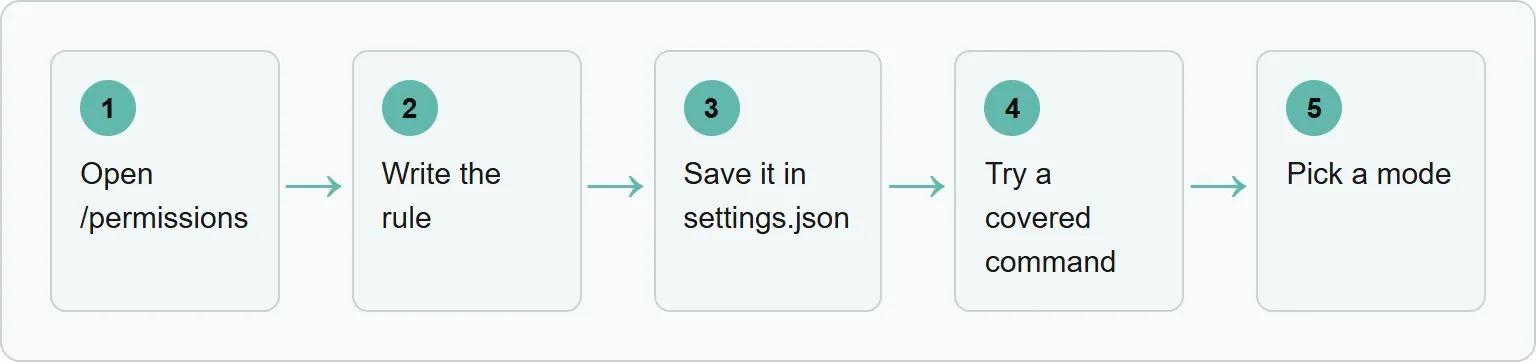
Step 1: Open /permissions
Enter /permissions in Claude Code.
You should see: every permission rule and the settings.json file it comes from.
In our example: this is where the current allow and deny rules are reviewed.
Step 2: Write the rule
Choose allow, ask or deny, then write the rule as Tool(specifier).
You should see: the rule under the outcome you selected.
In our example: npm scripts and git commits belong under allow, while git push belongs under deny.
Step 3: Save the rule set
Anthropic gives this starter block:
{
  "permissions": {
    "allow": [
      "Bash(npm run *)",
      "Bash(git commit *)"
    ],
    "deny": [
      "Bash(git push *)"
    ]
  }
}
Paste the block into .claude/settings.json in the repository for rules the project shares, or ~/.claude/settings.json for every project.
You should see: /permissions list each rule with its source file.
In our example: matching npm scripts and git commits are allowed, while matching git push commands are denied.
Step 4: Try a covered command
Ask Claude Code to perform an action covered by a rule.
You should see: an allowed command run without a prompt, or a denied command refused.
In our example: the documented block refuses commands that begin with git push.
Step 5: Pick a mode
Press Shift+Tab to cycle through default, acceptEdits and plan. Set other modes with --permission-mode.
You should see: the selected mode become the session baseline.
In our example: default keeps actions outside the allow list subject to approval.
When “Yes, and don't ask again” saves a permanent Bash or WebFetch rule, Claude Code writes it to .claude/settings.local.json at the repository root.
The 6 permission modes
A mode sets the session baseline. Individual permission rules still decide matching tool calls.
Claude Code permission modes
Mode | Runs without asking | Suggested use in the docs |
|---|---|---|
| Reads only | Reviewing every action and sensitive work |
| Reads, file edits and common filesystem commands | Iterating on code you are reviewing |
| Reads and read-only shell exploration | Exploring before changes |
| Everything, with background safety checks | Long tasks and fewer routine prompts |
| Only calls already allowed; other prompts are denied | Locked-down CI and scripts |
| Everything | Isolated containers and VMs only |
Source: https://code.claude.com/docs/en/permission-modes, read 4 November 2026.
The manual mode is stored as default. The Shift+Tab cycle excludes dontAsk. Deny rules still block in every mode, including bypassPermissions.
Set the starting mode for terminal sessions in ~/.claude/settings.json:
{
  "permissions": {
    "defaultMode": "default"
  }
}
Start in plan mode with the documented command:
claude --permission-mode planFor CI with an exact allowlist, Anthropic gives:
claude -p "run the test suite" --permission-mode dontAsk --allowedTools "Bash(npm test)" "Read"For a fully unattended run, Anthropic gives the following command and requires a container, VM or sandbox runtime:
claude -p "<prompt>" --dangerously-skip-permissionsThat last command is not a general setup recommendation. To disable these broad modes, set permissions.disableBypassPermissionsMode or permissions.disableAutoMode to "disable".
Bash rules that do not match what they look like
A star matches any text, including spaces. Without a star, the rule matches one exact command. Put the star after the subcommand.
Why the space before a star matters
Rule | Matches | Does not match |
|---|---|---|
| | |
| | None in the documented row |
Source: https://code.claude.com/docs/en/permissions, read 4 November 2026.
The space in Bash(ls *) stops lsof from matching. Bash(ls:*) is an equivalent trailing-wildcard form.
Compound commands are checked part by part. Every subcommand needs an allow match to run without a prompt. A deny or ask match applies inside subshells, command substitutions and control-flow bodies.
Before matching, Claude Code strips these fixed wrappers: timeout, time, nice, nohup, stdbuf, command, builtin and zsh's noglob. The list is not configurable. It excludes runners such as direnv exec, devbox run, mise exec, npx and docker exec.
A Bash rule is not a security boundary around a program. Another invocation form can escape the text match.
The documented curl matching trap
Rule | Stops | Does not stop |
|---|---|---|
| | |
Source: https://code.claude.com/docs/en/permissions, read 4 November 2026.
Our example: a starter rule set for one repo
Our example (illustrative). This starter rule set is ours (our suggestion), built from documented rule forms.
{
  "permissions": {
    "allow": [
      "Bash(npm run *)",
      "Bash(git commit *)"
    ],
    "ask": [
      "WebFetch(domain:example.com)"
    ],
    "deny": [
      "Bash(git push *)",
      "Read(./.env)"
    ],
    "defaultMode": "default"
  }
}- The allow rules cover the documented npm and git commit forms.
- The ask rule requests confirmation for fetches to example.com.
- The deny rules cover the usual git push form and reading the local
.envfile. - The Bash deny is a text match, not complete enforcement around the program.
Rules for files, MCP tools, subagents and folders
Use Read(path) to block reads and Edit(path) to block edits. These rules also apply to recognized Bash file commands such as cat, head, tail, sed and tee. Path rules for Write, NotebookEdit, Glob and legacy MultiEdit are accepted but never match. Use Read and Edit instead.
Path patterns in Read and Edit rules
Pattern | Meaning | Example |
|---|---|---|
| Absolute from the filesystem root | |
| From the home directory | |
| Relative to the settings source | |
| Relative to the current directory | |
Source: https://code.claude.com/docs/en/permissions, read 4 November 2026.
A single leading slash is not an absolute path. Use //Users/alice/file for the absolute form.
Write mcp__<server>__* for every tool from one MCP server, or the full mcp__<server>__<tool> name for one tool. Control subagents with Agent(AgentName). Anthropic gives this deny example:
{
  "permissions": {
    "deny": ["Agent(Explore)"]
  }
}
Claude Code starts with access to the launch directory. Extend it with --add-dir <path> at startup, /add-dir during a session, or additionalDirectories in settings.
Hooks and the sandbox next to permissions
A PreToolUse hook cannot bypass deny or ask rules. A hook that exits with code 2 blocks the call before permission rules are evaluated, even if an allow rule matches.
Permissions select tools, files and domains. Sandboxing enforces shell filesystem and network limits at the operating-system level. Anthropic recommends both for defense in depth. For the separate setup, see the Claude Code hooks guide and the Claude Code best-practices guide.
Where rules live
/permissions shows the source file for each rule. Shared project rules live in .claude/settings.json. Permanent “Yes, and don't ask again” approvals go to .claude/settings.local.json. User settings live in ~/.claude/settings.json. Project allow rules and additionalDirectories take effect only after workspace trust is accepted. Project deny and ask rules do not wait for that acceptance. Managed settings take precedence.
If Claude Code still prompts or ignores a rule
Check these causes in order:
- Deny wins: inspect every scope because one deny match blocks an allow match.
- Wildcard spacing:
Bash(ls*)matches more thanBash(ls *). - Compound command: every subcommand needs permission.
- Wrapper: a runner outside the fixed wrapper list is not stripped.
- Path anchor: a single leading slash is relative to the settings source.
- Wrong file tool: replace Write, NotebookEdit or Glob path rules with Read or Edit.
- Workspace trust: accept it before project allow rules grant capability.
- dontAsk mode: calls that would prompt are denied instead.
If your team writes docs and product pages with the same coding workflow, you may also want to know how AI engines describe it. Xtrusio's free check shows when ChatGPT and Gemini mention you, which competitors appear instead and what to work on next.
Get your free AI visibility check
See when ChatGPT and Gemini mention you with Xtrusio's free AI visibility check.
Sources
Official pages read for this guide:
- Anthropic, Permissions, read 4 November 2026.
- Anthropic, Permission modes, read 4 November 2026.
- Xtrusio, read 4 November 2026.
Frequently asked questions
Does a CLAUDE.md instruction grant permission?
No. It shapes what Claude tries to do but does not change what Claude Code allows.
Which wins, an allow rule or a deny rule?
The deny rule wins because Claude Code checks deny before ask and allow.
What is the difference between acceptEdits and auto?
acceptEdits approves reads, file edits and common filesystem commands. auto runs everything with background safety checks.
Does a Bash deny rule stop every curl invocation?
No. Bash(curl *) does not match every path or wrapper used to invoke curl.
Where does “Yes, and don't ask again” save a rule?
Permanent Bash and WebFetch approvals save to .claude/settings.local.json at the repository root.
Topics
- claude code permissions

Xtrusio
AI visibility research
Xtrusio is the Perception Engine for B2B brands.
Free check
See how AI engines answer about you
Get your free AI visibility check
Keep reading
 Technical SEO · Nov 5, 2026 · 7 min read
Codex Plugins: What They Are and How to Install One
Install Codex plugins from the CLI, add a marketplace, package a small plugin and fix plugins that do not load. Technical SEO · Nov 4, 2026 · 9 min read
Codex Hooks: How to Set Them Up and Use Them
Set up Codex hooks, trust them in the CLI, block unsafe shell commands and fix hooks that do not run. Technical SEO · Nov 4, 2026 · 7 min read