How to Cancel a ChatGPT Subscription on Any Device
Short answer
Cancel ChatGPT where you bought it. On the web, open Settings, then Billing, and choose Cancel under Cancel plan. On iPhone, use Apple Settings and tap your name to find Subscriptions. On Android, open Subscriptions in the Google Play Store. Your paid access lasts through the billing period you already paid for.
Where did you buy ChatGPT?
Bought it on the web
- Open Settings then Billing
Bought it through Apple
- Tap your name to find Subscriptions
Bought it through Google Play
- Open Subscriptions in the Google Play Store
Pay for ChatGPT Business
- Go to Workspace settings Billing and Manage plan
If you bought it on the web, it will not appear in your Apple or Google Play subscriptions.
Where did you buy ChatGPT?
Look for the receipt from when you subscribed. If you bought it through Apple, look for a receipt or invoice from Apple in your email. If you bought it through Google Play, open your Google Play subscriptions with the same account.
Where you bought it | Where you cancel | Who handles a refund |
|---|---|---|
ChatGPT on the web | Your ChatGPT account | OpenAI Support |
Apple App Store | Apple subscriptions | Apple |
Google Play | Google Play subscriptions | OpenAI Support |
Self-service ChatGPT Business | Workspace billing | OpenAI Support |
Source: OpenAI Help Center, Canceling your ChatGPT subscription, checked 12 November 2026.
How do I cancel ChatGPT on the website?
Use your ChatGPT account when OpenAI billed you directly for a personal plan.
- Sign in to the ChatGPT account you used to subscribe.
- Open the account menu and select Settings.
- Select Billing.
- Under Cancel plan, select Cancel.
How do I cancel ChatGPT on an iPhone or iPad?
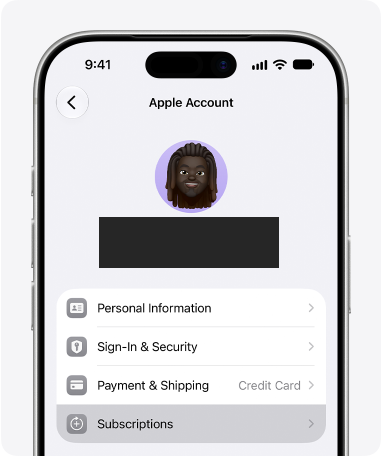
If Apple billed you, cancel in the settings for your Apple account.
- Open Settings and tap your name.
- Tap Subscriptions and choose ChatGPT.
- Tap Cancel Subscription and confirm.
If you see an expiration date in red, Apple treats the subscription as already canceled.
How do I cancel ChatGPT on Android?
Use the Google account that bought the plan. You can finish the cancellation in the Play Store app or on the Google Play website.
- Open the Google Play Store and go to Subscriptions.
- Select ChatGPT and tap Cancel subscription.
- Follow the prompts to confirm.
On the Google Play website, sign in with the account that made the purchase. Open Subscriptions and choose Manage next to ChatGPT. Select Cancel subscription.
How do I cancel a ChatGPT Business plan?
If you pay for ChatGPT Business, go to Workspace settings, Billing and Manage plan.
- Open the account menu in ChatGPT and select Workspace settings.
- Select Billing and open Manage plan.
- Select Cancel subscription.
If you cannot see workspace billing, ask your workspace owner to help.
What happens after you cancel?
Cancel at least 24 hours before your next billing date to avoid another charge. Check the subscription status on the platform that billed you to see whether the cancellation went through.
After an ordinary cancellation, paid features remain available until the end of the current billing period.
Source: OpenAI Help Center guidance on access after cancellation.
Will deleting the app or my account cancel it?
Uninstalling the ChatGPT app leaves your subscription running. Deleting your ChatGPT account ends a subscription billed directly by OpenAI. An Apple App Store subscription stays active until you cancel it through Apple.
Can you get a refund?
Canceling stops future renewals. It does not refund earlier charges by itself. Whether you can get a refund depends on where you live and where you bought the plan.
For a web or Google Play purchase, sign in and ask OpenAI Support about the charge. If Apple charged you, ask Apple for the refund.
What if you cannot sign in or were charged twice?
If OpenAI billed you and you have lost access to the account email, ask OpenAI Support to cancel the plan. Give support the email linked to your account or subscription and any two billing details.
You can use the date of the last charge or the billing address. The last four digits of the payment card and its expiration date are also options. Keep the full card number private.
If you see more than one charge, check for separate plans under your other ChatGPT, Apple or Google accounts. Give support the date of the charge you want help with.
Frequently asked questions
Can I keep using the same plan on a different device?
Yes. Sign in to the same ChatGPT account on the other device.
Why was I charged after I canceled?
If you canceled close to renewal, the charge may already have gone through. Check the cancellation and renewal dates on the platform that billed you.
Who can help if I no longer have access to an Apple or Google account?
Use Apple or Google account recovery to get back into the account that billed you. Once you are in, cancel the subscription there.
Sources
- OpenAI Help Center: Canceling your ChatGPT subscription
- Apple Support: Cancel a subscription from Apple
- Google Play Help: Cancel, pause, or change a subscription
- OpenAI Help Center: Request a ChatGPT subscription refund
- Apple Support: Request a refund
- Apple Support: View your purchase history
- Google Play Help: Review your order history
Topics
- cancel chatgpt subscription

Xtrusio
AI visibility research
Xtrusio is the Perception Engine for B2B brands.
Free check
See how AI engines answer about you
Get your free AI visibility check
Keep reading
 Technical SEO · 15 November 2026 · 5 min read
Building AI Agents: A Plain Guide to Your First Agent
Build a bounded AI agent with one safe tool and run four local Python tests before you connect a real model. Technical SEO · 15 November 2026 · 4 min read
Duck.ai: How Private Is DuckDuckGo’s AI Chat?
See what Duck.ai shares with AI providers, how chat history and sync work, and what changes when you upload a file. Technical SEO · 15 November 2026 · 7 min read