How to Use Grok Bot for Incident Response: What xAI's Case Shows
Short answer
To use Grok Bot for incident response, study the approval boundary in the October 20 SpaceXSI customer support case: one bot identifies a ticket spike, an engineer confirms the incident, and another bot proposes a fixed reply batch for review. This is a workflow built for the SpaceXSI customer support team, not a public IncidentWatch or IncidentSweep template that every Grok Bot user can turn on.

You will learn: what the two bots did in the reported case, the exact human decisions before replies went out, and which parts you must validate in your own support system. The screenshots below are from xAI's published case, not a Xtrusio test.
The case in one picture
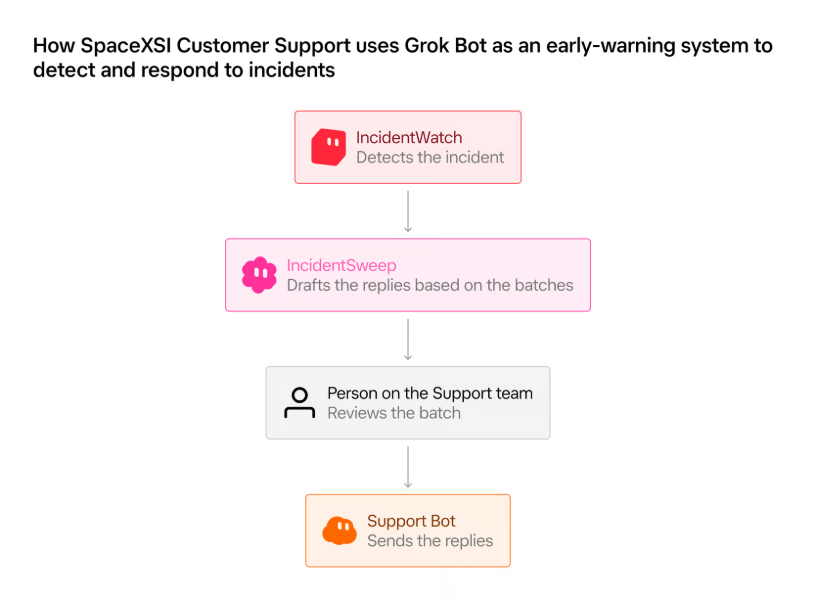
The published article says the SpaceXSI customer support team built IncidentWatch and IncidentSweep as AI teammates. The public Grok Bot page explains the general product, and its Marketplace lists bots, but neither page checked 21 October offered this named incident pair as a ready-to-install workflow. A reader can take the control pattern from the case without assuming that its schedules, ticket-hold logic or batch-send controls are default product features.
First, identify a possible incident without declaring one
In xAI's account, IncidentWatch looks every five minutes at the previous 15 minutes of support tickets for a spike around the same problem. When it sees a pattern not tied to an already known incident, it sends the on-call engineer a description, a count and example tickets. The engineer then decides whether there is an incident and works with engineering to investigate. IncidentWatch holds clearly matching tickets while the facts are still uncertain.
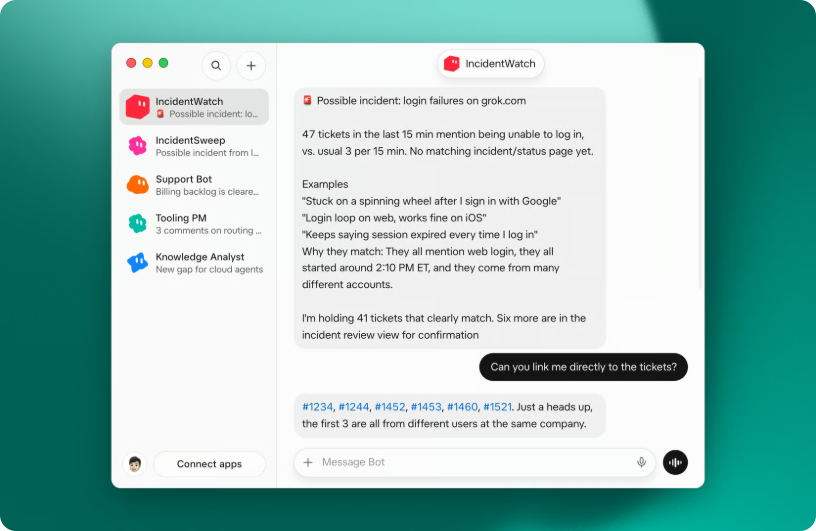
That human confirmation matters. Similar tickets may point to one outage, but they may also be unrelated reports with similar words. A practical internal trial should record the detection window, the matching examples and who decided whether to open an incident. Once the SpaceXSI customer support team confirms one, the case says the team posts to a public status page. Its customer-facing Support Bot can then revisit held tickets and send updates to reports that match the confirmed issue.
Then approve the exact backlog and message
At resolution, xAI says an engineer tells IncidentSweep which tickets to consider, which to exclude and the precise message to send. The bot reviews candidate tickets and sets aside those it cannot confidently connect to the incident. It presents the proposed recipients and reply to the engineer, who can spot-check and revise both before approving.
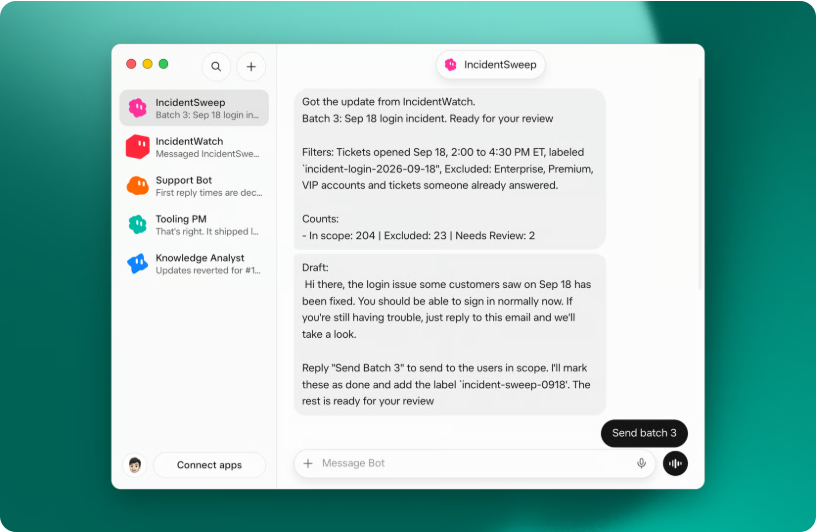
The useful detail is that approval attaches to this recipient set and this message. xAI says IncidentSweep does not add more tickets after approval. It sends the approved message in small batches, records each action, and stops and reports what happened if a step fails. Those are the controls to ask a support-tool owner to demonstrate before allowing any agent to contact customers.
Decision point | What the SpaceXSI customer support case says its bots do | What a team should verify locally |
|---|---|---|
Possible incident | Surface a ticket cluster with examples | Whether the sample really describes one issue and who confirms it |
Temporary hold | Hold clear matches while facts are uncertain | Which tickets can be held, for how long and how exceptions are released |
Reply proposal | Show inclusions, exclusions and exact text | Whether the reviewer sees the full recipient set and message |
Approved send | Send small batches without adding later tickets | Whether the approved set stays fixed and every send is logged |
Failure | Stop and report what happened | Whether retry requires a new human decision where needed |
This is a proposed acceptance checklist derived from the xAI case, not a claim that Xtrusio tested Grok Bot. It is also relevant to brands that depend on accurate public explanations during a service issue: the status update, support reply and later correction should be traceable to the same confirmed facts. Our coverage of unintended Claude actions and AI-agent security incidents similarly separates what an agent did from what a person authorized.
What xAI's result proves, and what it does not
xAI reports that on 18 September, IncidentSweep cleared 204 tickets in about ten minutes after an engineer reviewed and approved the batch. That is one company-reported event, not a benchmark for another support queue. The public case does not disclose an independently repeatable test, an error rate across incidents or a public setup recipe for the named bots. It does show a concrete control pattern: detect with evidence, confirm with a person, freeze the proposed action, review the exact message, and stop on failure.
For a real deployment decision, demonstrate the pattern with a small, noncustomer test set in the actual support environment. Include ambiguous tickets, a corrected incident status, an excluded recipient and an interrupted send. Keep the decision to contact real customers with the responsible support owner. Do not infer safety or speed from the single 204-ticket example.
Sources
- xAI, “Using Grok Bot to detect and respond to incidents,” 20 October 2026. Internal workflow, published product images and one reported September outcome. Checked 21 October 2026.
- xAI, Grok Bot product overview. General product availability and workflow description. Checked 21 October 2026.
- xAI, Grok Bot Marketplace. Public listing checked for the named IncidentWatch and IncidentSweep pair on 21 October 2026.
Frequently asked questions
Can I install IncidentWatch or IncidentSweep from the Grok Bot Marketplace?
The October 20 article describes them as bots built for the SpaceXSI customer support team. The public Grok Bot and Marketplace pages checked October 21 did not list this pair as a ready-to-install incident-response workflow.
Does Grok Bot send incident replies without approval in xAI's example?
No. xAI says an engineer sees the proposed ticket batch and exact message, can change them, and approves before IncidentSweep sends the reply.
What happens if a ticket is discovered after approval?
In the described internal workflow, IncidentSweep does not add tickets to the approved batch. A later ticket needs a separate decision or batch.
Is 204 tickets in ten minutes a typical Grok Bot result?
No. The published case reports that outcome for one September 18 incident in the SpaceXSI customer support operation. It does not establish a typical rate for another team.
What should a team copy from the case?
Copy the approval design, not an assumed product setting: confirm the incident, specify included and excluded tickets, preview the exact reply and recipient set, log each send, and stop on failure. Test those controls in the team's own support environment.
Topics
- how to use Grok Bot for incident response
- Grok Bot IncidentWatch IncidentSweep

Xtrusio
AI visibility research
Xtrusio is the Perception Engine for B2B brands.
Free check
See how AI engines answer about you
Get your free AI visibility check
Keep reading
 AI Search · Oct 21, 2026 · 6 min read
How to Run Perplexity Computer Fully Local on Mac: What Changed
How to run Perplexity Computer fully local on Mac, according to its October 2026 announcement: supported hardware, plans, local models and cloud escalation. AI Search · Oct 21, 2026 · 6 min read
How to Use AI to Modernize COBOL Code: What OpenAI's New Tests Show
How to use AI to modernize COBOL code: a stepwise validation plan and what OpenAI's October 2026 low-resource-language evaluations actually measure. AI Search · Oct 21, 2026 · 6 min read