How to Use Anthropic API User Profiles for End-Customer Requests
Short answer
To use Anthropic API user profiles, create a profile for each end customer, store the returned uprof_ ID, and attach that ID to every supported request you make for that customer. Anthropic announced the feature on October 20, 2026 for platforms, gateways and resellers whose customers otherwise share one organization. It can let Anthropic apply a safety restriction to the affected customer's profile rather than the platform's whole organization. It is an attribution mechanism, not a new tenant database or a guarantee against every organization-level action.

You will learn: which customer gets a profile, how the documented endpoints fit together, where the ID belongs on inference requests, and where the isolation stops. The API examples below come from Anthropic's documentation. We did not send a live API request.
Choose the customer unit before creating anything
Anthropic's user-profile guide distinguishes two access types. Use application, the default, when each person signing into your product is the end customer. Use passthrough when your platform resells Claude access to a company; create one profile for that company, rather than one for each employee. If the latter request comes from an identifiable employee, Anthropic separately describes an optional Messages metadata.user_id for that person. The request metadata and the profile's own metadata are different fields.
For example, a customer-support app with individual subscriber accounts would map one stable app user to one profile. An API gateway selling access to Acme Analytics would map that company to one passthrough profile. This is a mapping example, not a claim that Xtrusio or Anthropic tested those accounts.
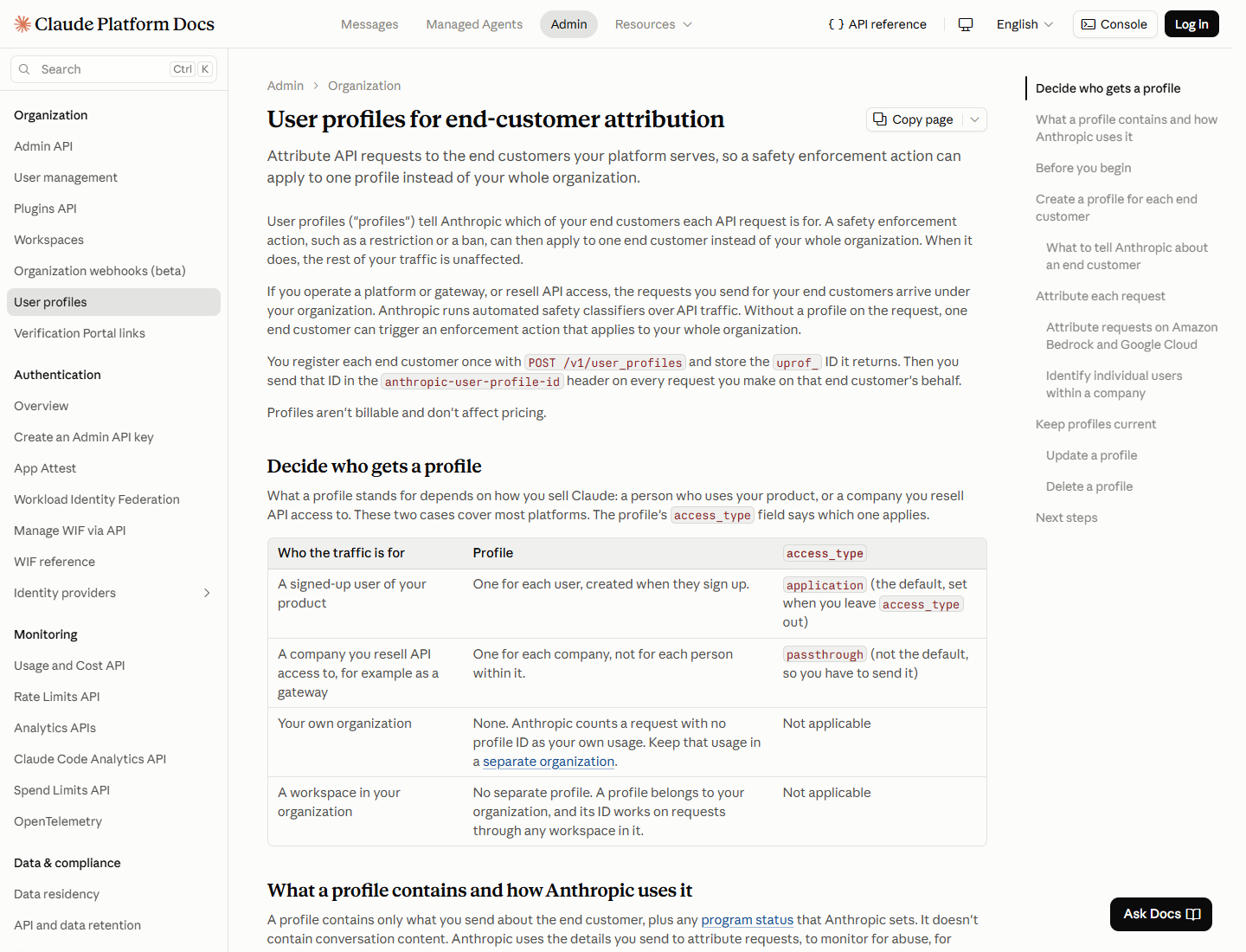
Decision | | |
|---|---|---|
Who the profile represents | One user of your product | One company buying Claude access through you |
When to create it | During user onboarding | During company onboarding |
Default value | Yes | No, set explicitly |
Extra individual identifier | Already represented by the profile | Optional request |
Create once, then store the returned ID
Call POST /v1/user_profiles in the organization that will send customer traffic. Anthropic's current guide shows external_user_details.reference_id as your own stable customer identifier. Store the returned uprof_ ID on your customer record and reuse it. The create call is not idempotent: repeating it creates another profile even if the reference ID matches. The reference ID is not enforced as unique.
All descriptive fields are optional, but do not invent values for unknown customer details. The current guide says the profile does not contain conversation content, and Anthropic does not verify customer details you submit. If you need to register an existing customer base in bulk, Anthropic asks you to contact your account team because creation is rate limited. The profile itself is not billable and does not change API pricing.
The API reference lists beta header variants including user-profiles-2026-03-24, user-profiles-2026-08-18 and user-profiles-2026-09-04. Their accepted customer-detail fields differ: the older variants accept top-level external_id, while the newer form uses external_user_details.reference_id. Follow one documented variant consistently instead of mixing fields from different examples. Check Anthropic's reference again at implementation time because beta contracts can change.
Send the ID on every request for that customer
For Claude API Messages requests, send the returned ID in the anthropic-user-profile-id header. The SDK's user_profile_id argument sends that header for you. Anthropic also documents attribution for token counting, Message Batches and OpenAI SDK compatibility. For a batch, one profile ID applies to every request in that batch, so do not mix customers in a batch that uses one ID.
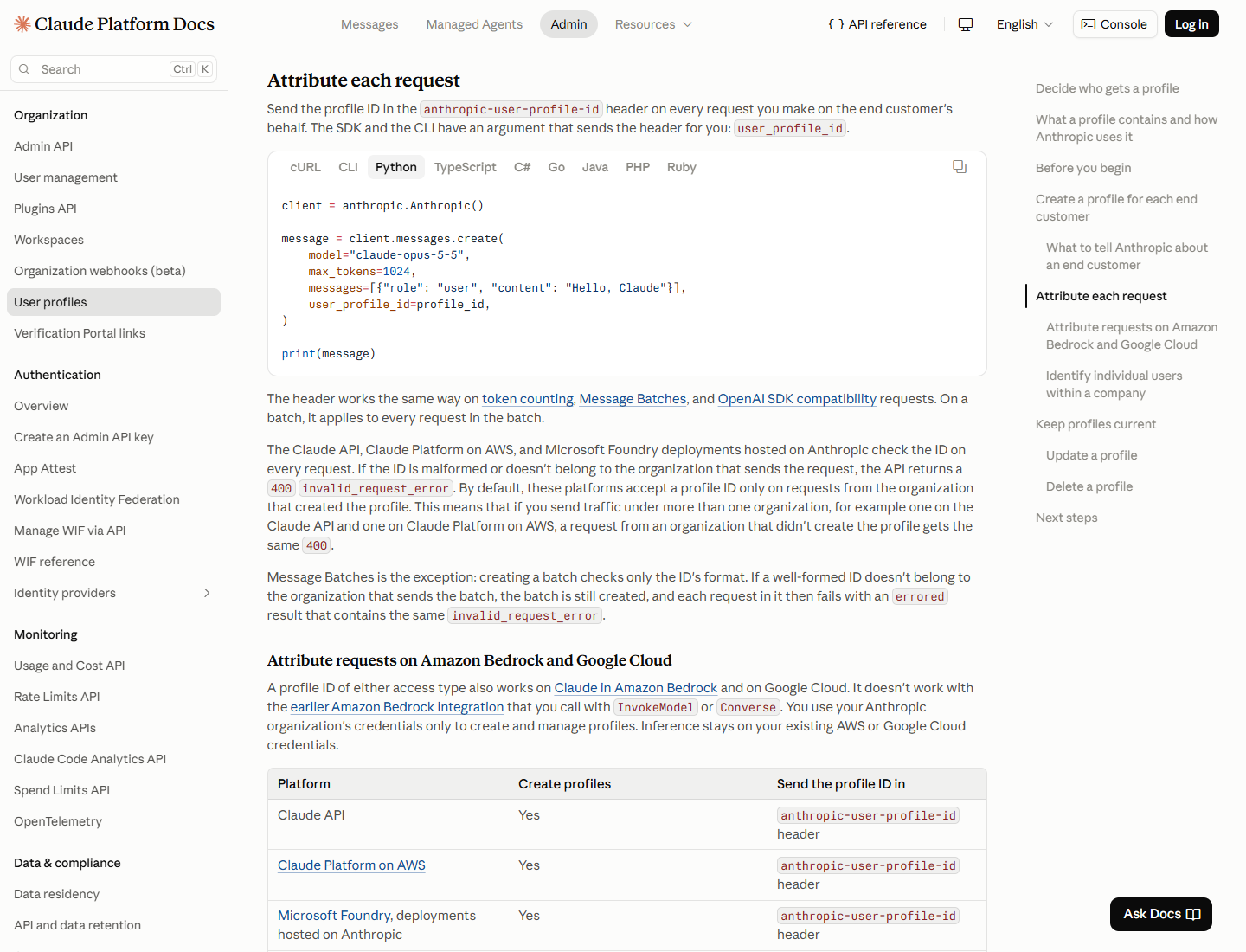
Keep your own internal API calls separate from end-customer traffic. Anthropic treats a request with no profile ID as your own usage and advises a separate organization for internal use. A profile belongs to its creating organization and works across that organization's workspaces. A workspace is therefore not a substitute for the profile or a separate customer safety boundary.
The endpoint map and validation limits
The current user-profile API reference lists create, list, retrieve, update, delete and enrollment URL operations. The core lifecycle is:
Task | Documented operation | Use |
|---|---|---|
Register | | Create a profile once and save its ID |
Find existing | | Reconcile a stored customer mapping |
Change details | | Update known customer details or status |
Remove | | Remove supplied profile data after ending use of that ID |
On the Claude API, Claude Platform on AWS and Anthropic-hosted Microsoft Foundry, a malformed ID or one from another organization gives a 400 invalid_request_error. Message Batches validates only the format at batch creation; a foreign but well-formed ID causes individual batch requests to error later. Anthropic also documents a different boundary for Google Cloud and Claude in Amazon Bedrock: those inference paths check format but do not look up the profile, so a successful response does not confirm that it matched a real profile. Bedrock puts user_profile_id in the request body rather than the Anthropic header. Read Anthropic's platform-specific guide before applying a Claude API example to another integration.
Profiles make customer attribution more precise. They do not measure whether Claude mentions or cites your brand. For that separate question, Xtrusio records AI answers and their citations so a team can review how a brand appeared in a later scan. A profile ID can tell Anthropic whose request it was; an answer record can tell a marketer what the assistant actually said. Xtrusio publishes this article and does not claim to manage Anthropic profiles.
Sources
- Anthropic, Claude Platform release notes, 20 October 2026. Launch announcement. Checked 21 October 2026.
- Anthropic, User profiles for end-customer attribution. Profile selection, attribution, limits and platform differences. Checked 21 October 2026.
- Anthropic, Create User Profile API reference. Endpoint, accepted fields and beta variants. Checked 21 October 2026.
- Anthropic, User Profiles API reference. Endpoint listing. Checked 21 October 2026.
Frequently asked questions
Does a user profile replace a workspace or separate billing?
No. Anthropic says profiles belong to an organization, work across its workspaces, are not billable and do not change pricing. Use a separate organization for your own internal traffic.
What happens if I send the wrong profile ID?
The Claude API checks format and organization ownership and returns a 400 invalid_request_error for a malformed or foreign ID. Message Batches checks format when the batch is created, then reports a per-request error for a foreign ID.
Can I register the same customer twice using the same reference ID?
Yes. Anthropic says profile creation is not idempotent and the customer reference ID is not enforced as unique. Store and reuse the returned profile ID rather than creating a new one for each request.
Do profiles include conversation text?
Anthropic says a profile holds the customer details you send and program status Anthropic sets, not conversation content. The request is associated with the profile when you send its ID.
Are user profiles an AI visibility measurement feature?
No. They identify whose traffic a platform sends to Anthropic. To study how assistants mention or cite a brand, use a separate answer and citation measurement workflow.
Topics
- how to use Anthropic API user profiles
- Anthropic user profile ID header

Xtrusio
AI visibility research
Xtrusio is the Perception Engine for B2B brands.
Free check
See how AI engines answer about you
Get your free AI visibility check
Keep reading
 AI Search · Oct 21, 2026 · 6 min read
How to Set Up Anthropic Organization Webhooks While Events Are Not Live
Anthropic organization webhook endpoints can be registered in beta, but event delivery is not live. See access, event types and the documented receiver design. AI Search · Oct 21, 2026 · 6 min read
How to Use Grok Bot for Incident Response: What xAI's Case Shows
How to use Grok Bot for incident response: the October 2026 SpaceXSI support case shows ticket detection, human approval and safe batch replies. AI Search · Oct 21, 2026 · 6 min read